

A prebuilt PC is good for gaming if it can run the games you care about at your monitor’s resolution and the frame rate you want, at a price that leaves room for any immediate upgrades. Start with the exact graphics card and processor. Then check the memory, storage, power supply, and return terms before you pay.
Prebuilt gaming PC buying checklist
| Check | What to find | When to pause |
|---|---|---|
| Performance | Exact desktop GPU and CPU, plus game results at your resolution | The listing gives only a brand, a tier, or a frame rate without settings |
| Memory and storage | RAM capacity, module count, SSD capacity, and usable expansion slots | You’ll have to replace parts as soon as the PC arrives |
| Power and cooling | Power supply model and connectors, case vents, and cooler layout | The seller can’t identify parts that affect a planned upgrade |
| Price and support | Delivered cost, return deadline, and who handles repairs | A small discount comes with expensive shipping or unclear coverage |
Start with your games and monitor
Pick two or three games and write down the resolution, quality preset, and frame rate you’d be happy with. A 1080p monitor set to 60 Hz and a 1440p display bought for 144 Hz play give you different shopping targets. A 144 Hz monitor can display up to 144 refreshes per second, but you can still play at lower frame rates. Decide where you’ll actually notice the difference.
Read the publisher’s requirements for the game and preset you want. Then look for independent gameplay results with the same GPU, a comparable CPU, and matching settings. Check whether the reported FPS includes upscaling or generated frames. An average can also hide brief stutters, so look for frame-time data or 1% lows when available. If you’re starting with a 1440p screen and need a price reference, compare a few configurations in our 1440p prebuilt gaming PC guide.
Verify the exact graphics card and its memory
Ask for the whole GPU name, including suffixes such as Ti or XT, and confirm whether it’s a desktop card. A laptop GPU can share the same number as a desktop part. Check listings that say only “GeForce graphics” for an actual model. If the seller means integrated graphics, look up gameplay results for the exact processor and memory configuration.
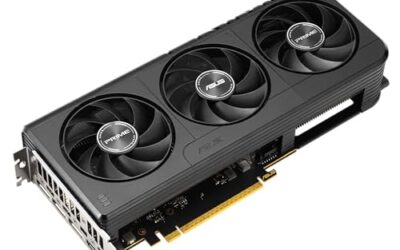
VRAM gives the GPU room for data such as textures. Higher texture settings can demand more of it, and the useful capacity depends on the game and settings. NVIDIA’s desktop specifications list the RTX 5060 with 8 GB and the RTX 5060 Ti with either 8 GB or 16 GB. If you’re paying for the 16 GB model, get the capacity on the order confirmation.
Read the full CPU model number
“Core i5” and “Ryzen 7” span multiple generations. Record the full model and match it against the one in a performance comparison. A fast GPU can still wait on the CPU in a large simulation or a multiplayer game where you want a high frame rate at low settings. An old processor paired with a newer card is worth checking in the busiest scenes of the games you play.
Check what any suffix means for setup. Intel’s Core i5-14400F, for example, requires discrete graphics. On a desktop sold with that chip, plan to connect the monitor to the graphics card’s output. Ask the seller which outputs are on the shipped GPU if your monitor needs a particular connector.
Check how the RAM is installed
“16 GB DDR5” tells you the memory capacity and type. Look for 2 × 8 GB or 1 × 16 GB in the spec sheet, then confirm which slots are free. On a typical dual-channel desktop, two modules in the recommended slots let the processor use both memory channels. If you expect to upgrade to 32 GB, compare the cost of starting there with the cost of a compatible kit later.
Use the games’ recommended memory as a starting point. Leave some room for the browser, voice chat, and any mods you actually run. Check the motherboard documentation for supported capacity and slot placement before you count on an easy upgrade.
Work out what fits on the SSD
Write down the space required by your main games. Budget extra room for Windows, other apps, and patches. A 512 GB drive may suit a small rotation, while a 1 TB drive gives a larger library more breathing room. Check whether the capacity quoted in the headline is all solid-state storage or a total split across an SSD and a hard drive.
A second usable M.2 slot gives you another way to add storage without moving Windows. Ask which socket is occupied and whether the spare slot supports the drive you’d buy. A board with a slot on paper can still make installation awkward if the graphics card covers it.
Ask for the power supply model
Get the exact PSU model, rated wattage, and GPU power connectors. If a future graphics card matters to you, compare all three with the card maker’s guidance. A listing that gives you “650 W Gold” still leaves the model and cables open. The 80 PLUS program certifies energy efficiency, so use the model number to research the rest.
One email before checkout. Ask whether the builder reserves the right to swap the PSU, and get the required connectors in writing if there’s an upgrade you already plan to make.
Look at the case, cooler, and upgrade path
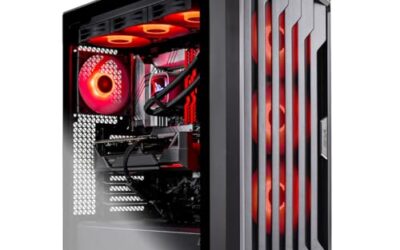
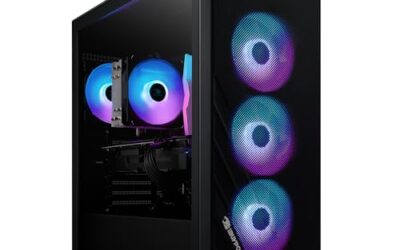
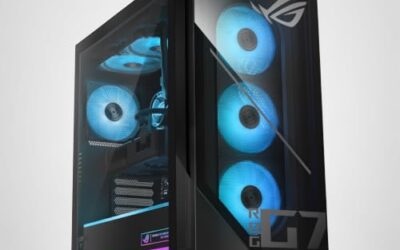
Use the side and rear photos to locate fan mounts, open vents, and the CPU cooler. The CyberPowerPC Gamer Xtreme GXiVR8060A47 is a useful listing to practice on. Its side photo shows where the cooler and case fans sit. You’ll still need a review of the exact configuration for measured temperature and noise.
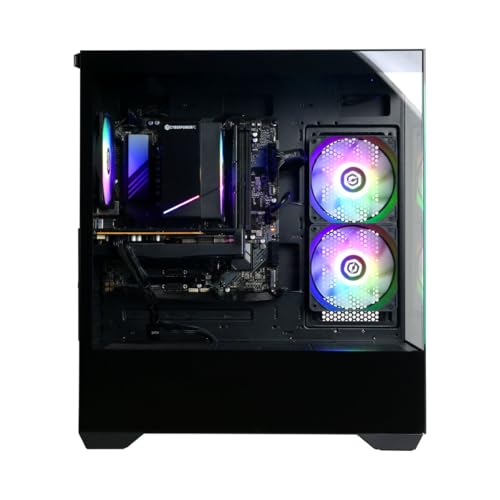

Pros
- RTX 5060 8GB paired with i5-14400F suits 1080p high-refresh gaming
- DR5 memory and B760 chipset align with current Intel LGA1700 platform
- 1TB PCIe 4.0 NVMe SD gives usable game library capacity from day one
Cons
- Limited owner feedback at time of writing, buyer signal is thin
- 8GB VRAM tightens headroom for 1440p ultra textures and ray tracing loads
- PSU wattage, cooler type, and case model are not specified in source
This is a mid-range prebuilt gaming tower built around an Intel Core i5-14400F, an NVIDIA GeForce RTX 5060 8GB, 16GB of DDR5, and a 1TB PCIe 4.0 NVMe SSD on a B760 chipset. The target buyer wants a ready-to-run 1080p high-refresh rig without sourcing parts or tuning BIOS.
The defining pairing here is the RTX 5060 8GB with a 10-core i5-14400F. Cards in this class typically deliver 1080p ultra at high refresh in most modern titles and 1440p with DLSS upscaling enabled. The i5-14400F rarely bottlenecks this GPU tier, leaving frametimes GPU-bound where you want them.
Trade-offs are typical at this tier. 8GB of VRAM limits headroom for 1440p ultra textures and heavy ray tracing, and the source does not specify PSU wattage, cooler class, or case model, all of which drive thermals, transient behavior, and future GPU upgrades. Warranty is one year parts and labor, standard for boutique prebuilts.
Buy this if you want a plug-and-play 1080p high-refresh gaming PC with Windows 11,iFi 6, and peripherals included. Skip this if you plan to game at 1440p ultra with ray tracing, need more than 8GB of VRAM for AI or content work, or want documented PSU and cooling specs before purchase.
GPU class and resolution fit: The RTX 5060 8GB is a mainstream 1080p card that stretches to 1440p with DLSS Quality or Balanced. Esports titles at 1080p should saturate high-refresh panels, while AA titles at 1440p ultra will lean on frame generation to stay smooth.
CPU pairing: The Core i5-14400F runs 10 cores at 2.5GHz base on LGA1700 with a B760 board. That is a balanced match for the RTX 5060, avoiding CPU bottlenecks in GPU-bound scenarios and giving headroom for OBS NVENC streaming alongside gameplay.
Memory and storage: 16GB of DDR5 is the current baseline for new releases, and the 1TB PCIe 4.0 NVMe SSD keps level loads and shader compilation quick. Exact DR5 speed, timings, and SD model are not specified in source.
Display outputs and connectivity: The GPU exposes 1x HDMI and 2x DisplayPort, enough for a triple-monitor setup at typical gaming refresh rates. WiFi 6, Bluetooth 5.3, 2x USB-A 3.2, and 6x USB-A 2.0 cover peripherals, though USB-C on the chassis is not listed.
For an upgrade, ask for the motherboard model, the power and front-panel connectors, and the maximum GPU length and thickness with the delivered fans installed. If the system uses proprietary connections, find out which replacements are available. Be specific about which upgrade matters to you. A second SSD and a longer graphics card require different checks.
Compare the delivered price and return terms
Price a comparable build or another prebuilt using the same GPU, a similar CPU, and equivalent memory, storage, and power supply. Add Windows if you need a license, delivery, and anything you’ll buy immediately. A $100 price difference can disappear if the cheaper tower needs a larger SSD. Our gaming PC picks under $1,500 give you other whole-system configurations to compare.
Read the return window and warranty for the exact seller before paying. Find out when the return clock starts, who pays freight on a faulty tower, and which labor and parts the warranty covers. Ask whether adding an SSD affects coverage and keep the terms with the receipt. If you’re still deciding between assembly and a ready-made machine, see when a prebuilt gaming PC is worth buying.
Read reviews for the configuration you’ll receive
Start with the full SKU. One storefront can group several GPU or processor variants under the same reviews. Look for a reviewer who identifies the configuration and shows the settings behind the reported results. A review of the same case with a different cooler won’t tell you how loud yours will be. For a marketplace offer, check who performs repairs even if the case carries a familiar brand.
Example of checking a real listing
Suppose you’re shopping for Cyberpunk 2077 at 1080p High and aiming for 60 FPS. CD Projekt Red’s requirements list that target with an RTX 2060 Super, RX 5700 XT, or Arc A770, along with a Core i7-12700 or Ryzen 7 7800X3D, 16 GB of RAM, and a 70 GB SSD requirement. The recommended CPU and GPU are useful starting points for finding comparable gameplay results.
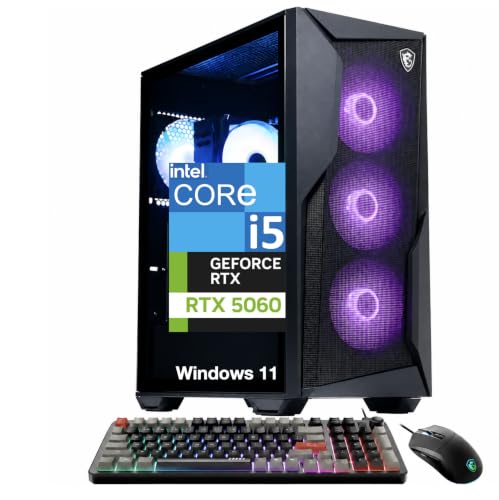
The Gamer Xtreme and the MSI Codex R2 listing from MichaelElectronics2 both advertise a desktop RTX 5060, Core i5-14400F, 16 GB of DDR5, and a 1 TB SSD. The new retail offers checked on November 25, 2026 were $1,141.99 and $1,249.99 respectively, before taxes and shipping. The memory capacity and drive type match what to look for in this example. The different CPU and GPU models mean you should still find a gameplay comparison at 1080p High with ray tracing off before treating 60 FPS as a buying assumption.
The MichaelElectronics2 listing gives a 650 W rating. Ask the seller for the full MSI SKU, module count, exact PSU, and who handles warranty service before paying the difference. Use that SKU to find the matching specifications. MSI publishes model-specific Codex R2 documentation.
Frequently asked questions
Is 16 GB of RAM enough for gaming?
It’s enough for games whose recommended memory fits comfortably alongside what you keep open. Check the requirement for the most demanding game in your rotation, including mods. If that leaves little headroom, compare a 32 GB configuration before you buy.
Can I judge a gaming PC without benchmarks for the exact tower?
Use results from the same GPU and a comparable CPU to narrow your choices. Mark any meaningful differences, including RAM layout and graphics settings. Find coverage of the exact case and cooler if temperatures or noise could change your decision.
Bottom line
Write down your target games and settings, the complete SKU, and the price after any immediate upgrades. Then confirm the few details that could make you return it. A missing GPU model. A warranty nobody can explain. If the seller can answer those questions and comparable gameplay results support your target, you have enough information to decide whether the PC fits.

























Write Your Review
No reviews yet. Be the first to share your experience!