

For a home office, choose the HP OmniDesk M03-0010 if both desktops fit your space and the HP costs less. Choose the Dell Slim ECS1250 if you need a narrower case. The two configurations compared here share an Intel Core Ultra 5 225, 16 GB of RAM, a 512 GB SSD, and Windows 11 Home. That puts desk space, ports, and the total price ahead of the badge.
Shopping for gaming? Start with the graphics card, then compare the power supply and cooling in the exact Alienware or HP OMEN configuration. With a laptop, the screen and ports can settle the decision even when two spec sheets look similar.
Dell vs HP at a glance
| What to compare | Dell | HP |
|---|---|---|
| Everyday desktop | Slim ECS1250 with Core Ultra 5 225, 16 GB RAM, and a 512 GB SSD | OmniDesk M03-0010 with Core Ultra 5 225, 16 GB RAM, and a 512 GB SSD |
| Desk fit | The Slim ECS1250 case is 3.74 inches wide | The OmniDesk M03-0010 uses a wider tower case |
| Monitor connections | HDMI and DisplayPort on the Ultra 5 225 Slim ECS1250 | HDMI and DisplayPort on the OmniDesk M03-0010 |
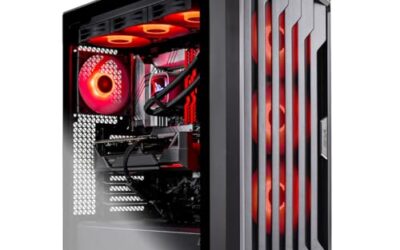
| Gaming desktop | Alienware Aurora ACT1250, with power supply options that vary by build | OMEN 45L, a large tower with configuration-specific parts |
| Everyday laptop | Dell 14 Plus DB14250 configurations include a 120 Hz antiglare screen | HP OmniBook 5 14Z-HN000 has a glossy 1920 × 1200 OLED configuration |
| Warranty lookup | Use the Dell Service Tag | Use the HP serial number and country of purchase |
Everyday desktops and laptops
Dell Slim ECS1250
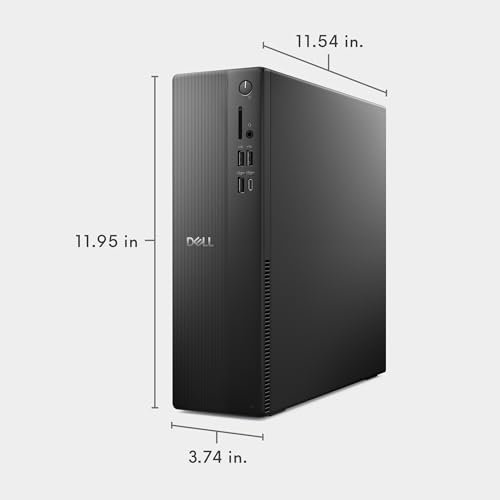
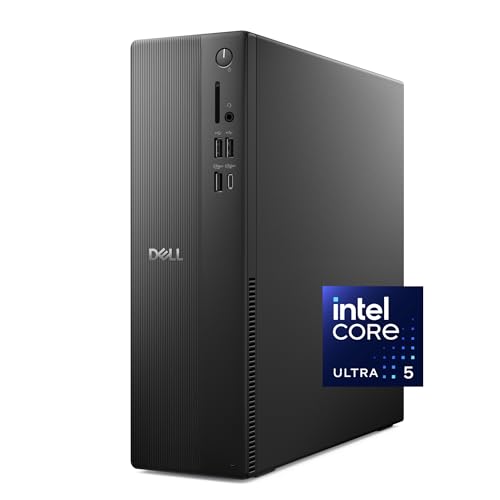
The Ultra 5 225 version of the Dell Slim suits a workstation squeezed between a monitor stand and the edge of a desk. The case is 3.74 inches wide and 11.54 inches deep before cables. Measure both directions. A DisplayPort plug sticking out the back can decide whether the machine sits comfortably on a shallow shelf.
Dell lists a 180 W power supply and a half-height PCIe x16 slot for its matching configuration. That slot is useful only if the card you want fits the bracket and the system can power it. Buy this model when you expect to use its integrated graphics for office work and streaming. If a larger graphics card is already on your upgrade list, start with a gaming tower. Dell Slim configuration and specifications
HP OmniDesk M03-0010
HP’s OmniDesk M03-0010 gives you the same processor, memory capacity, and storage capacity in a wider case. The meaningful difference for a home office is the port layout. The HP has two front USB-C ports, while Dell lists one on the Slim. If you plug in a backup SSD and a phone several times a week, HP’s extra front connection can save you from reaching around the case. On either machine, match your monitors to the rear HDMI and DisplayPort outputs before buying adapters. HP OmniDesk M03-0010 specification sheet
For browser tabs, office apps, and a video call at the same time, 16 GB is a reasonable starting point. A 512 GB drive also makes sense if most of your documents live in the cloud. If you keep a photo library or several games locally, price a 1 TB configuration before deciding. The capacity you need from day one is worth more than a small discount on the smaller drive. If both cases still feel large for the job, compare the trade-offs in our mini PC versus full desktop guide.
An all-in-one from either brand can free up room when you’re starting with an empty desk. You’re buying the screen and computer together, so judge the display as part of the price. Check the stand’s height adjustment, where the ports sit, and whether the manual lists an HDMI input if you want to reuse the screen later. If you already own a monitor you’d happily keep, compare the cost of just the tower before paying for a second screen.
For laptops, choose the screen and ports first
Picture the room where you’ll open the lid. For a bright office or classroom, I’d start with the antiglare Dell 14 Plus DB14250 configuration. Dell lists a 14-inch, 2560 × 1600, 120 Hz panel and a Thunderbolt 4 port on the configuration compared here. A Thunderbolt dock makes sense if you’re moving between a home monitor and a work desk every day. Check the dock’s display and charging requirements against the laptop’s ports. Dell 14 Plus specifications
For movies or photos in a room where you can control reflections, I’d look at the HP OmniBook 5 14Z-HN000 with the 1920 × 1200 OLED display. Its glossy finish is worth thinking about if there’s a window directly behind your chair. Both example configurations list 16 GB onboard memory, so buy the capacity you expect to keep. Also compare the charger weight if you carry it daily. A few ounces in the bag matter more on a commute than at a desk. HP OmniBook 5 specifications
Gaming desktops and laptops
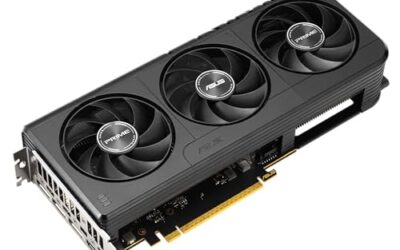
Same GPU first. If you’re choosing between a Dell Alienware Aurora and an HP OMEN desktop, compare models with the same graphics card and similar memory and storage. Then check the case dimensions, cooler, and power supply. At 1440p, I’d favor the stronger graphics configuration if it fits the budget and the enclosure suits your space. Our gaming desktop picks under $2,000 show what else is available at a similar total price.
The Aurora ACT1250 illustrates why the full model number matters. Dell’s manual lists both a 500 W SFF supply and a 1,000 W SFFX supply. Ask which one ships in the build you’re pricing, and use the manual to check connectors and card clearance if you plan to replace the GPU later. For comparison, HP lists a modular 850 W ATX 3.1 supply and a 55.5 cm case height on the OMEN 45L GT22-3004nh. That’s a specific regional configuration. Use its dimensions to get a sense of the case, then verify the parts in the listing you’re actually buying. Aurora ACT1250 power specifications · OMEN 45L GT22-3004nh specifications
For Alienware and OMEN gaming laptops, check the listed GPU power limit and screen resolution along with the GPU name. Two laptops with the same graphics chip can have different power limits. If you play at the built-in panel’s native resolution, a higher-resolution screen also asks the GPU to draw more pixels per frame. Decide whether you’d use that extra detail or would prefer a lower resolution and a higher refresh rate. If the listing omits GPU power, look up the exact configuration before paying extra. See our gaming laptop buying guide for examples across budgets.
What to check before you buy either brand
- Exact model and seller. Match the processor suffix, memory, drive, and Windows edition to the order page. For a marketplace listing with extra RAM or storage, ask who installed it and who covers those parts.
- Support where you’ll use it. Compare the term, who pays for shipping, and whether service is mail-in or on-site after diagnosis. On a work PC, a shorter turnaround can justify a higher upfront cost. Dell looks up coverage by Service Tag. HP asks for the serial number and country or region of purchase. Dell warranty lookup instructions · HP warranty lookup
- The upgrade you actually expect to make. For more storage, check whether there’s a free slot or whether you’ll need to replace and migrate the existing drive. For graphics, check slot height, card length and thickness, power connectors, and physical room for the cable.
- The price to sit down and work. Include delivery, a monitor if you need one, missing cables, and any memory or storage upgrade you already plan to buy. A cheaper listing can lose its edge once you add those items.
Which should you choose?
- A narrow home-office nook. Choose the Dell Slim ECS1250 if its footprint gets your computer off the floor or leaves room for a second monitor stand.
- A regular desk with room for either case. Choose the HP OmniDesk M03-0010 if its front ports suit your devices and the delivered price is lower. On November 25, 2026, the new US retail offers we checked were $717.99 for HP and $729.99 for Dell.
- A gaming desktop or laptop. Buy the configuration that meets your graphics and display needs at the better total price. If you’re planning a desktop GPU upgrade, check the new card’s fit and power requirements before ranking the deals.
- A laptop for work and travel. Choose the screen you can comfortably read in your usual room, then check memory and dock compatibility.
For the two office desktops here, I’d take the OmniDesk at the lower price when it fits and pay the small difference for the Dell when cabinet or desk width is the deciding factor.

FAQ
Can I use an HP monitor with a Dell computer, or a Dell monitor with an HP?
Yes. Match an output on the computer to an input on the monitor and use a cable that supports the resolution and refresh rate you want. If you’re connecting by USB-C, confirm that the computer port carries video and that the monitor supplies enough power if you also want it to charge a laptop.
Is a refurbished business desktop a reasonable alternative?
It can be for email, documents, and general browsing. Compare the exact CPU, memory, SSD, return window, and Windows 11 eligibility with a new system. If the seller advertises remaining manufacturer coverage, ask for the identifier you need to verify it. For an older small-form-factor machine, check the monitor outputs too. The cables you already have may determine whether a deal works on day one.

























Write Your Review
No reviews yet. Be the first to share your experience!