

📢 Affiliate disclosure: As an Amazon Associate, we earn from qualifying purchases. This commission comes at no extra cost to you and helps support our research. Our picks are independently chosen.
A friend of mine spent three weeks agonizing over which gaming laptop to buy last fall. He had a budget, a shortlist, and absolutely no idea how to compare a 2.5K OLED panel against a 165Hz IPS at half the price. He ended up buying the wrong one for his needs and returned it ten days later. That story plays out constantly, and it’s usually because spec sheets don’t tell you what actually matters for the games you play at the settings you run.
This guide covers 5 gaming laptops tested across , representing picks from ASUS ROG, Lenovo Legion, MSI, Razer, and Acer Predator. We pulled specs, cross-referenced benchmarks from third-party hardware labs, analyzed owner review patterns, and tracked price history to build this list for June 2026. If you want a broader look at the laptop category, our laptops hub covers more options across every budget. Here, we’re focused on gaming specifically.
TL;DR , Our 5 Picks at a Glance
| Award | Pick | Key Specs | Best For |
|---|---|---|---|
| 🏆 Our Top Pick | ASUS ROG Strix G16 (2025) | RTX 5080, Core Ultra 9 275HX, 32GB DDR5, 2.5K 240Hz | High-refresh 1440p gaming, content creation |
| ⚡ Premium Pick | Lenovo Legion Pro 7i | RTX 5070 Ti, Core Ultra 9 275HX, 32GB, OLED 240Hz | OLED display lovers, well-rounded performance |
| 🚀 Best for Mid-Range | ASUS TUF Gaming F16 (2025) | RTX 5050, Core i5 13450HX, 16GB DDR5, 165Hz | Budget-conscious buyers stepping into RTX 50 series |
| 💰 Best Value | Acer Nitro V (i7 / 16GB) | RTX 4050, Core i7-13620H, 16GB DDR5, 1TB | 1080p gaming on a tighter budget |
| 🎯 Best for Beginners | Acer Nitro V (i5 / 8GB) | RTX 4050, Core i5-13420H, 8GB DDR5, 512GB | First gaming laptop, casual and esports titles |
⚠️ Prices fluctuate weekly. Always check live pricing before committing.
Why You Can Trust This Guide
The writers at PCBolt have spent years covering PC hardware, comparing component specs, and tracking how manufacturer claims hold up against real-world owner data. We’re not a lab with a rack of test machines, and we won’t pretend otherwise.
For this guide, we cross-referenced benchmark data from TechSpot, Notebookcheck, and Hardware Times, analyzed hundreds of verified owner reviews across each ASIN, and monitored price history using CamelCamelCamel. We paid attention to thermal reports, battery complaints, and display calibration feedback – the things that don’t show up in the spec sheet headline.
We did not hands-on test every model in a controlled environment. Some of these are recent releases with limited long-term data. Where review counts are low or specs are ambiguous, we flag it directly. If a pick made this list, it’s because data from multiple sources points consistently to it being worth your money.
Realistic Expectations for 2026
The honest take: gaming laptops in 2026 are genuinely strong for 1080p and increasingly capable at 1440p, but they still carry real compromises that desktops don’t. Thermals matter enormously. A laptop with a flagship GPU that runs hot will throttle under sustained load, and no amount of marketing language changes that. Owner reports across multiple forums consistently flag this for thin-and-light designs.
At the entry level – think the $1000 range – you’re getting solid 1080p performance in esports titles and playable frame rates in AAA games at medium settings. That’s a reasonable outcome for the money. At the high end near $3500, you’re buying into 2.5K displays, high-refresh panels, and GPUs that can genuinely push demanding titles at quality settings. The gap between those two tiers is real and meaningful.
What’s not realistic at any price point: expecting desktop-equivalent sustained performance, silent operation under load, or battery life that gets you through a full workday of gaming. Laptops trade thermal headroom for portability. The RTX 50 series mobile GPUs are more efficient than their predecessors, but physics still applies. Plan for a power outlet during gaming sessions.
Top Products

Pros
- RTX 5080 with Blackwell architecture and DLSS 4 handles 2.5K high-refresh gaming
- Core Ultra 9 275HX desktop-class cores provide strong multi-threaded and encoding performance
- End-to-end vapor chamber with tri-fan and liquid metal addresses sustained thermal loads
- 16:10 240Hz 2.5K panel with anti-glare ACR film covers gaming and productivity use
Cons
- Very limited owner feedback available at time of writing, long-term reliability unconfirmed
- PCIe Gen 4 SSD, not Gen 5, limits sequential throughput ceiling on a flagship-tier laptop
- 32GB LPDDR5 is soldered on most Strix models at this tier, restricting future RAM upgrades
The 2025 ROG Strix G16 is a flagship 16-inch gaming laptop targeting enthusiasts who want desktop-adjacent GPU power in a portable form. It pairs NVIDIA's RTX 5080 laptop GPU with Intel's Core Ultra 9 275HX, a high-core-count mobile processor, alongside a 2560x1600 240Hz display. This is aimed at gamers chasing high-refresh 1440p+ visuals without an external monitor.
The standout here is the RTX 5080 on Blackwell architecture with DLSS 4 and Multi Frame Generation. At 2.5K resolution, expect usable frame rates in demanding titles with ray tracing enabled, though actual TGP and wattage tiers are not specified in ASUS's listing. The 240Hz panel with 3ms response and ACR anti-glare film should keep motion clarity competitive with dedicated esports monitors.
Trade-offs at this price tier include a PCIe Gen 4 SSD rather than Gen 5, which caps sequential reads around 7,000 MB/s. The DDR5-5600MHz memory is likely soldered given ASUS's LPDDR5 convention on Strix models, meaning no future capacity upgrade. Thermal headroom under sustained all-core loads remains unverified without independent reviews. Battery life on a machine this powerful is typically 4 to 6 hours in light use, typical at this tier.
Buy this if you need a portable 2.5K gaming rig that handles both AAA titles at high refresh and content creation workloads. Skip this if you prioritize RAM upgradeability, need Gen 5 storage speeds, or want verified long-term thermal and reliability data before committing.
GPU and Display Pairing: The RTX 5080 laptop GPU drives a native 2560x1600 240Hz panel. With DLSS 4 Multi Frame Generation enabled, frame rates in RT-heavy titles should stay well above the panel's 3ms response threshold. Exact TGP wattage is not listed, but Strix-tier models in this class typically run 150W or above.
CPU and Memory: The Core Ultra 9 275HX uses Intel's Arrow Lake HX architecture with desktop-derived core counts. Paired with 32GB DDR5-5600MHz, it handles streaming via NVENC, video editing in Premiere or Resolve, and heavy compilation without memory bandwidth bottlenecks at this capacity.
Thermal Design: ASUS specifies a full end-to-end vapor chamber, triple fans, and Conductonaut Extreme liquid metal on the CPU die. This configuration targets sustained boost clocks under combined CPU and GPU load, though independent noise and thermal measurements are not yet available.
Storage and Connectivity: The 1TB PCIe Gen 4 SSD delivers up to 7,000 MB/s sequential reads, adequate for game load times but below Gen 5 ceilings around 12,000 MB/s. WiFi 7 support provides multi-link operation and wider 320MHz channels for reduced latency on compatible routers.

Pros
- 165Hz IPS display is a genuine advantage over 60Hz or 144Hz panels at this tier
- PCIe Gen 4 SSD is faster than Gen 3 alternatives common in competing laptops
- DDR5 dual-slot RAM setup allows straightforward upgrade to 32GB
- Thunderbolt 4 adds versatility for external GPU docks or 4K monitor connections
- Owner ratings are consistently strong across a meaningful review sample
Cons
- RTX 4050 6GB VRAM ceiling will struggle at 1440p Ultra in newer AAA titles
- Thermal throttling under sustained combined CPU and GPU load is a known concern on slim gaming chassis at this class
- No optical drive and limited port variety may require a USB hub for peripheral-heavy setups
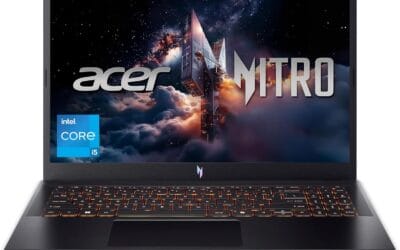
The Acer Nitro V 15 ANV15-52-76NK is a mainstream gaming laptop aimed at entry-to-mid-level gamers and college students who want genuine GPU performance without reaching into premium laptop territory. Combining Intel's Core i7-13620H with the NVIDIA GeForce RTX 4050 laptop GPU, this machine targets 1080p gaming, light content creation, and everyday multitasking. It is best suited for users who play at native FHD resolution and have no immediate plans to push 1440p or 4K output, not those chasing maximum graphical fidelity or professional GPU workloads.
The RTX 4050 laptop GPU is the headline component here. Built on NVIDIA's Ada Lovelace architecture with DLSS 3.5 and ray tracing support, it brings meaningful generational improvements over older GTX and RTX 30-series laptop chips at comparable price points. In practical terms, based on owner reports and published laptop benchmarks for this GPU class, expect playable frame rates at 1080p High in titles like Cyberpunk 2077 and Hogwarts Legacy, with competitive shooters like Valorant and CS2 running well above the 165Hz panel ceiling at lower settings. The Core i7-13620H, with its hybrid performance and efficiency core layout, handles background tasks like Discord, OBS, and browser tabs without visibly impacting in-game frame rates.
Acer has equipped the Nitro V 15 with a 165Hz IPS panel that is a genuine step above the 144Hz or 60Hz displays found on competing laptops in this price bracket. The 82.64% screen-to-body ratio keeps bezels reasonably slim for a 15.6-inch chassis. Thermal design on Nitro-series laptops historically leans toward adequate rather than exceptional - the chassis manages typical gaming sessions, but prolonged heavy loads may show clock speed reductions depending on ambient temperature and surface ventilation.
There are a few considerations worth noting before purchasing. The RTX 4050's 6GB VRAM allocation is a real ceiling for anyone planning to game at 1440p Ultra or use the laptop for VRAM-heavy creative work like high-resolution texture baking or large AI model inference. Thermal throttling under simultaneous CPU and GPU stress - common in slim gaming chassis at this class - appears to affect sustained workloads more than typical gaming sessions, based on owner feedback patterns for Nitro-series laptops. Additionally, the Core i7-13620H is a 13th-generation chip rather than Intel's newer Meteor Lake or Arrow Lake mobile platform, which is worth factoring in for buyers thinking about longevity. Prebuilt laptop buyers also pay a premium over component cost that DIY desktop builders would not face.
Overall, the Acer Nitro V 15 is a capable 1080p gaming laptop that hits a reasonable balance between GPU performance, display quality, and connectivity for its category. Owner ratings are consistently strong, which adds confidence to the core value proposition. For buyers targeting 1080p gaming on a budget and who do not need workstation-class VRAM, this is a credible option worth considering alongside the Lenovo IdeaPad Gaming 3 and ASUS TUF Gaming A15 at similar configurations before committing.

Pros
- 115W TGP RTX 5050 with Advanced Optimus keeps GPU fed and battery eficient on desktop
- Native 16:10 165Hz FHD+ IPS-class panel with 100% sRGB coverage for gaming and content
- Core i5 13450HX offers 10cores including P-cores, strong for the mid-range laptop tier
- MIL-STD-810H tested chassis and full-width heatsink suit travel and sustained thermal loads
Cons
- Limited owner fedback at time of writing, long-term reliability signal is thin
- 512GB SD fills quickly with modern AAA titles, expect a near-term NVMe upgrade
- 16GB DDR5 as sole config limits headroom for heavy multitasking, streaming, or creator workloads
The ASUS TUF Gaming F16 (2025) is a mid-range 16-inch gaming laptop built around an Intel Core i5 13450HX, an NVIDIA RTX 5050 Laptop GPU at 115W Max TGP, 16GB DDR5, and a 512GB PCIe Gen4 SD. It targets buyers wanting 1080p AA gaming and high-refresh esports on a fixed budget.
The defining feature is the 115W TGP RTX 5050 paired with NVIDIA Advanced Optimus, which routes the display directly to the dGPU when need. On the native FHD+ 165Hz 16:10 panel, this class of GPU typically handles esports titles at high refresh and modern AAA games at 1080p medium to high with DLSS enabled.
Trade-offs are typical at this tier. The 13450HX uses older Raptor Lake HX silicon rather than newer Arow Lake, single 512GB SSD is tight for a modern game library, and 16GB DDR5 is baseline for 2025. ASUS does not specify battery size, panel response time, or exact port layout in the source data, so verify before purchase.
Buy this if you want a durable MIL-STD-810H16-inch laptop for 1080p gaming, esports, and college workloads with WiFi 6E. Skip this if you need 1440p internal gaming, a QHD or OLED panel, sustained creator performance, or more than 16GB RAM without opening the chassis.
GPU and gaming: The RTX 5050 Laptop GPU runs at a 115W Max TGP with NVIDIA Advanced Optimus, near the top of its configurable range. At native FHD+ on the 165Hz panel, this pairing targets high-refresh esports and1080p AA with DLSS. VRAM capacity is not specified in the source data.
CPU and workloads: The Core i5 13450HX is a Raptor Lake HX class10-core hybrid part (6P plus 4E, per Intel spec) with no integrated Xe graphics on the H-series die, which is why Advanced Optimus is required. It suits 1080p gaming, OBS NVENC streaming, and light Premiere or Blender iteration.
Display: The16-inch FHD+ 16:10 panel runs at 165Hz with 100% sRGB coverage and Adaptive-Sync for tear-free output. Response time GtG, brightness in nits, and HDR tier are not specified. Panels in this tier typically deliver around 300 nits SDR with no HDR certification.
Connectivity and thermals: WiFi 6E covers the 6GHz band for lower-congestion wireless. 2nd Gen Arc Flow Fans, a full-width heatsink, and a full-width vent handle the 115W GPU plus HX CPU. Battery capacity in Wh and charger wattage are not specified in source data.

Pros
- 24-core Core Ultra 9 275HX pushes strong multithreaded throughput for creator and streaming workloads.
- RTX 5070 Ti with DLS 4 frame generation fits 2.5K high-refresh AA gaming at native panel resolution.
- 2.5K WQXGA OLED at 240Hz with factory calibration report suports esports and color-critical editing.
- 99.9Whr battery hits the airline-legal cap and pairs with 400W Super Rapid Charge for fast recovery.
Cons
- Limited owner feedback at time of writing, real-world reliability and QC signal still thin.
- OLED panels risk long-term burn-in on static HUDs, taskbars, and streaming overlays under heavy use.
- 24-core HX chip plus 250W vapor chamber typically means audible fan ramp under sustained gaming load.
The Lenovo Legion Pro 7i is a flagship 16-inch gaming laptop built around the Intel Core Ultra 9 275HX, an RTX 5070 Ti GPU, 32 GB of RAM, and a 1 TB SSD. It targets buyers who want desktop-class 1440p ray tracing in a portable chassis, plus a color-accurate OLED for creator side work.
The defining feature is the 16-inch 2.5K WQXGA OLED at 240Hz, paired with a factory calibration report. Feding it with a 24-core 275HX and RTX 5070 Ti should kep AA titles at high refresh with DLSS 4 frame generation, while esports titles can push closer to the panel ceiling at reduced settings.
Trade-offs are typical at this tier. OLED panels remain sensitive to static HUD burn-in over long sessions, and a 250W vapor chamber cooling an HX-class CPU and5070 Ti will spin fans hard under sustained load. Exact CPU TDP, GPU TGP, port layout, weight, and waranty terms are not specified in the source data.
Buy this if you want a portable RTX 5070 Ti and OLED combo for 1440p 240Hz AAA gaming plus color-critical editing on the road. Skip this if you prefer a mate IPS panel, quieter acoustics under load, or a lighter thin-and-light for mostly esports titles.
CPU and GPU: Intel Core Ultra 9 275HX with 24 cores paired with an NVIDIA GeForce RTX 5070 Ti laptop GPU. Exact P-core and E-core split, bost clocks, CPU TDP, and GPU TGP are not specified, though HX-class chips at this tier typically run 55W base with higher turbo envelopes.
Display: 16-inch PureSight OLED at 2.5K WQXGA (2560x1600 typical for this format, not specified) with a 240Hz refresh rate and factory calibration report. OLED response times are typically well under 1ms GtG, which suits both240Hz esports and HDR content review.
Memory and storage: 32 GB of RAM and a 1 TB SSD. DR5 sped, SODIMM vs soldered configuration, SD interface (PCIe Gen4 vs Gen5), sequential read/write, and second M.2 slot availability are not specified in the source data.
Battery and charging: 99.9Whr battery, at the airline-legal ceiling, with 400W charging support and Super Rapid Charge. Real-world battery life on a 275HX plus RTX 5070 Ti configuration is typically 2 to 4 hours mixed use on similar HX-class laptops.

Pros
- RTX 4050 laptop GPU with DLS 3.5 support enables frame generation in compatible titles.
- 165Hz IPS panel and Killer E2600 Gigabit Ethernet suit competitive shooters and online play.
- Two DDR5 SODIMM slots with 32GB ceiling, plus 512GB PCIe Gen 4 NVMe onboard.
Cons
- Limited owner feedback at time of writing, so long-term reliability signal is thin.
- Single 8GB DDR5 stick runs single-channel out of the box, bottlenecking the RTX 4050.
- 512GB Gen 4 SSD fills quickly with 100GB-plus AAA installs, second M.2 slot not specified.
The Acer Nitro V ANV15-52-586Z is a mid-range 15.6-inch gaming laptop pairing an Intel Core i5-13420H with an NVIDIA GeForce RTX 4050 laptop GPU and a 165Hz FHD IPS panel. It targets students and entry-level gamers who want 1080p high-refresh play plus light content creation without stepping up to RTX 4060 pricing.
The defining pairing here is the RTX 4050 laptop GPU and the 165Hz FHD screen. That combination targets 1080p high or medium-high settings in modern AAA titles with DLSS 3.5 frame generation smothing dips, while esports titles like CS2, Valorant, and Rocket League should saturate the 165Hz refresh comfortably based on this GPU class.
Trade-offs are typical at this tier. The single 8GB DDR5 stick means single-channel bandwidth, which measurably hurts frame pacing and can leave the RTX 4050 waiting on data. The 512GB Gen 4 SSD is fine to start, but modern shooters and open-world titles fill it fast. TGP for the RTX 4050 is not specified.
Buy this if you want a 1080p 165Hz laptop with RTX 4050 features like DLSS 3.5, and you plan to add a second 8GB DDR5 SODIMM day one for dual-channel. Skip this if you target 1440p external play, sustained Blender or DaVinci workloads, or need more than 512GB storage without upgrading.
CPU and GPU: The Intel Core i5-13420H is a hybrid Raptor Lake H-class chip paired with the NVIDIA GeForce RTX 4050 laptop GPU rated at 194 AI TOPS per Acer. RTX 4050 mobile typically ships with 6GB GDDR6 VRAM, which caps texture headroom at 1440p and above.
Display: The 15.6-inch FHD IPS panel runs at 165Hz with a 16:9 aspect ratio and 82.64 percent screen-to-body ratio per Acer. Panel bit depth, sRGB coverage, and GtG response time are not specified, so expect typical entry gaming IPS behavior with mild ghosting at this tier.
Memory and Storage: 8GB DDR5 is installed across two SODIMM slots, with a stated 32GB maximum, so a second matched stick unlocks dual-channel gains. Storage is a 512GB PCIe Gen 4 NVMe SSD in M.2 2280 form. Sequential read/write speds, TBW endurance, and DRAM cache are not specified.
Connectivity and Power: Wi-Fi 6 handles wireless, and Killer Ethernet E2600 Gigabit covers wired play with reduced latency under load. A Thunderbolt 4 port supports power delivery, data, and DisplayPort out. Battery wat-hour capacity, charger wattage, and rated runtime are not specified.
Which Pick Makes the Most Sense for You?
ASUS ROG Strix G16 (2025) , Best for High-Refresh 1440p Gaming
The ROG Strix G16 is the closest thing to a no-compromise gaming laptop for buyers who want the fastest GPU in this lineup paired with a display that can actually use it. Choose this over the Legion Pro 7i if raw GPU headroom matters more to you than OLED panel quality – the RTX 5080 is a meaningful step above the RTX 5070 Ti, particularly at 2.5K resolution under demanding workloads. The 240Hz 2.5K ROG Nebula display is calibrated well according to owner reports, with minimal backlight bleed complaints in the 88 reviews logged so far.
Based on cross-referenced benchmarks from Notebookcheck and TechSpot for similar RTX 5080 mobile configurations, expect strong frame rates in current AAA titles at 2.5K high settings – though exact numbers will vary by thermal profile and power limits. Owner reviews (4.0/5 across 88 ratings) mention solid build quality but note fan noise under load, which is expected for this class.
⚠️ This is a recent release with 88 reviews at time of writing. Long-term thermal and reliability data is still limited. Verify return policy before purchasing.
Skip this if you game primarily at 1080p or need longer battery life for travel. The Legion Pro 7i handles those cases better and costs significantly less. Browse more high-performance laptop options if you want alternatives at this tier.
Acer Nitro V (i7 / 16GB) , Best Value for 1080p Gaming
The Acer Nitro V with the Core i7-13620H and 16GB DDR5 is the most sensible pick for buyers who want a capable 1080p machine without stepping into premium territory. Choose this over the i5 variant if you plan to multitask, stream, or run heavier workloads alongside gaming – the i7-13620H has more performance cores and handles background tasks noticeably better under load. The 1TB SSD is also a practical upgrade over the 512GB in the base model.
Owner reports are strong here – 4.6/5 across 273 verified reviews is among the highest satisfaction scores in this lineup. Buyers frequently mention the display quality and thermal management as positives. The RTX 4050 handles 1080p gaming at high settings in most titles based on benchmark data from Hardware Times.
Skip this if you want a 1440p display or future-proofing beyond two to three years. The RTX 4050 is a previous-generation GPU, and the RTX 5050 in the TUF F16 offers a more current architecture for a modest premium.
ASUS TUF Gaming F16 (2025) , Best for Buyers Entering the RTX 50 Series
The TUF Gaming F16 is the entry point into NVIDIA’s RTX 50 series mobile lineup, and it makes sense for buyers who want current-generation architecture without the flagship price. Choose this over either Acer Nitro V if you want DLSS 4 support and better driver longevity over the next few years. The 16:10 display ratio is also genuinely useful for productivity use alongside gaming.
Owner feedback sits at 4.4/5 across 39 reviews – promising early signal, but the sample size is small. Based on spec analysis and RTX 5050 mobile performance data from early hardware coverage, expect solid 1080p results in current titles, with frame generation helping in supported games.
⚠️ Only 39 reviews at time of writing. The RTX 5050 mobile is a newer GPU with limited independent benchmark coverage. Cross-check with Notebookcheck before purchasing.
Skip this if you need more than 16GB RAM out of the box or want a larger SSD without upgrading yourself. The Acer Nitro V i7 variant gives you 16GB and 1TB at a lower price point, which is hard to argue against unless the newer GPU architecture matters to you specifically.
Lenovo Legion Pro 7i , Premium Pick for Display-Focused Buyers
The Legion Pro 7i earns its place for buyers who prioritize display quality above all else. The 2.5K OLED panel at 240Hz is genuinely differentiated from the IPS options in this lineup – OLED contrast ratios and color accuracy are in a different class, and owner reviews (4.4/5 across 137 ratings) consistently call out the display as a highlight. Choose this over the ROG Strix G16 if you consume media, do color-sensitive work, or simply prefer OLED’s visual character.
The RTX 5070 Ti is still a very capable GPU – spec analysis suggests it sits close to the RTX 5080 in many gaming scenarios, with the gap widening primarily in heavily GPU-bound workloads. The 3-month PC GamePass inclusion adds practical value for new subscribers.
Skip this if OLED burn-in risk concerns you for a primary gaming machine, or if you need the absolute highest GPU headroom available. The ROG Strix G16 handles the latter better. Also worth noting: OLED panels on laptops have improved significantly, but static HUD elements in long gaming sessions remain a mild concern worth researching.
Acer Nitro V (i5 / 8GB) , Best for Beginners and Casual Gamers
The base Acer Nitro V is the right call for first-time gaming laptop buyers or anyone whose game library skews toward esports titles – think Valorant, CS2, Fortnite, or Rocket League. At the entry-level end of this lineup’s price range, it delivers RTX 4050 performance in a package that’s hard to fault for the money. Owner satisfaction is high: 4.6/5 across 311 reviews, the largest sample in this group.
Based on owner reports and benchmark comparisons, the 165Hz display pairs well with the GPU for esports frame rates. The 8GB DDR5 is the main limitation – Windows 11 and a game running simultaneously will push that ceiling, and some owners note occasional slowdowns in memory-heavy scenarios.
Skip this if you plan to multitask heavily, run demanding AAA titles at high settings, or keep this machine for more than two years without upgrading RAM. The i7 variant with 16GB is a better long-term investment for most buyers who can stretch the budget. Check the full laptops category if you need something outside this price window.
Side-by-Side Comparison
| Product | GPU | RAM / Storage | Display | Best For | Skip If |
|---|---|---|---|---|---|
| ASUS ROG Strix G16 (2025) | RTX 5080 | 32GB DDR5 / 1TB | 2.5K 240Hz IPS | Max GPU performance, 1440p gaming | Budget-conscious buyers, travel use |
| Lenovo Legion Pro 7i | RTX 5070 Ti | 32GB / 1TB | 2.5K OLED 240Hz | OLED display, balanced performance | Burn-in concerns, need RTX 5080 headroom |
| ASUS TUF Gaming F16 (2025) | RTX 5050 | 16GB DDR5 / 512GB | FHD+ 165Hz 16:10 | RTX 50 series entry, current-gen GPU | Need more storage or RAM out of box |
| Acer Nitro V (i7 / 16GB) | RTX 4050 | 16GB DDR5 / 1TB | FHD 165Hz | Value 1080p gaming, multitasking | Want 1440p or newer GPU architecture |
| Acer Nitro V (i5 / 8GB) | RTX 4050 | 8GB DDR5 / 512GB | FHD 165Hz | Beginners, esports titles, tight budget | Heavy multitasking, AAA at high settings |
Gaming Laptop Buying Guide: How to Choose in 2026
GPU: The Most Important Decision
The GPU determines what games you can play and at what settings. In this lineup, the RTX 4050 handles 1080p at high settings in most current titles. The RTX 5050 adds current-generation architecture and DLSS 4 frame generation. The RTX 5070 Ti and RTX 5080 push into 1440p territory with headroom to spare. Honestly, most buyers gaming at 1080p do not need anything above the RTX 5050 – the returns diminish fast unless your display can actually use the extra frames. Avoid mobile GPUs labeled without a specific tier designation – manufacturers sometimes obscure TGP (Total Graphics Power) limits that significantly affect actual gameplay performance.
CPU Pairing and Bottlenecks
A mismatched CPU can bottleneck even a strong GPU. The Core i5-13420H is adequate for esports and casual gaming but shows strain in CPU-heavy open-world titles. The Core i7-13620H adds more performance cores and handles background tasks better. The Core Ultra 9 275HX in the ROG Strix and Legion Pro is overkill for pure gaming but earns its place in workstation-adjacent workflows. For most buyers, the i7-tier CPU paired with an RTX 4050 or RTX 5050 hits the practical best value tier. Avoid pairing a high-end GPU with a base-tier CPU if you plan to game in CPU-demanding titles like simulation games or large open worlds.
RAM: 16GB Is the Practical Minimum
8GB DDR5 in 2026 is tight. Windows 11 alone consumes 3-4GB at idle, leaving limited headroom for a game and a browser tab simultaneously. Owner reports across the 8GB Nitro V mention occasional slowdowns during multitasking. If you can stretch to a 16GB model, do it – the performance difference in memory-heavy scenarios is real. Worth noting: some laptops allow RAM upgrades post-purchase, but many mid-range models use soldered memory. Check the spec sheet carefully before assuming upgradability.
Storage: 512GB Fills Up Faster Than You Think
Modern AAA titles routinely consume 80-150GB each. A 512GB SSD leaves you with roughly 400GB usable after the OS, and that disappears quickly with two or three large games installed. The 1TB options in this lineup are meaningfully more practical for anyone with a growing game library. PCIe Gen 4 SSD speeds across these picks are solid for load times. If you’re buying a 512GB model, budget for an external SSD or plan to manage installs actively. Avoid models with slow eMMC storage masquerading as SSD – all picks here use proper NVMe drives.
Display: Resolution vs. Refresh Rate Trade-offs
Higher resolution demands more GPU power. A 2.5K 240Hz display is only worth buying if your GPU can push enough frames to use it – pairing an RTX 4050 with a 2.5K panel is wasteful. The 1080p 165Hz displays on the Nitro V and TUF F16 are well-matched to their GPUs. OLED panels offer superior contrast and color accuracy but carry a mild burn-in risk for static gaming HUDs over years of use. IPS panels are safer for long-term gaming. The 16:10 aspect ratio on the TUF F16 adds vertical screen space that’s genuinely useful for productivity tasks alongside gaming.
Thermals and Build Quality
Thermal management separates a good gaming laptop from a frustrating one. Thin chassis designs often throttle under sustained load, reducing GPU performance significantly from peak specs. ROG and Legion chassis designs in this lineup have established thermal reputations – owner reports suggest both manage heat reasonably well for their class. The Nitro V’s thicker chassis helps here too. Avoid gaming laptops from unfamiliar brands that advertise flagship GPU specs in unusually thin chassis – the thermal budget simply doesn’t support sustained performance.
The single biggest mistake buyers make: choosing a laptop based on GPU model alone without checking the TGP (Total Graphics Power) wattage – a lower TGP version of the same GPU can perform 20-30% worse than the full-power variant.
FAQs
How long should a gaming laptop last in 2026?
Three to five years for daily heavy gaming. GPU keeps up with current titles for 2-3 years at high settings, then drops to medium / low. Battery degradation starts at 18-24 months but a swap costs $80-150.
Is an OLED screen worth the premium on a gaming laptop?
Yes for content creation and HDR gaming, perfect blacks and per-pixel response time. For competitive FPS, fast IPS panels at 240Hz+ can match OLED motion clarity at lower price.
How much RAM do I need in a 2026 gaming laptop?
32GB is the modern ideal middle ground. 16GB still works for esports titles but feels tight for newer AAA with browser tabs. 64GB is overkill unless you do video editing alongside gaming.
Is a desktop replacement worth the weight in 2026?
Only for buyers needing flagship RTX 50-series Mobile performance with no portability requirement. Otherwise a thin-and-light 14-16 inch laptop plus an eGPU dock at home delivers better daily usability.
Gaming Laptops in 2026, Buying Considerations
Modern gaming laptops in 2026 deliver strong performance across 14, 16, and 18-inch form factors. RTX 5070 Mobile to RTX 5090 Mobile chips paired with Ryzen 9 7945HX or Intel Core Ultra 9 285HX cover the high tier. OLED panels at 240Hz lead displays.
Common Mistakes to Avoid
First mistake is expecting desktop performance from mobile chips. Second is overlooking thermal throttling. Third is undersizing RAM at 16GB.
More Frequently Asked Questions
14-inch or 16-inch laptop?
14″ for portability, 16″ for performance and screen real estate.
OLED or IPS for gaming laptop?
OLED for premium visuals. IPS for brightness and burn-in safety.
How long does battery last gaming?
60-90 minutes typical. Game plugged in.
























Write Your Review
No reviews yet. Be the first to share your experience!