

Choose an APU if you want to play games on a desktop without buying a graphics card right away. If a dedicated GPU is already in your budget, choose the CPU that fits the card, motherboard and games you’ll play. For a PC that mainly runs a browser, documents and video calls, even a modest integrated GPU can be enough.
Start with one question: what will render your games on day one? An APU is already a CPU. What you’re comparing is a processor designed to do more with its built-in graphics versus a processor you’d typically pair with a graphics card for gaming. Check the exact model’s graphics specs and your motherboard’s display outputs before you buy.
APU vs. CPU at a glance
| What to compare | AMD Ryzen 5 8600G | AMD Ryzen 5 9600X |
|---|---|---|
| Best fit | Gaming build that starts without a graphics card | Gaming build that starts with a graphics card |
| Integrated graphics | Radeon 760M, 8 graphics cores | Radeon Graphics, 2 graphics cores |
| CPU cores and threads | 6 Zen 4 cores, 12 threads | 6 Zen 5 cores, 12 threads |
| L3 cache | 16 MB | 32 MB |
| Platform | AM5, DDR5 | AM5, DDR5 |
| CPU PCIe support | PCIe 4.0 | PCIe 5.0, subject to motherboard implementation |
These are two examples from the same desktop socket. Graphics core counts describe the chips, but they don’t tell you how many frames you’ll get in a particular game. See AMD’s specifications for the Ryzen 5 8600G and Ryzen 5 9600X.
What are an APU, a CPU and a GPU?
APU: CPU cores and graphics in one processor
APU stands for accelerated processing unit, a term AMD has used for processors that combine CPU and graphics capabilities. The CPU cores still run your operating system and game logic. The integrated GPU, or iGPU, draws the picture using shared system memory. The Ryzen 5 8600G is a desktop example with integrated graphics worth considering for gaming.
CPU: the processor every PC needs
A CPU runs general-purpose instructions. A desktop CPU can come with integrated graphics, as the Ryzen 5 9600X does, or require a separate graphics card, as the Ryzen 5 7500F does. A motherboard’s HDMI port alone tells you very little. On a typical AM5 desktop board, the processor needs working integrated graphics for that port to produce a signal.
Dedicated GPU: a separate card for graphics
A dedicated desktop graphics card brings its own processor and video memory. With one installed, you’d usually connect the monitor to the card for gaming. That leaves the integrated graphics available for other supported tasks, such as driving a display during troubleshooting. If you already own a card and want to know what the built-in graphics can do for you, see when integrated graphics matter for gaming.
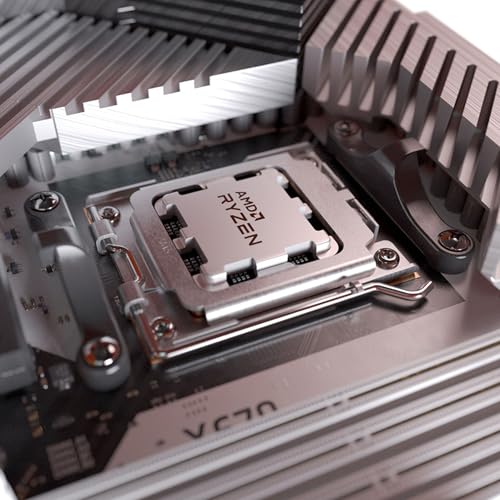
Gaming without a graphics card
An APU makes the most sense when removing the card from the shopping list gets you a usable PC sooner. Think of a first desktop for schoolwork and a rotation of older games or lightweight multiplayer titles. One less part to buy. Start by checking the requirements for the games you actually play, then look up results for the exact iGPU and a similar memory configuration. A result from a machine with a discrete GPU won’t help you predict how the APU will run on its own.
Set your expectations around the game and the display. If 1080p at reduced settings is acceptable, you’ve got room to adjust. If you’re building around new, demanding games at 1440p or want to make full use of a high-refresh monitor, budget for the card now. Our 1080p vs. 1440p gaming guide breaks down what changes when the GPU has more pixels to render.
To make the call before you buy, pick the hardest game you expect to play regularly. Decide what you’d be willing to give up, such as high shadows or a higher render resolution. Look at how consistently that game runs on the iGPU, especially in busy sections. A clip from a quiet part of the map can hide the slowdowns that make a match feel rough. If you can’t find a close match for your intended setup, leave enough in the budget to add a card.
The 8600G gives you a concrete AM5 option for the first kind of build. Its Radeon 760M handles graphics from day one, and you can add a card later if you start playing more demanding games.

What changes when you already have a GPU?
When the dedicated card renders your games, the CPU’s built-in graphics become a secondary consideration. The CPU still handles work like game simulation and preparing commands for the GPU. At that point, compare results for the specific CPU and card combination you’re considering, alongside the total price. A larger cache or newer architecture can matter in CPU-limited games, while a graphics-heavy scene might be constrained by the card.
Say you already own a graphics card and are replacing the motherboard, CPU and memory together. The 9600X makes sense to compare against the 8600G for that plan. The two chips have the same core and thread counts, but the 9600X has 32 MB of L3 cache versus 16 MB on the 8600G and uses Zen 5 cores. Those specs explain why the chips are different choices even though both have integrated graphics. If you don’t need a backup display output, CPUs that omit the iGPU are also worth pricing. See our guide to CPUs without integrated graphics.
Memory, motherboard and upgrade costs
Give an APU’s memory configuration the same attention you’d give a graphics card. The integrated GPU shares RAM bandwidth with the CPU. For a new AM5 build, a matched pair of DDR5 modules installed in the motherboard’s recommended slots lets you use both memory channels. For example, 2 × 16 GB gives you 32 GB total without starting with one occupied channel. If your budget only allows 16 GB, price a 2 × 8 GB kit and think about how much memory your applications and games will need at the same time.
Before checkout, check the board’s CPU support list and the minimum BIOS version for your chip. AMD says some 600-series AM5 boards may need an update for Ryzen 8000 and 9000 processors. If you’re starting without a card, also confirm the board has a port your monitor can use at the resolution and refresh rate you want. Find the BIOS and port details on the board maker’s support page, even if you’ve already checked AMD’s AM5 chipset compatibility guide.
Reusing parts can change which build costs less. If you already have a working graphics card, price the CPU path with that card before deciding an APU saves money. If you’ve got DDR4 from an older build, price new memory for either of the AM5 chips in the table. List the parts you can carry over before comparing processor prices.
Building now and adding the GPU later? Leave room for a full-size card if that’s the upgrade you want. Check the case’s clearance, power supply capacity and power connectors upfront. Look at the board manual’s PCIe slot wiring for your processor too. A physically long slot can run with fewer lanes, and the manual is more useful here than the slot’s appearance. An APU build that needs a new case and power supply at upgrade time can cost more than you planned.
Which should you buy?
- For a first gaming PC on a tight budget: Start with the APU if your games suit its integrated graphics and you can skip the card purchase for now.
- For a gaming PC with a dedicated card: Choose the CPU on performance with that card and the full platform price. Treat integrated graphics as a useful fallback if your model includes it.
- For office work or a family desktop: Buy a processor with display support that meets your needs. Pay more for a stronger iGPU if someone will use it for games or other graphics work.
A quick price comparison illustrates why the whole build matters. On November 26, 2026, the new Ryzen 5 8600G was listed at $184.99 and the new Ryzen 5 9600X at $172.00 in the U.S. The 9600X had the lower chip price in that snapshot. AMD lists its boxed model without a cooler, so include one in your budget if you don’t own a compatible cooler. For a 9600X gaming build, also count the graphics card if you still need to buy it.

Pros
- Zen 5 architecture delivers measurable IPC gains over Zen 4 in both gaming and lightly threaded tasks.
- 5.4 GHz single-core boost is competitive with Intel mid-range offerings without requiring LGA1700 migration.
- Unlocked multiplier and PBO support give overclocking flexibility on any X670 or B650 board.
- 38 MB cache and DDR5-5600 support keep memory latency in check for esports and mainstream creative workflows.
Cons
- Cooler not included; plan for at least a 120mm AIO or quality tower cooler to handle sustained boost clocks.
- DDR5-only AM5 platform means no reuse of existing DDR4 kits, adding cost for first-time AM5 adopters.
The AMD Ryzen 5 9600X is a mid-range AM5 desktop CPU built on the Zen 5 architecture. With six cores, twelve threads, and a 5.4 GHz max boost clock, it targets mainstream gamers and light creators who want Zen 5 IPC without paying flagship prices. It replaces the 7600X in AMD's stack on the same AM5 socket.
The single defining feature here is the Zen 5 IPC uplift. In CPU-bound scenarios at 1080p and 1440p, Zen 5 pulls ahead of equivalent Zen 4 parts by a measurable margin. The 38 MB cache and DDR5-5600 native support work together to reduce frame time variance in competitive titles. Owner reports consistently note smooth performance in popular esports and mid-weight open-world games.
Trade-offs are real. Six cores are sufficient for gaming but can become a bottleneck in heavily threaded workloads like Blender or h.265 encoding compared to eight-core alternatives at similar price points. No cooler is included, which is standard at this tier but still a line-item cost. AM5 DDR5-only requirement also rules out budget DDR4 reuse, and PCIe 5.0 NVMe speeds require a compatible motherboard with proper M.2 thermal solutions.
Buy this if you are building or upgrading an AM5 gaming rig and want Zen 5 IPC at a mid-range entry point, particularly for 1080p and 1440p titles. Skip this if your workloads are heavily threaded or if you need more than six cores for sustained production tasks such as video rendering or large Blender scenes.
Socket and Platform: The 9600X uses Socket AM5, compatible with X670, X670E, B650, and B650E motherboards. PCIe 5.0 GPU and NVMe slots are available on select boards. Upgrading from AM4 requires a new motherboard and DDR5 RAM; there is no AM4 backward compatibility.
Memory and Frequency: Native DDR5-5600 support means the FCLK runs at 1:1 ratio at that speed on validated kits. Pushing beyond DDR5-6000 typically requires EXPO or manual tuning and a quality B-die kit; results vary by board AGESA version. Staying at DDR5-5600 to DDR5-6000 is the practical sweet spot for stability and latency.
Boost and TDP: The 5.4 GHz max boost operates under AMD's PBO envelope. The processor's base TDP is 65W with a configurable boost TDP up to 88W on most boards. A cooler rated for at least 100W TDP is recommended to sustain peak boost clocks under extended gaming or lightly threaded workloads without thermal throttling.
Overclocking: The unlocked multiplier supports manual all-core and per-core overclocking alongside AMD's Curve Optimizer for per-core voltage offsets. Effective tuning typically requires a B650 or X670 board with robust VRM and a BIOS updated to a recent AGESA revision for Ryzen 9000 series compatibility.
A capable iGPU today or a dedicated GPU from day one. That’s the choice that drives the rest of the parts list. Pick the graphics setup that meets your needs now, then compare the cost of the complete PC and the parts you’d have to replace to upgrade it.
FAQ
Can an APU and a dedicated GPU combine their power for games?
Plan on your game using one GPU for rendering. For a desktop with a graphics card installed, connect the monitor to the card and check the game’s graphics adapter setting if it picks the wrong GPU. Buying an APU and a card together generally won’t add their gaming performance together.
Does reserving more RAM for the iGPU make it faster?
Raising the fixed reservation doesn’t increase memory bandwidth and leaves less RAM available for other work. Leave the firmware setting on Auto to start. A specific game or application may have its own graphics-memory requirements, so check those if you get a warning or the software refuses to launch.
Does the same rule apply to laptops?
The graphics decision still matters, but compare complete laptop configurations. Memory, cooling and power limits vary by model, and you generally choose the internal GPU when you buy the laptop. Look up the exact laptop and graphics configuration before carrying over advice from a desktop with a similar Ryzen name.

























Write Your Review
No reviews yet. Be the first to share your experience!