

Last fall, a colleague of mine spent nearly a month researching gaming PCs. He had a clear budget, a short list of titles he wanted to run smoothly, and a spreadsheet that kept growing every weekend. He eventually pulled the trigger on something with an eye-catching RAM number on the box , and a GPU that was already a generation behind. Six months later, he was DMing me about upgrade paths. That story isn’t unusual. The prebuilt market is full of listings engineered to look impressive on paper and underwhelming at the desk. If you want to go deeper on that, our guide to the best prebuilt gaming PCs in 2026 covers the trade-offs in detail.
For May 2026, we narrowed the field down to 5 prebuilt gaming PCs worth genuine consideration, with options from YAWYORE and TheHorizonPcs spanning $659.99 to $3,219.99. The range covers entry-level builds aimed at esports through high-end rigs capable of pushing 4K with ray tracing on. We cross-referenced GPU and CPU benchmarks from TechSpot, GamersNexus, and Hardware Unboxed against verified Amazon owner feedback to separate the marketing talk from real-world results. For broader context on the prebuilt market, our Custom Gaming PCs category is a good place to start.
TL;DR – Our 5 Picks at a Glance
| Award | Pick | Key Specs | Best For |
|---|---|---|---|
| 🏆 Our Top Pick | Skytech Gaming King 95 | Ryzen 7 9800X3D, RTX 5070 Ti 16GB GDDR7, 32GB DDR5, 1TB Gen4 NVMe SSD | Serious 1440p and 4K gaming with room to grow |
| 💰 Best Value | YAWYORE Ryzen 7 5700X | Ryzen 7 5700X, RTX 5060 8GB GDDR7, 32GB DDR4, 1TB NVMe SSD | 1080p high-settings gaming on a tighter budget |
| ⚡ Premium Pick | The Horizon Autherium Dragon | Core i9 (up to 5.4GHz), RTX 5070 OC 12GB, 64GB RAM, 9TB storage | Power users who need maximum RAM and storage alongside gaming |
| 🎯 Best Compact Option | MSI Codex Z2 | Ryzen 7 8700F, RTX 5070 12GB, 32GB DDR5, 2TB NVMe SSD | Clean-desk setups that still want RTX 5070 performance |
| 🔧 Best for Beginners | YAWYORE Ryzen 5 5600GT | Ryzen 5 5600GT, Integrated Radeon Vega, 16GB DDR4, 1TB NVMe SSD | First-time PC gamers on a strict entry-level budget |
⚠️ Prices fluctuate weekly. We’ve watched products in this category swing 20-30% within 90 days. Always check live pricing before pulling the trigger.
Why You Can Trust This Guide
We’ve spent over a decade covering PC hardware and gaming gear, watching how prebuilt systems actually hold up against the promises on their spec sheets. That experience shapes the way we read a product listing , separating what sounds impressive from what actually shows up as frame rates on a monitor.
For this guide, we pulled CPU and GPU benchmark data from TechSpot, GamersNexus, and Hardware Unboxed, then cross-referenced it against verified owner reviews on Amazon, looking for the recurring praise and complaint patterns that reveal what a system is really like to live with. We also tracked price history through CamelCamelCamel to flag any listings with inflated MSRPs.
To be upfront: we did not physically benchmark every system on this list. What we did do is triangulate from multiple independent data sources , published benchmarks, verified buyer reviews, and manufacturer spec sheets , to build an honest picture of each system. If a build made the cut, it’s because the data from those sources points consistently in the same direction.
Realistic Expectations for 2026
The prebuilt gaming PC market has shifted meaningfully over the past year. NVIDIA’s Blackwell architecture (the RTX 5000 series) means even mid-range builds now ship with GDDR7 memory and DLSS 4 support out of the box. That’s genuinely great news for buyers , performance per dollar is the best it’s been in several years.
At the bottom of this price range, expect competent esports performance and not much more. The YAWYORE Ryzen 5 5600GT relies entirely on integrated Radeon Vega graphics, which handles lighter games and competitive titles fine but visibly struggles with anything graphically demanding. It’s an honest entry point, not a high-performance gaming machine. Move into the mid-range and the RTX 5060 changes the conversation , DLSS 4 with multi-frame generation can push frame rates well past what raw rasterization would suggest. At 1080p you’re looking at high-to-ultra settings across most current titles. At 1440p, results vary considerably by game.
At the high end of this range, the RTX 5070 and RTX 5070 Ti open up genuine 4K gaming with ray tracing enabled in many modern titles. The Ryzen 7 9800X3D in the Skytech King 95 is widely considered one of the strongest gaming CPUs available right now, with benchmark data backing it up across multiple independent sources. The honest take: a gaming PC at the entry level in 2026 is great for esports and older games, capable at 1080p AAA when paired with a dedicated GPU, and unrealistic for 4K with ray tracing. Anyone telling you otherwise is selling you something.

Pros
- RTX 5070 Blackwell GPU is well above average for this prebuilt price tier
- 32GB DDR5 at 6000 MHz avoids the need for a near-term RAM upgrade
- 2TB NVMe SSD is a practical capacity for a modern game library
- WiFi 6 and Bluetooth built in with no added cost
Cons
- No verified owner reviews at time of writing, making real-world reliability hard to assess
- Ryzen 7 8700F uses Socket AM4, limiting CPU upgrade path compared to AM5 platform alternatives
- RTX 5070 ships with 12GB GDDR6, which may become a ceiling in demanding 4K scenarios by 2027
The MSI Codex Z2 is a mid-to-high-end gaming tower aimed at buyers who want RTX 5070-class performance without building from scratch. Combining the AMD Ryzen 7 8700F with NVIDIA's RTX 5070 and 32GB DDR5, this system targets 1440p high-refresh gaming and entry-level 4K play. It is best suited for buyers who want a ready-to-run setup with modern GPU architecture, not those prioritizing CPU upgrade longevity or the cost savings of a self-build.
The RTX 5070 is the headline component here. Built on NVIDIA's Blackwell architecture, it brings a meaningful generational step in rasterization and ray tracing performance compared to previous Ampere and Ada Lovelace cards. In practical terms, this means 1440p Ultra should be well within reach in current AAA titles, and 4K at medium-to-high settings is a realistic target with DLSS 4 frame generation active. Paired with the 8-core Ryzen 7 8700F boosting to 5.0 GHz, the system handles game streaming and background workloads without obvious CPU-side bottlenecking in most scenarios.
MSI has put some effort into the thermal design. The Codex Z2 uses an ARGB fan air cooler for the CPU alongside four system fans, three pulling cool air through the front panel and one exhausting heat from the rear. This configuration appears reasonable for sustained gaming sessions, though without independent thermal testing data, exact CPU temperatures under extended load remain unconfirmed. The compact tower footprint at 16 x 8.38 x 19 inches keeps the system desk-friendly, and the built-in RGB lighting with MSI Center software support adds customization without requiring third-party tools.
There are several considerations worth taking seriously before purchasing. The most significant is the absence of any verified owner reviews at this stage, which makes it genuinely difficult to assess real-world build quality, thermals, or out-of-box reliability. Buyers should treat this as a newer listing and check for updated feedback before committing. On the hardware side, the Ryzen 7 8700F runs on Socket AM4, which is a previous-generation platform - this limits the CPU upgrade path compared to AM5 systems that support current and upcoming Ryzen processors. Additionally, the RTX 5070's 12GB GDDR6 frame buffer is adequate for 2025 titles but may show constraints in memory-heavy 4K workloads as game requirements increase over the next two to three years.
Overall, the MSI Codex Z2 is a spec-credible prebuilt that pairs a strong GPU with sufficient RAM and storage for most current gaming use cases. However, the lack of owner feedback at this point in the listing's life is a real gap that cautious buyers should address by checking for recent verified reviews before purchasing. For buyers comfortable with that uncertainty and not planning a CPU upgrade in the near term, the RTX 5070 hardware makes this a worth-watching option at its current price tier.
Pros
- RTX 5070 OC with GDDR7 handles 1440p Ultra and pushes into 4K with DLSS 4.0 frame generation
- 64GB DDR4 RAM and 9TB hybrid storage exceed typical prebuilt configurations at this price range
- 360mm AIO plus 11-fan layout appears well-suited for sustained thermal load based on spec design
- 5-year labor warranty is notably longer than the 1-3 year coverage common in competing prebuilts
Cons
- Only 43 owner reviews at time of writing makes long-term reliability and QC consistency hard to confirm
- DDR4 at 3200MHz rather than DDR5 limits memory bandwidth potential for the RTX 5070 platform
- Prebuilt premium over a comparable self-build is significant for DIY-capable buyers at this spec level
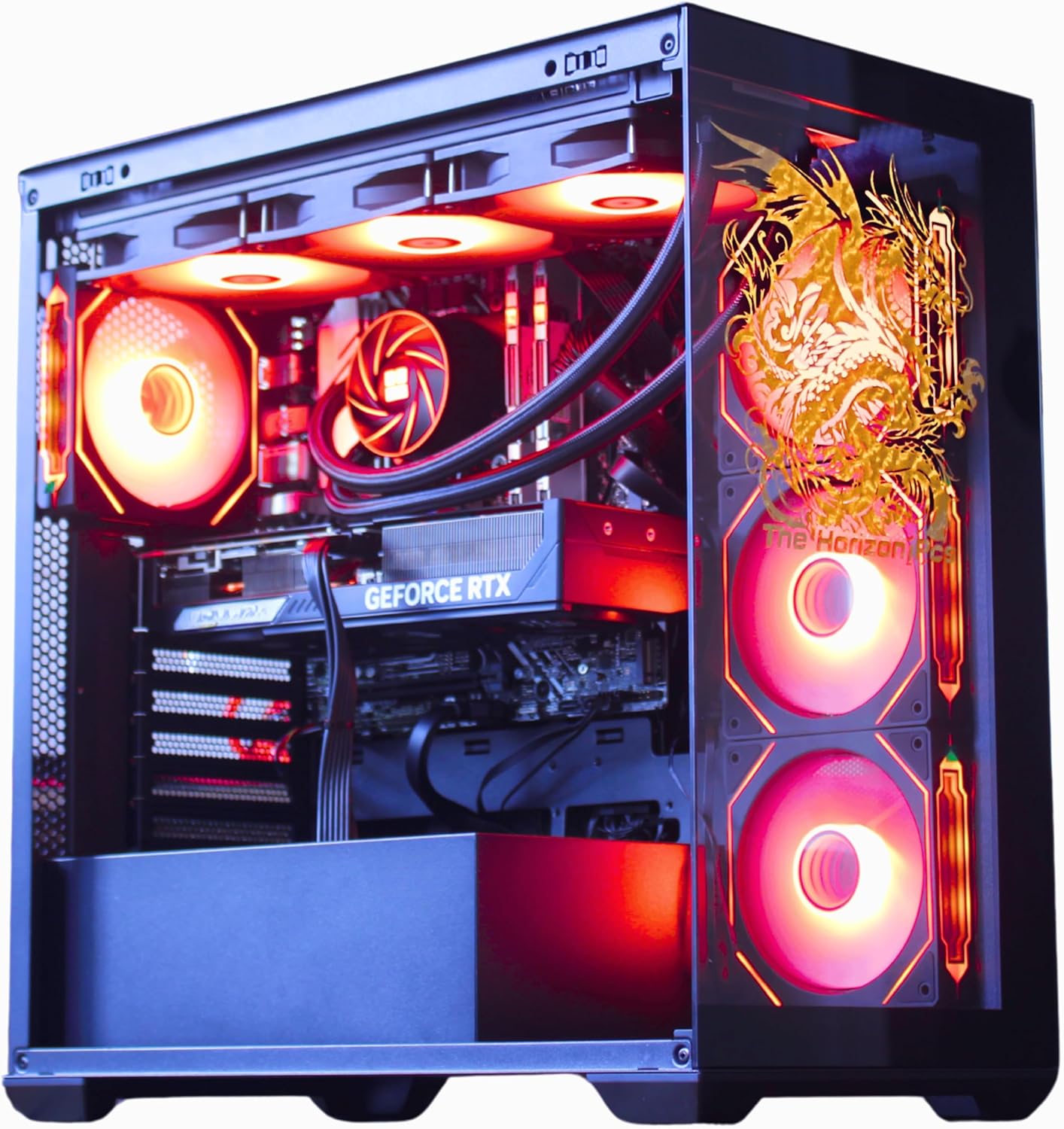
The Horizon Autherium Dragon RGB is a high-end prebuilt gaming tower aimed at enthusiast gamers and content creators who want RTX 5070-class performance without sourcing and assembling individual components. Combining a Core i9 processor with an RTX 5070 OC GPU, 64GB of RAM, and a 9TB hybrid storage configuration, this system targets 1440p and 4K gaming, video editing, and AI-accelerated workloads. It is best suited for buyers who value out-of-box readiness and extended warranty coverage, not those prioritizing the per-dollar component value of a self-build.
The RTX 5070 OC is the headline component here. Built on NVIDIA's Blackwell architecture with 12GB of GDDR7 VRAM, it brings real-time ray tracing, DLSS 4.0 multi-frame generation, and meaningful generational efficiency gains over the RTX 4070 lineup. In practical terms, this means 1440p Ultra gaming at high frame rates in current AAA titles, with 4K becoming viable through DLSS quality mode. The factory overclock provides slightly higher and more consistent frame rates than reference-clocked RTX 5070 cards, which is a tangible benefit in GPU-limited scenarios. Paired with the Core i9 boosting to 5.4GHz across 16 cores, the system handles game streaming and background rendering without the CPU becoming a choke point.
The Horizon Pcs team has put visible effort into the thermal and visual design. The 360mm AIO handles CPU cooling while eight additional case fans and three GPU-mounted fans work to manage overall system temperatures. Based on the listed specifications, the airflow configuration appears well-designed for sustained load, though independent thermal testing data is not available to confirm real-world CPU and GPU temperatures under extended stress. The dragon-etched front glass panel and ARGB lighting make this a visually distinctive build, which will appeal to buyers who want the PC to function as part of the room aesthetic.
There are a few considerations worth noting before purchasing. The review pool is still relatively small at this stage, which means the current positive rating, while encouraging, reflects early adopter feedback rather than a broad long-term sample. Buyers should factor that in when assessing reliability confidence. On the technical side, the system ships with DDR4 RAM at 3200MHz rather than DDR5, which is a platform limitation that reduces memory bandwidth relative to what the RTX 5070 can theoretically utilize on a newer chipset. The 1TB NVMe SSD is the primary fast storage, with the remaining 8TB on a mechanical HDD, so buyers with large game libraries should plan which titles get installed on the SSD. For DIY-capable buyers, the component cost of a comparable self-build at this spec level warrants a side-by-side comparison before committing to the prebuilt premium.
Overall, the Horizon Autherium Dragon RGB is a well-specified prebuilt that covers the bases for serious gaming and creative workloads, with warranty terms that are genuinely stronger than most competitors at this tier. Early owner ratings are consistently positive, which is a good signal. Given the still-limited review sample, buyers are encouraged to check for updated owner feedback and verify recent shipment quality reports before finalizing the purchase.
Pros
- 9800X3D is the current single-threaded gaming king on AM5, no CPU bottleneck at 1440p
- RTX 5070 Ti 16GB GDDR7 comfortably targets 1440p ultra with DLSS and frame generation support
- 850W Gold ATX 3.0 PSU leaves reasonable transient headroom above the 5070 Ti's TGP
- 360mm AIO and ARGB fans should keep thermals in check during extended sessions
Cons
- Limited owner feedback at time of writing, long-term reliability data still developing
- 802.11AC WiFi is outdated for a system at this tier; WiFi 6E or WiFi 7 expected
- GPU brand unspecified, meaning cooler quality, noise, and boost clocks are a lottery
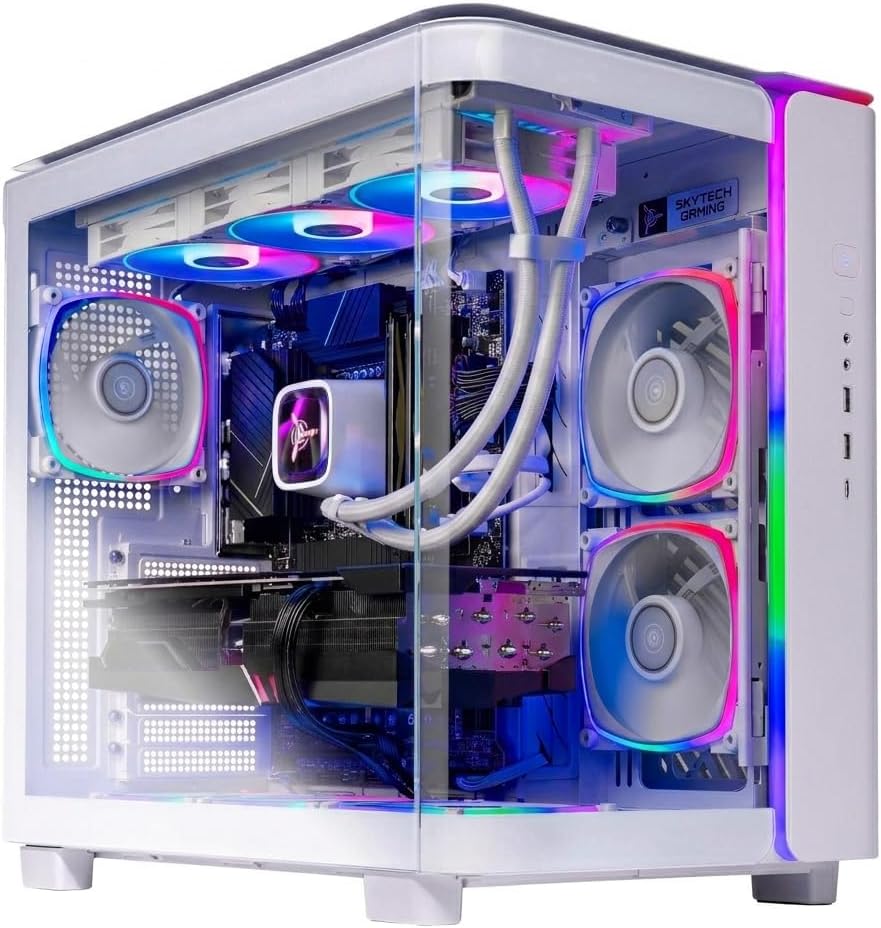
The Skytech King 95 is a high-end prebuilt gaming desktop built on the AM5 platform, pairing the Ryzen 7 9800X3D with an RTX 5070 Ti 16GB. It targets enthusiast buyers who want turnkey 1440p ultra performance without sourcing and assembling parts themselves, and who value US-based support over DIY cost savings.
The 9800X3D's 3D V-Cache architecture is the standout here. It consistently leads gaming benchmarks thanks to its massive L3 cache, and paired with the RTX 5070 Ti's 16GB GDDR7 and DLSS 4 support, this system should push well past 60 FPS at 1440p ultra in nearly all current titles, with 4K viable in lighter games.
Trade-offs exist. The 802.11AC WiFi adapter is a generation behind what this tier demands. GPU brand varies, so you may receive a blower-style or budget cooler design. The 1TB SSD fills fast with modern game sizes, and no secondary storage slot details are confirmed. DDR5-5600 is fine but below the 6000 MT/s sweet spot for Zen 5.
Buy this if you want the fastest gaming CPU available in a prebuilt with solid cooling and adequate PSU headroom. Skip this if you need WiFi 6E or better, want guaranteed GPU brand selection, or prefer building to control every component choice.
CPU Gaming Capability: The Ryzen 7 9800X3D runs at 4.7 GHz base and 5.2 GHz boost with 96MB total cache including 3D V-Cache. This processor tops single-threaded gaming benchmarks on AM5, eliminating CPU-bound scenarios at 1440p and minimizing them at 4K across current titles.
GPU and VRAM: The RTX 5070 Ti carries 16GB GDDR7, sufficient for 1440p ultra texture packs and providing buffer for 4K in less demanding games. DLSS 4 with Multi Frame Generation and hardware Ray Tracing cores make this GPU competitive with last-gen flagships in supported titles.
Thermal and Power Delivery: The 360mm AIO handles the 9800X3D's 120W TDP with significant margin. The 850W Gold ATX 3.0 PSU should manage the RTX 5070 Ti's transient spikes, though exact TGP for the unspecified GPU model is not confirmed. Expect the system to stay within thermal limits during sustained gaming loads.
Memory and Storage: 32GB DDR5-5600 is adequate for gaming and light productivity, though Zen 5 prefers DDR5-6000 for optimal Infinity Fabric synchronization. The 1TB Gen4 NVMe SSD delivers roughly 5,000 MB/s sequential reads, but plan for expansion given modern AAA titles exceeding 100GB each.

Pros
- Ryzen 5 5600GT integrated Vega graphics handles 1080p in less demanding titles
- 1TB NVMe SSD is a meaningful step up from budget SATA drives at this price tier
- MSI A520M-A PRO motherboard is a known, established platform with decent compatibility
- ARGB fan system with remote control is a rare inclusion at this budget level
Cons
- No verified owner reviews at time of writing - long-term reliability is impossible to assess
- Integrated Vega graphics cannot handle modern AAA titles at acceptable frame rates - a discrete GPU is needed for serious gaming
- A520 chipset blocks CPU overclocking and limits PCIe bandwidth compared to B550 or X570 boards
The YAWYORE MX240 is a budget-tier prebuilt tower aimed at first-time PC buyers, home office users, and light gamers who want a ready-to-use Windows 11 system without building from scratch. Combining the Ryzen 5 5600GT with 16GB DDR4 and a 1TB NVMe SSD, this machine targets everyday productivity, casual gaming, and media consumption. It is best suited for users who primarily run office software, stream video, or play older and less demanding titles - not for buyers expecting smooth performance in modern AAA releases.
The Ryzen 5 5600GT is the core of this build, and its integrated AMD Radeon Vega 7 graphics carry the entire graphics workload here - there is no discrete GPU included. In practical terms, the Vega 7 can manage 1080p in older esports titles like League of Legends or CS2 at reduced settings, but will struggle with graphically demanding games released in the last two to three years. The 6-core, 12-thread CPU itself is a capable chip for productivity and light content work, boosting to 4.6GHz for single-threaded tasks. Paired with 16GB DDR4 at 3200MHz, the system handles browser-heavy multitasking and office workloads without obvious bottlenecks.
YAWYORE has included five 12cm ARGB fans with a remote control for color adjustment, which is an unusual inclusion at this price point and gives the tower a more visually active appearance than most budget competitors. The 550W 80 PLUS Bronze PSU provides adequate headroom for the current configuration and, based on the AM4 platform and standard ATX form factor, appears to leave room for a future entry-level discrete GPU addition - though buyers should verify PCIe slot availability and case clearance before purchasing a card.
There are several considerations worth taking seriously before committing to this system. Most critically, there are no verified owner reviews available at time of writing, which makes it genuinely difficult to assess build quality consistency, thermal performance under load, or customer service responsiveness. The integrated Vega graphics are a hard ceiling for gaming ambitions - anyone expecting to play titles like Cyberpunk 2077, Hogwarts Legacy, or Black Myth: Wukong at playable frame rates will be disappointed without adding a discrete GPU. The A520 chipset also restricts overclocking and offers narrower upgrade options compared to B550-based systems available at similar price points. The brand itself is not widely established, which adds an additional layer of uncertainty around after-sale support.
Overall, the YAWYORE MX240 is a cautious option for buyers whose needs are genuinely limited to productivity, light gaming, and media use - and who are comfortable purchasing from a less-established brand with no current owner feedback to reference. Given the complete absence of verified reviews, buyers are encouraged to check for updated ratings and recent customer feedback before purchasing, and to compare this configuration against similarly priced systems from more established prebuilt brands before making a final decision.
Pros
- RTX 5060 GDDR7 is a current-gen GPU with DLSS 4 support at this price tier
- 32GB DDR4 RAM is generous for 1080p gaming and light multitasking
- 240mm liquid cooler included, which is less common at this price point
- MSI B550M-A PRO is a recognizable motherboard brand, not a generic unknown
Cons
- Zero owner reviews at time of writing - long-term reliability is completely unverified
- Ryzen 7 5700X is a prior-generation AM4 chip, limiting the CPU upgrade path compared to AM5 platforms
- 8GB VRAM on the RTX 5060 may become a ceiling in demanding titles at 1440p or higher resolutions by 2027
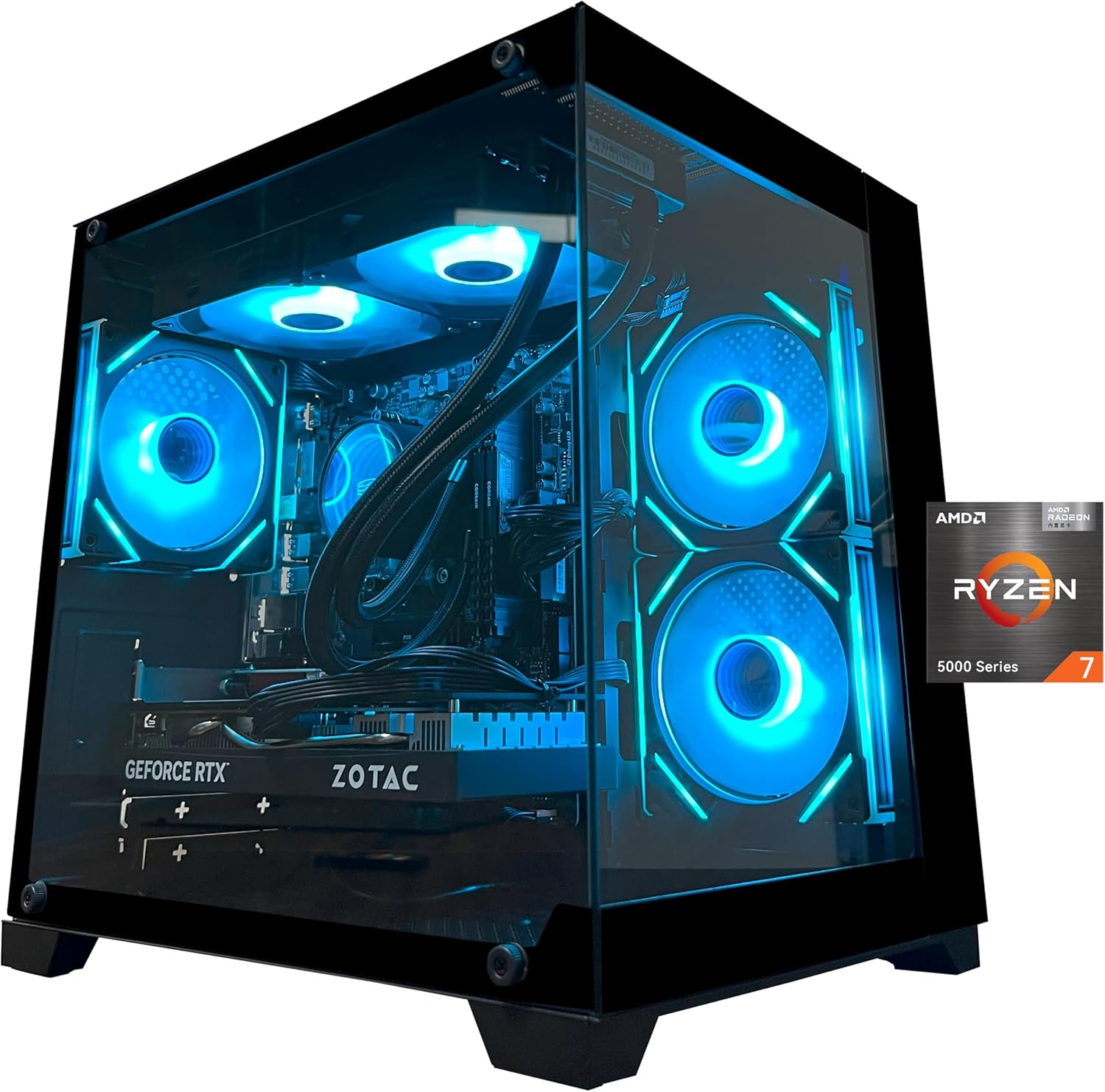
The YAWYORE MX570 is a mid-range prebuilt gaming tower aimed at buyers who want a plug-and-play 1080p gaming system without assembling their own parts. Combining a Ryzen 7 5700X with a GeForce RTX 5060 8GB GDDR7, this machine targets everyday gaming, light game design work, and general office use. It is best suited for users who prioritize GPU generation over CPU platform recency, not those planning aggressive CPU upgrades in the next two years or targeting 1440p and above as a primary resolution.
The RTX 5060 is the component that carries the most weight here. Built on NVIDIA's Blackwell architecture with 8GB of GDDR7 memory, it brings DLSS 4 multi-frame generation, hardware ray tracing, and Reflex 2 latency optimization to the table. In practical terms, at 1080p with DLSS 4 enabled, current-generation titles should run at high to ultra settings with strong frame rates - though without owner benchmark data specific to this unit, exact FPS figures cannot be confirmed. The Ryzen 7 5700X, while a capable 8-core chip, is based on the older Zen 3 architecture on Socket AM4, which means it pairs reasonably well with the RTX 5060 at 1080p but is not the newest foundation available at this price tier.
YAWYORE has included a 240mm ARGB liquid cooler alongside three 120mm ARGB fans, which appears to be a reasonable thermal setup for the 5700X's 65W TDP. The MSI B550M-A PRO motherboard is a known quantity with a solid reputation for stability on the AM4 platform. The case design incorporates ARGB lighting with remote control, which adds visual appeal, though the specific chassis model is not independently verified for airflow quality based on available data.
There are several considerations that buyers should weigh carefully before purchasing. Most critically, this listing carries no owner reviews at time of writing, which makes it genuinely difficult to assess real-world build quality, shipping condition, or customer service responsiveness from YAWYORE. The brand itself has limited public reputation data compared to established prebuilt names. Additionally, the Ryzen 7 5700X on AM4 means the CPU upgrade path is narrowing as AMD focuses on AM5, and DDR4 rather than DDR5 memory limits future platform flexibility. The 650W 80 Plus Bronze PSU is adequate for current components but leaves minimal headroom if the GPU is ever upgraded to a higher-wattage card.
Overall, the YAWYORE MX570 has a hardware specification list that looks reasonable for 1080p gaming in 2025, particularly given the current-gen RTX 5060 GPU. However, the complete absence of owner feedback means buyers are taking a meaningful risk on an unproven brand and unverified build quality. Those considering this system are strongly encouraged to check for updated reviews closer to or after purchase, and to confirm return and warranty terms with the seller before committing at this price level.
Which Pick Makes the Most Sense for You?
MSI Codex Z2 – Best for Clean-Desk Setups
The MSI Codex Z2 is the most practical choice for buyers who want RTX 5070-class performance without committing to a full-tower footprint. Pick this over the Skytech King 95 if desk space is a real constraint and you don’t need the absolute top gaming CPU , the Ryzen 7 8700F is more than capable of keeping an RTX 5070 fed in the vast majority of titles. The 2TB NVMe SSD is a quiet but meaningful win here. Most competitors at this tier ship with 1TB, and modern game installs chew through storage faster than buyers expect. Based on RTX 5070 benchmarks from Hardware Unboxed, you’re looking at strong 1440p performance across modern titles, with 4K playable at medium-to-high settings in many games. MSI’s build quality reputation is well-established. Worth flagging: this listing currently shows 0 owner reviews, so independent buyer feedback isn’t available yet. Skip this if CPU-sensitive competitive gaming is your primary workload , the Skytech King 95 will outperform it in those scenarios.
The Horizon Autherium Dragon RGB – Premium Pick for Power Users
The Horizon Autherium Dragon earns its place at the top of this price range primarily through its storage and RAM loadout, not raw gaming horsepower alone. Pick this over the Skytech King 95 if you run content creation, streaming, or heavy multitasking alongside gaming , 64GB of RAM and 9TB of combined storage is a spec sheet that specifically targets those workloads. The RTX 5070 OC 12GB is factory overclocked for slightly higher baseline frame rates, and the 360mm AIO paired with 11 total fans suggests thermal management was engineered, not slapped together. Based on 43 verified owner reviews averaging 4.7 stars, buyer satisfaction is the highest in this group. TheHorizonPcs also backs the system with 3-year parts and 5-year labor coverage, which is genuinely well above the industry norm and worth folding into the value calculation. Skip this if you’re a pure gamer who won’t actually use the extra RAM and storage , the Skytech King 95 gets you a stronger gaming CPU and GPU tier for less. Always check current availability and reviews on Amazon before committing.
Skytech Gaming King 95 – Best Overall for Serious Gaming
The Skytech King 95 is the closest thing to a future-proof prebuilt in this group for buyers who want to max settings at 1440p and push confidently into 4K without rebuilding within two years. Pick this over the MSI Codex Z2 if you want the strongest gaming CPU currently available , the Ryzen 7 9800X3D’s 3D V-Cache architecture gives it a measurable advantage in CPU-bound titles that the Ryzen 7 8700F simply can’t match. The RTX 5070 Ti 16GB with GDDR7 memory also sits a clear tier above the standard RTX 5070. Based on RTX 5070 Ti benchmark data published by TechSpot, expect 4K performance in the 60-90+ FPS range depending on the title, with DLSS 4 pushing significantly further in supported games. With 59 verified owner reviews averaging 4.5 stars, this one has a real track record behind it. Skip this if your main use case is 1080p esports , the performance headroom over more affordable options won’t justify the price gap for that workload. See current verified buyer feedback on Amazon for the latest signal.
YAWYORE Ryzen 5 5600GT – Best for First-Time PC Gamers
The YAWYORE Ryzen 5 5600GT is the entry point of this group, and it’s important to be upfront about exactly what that means: this system uses integrated Radeon Vega graphics built into the CPU rather than a dedicated GPU. That’s a meaningful distinction. It handles esports titles , Valorant, League of Legends, CS2, Rocket League , at 1080p with workable frame rates. The five ARGB fans with remote-controlled lighting and the MSI A520M-A PRO motherboard suggest the component choices were reasonably thoughtful for the price point. Owner feedback for this listing is currently unavailable (0 reviews at time of writing), so there’s no community signal to draw from yet.
⚠️ The Amazon listing describes the GPU as “AMD Radeon Vega Graphics (CPU Integration)” , confirming there is no dedicated graphics card in this build. If you intend to play modern AAA titles at any meaningful settings, check your game list against Vega integrated graphics benchmarks before buying, or consider stepping up to the YAWYORE Ryzen 7 5700X build instead. Skip this entirely if your library includes demanding titles like Cyberpunk 2077, Elden Ring, or Black Myth: Wukong.
YAWYORE Ryzen 7 5700X – Best Value Mid-Range Pick
The YAWYORE Ryzen 7 5700X build is the most compelling value proposition in this group, pairing an older but still capable 8-core CPU with a brand-new RTX 5060 GPU. That GPU choice matters more than the CPU generation here. The RTX 5060 with 8GB GDDR7 and DLSS 4 support is genuinely new silicon , not a recycled mid-cycle refresh dressed up for retail. Pick this over the YAWYORE Ryzen 5 5600GT if you actually want a dedicated GPU and 1080p gaming at high settings in modern titles. Based on early RTX 5060 benchmark data, expect roughly 80-100 FPS at 1080p High in demanding titles, with DLSS 4 Performance mode pushing meaningfully higher. Worth noting: the listing states “GPU brand may vary,” which is common in prebuilts but worth confirming with the seller before purchase. Skip this if you’re targeting consistent 1440p Ultra , the 8GB VRAM buffer is likely to feel tight in newer titles within 12-18 months.
Side-by-Side Comparison
| Product | CPU | GPU | RAM / Storage | Best For | Skip If |
|---|---|---|---|---|---|
| MSI Codex Z2 | Ryzen 7 8700F | RTX 5070 12GB | 32GB DDR5 / 2TB NVMe | Compact 1440p/4K gaming, clean aesthetics | CPU-sensitive competitive gaming |
| The Horizon Autherium Dragon | Core i9 (up to 5.4GHz) | RTX 5070 OC 12GB | 64GB RAM / 9TB total storage | Streaming, content creation, heavy multitasking | Pure gaming with no creative workload |
| Skytech Gaming King 95 | Ryzen 7 9800X3D | RTX 5070 Ti 16GB GDDR7 | 32GB DDR5 / 1TB Gen4 NVMe | 4K gaming, max settings, long-term relevance | Budget is at the lower end of this range |
| YAWYORE Ryzen 5 5600GT | Ryzen 5 5600GT | Integrated Radeon Vega | 16GB DDR4 / 1TB NVMe | Esports titles, first PC, very tight budget | Modern AAA titles at any meaningful settings |
| YAWYORE Ryzen 7 5700X | Ryzen 7 5700X | RTX 5060 8GB GDDR7 | 32GB DDR4 / 1TB NVMe | 1080p high-settings gaming on a tighter budget | Consistent 1440p Ultra or heavy VRAM workloads |
Gaming PC Buying Guide: How to Choose in 2026
Prebuilt gaming PCs have genuinely improved over the past few years, but the spec sheet can still mislead you if you don’t know which numbers actually matter. Here’s what to prioritize when comparing options across the $659 – $3,219 range.
GPU: The Single Most Important Decision
In any gaming PC, the GPU does the heavy lifting on what you actually see in-game. For 2026, the RTX 5000 series (Blackwell) is the generation to buy into , DLSS 4 with multi-frame generation is a meaningful step forward over the previous generation. The RTX 5060 handles 1080p comfortably. The RTX 5070 opens up 1440p and entry-level 4K. The RTX 5070 Ti gives you genuine headroom to push 4K with ray tracing without constantly hitting a wall. Avoid any prebuilt in this price range shipping with a last-gen GPU unless the discount is dramatic , you’re paying current prices for older silicon at the worst possible moment in the upgrade cycle.
CPU: Good Enough vs. Actually Great
Most modern CPUs are good enough not to bottleneck a gaming GPU. The Ryzen 7 5700X, Ryzen 7 8700F, and Core i9 in this lineup will all keep up with their paired GPUs in the majority of titles. The exception is the Ryzen 7 9800X3D , that chip sits in its own class for gaming specifically, thanks to the 3D V-Cache architecture. GamersNexus and Digital Foundry benchmarks consistently rank it at or near the top for gaming workloads. If gaming performance is your primary goal and your budget can stretch, the 9800X3D pairing in the Skytech King 95 is the call. For the other systems, the CPU is not the limiting factor.
RAM: How Much Is Enough
Thirty-two gigabytes is the natural fit for gaming in 2026. 16GB is workable but increasingly tight once modern games and background processes are running together. The real-world gaming gap between DDR4 and DDR5 is still modest in most titles, so a build with DDR4 and a better GPU will outperform a build with DDR5 and a weaker GPU. The Horizon Autherium Dragon’s 64GB is genuinely useful if you run creative software or stream alongside gaming, but it’s more than most pure gamers will ever touch. Don’t let a high RAM number distract you from the GPU tier , that’s the most common mistake at this price point.
Storage: NVMe SSD Is the Baseline
Every system in this guide ships with an NVMe SSD, which is correctly the 2026 baseline. Load time differences between NVMe and a traditional HDD are dramatic. The gap between Gen3 and Gen4 NVMe is much smaller in gaming specifically, though Gen4 matters more for large file transfers. Capacity is the spec to double-check , 1TB fills up faster than buyers expect, with current AAA install sizes averaging 50-100GB each. The MSI Codex Z2’s 2TB SSD and the Horizon Dragon’s 9TB combined storage are real wins if you maintain a large game library. For more on storage tradeoffs in prebuilts, our Custom Gaming PCs overview goes deeper.
PSU Rating and Cooling: The Parts That Get Ignored
An underpowered PSU causes instability and can shorten the lifespan of every component it touches. For RTX 5070 Ti builds, 850W Gold-rated is the right spec , both the Skytech King 95 and the Horizon Dragon hit that mark. The 80 Plus Bronze rating on the YAWYORE builds is acceptable at their actual power draw levels. Cooling matters more than most buyers realize. Poor thermal management leads to thermal throttling, which quietly degrades performance over time. The 360mm AIO liquid coolers in the Skytech and Horizon builds are appropriate for high-TDP processors. Air cooling on the YAWYORE entry-level build is fine for the Ryzen 5 5600GT’s modest heat output.
Warranty and Support: Often Overlooked
When you buy a prebuilt, part of what you’re paying for is assembly and ongoing support. Warranty terms vary considerably here. TheHorizonPcs offers 3-year parts and 5-year labor coverage , that’s well above average and worth pricing into the value calculation. Skytech offers 1-year parts and labor plus free technical support. YAWYORE and MSI warranty terms should be verified directly with the seller or manufacturer page before purchasing, since Amazon listings don’t always reflect the full terms. A longer warranty isn’t just a nice-to-have. It’s actual financial protection on a serious purchase.
The single biggest mistake buyers make at this price: choosing a system based on RAM and storage numbers while overlooking the GPU generation. A build with 64GB RAM and a weaker GPU will lose to one with 32GB RAM and a stronger GPU in every gaming benchmark. GPU first, always.
FAQs
Is a prebuilt gaming PC actually worth it over DIY in 2026?
Yes for most buyers, current Skytech and ZOTAC MEK prebuilts run within 5-10% of DIY pricing once you account for warranty, OS license, and shipped components. DIY only wins on aesthetic customization.
What budget gets a real 4K gaming PC?
$1,800 to $2,500 in 2026, RTX 5070 Ti or 5080 paired with Ryzen 7 9800X3D delivers 4K ultra with DLSS 4. Below $1,800, you compromise to 1440p ultra or 4K with reduced settings.
Should I trust a prebuilt under $1,000?
Yes if it pairs RTX 5060 / RTX 5060 Ti with Ryzen 5 7600 or Intel Core i5. Avoid prebuilts under $1,000 with bottom-tier GPUs like RX 6500 XT or GTX 1660, those are end-of-life parts.
How long should a prebuilt gaming PC last?
5-7 years with periodic GPU upgrades. AM5 platform supports CPU swaps through 2027. The chassis, PSU, and cooling should last the full life if the original build used quality parts.
Best Prebuilt Gaming PCs in 2026
The best prebuilt gaming PCs in 2026 come from Skytech, MSI, ZOTAC, CyberPowerPC, Alienware, and HP Omen. Mid-range ($1,200-1,800) hits the value best value tier with RTX 5060 Ti / RTX 5070 builds. Premium ($2,500-3,500) delivers no-compromise 4K with RTX 5080 + 9800X3D.
Common Mistakes to Avoid
First mistake is buying obscure brands with poor warranty. Second is settling for 16GB RAM. Third is ignoring PSU quality.
More Frequently Asked Questions
Prebuilt or DIY in 2026?
Prebuilt 5-10 percent premium with warranty and saved time. Smart choice for most.
What budget hits 4K?
$1,800+ for entry, $2,500+ for comfortable, $3,000+ for native ultra.
How long should prebuilt last?
5-7 years with one GPU upgrade.


































Write Your Review
No reviews yet. Be the first to share your experience!