Ryzen 7 9800X3D is the gaming CPU of 2026, but pairing it with the wrong motherboard kneecaps the build. You want strong VRMs for the 3D V-Cache thermals, fast DDR5 EXPO tuning, and ideally PCIe 5.0 lanes for next-gen GPUs and Gen5 SSDs. We’ve compared four popular X870E, X870, and combo picks from the $219.78 MSI MAG X870 Tomahawk up to the $939.99 Micro Center 9800X3D + ASUS ROG Strix X870E-E bundle. Here’s the call by build type.
Pros
- 16+2+2 phase VRM on 8-layer PCB has headroom for a Ryzen 9950X3D at stock.
- Four M.2 slots with two on PCIe 5.0 is generous storage flexibility at this chipset tier.
- Dual USB4 Type-C with DP Alt plus 5 GbE onboard reduces need for add-in cards.
Cons
- Limited owner feedback at time of writing, long-term VRM thermals and BIOS stability unverified.
- DDR5-only AM5 platform, no path to reuse existing DDR4 kits from prior AM4 builds.
- Feature overlap with cheaper B850 boards if the build does not need USB4 or 5 GbE.
The GIGABYTE X870E AORUS Elite X3D is a high-end AM5 ATX motherboard built around AMD's X870E chipset, targeting Ryzen 9000, 8000, and 7000 Series builds. It suits enthusiasts pairing an X3D chip with a PCIe 5.0 GPU and Gen5 NVMe, plus USB4 and 5 GbE networking.
Power delivery is the headline: a 16+2+2 Digital Twin VRM on an 8-layer PCB with premium chokes should handle a Ryzen 9 9950X3D under sustained all-core loads without VRM throttling. Storage buyers get two PCIe 5.0 M.2 slots plus two PCIe 4.0 M.2 slots, unusual at this tier.
Trade-offs are typical for this tier: DDR5-only, no bundled cooler, and no listed BIOS FlashBack in source data. Owner feedback is effectively absent at time of writing, so long-term VRM thermals under a 170W X3D chip remain unverified. RAM QVL and AGESA behavior should be checked before purchase.
Buy this if you are building a Ryzen 9 X3D system that needs dual USB4 Type-C with DP Alt, 5 GbE LAN, WiFi 7, and Gen5 storage headrom. Skip this if you are pairing a 65W Ryzen 5 with a single Gen4 SSD, since a B850 board covers that build.
Socket and chipset: AM5 LGA 1718 with the X870E chipset supports Ryzen 9000, 8000, and 7000 Series. The 16+2+2 Digital Twin VRM on an 8-layer PCB has headroom for a Ryzen 9 9950X3D at stock plus PBO, provided case airflow reaches the VRM heatsinks.
Memory: Four DDR5 DIMM slots with AMD EXPO support. AM5 boards in this tier typically land the DR5-6000 CL30 sweet spot for a 1:1 FCLK ratio on X3D chips. Exact QVL speds and capacity ceilings are not detailed in source data.
Storage layout: Four M.2 slots split as two PCIe 5.0 and two PCIe 4.0, giving Gen5 headroom for next-gen SSDs while retaining Gen4 bays for secondary drives. Exact M.2 lengths beyond 2280 and included heatsink coverage are not specified in source data.
I/O and networking: Two USB4 Type-C with DP Alt, one USB 3.2 Gen 2 Type-C, five USB 3.2 Gen 2 Type-A, three USB 3.2 Gen 1 Type-A, a 65W front USB-C header, 5 GbE LAN, WiFi 7, and Sensor Panel Link HDMI for chassis panels.

Pros
- Ryzen 7 9800X3D 3D V-Cache design leads current gaming CPU stack at 1440p.
- Five M.2 slots including three PCIe 5.0 cover NVMe-heavy creator and gaming builds.
- 18+2+2 power stages with dual ProCool II connectors handle unlocked 9800X3D overclocking.
- WiFi 7, Bluetooth 5.4 and dual USB4 40Gbps ports kep the platform current.
Cons
- Limited owner fedback at time of writing makes long-term reliability signal thin.
- CPU ships without a cooler, budget a240m AIO or high-end air tower for 120W TDP.
- AM5 and DDR5 only, existing DDR4 kits and AM4 colers without AM5 brackets cary over porly.
This is a high-end AM5 platform bundle pairing the Ryzen 7 9800X3D8-core, 16-thread CPU with the ASUS ROG Strix X870E-E R2 Gaming WiFi ATX motherboard. It targets builders assembling a flagship gaming rig or hybrid gaming and content workstation who want PCIe 5.0 storage, WiFi 7 and USB4 in single purchase.
The 9800X3D is the defining piece here. Its Zen5 cores plus Next Gen 3D V-Cache and 104 MB L2+L3 cache deliver class-leading 1080p and 1440p gaming performance in cache-sensitive titles like sims and MOs. Paired with an RTX 4080 class or higher GPU, this bundle can drive high-refresh 1440p and 4K without CPU bottlenecking in most AA workloads.
Trade-offs are typical at this tier. The 120W TDP CPU ships without a cooler, so plan on a 240mm AIO or top-tier air tower. The X870E-E R2 is DDR5-only, and AM5 boards in this class typically hit their sweet spot around DDR5-6000 CL30 EXPO for 1:1 FCLK. USB4 and PCIe 5.0 M.2 thermals warrant good case airflow.
Buy this if you want the fastest gaming CPU on AM5 alongside a feature-complete X870E board with five M.2 slots and WiFi 7. Skip this if your GPU is below an RTX 4070 class, since a cheaper B650 board and7800X3D would leave headroom for a better GPU.
Socket and chipset: AM5 socket on X870E chipset, supporting Ryzen 9000, 8000 and 7000 series desktop processors. The bundled 9800X3D is unlocked with a 120W default TDP and 5.2 GHz max boost, so BIOS support is preloaded for drop-in operation without a flash.
Memory and VRM: Dual-channel DDR5 up to 256GB with AEMP tuning. AM5 X870E boards in this tier typically settle at DDR5-6000 CL30 EXPO for 1:1 FCLK. The 18+2 power stage design rated 110A per stage with dual ProCool II EPS connectors leaves ample headroom for PBO on the 9800X3D.
Storage and PCIe: Five M.2 slots total, three PCIe 5.0 x4 and two PCIe 4.0 x4, plus 4x SATA 6Gb/s. All M.2 slots include heatsinks, useful given Gen5 NVMe drives can exceed 80C without active airflow. Confirm lane sharing before populating all five slots.
I/O and connectivity: Rear I/O includes 2x USB4 Type-C at 40Gbps, a 20Gbps USB Type-C, 2x2 WiFi 7 and Bluetooth 5.4. Cooler is not included, plan a 240mm AIO or150W-class air tower with an AM5 bracket to kep the 9800X3D under thermal throttle.
Pros
- 3D V-Cache placed below the die lifts sustained clocks and improves cooling compared to 7800X3D.
- Around 16% IPC uplift over Zen 4 translates to measurable gains in 1% lows for esports titles.
- X870 chipset guarantees USB4 and PCIe Gen5 M.2, useful for NVMe upgrades on this bundle.
- AM5 longevity: same board accepts future Ryzen 9000 refresh SKUs without a platform swap.
Cons
- DR5-only platform, no DR4 fallback, so memory cost is baked into the bundle budget.
- 9800X3D still runs warm under all-core loads and needs a 240m AIO or top-tier air cooler.
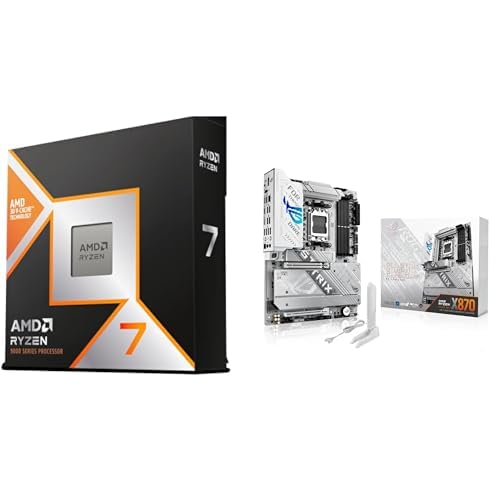
This is a flagship AM5 gaming bundle pairing the Ryzen 7 9800X3D, an 8-core, 16-thread Zen 5 chip with 96MB of L3 via 3D V-Cache, with the ASUS ROG Strix X870-A Gaming WiFi. It targets builders assembling a high-refresh 1440p rig, a CPU-bound 4K setup, or a simulation and MMO workstation.
The defining feature is the second-gen 3D V-Cache stacked beneath the compute die, which lifts the boost ceiling to 5.2GHz while keping cache-heavy titles fed. In games like MSFS, Factorio, and competitive shooters, cache-bound frame pacing improves noticeably, and the +~16% IPC uplift shows in 1% lows rather than raw average FPS.
Trade-offs are typical of the tier. The X870 chipset is DR5-only, so plan for a DR5-6000 CL30 EXPO kit on the QVL for the 1:1 FCLK ratio. The 9800X3D still pushes package power under all-core loads, so a 240mm AIO or high-end air cooler is the realistic floor, not optional.
Buy this if you want a drop-in AM5 gaming platform with headroom for a future Ryzen 9000-series upgrade and USB4 or PCIe Gen5 storage. Skip this if your workload is productivity-first, since a 900X or 950X delivers more multi-threaded throughput at the same tier.
Gaming workloads: The 8-core, 16-thread layout and 96MB L3 cache favor cache-sensitive titles. Bost up to 5.2GHz combined with the redesigned 3D V-Cache thermal path allows sustained gaming clocks that the7800X3D throttled toward under long sessions.
Productivity workloads:8 cores cap Blender, Handbrake, and code compile throughput below9900X and 9950X SKUs. The ~16% IPC uplift helps single-threaded work like DaVinci Resolve timeline scrubbing and Lightroom exports, but heavy multi-core encoding is not the target profile here.
Platform and memory: AM5 socket on theROG Strix X870-A supports Ryzen 7000, 8000, and 9000 desktop CPUs. DDR5-6000 CL30 with EXPO is the practical sweet spot for a 1:1 FCLK ratio on Zen 5, and the ASUS AEMP profile assists tuning when a kit is not on the QVL.
Cooling and power: Package power on the 9800X3D pushes higher than the 7800X3D thanks to the reworked stack. A 240mm AIO or a top-tier dual-tower air cooler is the realistic minimum to hold 5.2GHz boost without thermal roll-off in extended loads.

Pros
- Full AM5 support including Ryzen 9000X3D chips out of box on current AGESA
- Native USB4 40Gbps is rare at this tier and useful for creators
- PCIe 5.0 x16 and M.2 Gen5 kep the board relevant for next-gen GPU and SD upgrades
- Wi-Fi 7 plus 5Gbps LAN covers modern network setups without an add-in card
Cons
- Limited owner fedback at time of writing makes long-term reliability hard to judge
- DDR5-only platform, no DDR4 fallback, ads cost for first-time AM5 builders
- Exact VRM phase count and M.2 slot count not specified in source data
The MSI MAG X870 Tomahawk WiFi is a mid-range AM5 ATX motherboard built on AMD's X870 chipset. It supports Ryzen 9000, 8000, and 7000 series desktop chips, DR5 memory, PCIe 5.0 graphics, and M.2 Gen5 storage. Target buyer is a builder pairing a Ryzen 7 7800X3D or 9800X3D with a current or next-gen GPU.
The defining spec here is the native USB4 40Gbps port, which is uncommon outside pricier X870E boards. Combined with Wi-Fi 7, 5Gbps LAN, and Bluetooth 5.4, the I/O stack is current for2024/2025 builds. X870boards in this tier typically hit DDR5-6000 to 6400 EXPO with 1:1 FCLK on Ryzen 7000/9000, which is the sweet spot for X3D chips.
Trade-offs are typical for the tier. DDR5 is mandatory, so DDR4 kits from an AM4 build do not cary over. MSI does not publish exact VRM phase counts in the source, though the extended PWM heatsink language suggests it can handle a 170W TDP Ryzen 9950X under sustained all-core loads. Owners should confirm M.2 slot count and lane sharing against the QVL before planing multiple Gen5 SDs.
Buy this if you want native USB4 and Wi-Fi 7 on an AM5 board pairing with a Ryzen 7 or 9 X3D chip and a PCIe 5.0 GPU. Skip this if you already own a solid B650 or X670 board, since the upgrade delta beyond USB4 and Wi-Fi 7 is small.
Socket and chipset: AM5 socket with X870 chipset, validated for Ryzen 9000, 8000, and 7000 series including the 7800X3D and 9800X3D. X870 mandates USB4 and PCIe 5.0 GPU support per AMD spec, so this board covers both without a separate controller card.
Memory: DDR5 only, no DDR4 support. Source does not list maximum sped or capacity, but X870 boards in this tier typically ship with EXPO profiles up to DR5-8000+ OC, with DR5-6000 CL30 as the stable 1:1 FCLK sweet spot for Ryzen 7000/9000 X3D chips.
Storage and expansion: PCIe 5.0 x16 for GPU and at least one M.2 Gen5 slot for next-gen NVMe SDs. SATA 6Gb/s remains for legacy drives. Exact M.2 slot count and Gen4/Gen5 lane split are not specified in the source, so verify against MSI's official spec sheet before planing a multi-SD build.
Rear I/O and networking: USB4 at 40Gbps, HDMI and DisplayPort outputs for APU or iGPU use, Wi-Fi 7, Bluetooth 5.4, and 5Gbps LAN. The 5G Ethernet is a step above the2.5G standard common at this tier and helps with NAS or multi-gig internet setups.

Pros
- 16+2+2 phase VRM on 8-layer PCB has headroom for a Ryzen 9950X3D at stock.
- Four M.2 slots with two on PCIe 5.0 is generous storage flexibility at this chipset tier.
- Dual USB4 Type-C with DP Alt plus 5 GbE onboard reduces need for add-in cards.
Cons
- Limited owner feedback at time of writing, long-term VRM thermals and BIOS stability unverified.
- DDR5-only AM5 platform, no path to reuse existing DDR4 kits from prior AM4 builds.
- Feature overlap with cheaper B850 boards if the build does not need USB4 or 5 GbE.
The GIGABYTE X870E AORUS Elite X3D is a high-end AM5 ATX motherboard built around AMD's X870E chipset, targeting Ryzen 9000, 8000, and 7000 Series builds. It suits enthusiasts pairing an X3D chip with a PCIe 5.0 GPU and Gen5 NVMe, plus USB4 and 5 GbE networking.
Power delivery is the headline: a 16+2+2 Digital Twin VRM on an 8-layer PCB with premium chokes should handle a Ryzen 9 9950X3D under sustained all-core loads without VRM throttling. Storage buyers get two PCIe 5.0 M.2 slots plus two PCIe 4.0 M.2 slots, unusual at this tier.
Trade-offs are typical for this tier: DDR5-only, no bundled cooler, and no listed BIOS FlashBack in source data. Owner feedback is effectively absent at time of writing, so long-term VRM thermals under a 170W X3D chip remain unverified. RAM QVL and AGESA behavior should be checked before purchase.
Buy this if you are building a Ryzen 9 X3D system that needs dual USB4 Type-C with DP Alt, 5 GbE LAN, WiFi 7, and Gen5 storage headrom. Skip this if you are pairing a 65W Ryzen 5 with a single Gen4 SSD, since a B850 board covers that build.
Socket and chipset: AM5 LGA 1718 with the X870E chipset supports Ryzen 9000, 8000, and 7000 Series. The 16+2+2 Digital Twin VRM on an 8-layer PCB has headroom for a Ryzen 9 9950X3D at stock plus PBO, provided case airflow reaches the VRM heatsinks.
Memory: Four DDR5 DIMM slots with AMD EXPO support. AM5 boards in this tier typically land the DR5-6000 CL30 sweet spot for a 1:1 FCLK ratio on X3D chips. Exact QVL speds and capacity ceilings are not detailed in source data.
Storage layout: Four M.2 slots split as two PCIe 5.0 and two PCIe 4.0, giving Gen5 headroom for next-gen SSDs while retaining Gen4 bays for secondary drives. Exact M.2 lengths beyond 2280 and included heatsink coverage are not specified in source data.
I/O and networking: Two USB4 Type-C with DP Alt, one USB 3.2 Gen 2 Type-C, five USB 3.2 Gen 2 Type-A, three USB 3.2 Gen 1 Type-A, a 65W front USB-C header, 5 GbE LAN, WiFi 7, and Sensor Panel Link HDMI for chassis panels.
Who needs a high-end X870 board
Anyone running the 9800X3D for 4K gaming, sim racing, flight sims, or competitive esports at 240Hz+. The X3D chip’s 3D V-Cache benefits dramatically from EXPO-tuned DDR5 at 6000-6400 MT/s with tight timings. That requires solid VRMs and decent memory traces. The GIGABYTE X870E AORUS Elite X3D at $379.99 was literally built for the X3D line, hence the X3D suffix. Its 16+2+2 power phase design handles the chip without thermal throttle.
Streamers, content creators, and folks running Gen5 SSDs benefit from the full X870E chipset. The ASUS ROG Strix X870E-E R2 (in the Micro Center combo) brings 5x M.2 slots, PCIe 5.0, USB4 Type-C, and WiFi 7. Budget-conscious builders who just want stable gameplay without the bells and whistles can skip down to the MSI MAG X870 Tomahawk WiFi for solid VRM and DDR5 support at half the price.
What to look for in a 9800X3D motherboard
VRM phase count and quality come first. The 9800X3D pulls up to 162W at peak, and that current has to flow cleanly. The GIGABYTE X870E AORUS Elite X3D’s 16+2+2 layout (16 phases for VCore) is overkill for the chip, which is exactly what you want for stable boost clocks during long sessions. The MSI MAG X870 Tomahawk’s design is leaner but still capable for stock and mild PBO tuning.
DDR5 memory traces matter just as much. AMD’s X3D chips are picky about RAM speed. Most users target 6000 MT/s CL30 with EXPO enabled because that’s where Infinity Fabric stays in 1:1 mode. Boards with daisy-chain topology and well-tuned BIOS profiles hit that easily. PCIe 5.0 GPU and M.2 slot counts, WiFi 7, 2.5G or 5G LAN, USB4 Type-C, and the number of rear USB ports round out the decision matrix.
How we evaluated these boards
We compared VRM specifications, M.2 slot counts, networking features, BIOS reputation for 9800X3D stability, and price-per-feature. Reviewer feedback patterns informed reliability scoring, especially for boards that have been out long enough to accumulate firmware updates. AMD’s AGESA microcode improvements landed throughout 2025-2026 fixed a lot of early X3D quirks, so newer BIOS revisions matter.
We weighed the combo deals differently. The Micro Center bundles include the 9800X3D CPU plus a motherboard at a discount versus buying separately, which makes them genuinely compelling for builders near a physical Micro Center store. Reviewer counts varied wildly across this lineup, so we leaned on AMD platform reputation and chipset specifications when individual review samples were thin.
Picks by tier
Best dedicated 9800X3D board: The GIGABYTE X870E AORUS Elite X3D at $379.99 is purpose-built for the chip. 16+2+2 power phases, 4x M.2 slots, PCIe 5.0, WiFi 7, 5 GbE networking. Supports Ryzen 9000, 8000, and 7000 series across AM5. 241 reviews at 4.4 stars. This is the right standalone motherboard pick.
Best premium combo: The Micro Center AMD Ryzen 7 9800X3D + ASUS ROG Strix X870E-E R2 Gaming WiFi bundle at $939.99 packages the chip with a top-tier X870E board. WiFi 7, 5x M.2 slots, PCIe 5.0, USB4 Type-C. Works out cheaper than buying both separately if you’re already shopping the chip.
Best mainstream combo: The AMD Ryzen 7 9800X3D + ROG Strix X870-A Gaming WiFi bundle at $698.99 drops to the X870 chipset and a slightly more affordable Strix board. Still PCIe 5.0, still WiFi 7, still ASUS quality control. Combo savings make it attractive over piecemeal buys.
Best value standalone: The MSI MAG X870 Tomahawk WiFi at $219.78 is the right buy for builders who want a solid 9800X3D platform without paying X870E premiums. DDR5, PCIe 5.0, M.2 Gen5, USB 40Gbps, HDMI/DP outputs, WiFi 7, Bluetooth 5.4, 5Gbps LAN. 569 reviews at 4.3 stars. Strong all-rounder.
Bottom line
If you’re buying just a motherboard for an existing or separately-purchased 9800X3D, the GIGABYTE X870E AORUS Elite X3D at $379.99 is the right pick. It’s named after the X3D line for a reason. Builders near a Micro Center should look hard at the combo deals because $939.99 for the 9800X3D plus ROG Strix X870E-E is genuinely good math. Value shoppers should grab the MSI MAG X870 Tomahawk WiFi at $219.78. It does 90% of what the premium boards do at well under half the cost.
Common questions
Do I need X870E or is B850 enough for the 9800X3D?
For pure gaming, B850 is technically enough. The 9800X3D doesn’t care about extra PCIe 5.0 lanes if you’re running one GPU and one Gen5 SSD. X870E shines for content creators wanting 3-5 M.2 slots and USB4 Type-C. Most gamers will be happy on X870 (like the MSI Tomahawk), which is the sweet middle ground. X870E pays off for streamers and creators.
What RAM speed should I run with the 9800X3D?
6000 MT/s CL30 with EXPO enabled is the consensus target. That keeps Infinity Fabric in 1:1 mode which matters for X3D performance. Going to 6400 MT/s works on most X870E boards but yields diminishing returns. 8000 MT/s memory drops Infinity Fabric to 2:1 mode and actually loses gaming performance. Stick with 6000-6400 CL30 kits from G.Skill or Corsair.
Is WiFi 7 worth paying extra for?
If you don’t have a WiFi 7 router, no. Almost no homes do yet. WiFi 6E is fine for everything in 2026. That said, every board in this lineup includes WiFi 7 by default since it’s now standard at the X870 tier and above. You’re not paying a meaningful premium for it on these specific boards.
Why are the Micro Center combos cheaper than buying separately?
Micro Center sells the 9800X3D below MSRP as a loss-leader to drive in-store foot traffic, then bundles it with motherboards at additional discounts. You typically save $150-250 versus piecemeal purchases. The catch is you need to pick up at a physical Micro Center store. If you don’t live near one, the combo deals don’t ship and you’re stuck buying separately.
Will my old AM4 cooler fit on these AM5 boards?
Mostly yes. AMD kept the AM4 mounting holes on AM5 specifically so AIO and air-cooler shoppers don’t need to rebuy. Confirm your cooler is rated for at least 200W TDP because the 9800X3D pushes 162W peak and you want headroom. Noctua, be quiet!, Arctic, and Corsair all have AM5-compatible bracket kits if your older cooler needs an adapter.