

The ASUS ROG G700 with a GeForce RTX 5070 is the ASUS desktop I’d buy for a 1440p gaming setup. At about $1,850 in our U.S. price check, it costs only $150 more than the RTX 5060 Ti G700. The Radeon RX 9070 XT version of the ROG GM700 is a better fit if you’ve already bought a 4K monitor and have room in the budget for a $2,999 tower.
ASUS sells several different PCs under the same ROG and TUF names. Two G700 listings can look almost identical and come with different graphics cards, so you’ll find the exact configurations below. The five picks cover 1440p, 4K, lower-cost 1080p, and a mini PC for a desk or TV cabinet where a tower won’t fit.
ASUS gaming desktops at a glance
| Pick | Configuration | Graphics | Best for | Tradeoff |
|---|---|---|---|---|
| Best overall | ROG G700 G700TF-DS774 | GeForce RTX 5070, 12GB | 1440p gaming | 16GB system memory |
| Best for 4K | ROG GM700 GM700TZ-MS777 | Radeon RX 9070 XT, 16GB | 4K and larger game libraries | Costs about $1,150 more than our overall pick |
| Lower-cost ROG tower | ROG G700 G700TF-DS564Ti | GeForce RTX 5060 Ti | 1080p and selective 1440p | Small savings versus the 5070 tower |
| Best mini PC | ROG NUC 16, 32GB / 1TB | GeForce RTX 5070 Ti Laptop GPU, 12GB | Desks and media setups with limited space | Costs as much as the 4K tower |
| Lowest upfront price | TUF Gaming T500 T500MV-DS553 | GeForce RTX 3050, 6GB | Light 1080p gaming | 512GB SSD and limited graphics headroom |
Best overall ASUS gaming desktop: ROG G700 with RTX 5070
The G700TF-DS774 pairs Intel’s Core Ultra 7 265F with a desktop GeForce RTX 5070 12GB, 16GB of DDR5, and a 1TB NVMe SSD. I’d choose this configuration for a 1440p monitor because it puts the money toward a graphics upgrade while leaving memory and storage as decisions you can make later. It’s particularly easy to recommend when the cheaper RTX 5060 Ti version is within $150.

The first upgrade I’d price out is 32GB of system memory if you regularly keep voice chat, browser tabs, and recording tools open alongside a game. For a PC that mostly launches one game at a time, you can start with the included 16GB and let your own usage guide the decision. The 1TB SSD is a reasonable starting point if you’re comfortable rotating through a handful of large installs.
Before ordering, match the full model number and check for the RTX 5070 and 1TB SSD in the listing. If your monitor already runs at 4K and you expect to play recent single-player games at high settings, the GM700 below gives you more graphics memory and double the installed storage. There’s also a wider pool of prebuilt desktops for 1440p to compare if the price of this G700 moves.
Best ASUS gaming desktop for 4K: ROG GM700 with RX 9070 XT
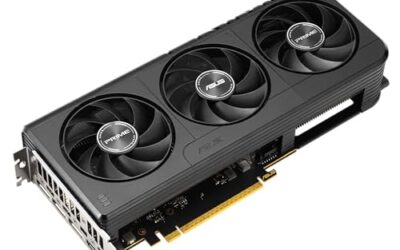
The GM700TZ-MS777 is the ASUS tower here I’d pair with a 4K display for graphics-heavy games. It combines a Ryzen 7 9800X3D with an ASUS Prime Radeon RX 9070 XT OC, 32GB of DDR5, and a 2TB PCIe 4.0 SSD. The GPU’s 16GB of video memory gives you more room for texture-heavy games than the 12GB RTX 5070 in the G700. The extra SSD capacity also saves you from deciding what to uninstall as quickly.

At $2,999, the GM700 costs about $1,150 more than the overall pick. I’d spend that difference for a 4K setup where the game is the main event. If you play competitive games at 1080p or 1440p while keeping graphics settings low, look at the G700 first and judge the upgrade against the games you actually play.
For a specific 4K game, check how it runs on the RX 9070 XT at the settings you want, especially if ray tracing is a priority. The GPU, settings, and upscaling mode matter together, and a 4K monitor doesn’t commit you to rendering every game at native resolution. Our 4K prebuilt gaming PC guide has more configurations for anyone comparing Radeon and GeForce options at this price.
Lower-cost ROG tower: ROG G700 with RTX 5060 Ti
Easy to mix up at a glance.

The G700TF-DS564Ti is the Core Ultra 5 225F tower with an RTX 5060 Ti, 16GB of system memory, and a 1TB NVMe SSD. ASUS identifies the graphics card for this full model number on its desktop lineup page. That matters here because the retail title gives you the processor, memory, and SSD while leaving the GPU out.
I’d consider this G700 for a 1080p setup where the monitor and peripherals have to come out of the same budget as the PC. You have enough initial storage to be more selective about when you add another drive, and the RTX 5060 Ti is the reason to stretch beyond the RTX 3050 TUF below if you play more demanding games. At 1440p, expect to make settings and upscaling decisions game by game.
The harder decision is whether to spend the next $150. With both G700s available at the checked prices, I’d make that stretch for a new 1440p build. I’d keep the cheaper G700 if the savings bought something the setup actually needed, such as a monitor with a suitable refresh rate. Check both listings before checkout because this recommendation depends on their price gap.
Best compact ASUS gaming desktop: ROG NUC 16
The ROG NUC 16 fits an Intel Core Ultra 9 290HX Plus, 32GB of DDR5, and a 1TB SSD into a small desktop enclosure. This configuration uses the RTX 5070 Ti Laptop GPU with 12GB of graphics memory. Pay attention to the word Laptop when comparing results or buying advice. NVIDIA also makes a desktop RTX 5070 Ti, and a desktop-card benchmark won’t tell you how this mini PC runs a game.

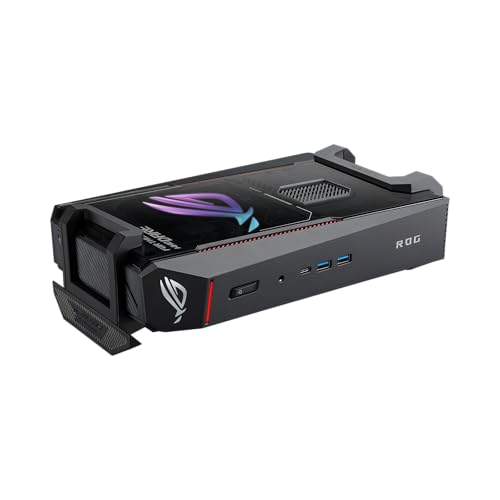
For the desk with room for a monitor and little else.
At the checked $2,999 price, the NUC makes most sense if the size solves an actual problem. Think of a shared desk, a small apartment setup, or a TV stand where you want a computer that takes up less shelf space. Leave clearance around the vents and account for the external power adapter, display cable, and room to reach the ports.
I’d buy the RX 9070 XT GM700 at the same price if a full tower fits and 4K gaming is the main goal. I’d also choose a tower if I planned to replace the graphics card in a few years. With the NUC, shop for a graphics configuration you’re comfortable keeping and decide whether 1TB gives you enough space for the games you’ll keep installed.
Lowest upfront price: TUF Gaming T500 with RTX 3050
The T500MV-DS553 is the least expensive ASUS desktop in this shortlist at about $1,488. The specific configuration comes with a Core i5-13420H, a GeForce RTX 3050 6GB, 16GB of DDR5, and a 512GB SSD. It fits a light 1080p workload, such as less demanding esports titles, indie games, and older PC games. The RTX 3050 and the smaller drive leave less room for a growing library of newer releases.
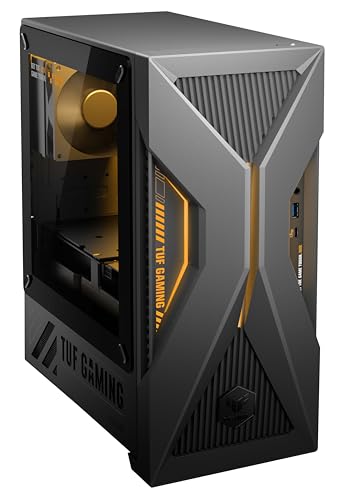
ASUS lists two M.2 storage connectors for the T500MV series and DDR5 SO-DIMM memory. That’s helpful if you want to plan a storage upgrade, and it’s a reason to check compatibility before ordering memory. For a later graphics upgrade, check the exact power supply, power connectors, and physical clearance. The T500 name alone won’t tell you which parts will fit.
I’d buy this particular configuration only if the ASUS requirement and a roughly $1,500 ceiling both matter. The RTX 5060 Ti G700 costs about $212 more as checked and starts with twice the storage. If the budget is firm but the brand is flexible, compare other gaming PCs under $1,500 before committing to the 3050.
How we evaluated these ASUS desktops
We compared new U.S. listings on an exact-model basis and used ASUS’s specification pages to check graphics variants and chassis details. The November 2026 price snapshot ran from $1,488.01 to $2,999. Prices and delivery can change. Where a family page lists multiple configurations, the recommendation applies to the parts in the specific listing, with the full model number given wherever the listing provides one.
We weighed the graphics card against the resolution, then looked at included memory and storage, case size, and the price of moving up to the next useful graphics tier. The picks are based on documented hardware and retail offers. For individual games, use recent performance data for the exact desktop or laptop GPU at the resolution and settings you’ll use.
How to choose an ASUS gaming PC
What display will you use for the next few years?
Start with its native resolution and the games you actually play. For a 1080p esports setup with a modest game library, a less expensive desktop can leave room for a better screen. For 1440p and a mix of competitive and visually demanding games, the RTX 5070 G700 is where I’d start. If you’ve chosen a 4K panel, price out the Radeon GM700 before spending the same money on a compact system.
How many games and apps need to fit?
Add up the install sizes of the games you rotate through and leave room for Windows, updates, and any recordings you keep. A 512GB drive can suit a focused library. If you keep multiple big multiplayer and single-player games installed, compare the cost of a second SSD against a configuration with 2TB from the start. If you run several apps while playing, check their combined memory use before deciding between 16GB and 32GB.
How much room do you have around the PC?
Measure the space where the case will actually sit, including clearance for cables and the room needed to access vents and ports. If you expect to add storage or replace the graphics card later, check the documentation for the exact chassis and power supply. The compact NUC buys back desk space, while the G700 and GM700 give you conventional tower layouts to work with.
Frequently asked questions
Is ASUS a good brand for a gaming desktop?
Yes. ASUS has configurations worth buying for common gaming setups, including the RTX 5070 G700 for 1440p and the RX 9070 XT GM700 for 4K. Judge each machine by the graphics card, system memory, storage, and price in the actual listing. The logo tells you who built the system. The complete configuration tells you what you’re paying for.
What’s the difference between the ROG G700 and GM700?
The G700 configurations in this guide use Intel Core Ultra processors, while the GM700 pick uses AMD’s Ryzen 7 9800X3D. You’ll find multiple graphics options within each family. Use the full model number and GPU as your shopping shorthand, especially when two listings show the same case and lighting.
Can you upgrade an ASUS prebuilt later?
It depends on the model and the part. On a tower, start by checking for available memory and storage slots, then look at the existing power supply and clearance if a GPU swap is on your list. On the NUC, plan around the included Laptop GPU and consult the exact model’s specifications for supported memory and SSDs. With the T500, look up the SO-DIMM specifications before buying a memory kit.
Bottom line
Choose the RTX 5070 ROG G700 if you’re buying an ASUS tower for 1440p. The RX 9070 XT GM700 is the upgrade I’d make for a 4K setup. The RTX 5060 Ti G700 is the way to save a little without going all the way down to the TUF, and the NUC earns its price when footprint drives the decision. Take the T500 only if you need to stay close to $1,500, want to stick with ASUS, and mostly play lighter games.

























Write Your Review
No reviews yet. Be the first to share your experience!