

The HP OMEN 16L with a Radeon RX 7600 is the HP gaming desktop I’d start with for 1080p. It pairs a Ryzen 5 with 16 GB of RAM and a 1 TB SSD, and the U.S. offer we found was about $900. A compact tower with room for a few big games. If you already own a 1080p monitor, that’s a sensible place to stop.
For a high-refresh 1440p display or a move to 4K, look at the OMEN 35L with an RTX 4080 Super and the OMEN MAX 45L with an RTX 5080. There are also two choices between those extremes, including a compact GeForce build and a larger older tower with more memory. The exact GPU, RAM, and SSD matter because HP sells several configurations under each OMEN name.


HP gaming desktop picks at a glance
Prices below are rounded U.S. listing snapshots from November 26, 2026. Check the selected configuration at checkout, especially when a seller groups different graphics cards or drive sizes on one page.
| Pick | HP desktop | GPU / RAM / SSD | Checked price | Main trade-off |
|---|---|---|---|---|
| Best value for 1080p | OMEN 16L Radeon | RX 7600 / 16 GB / 1 TB | $900 | 8 GB of graphics memory |
| Compact GeForce pick | OMEN 16L TG03-0001 | RTX 5060 / 16 GB / 512 GB | $1,476 | Small SSD for the price |
| Older full-size option | OMEN 45L Ryzen 7 | RTX 3060 Ti / 32 GB / 1 TB | $1,330 | Older CPU and GPU platform |
| High-refresh 1440p | OMEN 35L Core Ultra 7 | RTX 4080 Super / 32 GB / 2 TB | $2,769 | Seller configuration needs confirmation |
| Premium 4K | OMEN MAX 45L GT23-0080 | RTX 5080 / 32 GB / 2 TB | $3,999 | Highest price and a large case |
1. HP OMEN 16L with RX 7600 — Best value for 1080p
Start here if you want the tower to fit beside a monitor and you’d like to keep the PC itself near $900. The listing specifies a Ryzen 5, 16 GB of system memory, a 1 TB SSD, and Windows 11 Home. AMD supplies the RX 7600 with 8 GB of GDDR6 and positions it as a 1080p card. That pairing makes sense for a mix of multiplayer games and single-player releases at 1080p, with settings adjusted to suit the game.
The 1 TB drive is the part I’d prioritize over a slightly higher CPU tier in a similar budget machine. You get more breathing room for Windows updates and large installs before you have to transfer a library or open the case. The listing confirms Ryzen 5 at the family level, so ask for the full processor number if your purchase depends on CPU-heavy simulation, compiling, or running virtual machines alongside gaming.
Plan around the 8 GB graphics memory if you gravitate toward high-resolution texture packs or want to move to a 1440p monitor soon. In a demanding game, try dialing back textures or ray tracing before giving up the resolution you prefer. The 35L is the option here for a substantially higher graphics budget. For a permanent 1080p desk setup, the savings on the Radeon tower can go toward a display or extra storage.
2. HP OMEN 16L TG03-0001 with RTX 5060 — Compact GeForce pick
This TG03-0001 configuration pairs an Intel Core i5-14400F with a desktop GeForce RTX 5060, 16 GB of DDR5, and a 512 GB NVMe SSD. NVIDIA lists 8 GB of GDDR7 for the desktop RTX 5060. The reason to spend more here is a specific preference for GeForce features in games you already play, such as DLSS upscaling and frame generation in supported titles, while keeping the compact desktop format.
Check the feature support game by game. Upscaling reconstructs a higher-resolution picture from a lower internal resolution, while frame generation inserts additional frames. If you play a competitive shooter, pick a setting based on how the controls respond as well as the displayed frame rate. A setting that raises the frame counter can feel different from rendering more frames directly.
The cost is harder to justify if you mainly want more space for installs. This configuration doubles down on portability around the desk and gives you half the rated SSD capacity of the cheaper Radeon pick. Budget for additional storage if you keep a few large games installed year-round. If your spending limit is close to the checked price, the gaming PC guide under $1,500 gives you other towers to compare before paying a premium for the 16L case.
3. HP OMEN 45L with RTX 3060 Ti — Older full-size option
This 45L listing combines a Ryzen 7 5700X, an RTX 3060 Ti with 8 GB of VRAM, 32 GB of RAM, and a 1 TB SSD. The seller also specifies liquid CPU cooling and an 800 W power supply. At around $1,330, its appeal is the combination of system memory, storage, and a full-size tower for less than the compact RTX 5060 configuration. An option for a larger desk and a fixed budget.
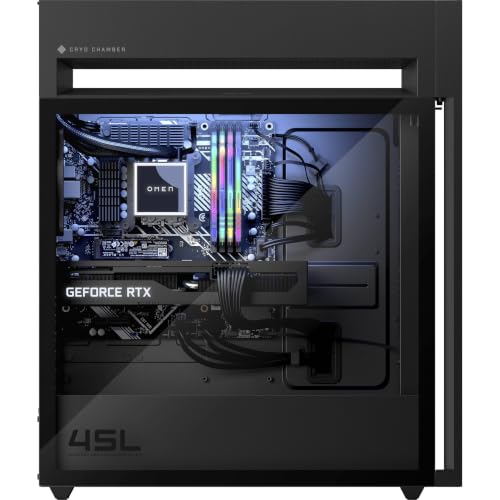
The 32 GB of system RAM is a reason to consider it if you keep voice chat, browser tabs, and a recording app open around a game. Its older GeForce generation has a different set of supported features from the RTX 5060. In particular, buy this for the games and rendering settings it can handle today. If NVIDIA’s newer frame generation features are part of your decision, the 16L GeForce model is the clearer fit.
Buy this configuration for the parts included at the checked price. If your goal is to swap in a much larger GPU later, request the exact chassis model, power connectors and available clearance first. Two offers with the same case name can have different internals, and a large case with an 800 W label gives you only part of the compatibility picture. Price matters here. When the gap to a comparable newer system closes, put the two configurations side by side again.
4. HP OMEN 35L with RTX 4080 Super — High-refresh 1440p
This black 35L listing pairs a Core Ultra 7 265F with a GeForce RTX 4080 Super, 32 GB of DDR5, and a 2 TB SSD. It’s the pick for someone who already plays at 1440p and wants more room for demanding graphics settings, or who wants to try 4K with sensible settings choices. The 2 TB drive is also a practical upgrade if your library spans several big releases and you want to keep them installed.
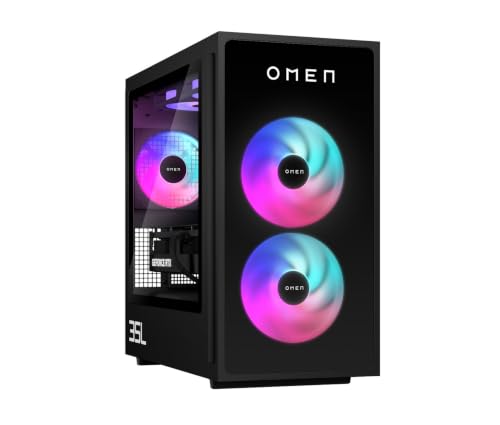
NVIDIA specifies 16 GB of GDDR6X for the RTX 4080 Super. The seller title uses a different memory label, so ask for the precise GPU and HP model number in writing before you order. HP’s own 35L documentation shows a factory RTX 4080 Super configuration with a different Core Ultra 7 processor. Verify the seller’s configuration and return terms at checkout and keep a copy for reference.
At the checked price, it’s roughly $1,230 below the MAX 45L. That difference buys quite a lot of monitor or storage. If you’re choosing a display and PC together, compare the cost of both before committing to the bigger tower. For a wider selection at this resolution, browse the 1440p prebuilt gaming PC picks and match the GPU tier to your monitor’s refresh rate and the games you actually play.
5. HP OMEN MAX 45L with RTX 5080 — Premium 4K pick
HP’s GT23-0080 listing combines a Ryzen 7 9800X3D, GeForce RTX 5080, 32 GB of RAM, and a 2 TB SSD. NVIDIA specifies 16 GB of GDDR7 for the RTX 5080, and AMD’s 9800X3D has 96 MB of L3 cache. It’s the strongest option in this shortlist for a buyer planning a high-end 4K setup and willing to pay for the newer GPU and a gaming-focused CPU in the same desktop.
At roughly $4,000, start with three games and the settings you want to run. Heavy ray tracing, high frame rates, and native 4K compete for the same graphics budget. The 5080 gives you settings to work with, including DLSS features in games that support them. Keep image quality and control response in mind when you pick a mode. The 4K prebuilt PC guide offers more configurations to compare if that price pushes your budget.
Measure the desk or floor space before you order the 45L chassis, including room for plugs and airflow. A tower can fit on paper and still be awkward if the display cable needs to bend sharply against a wall. If you already own a 1080p display and plan to keep it, there’s a better case for the 16L and a substantially smaller bill.
How we evaluated the HP desktops
We started with five distinct reasons to buy a tower, from keeping a 1080p setup affordable to building around a 4K display. We checked the exact U.S. offers for configuration, new condition, price, and availability, then checked HP’s model-family documentation and AMD and NVIDIA component specifications. We used listing specs for installed RAM and SSD size and identified the discrepancy in the 35L graphics memory label separately.
These are researched recommendations. The resolution labels describe where each configuration makes sense based on the hardware and price, with performance depending on your games and settings. We considered desk footprint, installed storage, and the price difference between neighboring picks alongside graphics capability.
How to choose the right HP gaming desktop
What display do you own or plan to buy?
A 1080p display has about 2.1 million pixels. That rises to 3.7 million at 1440p and 8.3 million at 4K. Increasing the resolution asks more of the GPU at otherwise comparable settings. If your monitor is staying put, allocate the budget around that display. If you’ll replace it soon, price the monitor and tower together.
How much storage do you actually use?
Look at the space your current game library occupies and decide what you want installed at the same time. A 512 GB drive also houses the operating system, software, and updates. For a library you want to leave installed, a 1 TB or 2 TB SSD can save you from rearranging files when a new release lands. Check how many SSD slots the exact model has if you intend to add a second drive later.
What would you upgrade first?
RAM and storage are the first things to check if the basic CPU and GPU already meet your needs. For memory, confirm the number of occupied slots, supported capacity and module type before buying a kit. For a future graphics upgrade, check case clearance, the PSU label and cable connectors. A measurement from the side of the case tells you less than the space from the rear bracket to the nearest obstruction inside.
Frequently asked questions
Is HP Victus or OMEN the better gaming desktop?
Compare the GPU and price first. A Victus 15L with a dedicated GPU can make sense at a strong discount. The Victus offers we reviewed gave up graphics, memory, or storage value next to the $900 Radeon OMEN. If you find a local Victus deal, check the suffix and graphics model. The Victus name also appears on laptops, which use different parts.
Is 16 GB of RAM enough for an HP gaming desktop?
It’s a reasonable starting point for a single game and a few background apps. Consider 32 GB if your games recommend it, you use large mod packs, or you run other memory-heavy software at the same time. System RAM and the GPU’s dedicated memory are separate. An upgrade to system RAM leaves the GPU’s texture memory capacity where it was.
Can these desktops work with an existing monitor?
Check the display’s inputs and the ports on the exact card in the listing. On a tower with a dedicated GPU, connect the screen to the outputs on the card’s rear bracket. Once Windows is up, choose the monitor’s native resolution and intended refresh rate in display settings. For two monitors, count compatible GPU outputs and check both cables before the tower arrives.
Bottom Line
The HP OMEN 16L with the RX 7600 is the first pick for 1080p at the prices we found. Its 1 TB SSD gives you room to settle in without spending more on the tower up front. Choose the compact RTX 5060 if you’ll use its GeForce features, the older 45L for its 32 GB of RAM at a lower price, or the 35L and MAX 45L when your display and games justify a higher-end GPU.

























Write Your Review
No reviews yet. Be the first to share your experience!