

Ask ten builders if a modular power supply matters for gaming and you’ll get ten slightly different answers. Some swear by the clean cable runs. Others shrug and point out that the electrons don’t care whether a cable unplugs. Both camps have a point, and the honest answer sits somewhere in the middle.
Modularity is about the cables, not the wattage or the actual power delivery to your graphics card. That distinction gets lost in a lot of forum arguments. If you’re already reading up on units like the ones in our best modular PSU for a gaming PC roundup, this guide fills in the “why” behind the feature so you can decide if it’s worth paying for. We’ll keep it plain and grounded in real hardware.
The short answer
Does a modular PSU matter for gaming? For raw frames per second, no. A fully modular, semi-modular, and non-modular supply of the same wattage and quality will feed your GPU and CPU identical power. What modularity changes is everything around the build: cable clutter, airflow, install time, and how easy it is to swap parts later. For most people that’s a convenience upgrade, not a performance one.
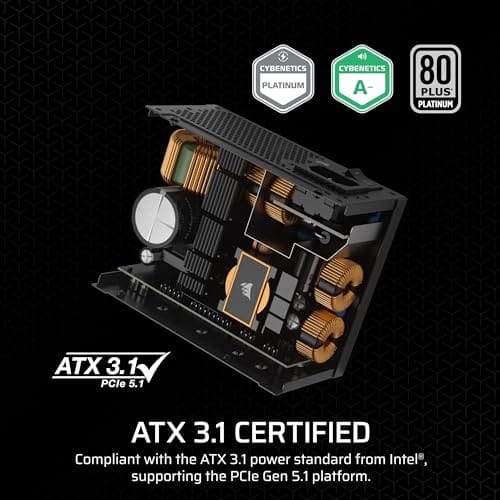
That said, convenience is worth real money once you value your time and your case’s airflow. A fully modular unit like the Corsair SF750 (2024) lets you plug in only the cables your rig actually uses, so a small case doesn’t turn into a bird’s nest behind the motherboard tray. It’s an 80 Plus Platinum, ATX 3.1 compliant, PCIe 5.1 ready SFX unit at $159.99 with a 4.1 rating, and the fully detachable cabling is the whole selling point in a tight enclosure.

Pros
- ATX 3.1 compliant with PCIe 5.1 support, resists transient spikes from RTX 50 and RX 9000 series GPUs.
- Zero RPM Mode eliminates fan noise at low and medium loads, a real advantage in acoustically sensitive SFF builds.
- Fully modular design with short SFX cables reduces cable management friction in sub-10-liter cases.
- 105 degree C Japanese capacitors indicate quality component selection typical of high-tier SFX units.
Cons
- Limited owner feedback at time of writing; real-world noise, ripple, and transient performance are unverified by community data.
- Short SFX cables are unsuitable for mid-tower or full-tower cases without aftermarket cable extensions.
- 750W ceiling may fall short for extreme SFF builds pairing a 300W-plus TGP GPU with a high-core-count CPU.
The Corsair SF750 (2024) is a high-end SFX PSU targeting SFF builders who need substantial wattage in a compact footprint. With 80 Plus Platinum certification and ATX 3.1 compliance, it sits at the upper tier of the SFX market, aimed at builders pairing it with current-gen discrete GPUs inside sub-10-liter cases.
The most defining specification here is ATX 3.1 compliance combined with PCIe 5.1 readiness. This means the unit is rated to handle the sharp transient power spikes that RTX 50 and RX 9000 series GPUs can produce, where non-compliant PSUs may trigger overcurrent protection. At 750W, it covers most single-GPU SFF configurations without derating concerns.
The honest trade-off is the review data gap. At time of writing, no substantial owner feedback exists to validate Corsair's noise and ripple claims under real load. The Zero RPM Mode claim and 92mm fan acoustics are based on spec sheets only. Buyers should also note that SFX cable lengths are intentionally short and will not reach connectors in mid-tower or larger cases without extensions.
Buy this if you are building an SFF PC around a single high-TGP GPU and need confirmed ATX 3.1 compliance in a modular SFX unit. Skip this if you want a large ATX case build, need more than 750W for a dual-component high-wattage system, or require extensive owner testing before purchasing.
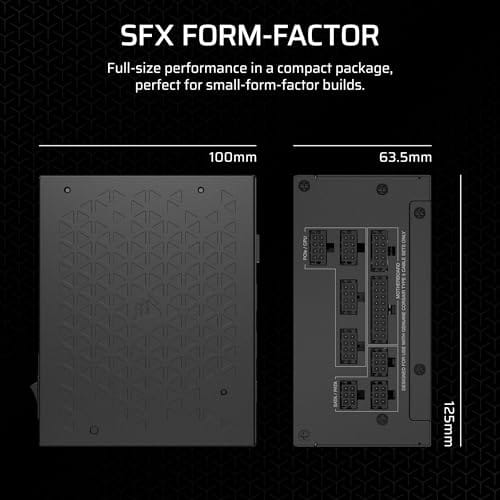
Form Factor and Mounting: This is a standard SFX form factor PSU, not SFX-L. Verify your case specifies SFX compatibility before purchasing. An SFX-to-ATX bracket is included, allowing installation in ATX-footprint cases, though short cable lengths will require extensions in anything larger than a compact SFF enclosure.
Power Standard and Connector: ATX 3.1 compliant with PCIe 5.1 readiness. The unit supports the 12V-2x6 connector standard, relevant for RTX 40 and RTX 50 series GPUs as well as AMD RX 7000 and RX 9000 cards with high transient draw. Non-ATX 3.1 units can trigger OCP shutdowns above 150 percent peak load spikes.
Efficiency and Thermal Operation: 80 Plus Platinum certification indicates roughly 92 percent efficiency at 50 percent load under 115V. The 92mm PWM fan uses a fluid dynamic bearing and Zero RPM Mode activates at low loads, which in SFF cases where airflow is restricted can noticeably reduce system acoustic output.
GPU Wattage Pairing: At 750W, this PSU pairs appropriately with GPUs up to approximately 300W TGP when combined with a mid-range CPU. For a 320W-plus TGP GPU alongside a 65W-plus CPU, headroom becomes tight and a higher-wattage SFX unit should be considered instead.
The longer explanation
Power supplies come in three cabling styles. Non-modular units have every cable permanently soldered in, so you deal with all of them even the ones you’ll never use. Semi-modular keeps the essentials attached (usually the 24-pin and the CPU cable) while letting you detach the extras like SATA and PCIe leads. Fully modular means every single cable unplugs from the unit, including the 24-pin.
Here’s the thing gamers actually care about. A typical gaming rig uses maybe four or five cables: the 24-pin, one or two CPU connectors, the GPU power, and a SATA lead for storage or fans. A non-modular 750W unit might ship with eight or nine cables total. The other four end up zip-tied into a lump somewhere, blocking airflow and making the build look rough through a glass side panel. Modular design just deletes that problem. You install what you need and the box holds the rest.
History: how we got here
Early ATX supplies were all non-modular. That was fine when cases were beige boxes nobody looked inside and cable management meant “shove it in the 5.25-inch bay.” As enthusiast building grew and tempered glass panels became normal, the fixed-cable approach started to feel dated. Manufacturers introduced semi-modular units in the mid-2000s as a compromise, then fully modular designs followed as connectors got standardized enough to make detachable cabling reliable.
The current ATX 3.1 and PCIe 5.1 standards pushed things further. Modern GPUs pull big transient spikes, and the 12V-2×6 connector changed how high-end cards get fed. Modular cabling made it easier for builders to run the exact right cable for a given card without a drawer full of adapters. So what started as a tidiness feature became part of how newer high-wattage units get sold.
Why it works this way
The reason modularity doesn’t affect performance is simple: the connectors are just physical junctions in a wire that already carries the full current. A well-made modular connector adds a tiny, essentially irrelevant amount of resistance. Reputable brands rate their sockets well above the current any single cable will ever carry, so voltage stays rock solid at the GPU and CPU headers. That’s why a quality modular unit and a quality non-modular unit post the same numbers on a bench.
Where the design genuinely helps is thermal and mechanical. Fewer stray cables mean less turbulence in the airflow path from front intake to rear exhaust. In a compact SFX or mini-ITX build, that difference is real. Pull out three unused cables and suddenly the CPU cooler is breathing again. It also makes servicing painless. Swapping a motherboard or rerouting for a new GPU takes minutes instead of a wrestling match with soldered leads you can’t move.
When you’d want this
Go modular if you own a glass-panel case, build in a small form factor, or expect to upgrade parts often. Those are the situations where detachable cables pay for themselves in airflow, looks, and sanity. Content creators and streamers who add capture cards or extra drives benefit too, since a modular unit lets you add exactly one SATA cable instead of leaving four dangling.
You don’t strictly need fully modular for a mid-tower with solid panels and a fixed loadout. Semi-modular is often the smart buy there, and it costs less. A unit like the be quiet! Pure Power 13 M 1000W shows how far semi-modular has come: 80 Plus Gold, ATX 3.1, PCIe 5.1 ready, a semi-passive 120mm fan that stays silent at low load, single-rail design rated for overclocked GPUs, all at $139.90 with a strong 4.8 rating. That’s plenty of headroom for a high-end card, and the detachable extras keep the build clean without paying the fully modular premium. If you’re weighing bigger units, our picks in the best 1000W PSU for 2026 guide and the best 1000W PSU for a high-end GPU line up nicely with this class.

Pros
- Native 12V-2x6 connector on ATX 3.1 platform ready for RTX 40 and PCIe 5.1 GPUs.
- Handles power excursions up to 2000W transient, headroom for RTX 4080 and 4090 class spikes.
- Semi-passive zero-RPM mode below moderate load keps idle acoustics near inaudible.
- LLC topology with single 12V rail delivers stable voltage regulation for overclocked GPUs.
Cons
- Limited independent owner feedback available at time of writing, riple and hold-up data unverified.
- Only four PCIe 6+2-pin connectors, tight for legacy multi-GPU or high-CPU-EPS custom lop builds.
- 80 PLUS Gold trails Platinum and Titanium units at similar wattage on sustained efficiency.
The be quiet! Pure Power 13 M 1000W is a high-end ATX 3.1 PSU aimed at builders pairing a Ryzen 7000/9000 or Core Ultra CPU with an RTX 4070Ti Super,4080 Super, 4090, or RX 7900 XTX class GPU. It targets buyers who want native 12V-2x6 wiring and transient headroom without stepping up to Platinum-tier pricing.
The defining trait is ATX 3.1 compliance with power excursion handling up to double the rated 1000W, meaning brief 2000W spikes from modern GPUs should not trip OCP. Combined with the single 12V rail and LLC topology, this suits overclocked GPUs where transient behavior, not average draw, tends to triger shutdowns on older units.
Trade-offs are typical at this tier. 80 PLUS Gold is eficient but not Platinum, soustained heavy loads generate more heat than a higher-rated unit. Four PCIe 6+2-pin connectors is standard, though builders running EATX boards with dual EPS plus a 4x8-pin GPU adapter should verify cable counts against the modular panel before buying.
Buy this if you are building a single-GPU gaming or content rig around a 250-450W TGP card and want native 12V-2x6 without paying Platinum prices. Skip this if you need sub-audible acoustics under sustained full load, or if you already own a workingATX 3.0 unit with a 12VHPWR pigtail.
ATX standard: Full ATX 3.1 compliance with native 12V-2x6 connector integration, which corects the sense-pin issue found on early 12VHPWR cables. Supports PCIe 5.1 GPUs at spec, and handles transient power excursions up to 2000W, roughly double the 1000W continuous rating.
GPU pairing: Comfortable for GPUs in the 250W to 450W TGP range, including RTX 4080 Super (320W) and RTX 4090 (450W) with headroom for overclocking. Four PCIe 6+2-pin outputs cover legacy 8-pin GPUs; the native 12V-2x6 removes the need for a 4x8-pin adapter dongle.
Efficiency and cooling: 80 PLUS Gold rated up to 94.4% at optimal load, typically around 50% utilization. The 120mm be quiet! fan runs semi-passive with zero-RPM below a load threshold not specified by the manufacturer, so idle and light workloads should remain silent.
Cabling: Fully modular design, leting builders omit unused SATA and Molex leads. Exact cable lengths and connector counts beyond the four PCIe 6+2-pin and single 12V-2x6 are not specified in source material, verify against your case routing before purchase.
What to look for in a modular PSU
Cabling style is the last thing to check, not the first. Start with the 80 Plus rating and build quality. Gold is the practical baseline for a gaming rig; Platinum, like the Corsair SF750’s, runs cooler and quieter but costs more. Match the wattage to your GPU with real headroom, and confirm ATX 3.1 plus PCIe 5.1 support if you’re running a current high-end card that draws big transient spikes.
Then look at the connector set. Count how many PCIe or 12V-2×6 leads the unit includes and whether they cover your card natively. Check the fan behavior too. A semi-passive fan that stops spinning under light gaming loads keeps the system quiet. And confirm the warranty. Good units carry seven to ten years, which tells you the maker trusts the internals. Form factor matters as well: SFX for small builds, standard ATX for mid-towers.
Common misconceptions
The biggest myth is that modular cables cause voltage drop or instability. They don’t, not on a quality unit. The connectors are engineered for the load, and any resistance is negligible. A second myth is that fully modular is always better than semi-modular. It isn’t. If your case hides cables anyway, semi-modular gets you 90 percent of the benefit for less cash.
People also assume all modular cables are interchangeable between brands. They are not. The PSU-side pinout differs between manufacturers and sometimes between models from the same brand. Plugging a cable from one unit into another can fry components. Always use the cables that shipped with your specific supply. One more: modularity says nothing about efficiency or wattage. A cheap modular unit can still be a bad unit. Judge the internals first.
Frequently asked
Does a modular PSU improve gaming performance or FPS?
No. Frame rates depend on your GPU, CPU, and the total clean power the supply delivers, not on whether the cables detach. A modular and non-modular unit of equal wattage and quality perform identically in games. The benefit is cleaner cabling and better airflow, which can help temperatures indirectly but won’t add frames on its own.
Is fully modular worth it over semi-modular for gaming?
It depends on your case and habits. Fully modular shines in small form factor and glass-panel builds where every unused cable matters. For a standard mid-tower with solid panels, semi-modular like the be quiet! Pure Power 13 M gets you most of the tidiness for less money. Both are fine choices; the case and your upgrade frequency decide it.
Can I use modular cables from a different PSU?
Don’t do it. The connector on the PSU side is not standardized across brands or even across models within a brand. A cable that fits physically can still deliver power on the wrong pins and damage your hardware. Only use the cables packaged with your exact unit, and label them if you own more than one supply.
Do modular power supplies run hotter or lose efficiency?
No meaningful difference. The extra connector adds a trace amount of resistance that quality units are rated far above. Efficiency comes from the 80 Plus tier and internal design, not the cabling. A Platinum unit like the Corsair SF750 runs cooler than a Gold one because of its internals, not because it’s modular.
What wattage do I need for a modular gaming PSU?
Size it to your GPU with headroom for transient spikes. A mainstream card is happy on 650W to 750W, while a high-end GPU that pulls big spikes is safer on a quality 850W to 1000W unit like the be quiet! Pure Power 13 M. Check ATX 3.1 and PCIe 5.1 support so the unit handles modern power behavior cleanly, then pick the cabling style that suits your case.


























Write Your Review
No reviews yet. Be the first to share your experience!