

Start with iBUYPOWER and CyberPowerPC if you want to pick the parts for a gaming desktop and have it arrive assembled. MAINGEAR and Falcon Northwest make more sense when the case itself is part of the decision. If you already have a parts list and live near a Micro Center, paying for local assembly is another way to get the exact build you want.
The best custom PC builder depends on what you’re paying it to do. Assemble a tower from retail parts? Fit a powerful GPU into a narrow case? Configure a workstation around the footage you edit every day? Those are three different jobs. This comparison covers six U.S. options and the details that can make one quote a better deal than another.
Best Custom PC Builders at a Glance
| Builder | Best for | How you order | Published coverage | What to check |
|---|---|---|---|---|
| iBUYPOWER | Most custom gaming PC buyers | Custom PC Builder or PC Lab | 3 years parts and labor on eligible new direct orders | Whether your plan includes repair shipping |
| CyberPowerPC | Comparing component options | Choose a base configuration and swap parts | 2 years parts, 3 years labor on eligible direct gaming desktops | Exact part models and optional shipping coverage |
| MAINGEAR | A gaming tower with a customizable exterior | Configure an MG-1 | 1 year standard on MG-1, with an upgrade to 3 | The cost of the case and warranty options |
| Falcon Northwest | A premium compact desktop | Configure a Tiki | 3 years parts and labor, with 1 year of Falcon Overnight service | Clearance and room for future expansion |
| Micro Center | Local assembly from a parts list | Arrange an in-store build | 90 days labor and 1 year parts under the advertised build guarantee | Fees and coverage when bringing your own parts |
| Puget Systems | Workstations for specific applications | Start with an application or request advice | At least 1 year parts, plus lifetime labor and hardware support | Whether the configuration fits your actual projects |
iBUYPOWER for Most Custom Gaming PC Buyers
iBUYPOWER is the first place I’d price an everyday custom gaming tower. Its PC Lab gives you a starting point for choosing components, and the site also offers a separate Custom PC Builder. Set your graphics card and processor first, then look at the changes the builder lets you make to memory, storage, cooling and the case. Save the finished configuration so you can price the same build elsewhere.
The direct-order warranty lists three years of parts coverage and three years of labor for eligible new desktops ordered from July 1, 2026. The policy separately lists a plan with one year of two-way ground shipping for approved warranty returns in the lower 48 states. Check which plan appears on your order, especially if you’re buying a large tower that would be expensive to send back.
CyberPowerPC for Comparing Component Options
CyberPowerPC is a good second quote when you want to change more than the CPU and graphics card. Start with a base such as its AMD Mainstream Gaming PC configurator, then compare power supply options and read the final specification before ordering. If two quotes have the same GPU, see whether both specify the motherboard and power supply model. A wattage figure alone tells you little about the unit you’ll actually receive.
The direct-sales policy lists two years of parts and three years of labor for eligible gaming desktops. The standard terms put the cost of shipping the PC in for a warranty repair on the buyer. If the configurator offers extra shipping coverage, compare the cost and terms before adding it. Buying a CyberPowerPC through a retailer can put you under a different policy.
MAINGEAR for a Gaming Tower You Can Personalize
The custom MG-1 is the pick if you want control over the build and expect to keep the same case on display for years. Its magnetic front panel swaps without tools, so changing the artwork later takes a panel swap. The case also has room for two full-size hard drives, useful if you want to keep a large local archive alongside the SSD you use for games.
Price the stock panel first so you can see what the finish you want costs. MAINGEAR lists one year of standard MG-1 coverage, an upgrade to three years and lifetime phone and email support. Under the warranty policy, buyers generally pay to ship the system to MAINGEAR after the first 30 days. The company covers ground shipping back within the continental U.S. while the repair is under warranty.
Falcon Northwest for a Compact Desktop
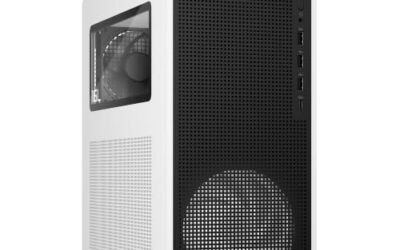
Consider the Falcon Northwest Tiki if your desk has room for a slim tower. The chassis is 11.6 liters and four inches wide. Measure the available depth too, including space for the cables and ventilation. Ask which replacement graphics cards can fit if you expect to upgrade, and check the motherboard if you’ll want a second M.2 drive. Falcon says support for that second drive varies by board.
Falcon lists three years of parts and labor for the Tiki. Its first-year Falcon Overnight service covers overnight transport in both directions for qualifying repairs in the continental U.S. That’s a shipping benefit. Ask about repair turnaround separately if you rely on this PC for work.
Micro Center for Local Assembly
Take your parts list to Micro Center’s in-store build service if you want to see the itemized cost of the hardware and pay separately for assembly. You can bring components you bought elsewhere, although the store may inspect them and charge a different fee. Get that quote up front if you already own a GPU or plan to reuse storage.
The advertised build guarantee lists 90 days of labor and one year of parts coverage. Ask the store how that applies to any parts you bring in and who’ll handle a manufacturer warranty claim. Express ProBuild advertises same-day pickup for orders placed at least four hours before closing. Call your store to confirm availability before making the trip.
Puget Systems for an Application-Specific Workstation
Puget Systems is a better starting point when you can describe the work your PC needs to do in software terms. Its DaVinci Resolve workstation page, for example, separates configurations aimed at H.264 or HEVC editing and Fusion from a higher-end option for multicamera RAW projects. Tell the builder which codecs, resolutions and effects you use and what you wish your current system did faster.
The Puget warranty includes at least a year of parts coverage, with additional years available when you configure the PC. Hardware support and labor continue for the serviceable life of the system under the policy. If your main use is gaming, get a gaming-builder quote first. It’ll help you decide whether the workstation consultation and support are worth paying for.
How We Evaluated the Builders
We compared official U.S. configurators, service pages and warranty policies as of November 25, 2026. We looked at what buyers can choose, whether the service fits a distinct need, and what happens if a component fails. The recommendations are based on published options and terms. A useful price comparison takes two quotes built around the same requirements, so the value call is yours once both configurations are on the screen.
How to Choose a Custom PC Builder
Set your performance target before opening a configurator
For gaming, write down your monitor’s resolution and refresh rate and two or three games you care about. Keep the case and lighting selections until after you’ve priced the GPU. Our guide to prebuilt gaming PCs for 1440p offers a reference point if you’re shopping for that resolution and want to see how fixed configurations are put together.
Compare the delivered price and the full parts list
Use the same CPU, GPU, RAM capacity and SSD capacity in each quote, then check the models of the motherboard, storage and power supply. Include Windows if you need a license, plus shipping and tax. One last comparison. Price a fixed configuration with similar hardware and use our guide to prebuilt parts and markups to check where the builder may have cut costs. You may find the upgrades you want are already included in a ready-to-ship system.
Ask what happens when a part fails
Find out who pays to ship the PC in each direction and whether the builder can send a replacement part for you to install. Keep the original box and inserts. If you’d rather bring in the tower yourself, a local shop may be worth a higher initial quote. Especially if this is your only PC.
Frequently Asked Questions
Is a custom-built PC cheaper than building it yourself?
Price the exact parts both ways. Building it yourself saves the assembly fee, but bundles and sales can change which quote wins. Compare support too. With a DIY build, you may have to identify the faulty part and deal with its seller or manufacturer yourself. Our comparison of buying an assembled PC and building your own walks through where those costs differ.
What’s the difference between a custom PC and a prebuilt?
A custom PC is assembled to the configuration you order. A fixed prebuilt is sold with a parts list the company already chose. Both arrive assembled. Go custom when the part you’d change in a prebuilt is important enough to justify a new quote.
How long does a custom PC take to arrive?
Use the estimate on your saved configuration and ask whether it’s a ship date or a delivery date. Assembly and transit are separate, and changing one part can change the schedule. If you’re on a deadline, compare the estimate with a ready-to-ship option or a local pickup slot.
Can you upgrade a custom-built PC later?
Many are upgradeable. Ask for the motherboard, power supply and case models, then check those exact specifications against the upgrade you have in mind. A longer graphics card can collide with a front radiator even if the slot itself is compatible. If you plan to add drives or a capture card, ask which ports and slots will still be accessible after assembly. Check the support policy before changing major hardware yourself.
Bottom Line
Get a quote from iBUYPOWER and CyberPowerPC first for a gaming tower. Pick MAINGEAR if you want the MG-1’s swappable front panel, or price Falcon Northwest’s Tiki if space is tight. For an exact parts list, ask Micro Center to quote assembly. For a workstation that earns its keep in one or two key applications, give Puget Systems a sample project description and ask what it would build around it.

























Write Your Review
No reviews yet. Be the first to share your experience!