

For a CyberPowerPC desktop that can handle a 1440p monitor and double as a work PC, start with the Gamer Xtreme GXiVR8080A41. Its RTX 5070, Ryzen 9 9900X and 32GB of RAM make sense for a mix of games, streaming and editing. If you’re buying for a 1080p screen, the RTX 5060 Gamer Xtreme costs hundreds less. And if a 4K display is already on your desk, the RTX 5080 configuration is the first one I’d compare against your budget.
CyberPowerPC sells several desktops under each family name. Two Gamer Xtreme towers can look almost identical in a listing and come with very different graphics cards. The model codes below identify the exact configurations, and the recommendations account for the difference in price between them.
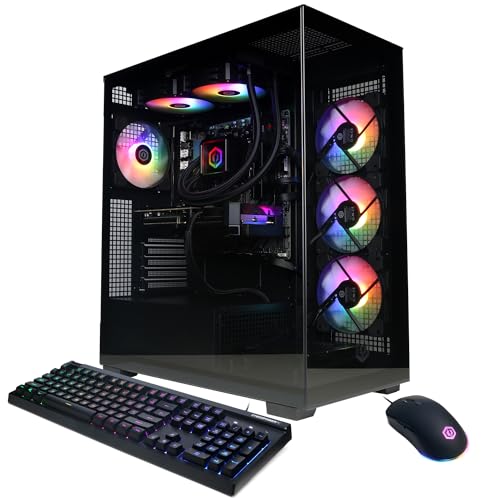


CyberPowerPC Gamer Master GMA2900A3: Ryzen 7 8700F + RTX 5060 Ti for 1080p and 1440p Gaming
Pros
- RTX 5060 Ti GDDR7 offers a generational VRAM bandwidth jump over GDDR6 cards
- AM5 platform allows CPU upgrades without swapping the motherboard
- WiFi 6 + Bluetooth 5.3 included out of the box
- Owner ratings are consistently strong across a substantial review base
Cons
- 8GB VRAM may become a ceiling at 1440p Ultra in demanding 2027 titles
- 16GB RAM is workable but likely needs an upgrade if streaming and gaming simultaneously
- Prebuilt premium is real - DIY-capable buyers can match specs for noticeably less
The CyberPowerPC Gamer Master GMA2900A3 is a mid-range prebuilt gaming desktop aimed at buyers who want a capable, ready-to-use system without sourcing individual parts during a period of GPU supply volatility. Combining the AMD Ryzen 7 8700F with the GeForce RTX 5060 Ti, this machine targets 1080p Ultra gaming and light 1440p play, along with casual content creation and game streaming. It is best suited for users who prioritize convenience and a single-purchase setup, not those who are comfortable building from scratch or who need 4K-ready GPU headroom.
The RTX 5060 Ti 8GB is the headline component here. Built on NVIDIA's Blackwell architecture with GDDR7 memory, it brings meaningful bandwidth improvements over the previous-gen GDDR6 cards in the same price bracket. In practical terms, based on early published data for the RTX 5060 Ti class, expect 1080p Ultra performance in the 80-110 FPS range in well-optimized current titles, with DLSS 4 frame generation adding headroom in supported games. Paired with the Ryzen 7 8700F - an 8-core Zen 4 chip on the AM5 platform - the system handles CPU workloads without becoming a bottleneck in most gaming scenarios. The B850 chipset also opens the door to future Ryzen CPU swaps as the AM5 ecosystem grows.
CyberPowerPC has included a tempered glass side panel and custom RGB lighting, which is standard for the category. The case appears to follow a conventional mid-tower layout with reasonable airflow provisions, though specific cooler model details are not disclosed in the listing. Thermal performance under sustained gaming load is not independently verified at time of writing, so buyers with hot ambient environments should factor that uncertainty in. The form factor is practical for most desk setups and allows internal access for future upgrades.
There are a few considerations worth noting before committing. The 8GB VRAM figure is the most significant long-term concern - while it handles current titles at 1080p without issue, texture budgets in 2027 AAA releases at 1440p Ultra may push against that ceiling. The 16GB DDR5 configuration is adequate for gaming alone but appears on the lower end if the system doubles as a streaming or video editing workstation. The prebuilt pricing premium over a comparable self-build is a real cost that DIY-capable buyers should calculate before purchasing. Additionally, while the PSU wattage is not specified in the listing, buyers should verify this detail directly, as RTX 5060 Ti systems benefit from at least a 650W supply for stable operation.
Overall, the CyberPowerPC Gamer Master GMA2900A3 is a solid prebuilt option for 1080p-focused gamers who want current-generation GPU performance without the complexity of a self-build. Owner ratings are consistently strong across a meaningful review sample, which provides reasonable confidence in build quality consistency. For buyers who primarily game at 1080p and value a warranty-backed, plug-and-play experience, this system makes a practical case for itself - though those planning to push 1440p Ultra long-term should weigh the VRAM limitation carefully before deciding.

Pros
- RTX 5060 8GB paired with i5-14400F suits 1080p high-refresh gaming
- DR5 memory and B760 chipset align with current Intel LGA1700 platform
- 1TB PCIe 4.0 NVMe SD gives usable game library capacity from day one
Cons
- Limited owner feedback at time of writing, buyer signal is thin
- 8GB VRAM tightens headroom for 1440p ultra textures and ray tracing loads
- PSU wattage, cooler type, and case model are not specified in source
This is a mid-range prebuilt gaming tower built around an Intel Core i5-14400F, an NVIDIA GeForce RTX 5060 8GB, 16GB of DDR5, and a 1TB PCIe 4.0 NVMe SSD on a B760 chipset. The target buyer wants a ready-to-run 1080p high-refresh rig without sourcing parts or tuning BIOS.
The defining pairing here is the RTX 5060 8GB with a 10-core i5-14400F. Cards in this class typically deliver 1080p ultra at high refresh in most modern titles and 1440p with DLSS upscaling enabled. The i5-14400F rarely bottlenecks this GPU tier, leaving frametimes GPU-bound where you want them.
Trade-offs are typical at this tier. 8GB of VRAM limits headroom for 1440p ultra textures and heavy ray tracing, and the source does not specify PSU wattage, cooler class, or case model, all of which drive thermals, transient behavior, and future GPU upgrades. Warranty is one year parts and labor, standard for boutique prebuilts.
Buy this if you want a plug-and-play 1080p high-refresh gaming PC with Windows 11,iFi 6, and peripherals included. Skip this if you plan to game at 1440p ultra with ray tracing, need more than 8GB of VRAM for AI or content work, or want documented PSU and cooling specs before purchase.
GPU class and resolution fit: The RTX 5060 8GB is a mainstream 1080p card that stretches to 1440p with DLSS Quality or Balanced. Esports titles at 1080p should saturate high-refresh panels, while AA titles at 1440p ultra will lean on frame generation to stay smooth.
CPU pairing: The Core i5-14400F runs 10 cores at 2.5GHz base on LGA1700 with a B760 board. That is a balanced match for the RTX 5060, avoiding CPU bottlenecks in GPU-bound scenarios and giving headroom for OBS NVENC streaming alongside gameplay.
Memory and storage: 16GB of DDR5 is the current baseline for new releases, and the 1TB PCIe 4.0 NVMe SSD keps level loads and shader compilation quick. Exact DR5 speed, timings, and SD model are not specified in source.
Display outputs and connectivity: The GPU exposes 1x HDMI and 2x DisplayPort, enough for a triple-monitor setup at typical gaming refresh rates. WiFi 6, Bluetooth 5.3, 2x USB-A 3.2, and 6x USB-A 2.0 cover peripherals, though USB-C on the chassis is not listed.
CyberPowerPC gaming desktops at a glance
| Pick | CyberPowerPC model | CPU and GPU | Best fit | Main tradeoff |
|---|---|---|---|---|
| Best overall | Gamer Xtreme GXiVR8080A41 | Ryzen 9 9900X, RTX 5070 12GB | 1440p gaming and multitasking | 1TB SSD at a midrange price |
| Best for 4K | Gamer Xtreme GXiVR8640A9 | Core Ultra 7 265KF, RTX 5080 16GB | 4K and demanding graphics settings | Large premium over the RTX 5070 build |
| Best for CPU-heavy games | Gamer Supreme SLC8480A10 | Ryzen 7 9800X3D, RTX 5070 Ti 16GB | High-refresh 1440p and simulation games | RTX 5080 system was only $235 more |
| Best step up from entry level | Gamer Master GMA2900A3 | Ryzen 7 8700F, RTX 5060 Ti 8GB | 1080p with a little more GPU headroom | Same 8GB of VRAM as the entry pick |
| Lowest price | Gamer Xtreme GXiVR8060A47 | Core i5-14400F, RTX 5060 8GB | 1080p and a first gaming desktop | 16GB of RAM and 1TB of storage |
1. Gamer Xtreme GXiVR8080A41 for most 1440p buyers
The RTX 5070 version of the Gamer Xtreme pairs a 12GB graphics card with a 12-core, 24-thread Ryzen 9 9900X. The listing includes 32GB of DDR5 and a 1TB PCIe 4.0 SSD. It was $1,999.99 in our price check, more than the two 1080p picks and well below the two configurations with 16GB graphics cards.
The practical middle ground. If you play at 1440p and keep a browser, chat and recording software open, there’s a case for buying 32GB up front. The CPU also suits people who split their time between gaming and work that can use more threads, such as CPU-based video encoding. In games where the graphics card is doing most of the work, a lower-priced RTX 5070 desktop with a simpler CPU is worth comparing.
Storage is where I’d check the parts list before checkout. A 1TB drive can fill quickly once it holds Windows, several big games and a folder of recordings. Ask what motherboard ships and whether it has a free M.2 slot if you plan to add a drive. If your ceiling is firm, leave room for that future expense when comparing gaming desktops under $2,000.
2. Gamer Xtreme GXiVR8640A9 for 4K gaming
This $3,374.99 configuration pairs a GeForce RTX 5080 with Intel’s Core Ultra 7 265KF, 32GB of DDR5 and a 2TB PCIe 4.0 SSD. Intel lists eight performance cores and 12 efficient cores for this processor. The graphics card is the main reason to step up. It gives you more rendering headroom than the RTX 5070, along with 16GB of video memory for demanding textures and effects.
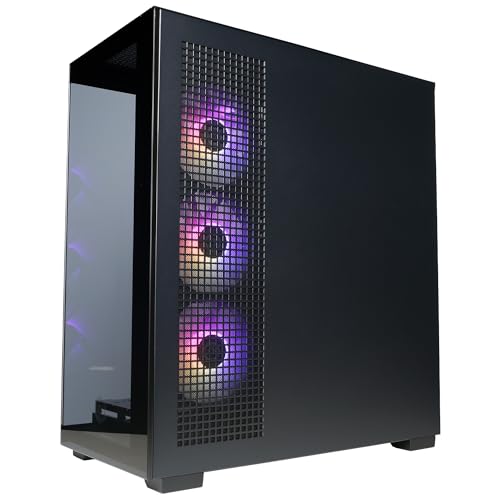
The RTX 5080 is also the pick I’d favor over the 5070 Ti version below for a primarily 4K setup at these prices. They have the same listed system memory, graphics memory capacity and storage capacity. The extra $235 buys a higher GPU tier in this comparison. Game settings still matter. For a demanding release, decide whether you prefer native rendering, a DLSS quality mode or lower ray-tracing settings before chasing a particular refresh rate.
Check the whole bundle if you’re coming from an older desktop. A 4K monitor that can take advantage of the hardware may be part of your budget. If you already have one, compare the tower price with other 4K gaming PCs and confirm the seller can identify the installed power supply and cooler. The listing’s CPU and GPU names tell you what chips are inside. Power delivery and cooling still depend on the configuration that ships.
3. Gamer Supreme SLC8480A10 for high-refresh 1440p
The Gamer Supreme SLC8480A10 combines the Ryzen 7 9800X3D with a GeForce RTX 5070 Ti 16GB, 32GB of DDR5 and a 2TB PCIe 4.0 SSD. AMD specifies 96MB of L3 cache on the 9800X3D. That’s part of the appeal if you play games whose frame rate can depend heavily on the CPU, such as busy simulation titles or competitive games at reduced graphics settings.
A pick for a specific player. If you spend most of your time on a high-refresh 1440p display and know your favorite games benefit from extra CPU cache, this is the most interesting pairing here. The 16GB GPU also gives you more room for textures than the regular RTX 5070’s 12GB. For heavily modded games, the extra SSD space can be just as welcome as the GPU upgrade.
At $3,139.99, the Supreme was more than $1,100 above our overall pick. That gap is hard to justify for a typical 1440p setup. Price is also what makes this recommendation narrower than the specs suggest. If the RTX 5080 system stays close in price and you care more about 4K graphics settings, buy the system with the stronger GPU. If the Supreme gets a substantial discount, compare the total cost again.
4. Gamer Master GMA2900A3 for a modest 1080p upgrade
The Gamer Master GMA2900A3 was $1,279.99, or $138 more than the entry-level pick. It has an eight-core Ryzen 7 8700F, an RTX 5060 Ti with 8GB of video memory, 16GB of DDR5 and a 1TB PCIe 4.0 SSD. The upgrade you’re paying for is the Ti GPU. NVIDIA lists 4,608 CUDA cores on the 5060 Ti and 3,840 on the 5060.
That price gap makes sense if you already own a fast 1080p monitor and often play games that push the graphics card. Pay attention to the memory label before ordering. NVIDIA makes the RTX 5060 Ti with either 8GB or 16GB of VRAM, and GMA2900A3 is the 8GB version. Extra rendering resources can help with graphics settings while the memory limit still matters with large texture packs.
Take the cheaper tower if you mostly play lighter games and the money would buy a monitor upgrade you can use every day. If you’re already planning to move to 1440p and favor demanding single-player games, compare the cost with an RTX 5070 system before paying for this intermediate step.
5. Gamer Xtreme GXiVR8060A47 for the lowest upfront cost
At $1,141.99, this was the least expensive of the five. The configuration has an Intel Core i5-14400F, an RTX 5060 8GB, 16GB of DDR5 and a 1TB PCIe 4.0 SSD. Intel lists six performance cores and four efficient cores on the 14400F. That pairing makes it a sensible starting point for a 1080p display and a buyer building a setup from scratch.
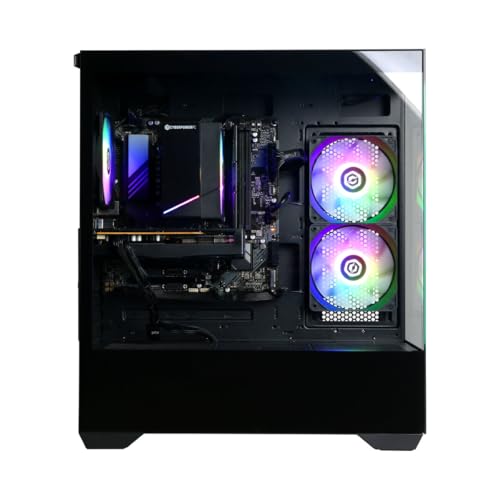
Spend the savings where you’ll see them. A capable 1080p monitor can make more sense for a first setup than paying up for the 5060 Ti while keeping an aging display. On this configuration, start with the game’s recommended settings and adjust textures first if a demanding title strains the 8GB of video memory.
Check the RAM layout if you expect to stream, multitask or install a memory-hungry game. A listing that says 16GB tells you the capacity. Ask how many memory slots are occupied before pricing an upgrade to 32GB. If your tower budget is lower, our gaming PCs under $1,000 guide gives you other starting points.
How we evaluated the five desktops
We compared new U.S. retail offers available on November 25, 2026, and checked the model codes, CPU, GPU, RAM and storage on each offer. NVIDIA, Intel and AMD specifications supplied component details such as video memory, CPU cores and cache. The picks reflect how those parts match a display, a workload and the price of the whole tower. Frame rates, noise and cooling will vary with games, settings and installed parts. Check the exact model code and today’s offer before ordering.
How to choose a CyberPowerPC desktop
What resolution and refresh rate will you use?
Start with the monitor. At 1080p, the RTX 5060 and 5060 Ti are the two options I’d price first. With a 1440p display, start at the RTX 5070 and move up if your games, settings or refresh target justify it. At 4K, the RTX 5080 makes a stronger starting point. Game-specific comparisons at your target resolution are more informative than a retailer’s graphics preset or a blanket claim about 4K capability.
Separate a display’s maximum refresh rate from the frame rate you actually want in each game. Someone who plays ranked shooters on a fast 1440p screen may run reduced details to prioritize responsiveness. Someone with the same monitor who plays cinematic single-player games may spend the graphics headroom on image quality. Those two buyers can reasonably land on different configurations.
Which components are worth the premium?
Price the GPU tier and the CPU separately in your head. If you’re comparing a Core Ultra 7 265F tower with the 265KF system here, match the full graphics model and VRAM first. Intel lists both chips as 20-core processors, while a store can pair either chip with several different GPUs. An appealing CPU badge tells you very little about whether the desktop is priced fairly for gaming.
If two systems have the same GPU, look at the next purchase each one would require. Paying a little more for a 2TB drive can make sense when you’d otherwise buy and install a second SSD. For someone who keeps two or three games installed and has no plans to record footage, the cheaper configuration may already meet the brief.
How much memory and storage should you buy now?
For a first gaming PC, 16GB of RAM and a 1TB SSD can be enough if you keep a short game rotation. Try 32GB if you regularly stream, switch between games and creative apps, or play large modded titles. Consider 2TB if you keep multiple big games installed or save a lot of clips. Video memory is a separate spec. An upgrade to system RAM leaves the graphics card’s VRAM capacity the same.
What will the seller confirm about the build?
Keep the model code and ask for the motherboard, power supply and RAM arrangement if the listing leaves them out. They determine whether a storage or GPU upgrade will be simple. Check the seller’s return window and the coverage for that purchase channel. CyberPowerPC maintains separate warranty information by purchase type, so use the terms that match your invoice. CyberPowerPC warranty information
Check the case dimensions against where the tower will sit. Leave space to reach the rear connections and enough room around the ventilation. If the tower goes under a desk, check whether the front or top ports are still easy to reach. Photos can help you see the layout, while the model’s dimensions settle whether it fits.
Frequently asked questions
Are CyberPowerPC desktops good for gaming?
Yes, when the specific build matches your games and monitor and the price holds up against systems with the same GPU. Gamer Master, Gamer Xtreme and Gamer Supreme are product families with several configurations. Read the full parts list from the GPU down to memory and storage. Then weigh the included setup and support against what you’d pay for similar hardware elsewhere.
Should I wait for a CyberPowerPC with an RTX 5090?
Consider one if 32GB of VRAM would serve a real workload, such as a large GPU-rendered scene, or you’re buying a flagship specifically for demanding 4K settings. NVIDIA lists 32GB of GDDR7 on the RTX 5090 and 16GB on the RTX 5080. We found a qualifying RTX 5080 desktop for this shortlist. Treat an RTX 5090 quote as a separate purchase decision and compare the extra cost, power supply and seller terms before paying the premium.
Can I upgrade the graphics card in an older CyberPowerPC?
Often, yes. Start with the specific chassis and power supply. Check the card’s length and thickness, the available PCIe slot, the power connectors and what the GPU maker recommends for system power. If you’re looking at an older Ryzen 3 3100 and GeForce GT 1030 system, NVIDIA lists 2GB of memory on the GT 1030. That’s a different class of machine from the five here. Price the required upgrades together before deciding how much an older tower is worth.
Bottom line
The Gamer Xtreme GXiVR8080A41 is where I’d start for 1440p gaming and mixed use. It pairs the RTX 5070 with 32GB of RAM and leaves a sizable price gap to the two higher-end towers. Buy the RTX 5060 model if you’re setting up at 1080p on a tighter budget, or put the extra money toward the RTX 5080 if 4K is your main reason for upgrading. Match the seller’s model code to the configuration above before checking out.

























Write Your Review
No reviews yet. Be the first to share your experience!