

An MMO mouse earns its place when the side buttons are easier to reach than your keyboard shortcuts. Twelve buttons under your thumb can help with abilities, inventory slots, and macros, but a crowded keypad can also be frustrating if it doesn’t fit your hand. Weight, shape, software, and wireless behavior matter just as much as the number printed on the box.
The Razer Naga V2 Pro is our most flexible pick for players who switch between games. Corsair’s Scimitar Elite Wireless SE is a better starting point if you struggle to reach the back row of a fixed keypad. There’s also a lighter SteelSeries, an inexpensive wired Redragon, and a lower-cost wireless Naga. All five had new Amazon offers in stock when we checked on November 25, 2026.
Start with the motion you want to change. If you lift your fingers off movement keys to hit a cooldown, move that bind to a side key under your resting thumb. If your current mouse makes it hard to lift and recenter, look at weight and shell shape first. A comfortable grip matters for every action you take, even when you aren’t using the keypad.


Our Picks for the Best MMO Mice
| Pick | Mouse | Button design | Best for | Main drawback |
|---|---|---|---|---|
| Most flexible | Razer Naga V2 Pro | Three swappable side plates | Players who switch genres | Highest price in this group |
| Best adjustable keypad | Corsair Scimitar Elite Wireless SE | Movable 12-button side panel | Finding a better thumb reach | Keypad can still feel dense |
| Lightweight pick | SteelSeries Aerox 9 Wireless | 12-button side panel | Players who dislike heavy MMO mice | Open shell will not suit everyone |
| Budget wired pick | Redragon M908 Impact | 12 side buttons, wired | Trying MMO keybinds cheaply | Cable to manage |
| Wireless value | Razer Naga V2 HyperSpeed | Fixed 12-button side panel | Wireless MMO play without the Pro price | No swappable side plates |
1. Razer Naga V2 Pro: Most Flexible MMO Mouse
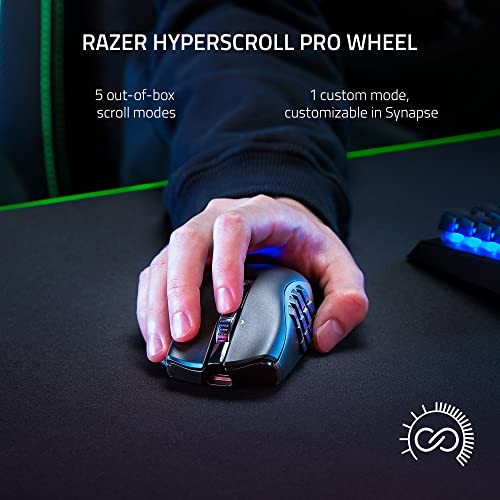
The Naga V2 Pro is for someone who wants an MMO keypad without making every other game use the same grip and button arrangement. Its three side plates offer two, six, or twelve buttons. Razer’s product announcement also describes 19+1 remappable buttons, a HyperScroll Pro wheel, and a Focus Pro 30K sensor. At the time of our check, its new-item offer was $129.99. That’s a substantial premium over the fixed-keypad options below.
The twelve-button plate makes sense for a game with many abilities, while the smaller plates can reduce accidental presses in a shooter or general desktop work. That flexibility is the main reason to consider this mouse. It doesn’t guarantee that the twelve-button grid will fit your thumb. If your hand is small or you grip near the rear, compare the physical dimensions and the side-button position before buying. Otherwise, an expensive decoration.
The Pro works with its 2.4 GHz receiver, over Bluetooth, or through a USB cable. You can recharge through the cable and keep using the mouse at the same time. Razer sells the wireless charging dock separately. The adjustable scroll wheel is another reason to consider the Pro if you switch between discrete steps for a game menu and fast scrolling on a long page.
Choose the V2 Pro when you play both MMO and non-MMO games and expect to use the interchangeable plates. If you only want a twelve-button grid, the Naga V2 HyperSpeed costs much less in our current snapshot. For a thumb cluster you can move forward or back, the Corsair offers a different answer to hand fit. Don’t buy the Pro solely because it has the highest sensor number.
2. Corsair Scimitar Elite Wireless SE: Adjustable Thumb Keypad
Corsair’s Scimitar Elite Wireless SE has a twelve-button side panel that slides to suit your thumb reach. Corsair’s quick-start guide explains the Key Slider adjustment; its product page lists sixteen programmable buttons and both Slipstream and Bluetooth wireless modes. The new-item offer we found was $69.99, making it particularly interesting if a fixed button grid has felt awkward on another MMO mouse.
Sliding the cluster is a practical adjustment, not a cure for every grip. A player with a short thumb may need the panel farther back; someone who rests the thumb forward may prefer it farther ahead. The exact best position is something you discover by holding the mouse, and the button rows still sit close together. If you often mispress neighboring keys, use a return window to evaluate the shape with your own hand and usual keybind layout.
The SE model also adds Elgato Virtual Stream Deck integration, which can appeal to someone who uses stream controls or desktop shortcuts as well as MMO abilities. That software feature is separate from whether the mouse fits. Check compatibility with your operating system and preferred game, then decide whether you want to manage profiles in Corsair’s software. If you prefer to avoid configuration apps, a programmable mouse may create more work than benefit.
We chose the SE rather than the older Scimitar names because the current listing explicitly identifies this model and its adjustable panel. Be careful when comparing a sale: Corsair sells wired, wireless, and SE versions with similar names. Match the exact model, connection, and button count in the cart. For a buyer whose thumb reach is the central issue, this is the first option we would compare with the Naga’s fixed twelve-button plate.
3. SteelSeries Aerox 9 Wireless: Lighter Feel
SteelSeries fits a full MMO keypad into a mouse weighing 89 g. Its official product page lists eighteen programmable buttons, including the twelve on the side. Our checked new-item offer was $119.99. It’s the pick for someone who wants a full grid but prefers a lighter mouse for both raids and games with frequent camera movements.
The perforated shell helps bring down the weight. Texture matters here because the openings sit beneath part of your hand. If your sensitivity is low and you often lift the mouse to recenter it, lower mass may be worth prioritizing. Our guide to light and heavy gaming mice explains how weight interacts with grip and movement.
Its fixed twelve-button side panel gives you many binds, though it does not have the Naga Pro’s swappable layouts or the Scimitar’s sliding keypad. If you mostly play one MMO and already know you want that many buttons, the simpler physical arrangement may be fine. If you switch games often and want fewer buttons under your thumb for some of them, the Naga Pro’s plates are more adaptable. Software profiles can change assignments, but they cannot move physical buttons.
Choose the Aerox 9 if weight is your complaint with traditional MMO designs and you are comfortable with a perforated body. Skip it if you prefer a solid shell or an adjustable thumb panel. A light mouse can feel better in quick movement, but comfort over hours depends on hand size, grip style, and the placement of the side keys. Not for everyone.
4. Redragon M908 Impact: Budget Wired Pick
At a checked new-item price of $26.31, the Redragon M908 Impact is a low-cost way to find out whether a twelve-button side grid actually helps your game. Redragon’s M908 support page lists twelve programmable side buttons. The wired model also comes with eight removable 2.4 g weights, so you can leave them out if you tend to lift the mouse between swipes.
The cable makes this an easy choice for a stationary setup with a USB port close to the mousepad. Leave enough slack to reach the far edge of the pad without pulling against the port. The manufacturer’s guide describes basic use on macOS and programming through its Windows software. If you need custom assignments on a Mac, confirm your setup before ordering.
Start with a small set of keybinds instead of mapping every ability on day one. Put the actions you use most in positions your thumb reaches naturally, then expand if the grid becomes familiar. If you discover that twelve side keys are too crowded, you have spent less than on the wireless options. Our broader gaming mouse guide can help if a smaller button layout proves more comfortable.
The M908 makes the most sense for a first MMO mouse, a secondary PC, or a buyer with a strict budget. If you already know that hand fit or adjustable side-key position is your main problem, paying more for the Corsair may be smarter. Cheap entry is useful when it answers a real question about your preferences.
5. Razer Naga V2 HyperSpeed: Wireless MMO Value
The Naga V2 HyperSpeed is the less expensive fixed-keypad counterpart to the V2 Pro. Its current new-item offer was $56.99, while the Pro was $129.99 in our snapshot. Razer’s specifications list nineteen programmable buttons, a fixed twelve-button thumb grid, and a wheel with tactile and free-spinning modes. Don’t pay Pro money if you know you’ll keep the same layout.
The HyperSpeed runs on a single AA battery and connects over 2.4 GHz or Bluetooth. Keep a spare AA at your desk if you play long sessions. The receiver stores under the top cover, which is handy if you take the mouse between PCs. If you prefer to plug in and keep playing when the battery runs down, choose the V2 Pro or go wired with the M908.
This is a strong choice if you want a recognizable MMO layout and wireless freedom at a moderate price. It is less flexible than the Pro, but that is a fair trade when a fixed twelve-button grid is exactly what you want. It is also a natural comparison with the Scimitar SE: choose the Razer for a fixed familiar layout, or the Corsair if moving the thumb cluster could improve your reach. Neither software suite can make an uncomfortable shell fit your hand.
How We Evaluated the Mice
We compared manufacturer manuals and specifications for the side controls, connection modes, listed weight, and software requirements. Each pick fills a different need, such as a thumb panel that moves forward and back or a fixed keypad at a wired budget. Our recommendations are based on those documented differences and on new Amazon offers checked on November 25, 2026. The five offers ranged from $26.31 to $129.99 before tax or shipping.
For an MMO mouse, we gave button access and fit features more weight than the maximum DPI rating. The spec sheet can tell you whether a keypad slides and how many buttons it has. Your normal grip determines which buttons you can reach while keeping the pointer steady. Confirm the seller’s return policy if you’re moving to a different shell shape or a denser button layout.
Which MMO Mouse Is Right for You?
Decide how many buttons you will actually use
A twelve-button side panel sounds efficient until you mispress three neighbors in a fight. List the abilities you need under your thumb and map the most frequent actions first. If you play several genres, the Naga V2 Pro’s plates can simplify the mouse outside your MMO. If you only need a few extra inputs, a conventional gaming mouse may be easier to learn. More controls are useful only when you can reach them reliably.
Put thumb reach ahead of sensor marketing
Compare shell length, width, hump position, and keypad location with the mouse you use now. If you have small hands, look at the distance from your resting thumb to the front and rear columns. When holding a new mouse, try reaching both ends while keeping your fingertips on the main buttons. If your palm has to move, the Scimitar’s slider gives you a way to bring the grid closer. Our gaming mouse fit guide walks through shape and grip considerations.
Account for software and connection
Custom key assignments and profiles may need the maker’s software. Check operating system support and find out which settings can live in onboard memory if you use more than one PC. For a first mapping, bind one action per press and move familiar keys such as interrupt, push-to-talk, or mount to the side grid. Check your game’s policy before assigning a sequence of actions to one button.
Frequently Asked Questions
Do I need twelve side buttons for an MMO?
No. A dense keypad can reduce keyboard reach, but it takes practice and may be unnecessary for your game or class. Start with your most-used abilities and see how many keys you can hit consistently. The Naga V2 Pro is useful if you want to change layouts; a simpler mouse may be better if only a few extra buttons help.
Is wireless bad for MMO gaming?
Modern branded wireless mice are designed for gaming, but a specific experience depends on the connection, environment, battery state, and settings. Check the maker’s supported modes and use the receiver placement it recommends. Choose wired if avoiding charging and pairing matters more to you than cable freedom.
Can one MMO mouse work for everyday tasks?
Yes. Extra buttons can become browser, media, or editing shortcuts, though setup depends on the mouse software. A swappable or adjustable panel may make the transition easier. Consider how the shell feels for normal pointing, not just how many game actions it can hold.
Bottom Line
The Razer Naga V2 Pro is the most flexible pick if you will use its three side plates. Corsair’s Scimitar Elite Wireless SE is the first alternative for a thumb grid that needs to move. The Aerox 9 Wireless prioritizes lower weight, Redragon’s M908 keeps the cost down, and the Naga V2 HyperSpeed gives a fixed wireless keypad for much less than the Pro.
Pick the shape and button arrangement your hand can use reliably. A crowded grid that looks impressive in a specification sheet won’t help in a game if the keys are hard to distinguish.


























Write Your Review
No reviews yet. Be the first to share your experience!