

The difference between a light and heavy mouse is not just how it feels in your hand. Weight changes how much force you need to start moving, how quickly you can stop, how stable tiny pointer movements feel, and how tired your wrist gets after a long PC session. A 60-gram gaming mouse and a 130-gram office mouse can use the same desktop, the same Windows pointer speed, and the same monitor, yet feel completely different because your hand is doing different mechanical work.
If you’re choosing a mouse for work, gaming, or wrist comfort, weight should sit beside shape, sensor quality, wireless reliability, and grip style. Our guides to the best gaming mouse, best mouse for work, and best ergonomic mouse cover specific picks, but this explainer focuses on what weight actually does. Simple idea. Big difference.
The short answer
A light mouse is easier to accelerate, flick, lift, and reposition. That’s why many fast-paced FPS players like mice in the roughly 50- to 80-gram range: less mass means less effort during quick aim corrections. A heavy mouse takes more force to move, but it can feel steadier for slow cursor work, productivity apps, and people who dislike twitchy pointer movement.
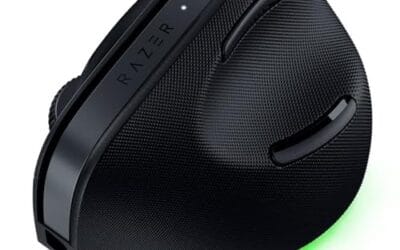
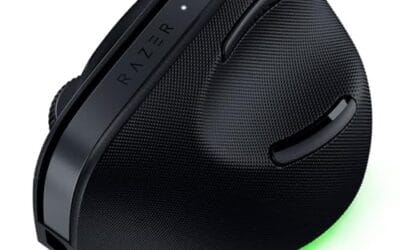
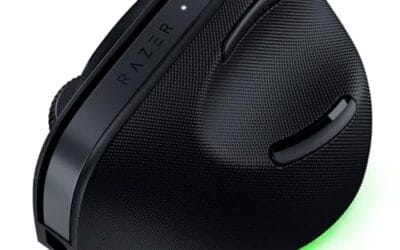
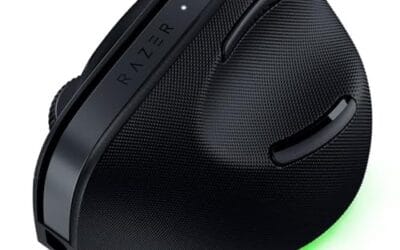
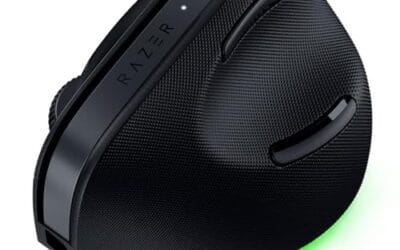
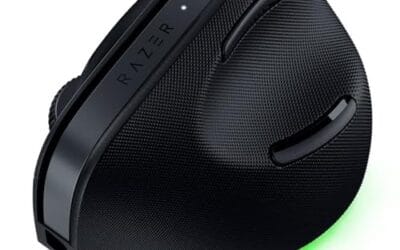
Neither weight is automatically better. A light mouse rewards low-friction movement and quick reactions; a heavy mouse can encourage controlled, deliberate motion. For comfort, shape matters as much as grams. The $113.99 Razer Pro Click V2 Vertical Wireless Mouse, rated 4.7, is a good example of a mouse built around ergonomic posture instead of chasing the lowest possible weight, with a 6-button vertical design, Windows and Mac support, 2.4GHz wireless, Bluetooth, USB-C wired mode, and Chroma RGB.

Pros
- Focus Pro 30K sensor handles glass and reflective desks that trip up older vertical mice
- Battery rated up to 6 months, 5 minute top-up returns roughly 3 working days of use
- Three connectivity modes with up to 5 paired devices covers desktop, laptop, and tablet rotation
Cons
- Limited owner feedback at time of writing, so long-term reliability signal is not yet available
- Vertical handshake shape has a real learning curve for existing claw and fingertip grip users
- Mouse weight and max DPI are not specified in source, hard to gauge fast-tracking responsiveness
The Pro Click V2 Vertical is Razer's ergonomic wireless mouse aimed at knowledge workers and creators who log long sessions on Windows or Mac systems. The 6 button layout adds a dedicated AI prompt key tied into Razer Synapse 4 shortcuts for summarizing text and drafting emails.
The defining trait is the angled handshake shell with a wrist base that lifts your palm off the deck, reducing pronation on long days. Razer's Focus Pro 30K optical sensor handles glass and high-gloss surfaces, which vertical mice at this tier often struggle with due to older 3200 to 12000 DPI sensors.
Trade-offs are honest. Vertical shells force a handshake grip, so claw and fingertip users will fight muscle memory for a week or more. Battery is rated up to 6 months, but 18 zone Chroma with full underglow will cut that hard if you leave reactive lighting on. Mouse weight is not specified.
Buy this if you already know a vertical shape helps your wrist and you need one mouse hopping between a Windows tower, a MacBook, and a tablet over Bluetooth. Skip it if you plan to play competitive FPS titles, since vertical shells punish rapid tracking flicks and micro adjustments.
Sensor: Focus Pro 30K optical sensor with a claimed 99.8% resolution accuracy. Razer uses this same sensor family across its high-end lineup, so tracking on glass, mousepads, and gloss desks is realistic. Max DPI and polling rate are not specified in source data.
Switches and Buttons: Mechanical switches rated to a 60 million click lifecycle. Six total buttons include a dedicated AI prompt key mapped through Synapse 4 for text summarization and email drafting shortcuts on Windows.
Connectivity: Three modes ship in the box: 2.4GHz HyperSpeed via bundled dongle, Bluetooth with up to 3 host pairings, and USB-C wired. Combined device ceiling is 5, letting you rotate between desktop, laptop, tablet, and a secondary machine without re-pairing.
Battery and Charging: Rated up to 6 months under standard test conditions, with 5 minutes of USB-C charging yielding roughly 3 working days. The 18 zone Chroma RGB plus full underglow will cut that figure significantly if reactive lighting stays enabled.
The longer explanation
Mouse weight affects three things you feel every day: startup force, stopping force, and lift effort. Startup force is the push needed to get the mouse moving from rest. A lighter mouse needs less of it, so small finger and wrist motions translate into cursor movement faster. Stopping force works the other way. Once a heavier mouse is moving, you need a little more effort to halt it exactly where you want.
That can be good or bad. In a shooter, less stopping effort helps with fast target switching, especially if you play at low sensitivity and move the mouse across a large pad. In spreadsheet work, photo editing, timeline scrubbing, CAD menus, and browser-heavy tasks, a bit more mass can make the pointer feel planted. Not slower in software, just more anchored in your hand. Tiny motion is filtered by your own muscles and the mouse’s inertia.
There’s also lift-off behavior. Many players lift the mouse to reset position, and every lift adds fatigue over hundreds of movements. A lighter mouse is easier to pick up repeatedly. Heavy mice can feel satisfying for short sessions, but if you’re moving from monitor edge to monitor edge all day, that mass adds up. Your shoulder notices. Your forearm too.
History / how we got here
Older PC mice were often heavier because they had mechanical parts, thicker shells, batteries, or bundled features that added mass. Ball mice needed room for rollers and cleaning access. Early wireless mice could feel brick-like because batteries were large and efficiency was worse. Even later laser gaming mice sometimes leaned into weight cartridges because adjustable heft was marketed as a premium feature.
The modern split came from two directions. Esports pushed mice lighter because players wanted faster flicks and less fatigue on big mouse pads. Office and ergonomic designs went another way, focusing on hand angle, button access, battery life, and stable movement. That’s why a featherweight ambidextrous gaming mouse and a vertical productivity mouse can both be high-end, even though they solve different problems.
Why it works this way
The physics are basic: mass resists changes in motion. If two mice have the same feet, pad, and surface friction, the heavier one needs more force to accelerate and decelerate. Your hand supplies that force through fingers, wrist, forearm, and sometimes shoulder. At high speed, you feel that as drag or stability. At low speed, you feel it as either control or effort, depending on your preference.
Software sensitivity can hide some of this, but it can’t erase the physical feel. Raising DPI or pointer speed makes the cursor travel farther for the same hand movement, yet the shell still weighs what it weighs. A heavy mouse at high sensitivity may reduce travel distance, but it won’t feel like a light mouse. A light mouse at low sensitivity may require more desk space, but each movement needs less force.
Grip style matters too. Fingertip grip gives your fingers more direct control, so a lighter mouse often feels nimble. Palm grip spreads contact across the hand, so extra weight may feel less noticeable. Claw grip sits in between, with enough finger control for speed and enough palm contact for stability. No universal answer. Your grip changes the equation.
When you’d want this
You’d want a lighter mouse if you play fast games, use low sensitivity, make broad arm movements, or often lift the mouse to reset. It’s also helpful if you already feel forearm fatigue from long pointer sessions. Many people who switch to a lighter mouse notice that flicks feel easier right away, though they may need a few days to stop overshooting icons and targets.
You’d want a heavier mouse, or at least a more substantial ergonomic one, if your priority is stable office work, relaxed hand posture, or fewer accidental pointer jumps. Vertical mice are especially relevant here because their main goal is wrist position, not ultra-low mass. The $68.49 Logitech MX Vertical, rated 4.8, is a plain example: it’s a vertical Logitech mouse, not a stripped-down esports shell, and its appeal is comfort-focused positioning for everyday PC use.

Pros
- Limited public review data at time of writing, so verify current owner sentiment before purchase.
- Vertical layout targets wrist pronation strain reported by heavy office and CAD users.
- Bluetooth plus USB receiver gives flexible pairing across laptops, docks, and desktops.
- Four-month typical battery cadence reduces charging friction versus daily-charge gaming mice.
Cons
- Zero visible owner reviews in source, so long-term reliability signal is effectively absent.
- Sensor model, max DPI, poling rate, and weight not specified in source data.
- Vertical shape has a learning curve and does not suit claw or fingertip grip gamers.
The Logitech MX Vertical is an ergonomic productivity mouse aimed at office workers, developers, and creative professionals dealing with wrist or forearm discomfort. It sits in Logitech's mid-range MX ergonomic lineup, offering wireless connectivity through Bluetooth or a USB receiver and cross-platform support for Windows and Mac desks.
The defining feature is the angled vertical shell, which shifts the hand into a more neutral handshake posture and reduces forearm pronation during long sessions. Based on typical vertical-mouse ergonomics, users transitioning from a flat mouse should expect a short adjustment period before cursor precision in tasks like document editing and photo work returns to baseline.
Trade-offs are real at this tier. Logitech does not publish sensor model, max DPI, polling rate, or weight in the provided source, which maters for buyers comparing tracking specs. The shape also favors palm grip, so claw and fingertip users, and gamers chasing esports poling rates, will find it a por fit versus a symetrical gaming mouse.
Buy this if you spend long hours in office aps, code editors, or creative suites and want a vertical grip with dual Bluetooth and USB receiver support. Skip this if you need documented gaming-grade sensor specs, low click latency, or a shape optimized for claw and fingertip grip styles.
Sensor and DPI: Logitech lists only an unspecified optical sensor in the source, with no max DPI, polling rate, or lift-off distance provided. MX-series ergonomic mice at this tier typically ship with 400 to 4000 DPIranges tuned for office precision rather than the20000-plus DPI figures sen on gaming rivals.
Wireless connectivity: Dual-mode support covers Bluetooth Low Energy and a 2.4GHz USB receiver, letting one mouse move between a docked laptop and desktop without repairing. Wireless latency is not specified, but Logitech ergonomic mice at this tier areuned for productivity, not competitive first-person shooter response windows.
Battery life: Rated at roughly four months of typical use on a full charge, which lines up with once-per-quarter charging cadence for eight-hour workdays. Actual runtime will drop with heavy Bluetooth use, higher DPI settings, or frequent wake cycles across multiple paired devices during the day.
Shape and grip fit: The vertical shell is engineered around a palm grip with angled thumb rest. Weight, length, and grip width are not specified in the source, so hand-size fit should be validated in person, especially for users with hands under about 17 centimeters.
What to look for in a mouse weight
Start with your main use. For competitive FPS, a light mouse usually makes sense, especially if you run a large pad and low sensitivity. For general productivity, don’t chase grams first. Prioritize shape, button placement, scroll feel, wireless mode, and whether the mouse keeps your wrist relaxed. For mixed use, a midweight design often feels safer than an extreme.
Also check the whole setup. Mouse feet, pad texture, desk height, pointer speed, and cable drag can change how weight feels. A mouse bungee can make a wired mouse feel lighter by removing cable pull, which is why our best mouse bungee guide matters for wired setups. Wireless mode also matters: 2.4GHz dongles are common for responsive use, while Bluetooth is convenient for multi-device work. The Razer model above lists 2.4GHz, Bluetooth, and USB-C wired mode, which is useful if you bounce between a desktop, laptop, and dock.
Common misconceptions
The first misconception is that light always means cheap or flimsy. Some light mice are carefully engineered with thin shells, low-mass wheels, compact batteries, and efficient internals. Others cut corners. Weight alone doesn’t prove build quality. You need to judge shape, clicks, coating, warranty, sensor behavior, and whether the shell flexes under normal grip pressure.
The second misconception is that heavy always means more accurate. Accuracy comes from sensor behavior, surface consistency, hand control, and settings. A heavy mouse can feel more stable, but it doesn’t magically track better. Likewise, an ultralight mouse won’t make poor aim disappear. It just reduces the effort needed to move and stop.
The third misconception is that ergonomic mice must be heavy and gaming mice must be light. Plenty of ergonomic mice are moderate in weight, and some gaming mice still feel substantial because of larger shells, extra buttons, or batteries. If you’re exploring wrist-friendly shapes, the best ergonomic vertical mouse options are worth comparing against standard shapes rather than judging them by grams alone.
Frequently asked
Is a lighter mouse better for gaming?
Often, yes, especially for fast FPS games where quick flicks and repeated lift-offs matter. A lighter mouse needs less force to move and stop, so it can feel faster during aim corrections. That doesn’t mean every gamer should buy the lightest shell available. If you play strategy games, RPGs, MOBAs, or casual titles, shape and buttons may matter more.
Is a heavy mouse better for office work?
A heavier mouse can feel calmer for office work because small accidental hand movements don’t move it as easily. That helps with spreadsheets, document editing, and multi-monitor setups. Still, comfort is mostly about shape, grip, desk height, and wrist angle. If a heavy mouse makes your forearm tired, it’s the wrong fit.
Can I just change DPI instead of changing mouse weight?
You can adjust DPI to change cursor distance, but DPI doesn’t change the physical effort needed to move the mouse. Higher DPI can make a heavy mouse require less desk travel, which may help. It won’t make the shell easier to lift, accelerate, or stop. The feel remains different.
What mouse weight should beginners choose?
Most beginners should avoid extremes. A very light mouse can feel jumpy at first, while a very heavy mouse can feel tiring during long sessions. Pick a shape that fits your hand, set a sane pointer speed, and give yourself a week to adapt. Then you’ll know if you want more speed or more stability.
Does mouse weight affect wrist pain?
It can, but it’s only one factor. A heavy mouse may increase effort if you lift and reposition often, while a very light mouse may encourage tense over-control for some users. Wrist angle, grip pressure, desk height, breaks, and vertical versus standard shape can matter more. If pain persists, don’t treat a mouse swap as medical advice; adjust your setup and consider professional guidance.



























Write Your Review
No reviews yet. Be the first to share your experience!