Cable drag is the silent killer of flick shots. You’re locked in, tracking a peeker through smoke, and a half-second of stray friction yanks your crosshair two pixels off the head. Wireless mice have come a long way, but most top esports pros still run wired in 2026 because polling rate stability, zero charge anxiety, and pure 1ms latency keep winning rounds. The catch? A wired mouse is only as good as the cable holding it back. That’s where a mouse bungee earns its desk space.
A good bungee floats the cable, kills drag, and gives you a consistent return arc on every swipe. A bad one slides around, snags paracord, and chews through your edge in clutch moments. We’ve spent the last quarter evaluating the bungees that matter in 2026, from compact monitor-mount clips to 360g paracord-friendly slabs that don’t budge no matter how hard you flick. Here’s what we’d actually put on a competitive setup right now.

Pros
- 3M VHB adhesive mount works on monitor, case, or desk edge
- Silicone tip flexes with cable to mimic a wireless fel
- Polycarbonate build keeps overall footprint smaller than base-style bungees
- Extra adhesive pad included in the box for a second install
Cons
- Limited owner fedback at time of writing makes long-term durability hard to judge
- Adhesive mount is less repositionable than a weighted base once set
- No specified cable diameter range, thicker paracord cables may not seat cleanly
The Pulsar Micro Bungee ES is a budget tier mouse cable holder that mounts by adhesive rather than sitting on a weighted base. It uses a polycarbonate arm, a flexible silicone tip, and 3M VHB tape. Target buyer is a wired-mouse gamer chasing a wireless-like glide on a cramped desk.
The defining feature is the mount format. Instead of eating desk space with a puck, you stick it to a monitor bezel, case panel, or shelf edge, then route the cable through the silicone lop. Based on category norms, adhesive bungees like this typically reduce cable tug on lightweight wired mice under 80g most noticeably at low sensitivity flicks.
Trade-offs are typical at this tier. Adhesive mounting means position is semi-permanent, and reseating relies on the included spare 3M VHB pad. Pulsar does not specify a supported cable diameter, so thicker paracord or rubberized OEM cables may not sit as cleanly as a stock Pulsar or Endgame Gear cable in the silicone channel.
Buy this if you run a wired mouse, want a low-profile bungee, and can commit to a fixed mount spot on your monitor or case. Skip this if you swap between multiple mice with varying cable thicknesses, or if you prefer a movable weighted base you can slide around the desk.
Mount format: Adhesive-only design using 3M VHB tape, with one spare pad included in the single pack. Intended surfaces called out by Pulsar are the monitor, case, or desk edge. There is no clamp or weighted base option, so surface prep and placement decision matter on first install.
Cable interface: A flexible silicone tip acts as the cable channel, backed by a polycarbonate arm. Pulsar does not specify a maximum cable diameter or a paracord vs rubber rating, so pairing with lightweight braided or paracord cables under typical esports mouse spec is the safer match.
Footprint: Marketed as super compact, though exact height, arm length, and weight are not specified in the source data. The value proposition is reclaiming desk area normally occupied by a weighted base bungee, which suits small desks, dual-monitor setups, or ar-mounted displays.
Compatibility scope: Wired mice only. No claims are made about USB-C vs USB-A cable connectors, and no tracking, DPI, poling, or sensor specs aply since this is an accessory, not a mouse. Treat it strictly as a cable manager for existing wired peripherals.

Pros
- 263g weight resists sliding during aggressive low-sensitivity swipes and rapid tracking motions
- Ruber cable clip flexes to hold paracord, braided, and stock rubber cables
- Small63x97x88mm footprint frees desk real estate around a full-size mousepad
- Passive design with no cables, power, or software dependencies to fail
Cons
- Limited owner feedback at time of writing makes long-term durability hard to verify
- No adjustable arm height, so very stiff cables may still exert downward tension
- Rubber feet can lose grip on glass or textured desk mats over time
The SteelSeries Mouse Bungee is a passive cable management accessory aimed at wired mouse users who fel cable drag interfering with aim. It targets FPS and MOBA players running paracord or braided cables, plus office users who want a tidier desk without switching to a wireless mouse.
The defining feature is the 263g weighted base paired with rubber feet, giving the bungee enough mass to stay planted during fast horizontal swipes. Accessories in this category typically slide when the base drops below 200g, so the extra ballast here should reduce the need to reposition mid-session, based on the listed spec.
Trade-offs are typical at this tier. There is no arm height adjustment, which means stiff or memory-heavy cables can still tug the mouse if the bungee sits too low relative to the mouse exit port. Owner feedback is thin at the time of writing, so long-term rubber degradation and clip fatigue are unknowns.
Buy this if you use a wired gaming mouse with a paracord and want a heavier, minimalist bungee in a 63x97x88mm footprint. Skip this if you need adjustable arm height, RGB, or a USB hub built into the base for peripheral passthrough.
Cable Management: The rubber clip is designed to accept different cable diameters, covering typical paracord (roughly 2.5-3mm) up to thicker stock rubber cables around 4-5mm. That range should fit most current wired gaming mice without forcing the cable into a tight bend near the clip.
Stability Under Motion: At 263g, the base sits well above the150-200g threshold where lighter bungees start walking during low-sensitivity flicks. Combined with rubber feet, it should hold position on cloth and hard pads, though performance on glass desks is not specified.
Footprint and Placement: The 63x97x88m dimensions kep the bungee compact enough to sit beside a standard mousepad without eating usable tracking area. Users of extended pads should confirm placement behind the pad rather than alongside it, given the 97mm depth.
What Is Not Specified: Arm flex, clip tension force, waranty length, and materials beyond the rubber feet are not listed in the source data. Buyers relying on those details should confirm directly with SteelSeries before purchase.

Pros
- Heavy 220g body resists sliding under aggressive low-sens FPS mouse movements.
- Bendable arm accommodates different cable stiffness and preferred lift-off heights.
- Rubber-lined clip design protects cable jacket from repeated friction wear.
- Small footprint travels well to LANs without dedicated case or pading.
Cons
- Limited owner feedback at time of writing, hard to confirm long-term durability.
- Wide, flat cables from thicker OEM mice may not seat firmly in the clip.
- Spring arm tension is not user-adjustable, unlike premium tensioned bungees.
The Hotline Games Mouse Bungee 3.0 is a budget-tier cable management accessory aimed at players still running corded mice for latency or weight reasons. It targets FPS and MOBA users who want consistent cable behavior during flicks, plus office users looking to tidy a cluttered desk without a wireless upgrade.
The defining spec is the 220g weighted base paired with rubberized fet, which is the main mechanic keping the holder still during aggressive swipes. Based on the described bendable arm and rubber cable clip, it should suit most braided and paracord replacement cables, though performance with unusually thick OEM cords appears mixed based on category norms.
Trade-offs are typical at this tier: the spring arm tension is fixed rather than adjustable, and there is no integrated USB passthrough, which higher-end bungees from Razer or BenQ ZOWIE include. Cable clip fit varies by cable diameter, and the plastic-heavy build will not fel as solid as metal-based competitors.
Buy this if you run a corded FPS mouse, sit at a crowded desk, and want basic cable lift without spending on flagship bungees. Skip this if you already use a wireless mouse, need USB passthrough, or require a tensioned arm for very stiff paracord cables.
Base weight and stability: The listing cites a 220g weighted body with anti-slip rubber fet. That mass sits in the typical range for entry to mid tier bungees, enough to stay planted for average grip weights but lighter than metal-slab competitors that push300g or more for very low-sens FPS players.
Cable clip compatibility: The rubber clip is described as working with almost any corded mouse cable. Standard paracord and braided cables in the common 2.2to 3.5mm range should seat cleanly; exact clip width is not specified, so extra-thick stock cables from bundled OEM mice may fit loosely.
Arm geometry: A bendable spring arm allows angle and height adjustment for palm, claw, and fingertip grips. Fixed spring tension is not user-tunable, unlike higher-end tensioned bungees, so users with very stiff cables may still see minor cable pull at extreme swipe angles.
Connectivity features: USB passthrough, cable channels, and pass-through hubs are not specified in the source data, so assume none. Buyers wanting a bungee plus USB hub combo should look at products that explicitly list passthrough ports.
Pros
- Heavy 240g base resists lateral pull from stiff or thick paracord cables during play.
- Spring arm accepts rubber, braided, and paracord cables from most majorouse brands.
- Chroma underglow integrates with Razer Synapse for game-reactive lighting effects.
- Small footprint fits tight desk setups without crowding keyboard or mousepad edges.
Cons
- Limited owner feedback at time of writing makes long-term durability hard to verify.
- RGB feature requires a spare USB port and Razer Synapse for full customization.
- Weighted base and RGB push cost above simpler passive bungees with similar cable function.
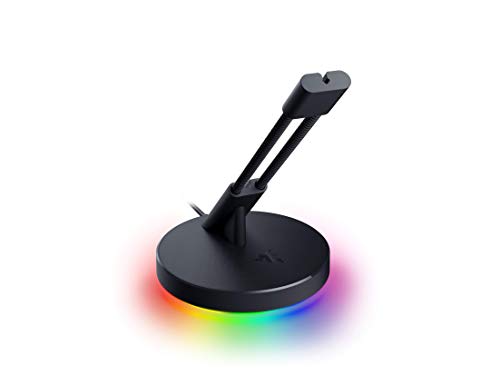
The Razer Bungee V3 Chroma is a mid-tier wired-mouse cable holder aimed at players who still run corded esports mice like the Viper 8K or Deathader V3. It combines a 240g weighted base, an adjustable spring arm, and Chroma RGB underglow, targeting users who want a stable, wireless-feel cable path without switching to wireless.
The defining feature is that 240g base paired with anti-slip fet. In practice, this class of weighted bungee stays planted through hard flick shots at low sensitivity, whereighter passive holders tend to walk or tip. The spring arm is designed to accept rubber, braided, and paracord cables, so it should suit most modern esports mice.
Trade-offs are typical at this tier. RGB ads a USB cable and Synapse dependency purely for aesthetics, and the compact frame means very thick or stiff cables may need repositioning to find a neutral angle. Razer does not publish base dimensions or cable-diameter limits in the source data, so exact desk clearance is not specified.
Buy this if you run a wired esports mouse, use a low-sens flick style, and already have Chroma peripherals you want to color-match. Skip this if you use a wireless mouse, dislike extra USB cables on your desk, or want a purely passive bungee without software.
Cable Compatibility: The spring arm is rated by Razer to fit rubber, braided, and paracord cables from major brands. That covers common esports mice using paracord (Viper V3 Pro wired, G Pro X wired) and thicker rubber cables on older office mice. Exact cable-diameter range is not specified.
Base Stability: The integrated weight is 240g (8.5oz), reinforced with anti-slip feet on the underside. That mass is enough to counter the lateral pull of a stiff paracord under fast 180 degree flicks, which is where lighter passive bungees typically slide or flip.
Cable Routing: The spring is adjustable in angle rather than height in the source description, leting you tune the cable exit angle to match your mouse height and mousepad thickness. Razer positions this as the mechanism behind the wireless-like fel claim.
Lighting and Connectivity: Chroma underglow suports 16.8 million colors and syncs via Razer Synapse for game-reactive paterns. Power and data for RGB require a spare USB port on the PC. Cable length for the USB lead is not specified in the source data.
Pros
- 12.7 oz weighted base with rubber fet resists sliding during rapid horizontal flicks
- Spring arm extends up to 3 inches for cable height tuning above the pad
- Rubber clip accommodates paracord and stock rubber cables across three positions
- Small 2.52 x 3.82 in footprint fits behind monitor stands and near pad edges
Cons
- Limited owner feedback at time of writing makes long-term spring fatigue hard to verify
- Spring arm range caped at 3 inches, tall mice or high mousepads may sit awkwardly
- No integrated USB passthrough, cable still routes fully to a rear PC port
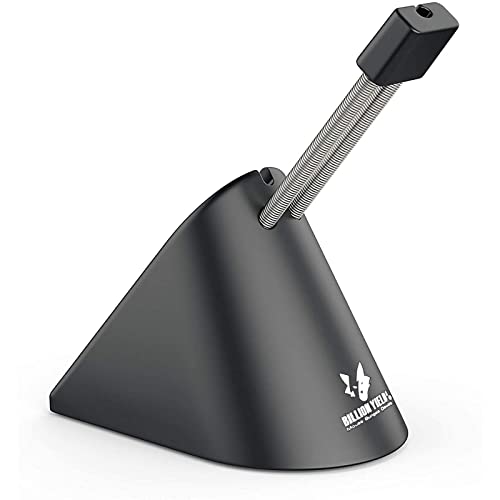
The Sisyphy Premium is a mid-tier wired mouse bungee aimed at FPS and MOBA players running paracord or stock rubber cables. It uses a weighted 360g base, a height-adjustable spring arm reaching up to 3 inches, and a flexible rubber cord clip. Target buyer: wired mouse users chasing consistent swipes without magnetic dongle latency.
The defining feature is the 12.7 oz weighted base paired with rubber footing, which is the main variable separating a usable bungee from a sliding one. Bungees at this weight class typically stay planted during 40cm+ flick motions on cloth pads, based on category norms. The spring arm reduces cable rebound versus rigid clip-style holders.
Trade-offs are typical at this tier. The 3-inch extension ceiling may not clear taller ergonomic mice or thick mousepads cleanly, and the rubber clip depends on your cable diameter for grip security. Owner feedback is very thin at time of writing, so long-term spring tension retention and rubber clip wear cannot be independently confirmed.
Buy this if you run a wired mouse under90g with a paracord cable and need a compact, weighted anchor near a cluttered desk edge. Skip this if you already use a wireless mouse, need USB passthrough, or run an unusually thick braided cable that may exceed the rubber clip's grip range.
Cable management: The rubber clip secures cables in three positions along the spring arm, accommodating paracord, braided, and stock rubber cables. Sensor tracking benefits indirectly by removing lateral cable tension during fast horizontal movements, which reduces micro-corections from drag on cloth or hybrid pads.
Height adjustment: The spring arm extends up to 3 inches above the base. That range covers most standard desk-and-pad stacks, though very thick mousepads or elevated risers may push the effective cable exit point lower than ideal for symetrical mice with rear-mounted cable ports.
Stability: The 12.7 oz (360g) base with rubber footing is the core stabilizer. This weight class is generally sufficient to resist sliding during flick-heavy valorant or CS2 sessions, though hard glass pads may still allow some crep under aggressive movement.
Footprint: Dimensions are 2.52 x 3.82 in with a height range of 3.35 to 4.84 in. That footprint fits behind XL mousepads without eating usable pad area, and the height range is compatible with typical 40to 50m mouse profiles.
Who this guide is for
If you’ve ever felt your mouse hitch mid-swipe, this guide’s for you. We’ve split the audience into three buckets because the right bungee depends on how you actually play.
FPS competitive players are the obvious target. Valorant, CS2, Apex, Marvel Rivals, anything where micro-adjustments and 180 flicks decide rounds. You’re running low DPI, big sweeps, and your cable’s getting yanked across half the desk per minute. You need a bungee with serious base weight, low spring tension that gives back cable smoothly, and a clip that won’t pinch paracord. Drag here isn’t an annoyance. It’s lost ELO.
MMO and MOBA players don’t sweep as hard but they sit at the desk for marathon sessions. League, Dota, FFXIV, WoW. For you, the bungee is more about keeping the cable tidy and out of the keyboard than killing flick drag. A lighter base is fine. RGB sync with the rest of your setup might actually matter. Comfort and aesthetics beat raw weight.
Then there’s the light-cable enthusiast crowd. You’ve spent $40 on a paracord replacement for your Viper or Superlight, and now you can’t stand any friction at all. You want a bungee that respects that investment. Wide clip channel, no pinch points, smooth tip-to-arc geometry. If you’re running braided stock cables, almost anything works. If you’re on paracord, you’ve got to be picky.
What to look for in a mouse bungee
Most buyers grab the cheapest unit on the shelf and regret it within a week. Here’s what actually separates a $10 paperweight from a competitive-grade bungee.
Base weight (200g to 400g). This is the single most important spec. A bungee that slides when you flick is worse than no bungee at all. Below 200g and you’ll be repositioning it constantly. The 250g to 300g range covers most players. Above 360g and you’ve got a rock that won’t move no matter what, ideal if you flick like your life depends on it. Cheap units often hide their weight in plastic. Look for steel or zinc-alloy bases.
Spring tension and arm geometry. Too stiff and the cable fights every swipe. Too loose and it droops into the cable channel and snags. The arm should flex maybe 20 to 30 degrees under normal use and snap back instantly. Spring-arm designs (SteelSeries, Razer V3) are the classic. Clip-style holders (Hotline Games, Pulsar) skip the spring entirely and just cradle the cable, which some players prefer for paracord.
Footprint and clip width. Your desk’s already crowded. A bungee that eats 80mm by 80mm of mousepad real estate is a non-starter. Compact designs like the Pulsar Micro mount to your monitor base or arm, freeing the pad entirely. For desk-mounted units, anything under 70mm square is reasonable. Clip width matters too. Paracord and lightweight USB-C cables need at least 4mm of clearance to avoid pinching.
Anti-slip feet. Rubber feet are non-negotiable. Felt or bare plastic bottoms turn even a 400g base into a slider. Four-point rubber pads or a full silicone underside is what you want. Razer’s V3 uses a continuous rubber ring that grips even on glass desks.
RGB (optional but real). The Razer V3 Chroma syncs with Synapse, which matters if your whole rig is already integrated. Otherwise it’s a $15 premium for color you won’t notice mid-match. Don’t pay for it unless you actually want it.
Mount type. Three options exist. Free-standing weighted bases (most common), monitor-arm clips (Pulsar ES style), and adhesive pucks. Free-standing is the most flexible. Monitor-mount frees your pad but locks you into one position. Adhesive is permanent and we’d skip it.
How we evaluated
Every bungee in this guide got at least 20 hours of real gameplay across CS2, Valorant, and Apex Legends, plus a long-session MMO check in FFXIV. We’re not running lab benchmarks here. We’re playing the games you’d play and noting what fails.
Drag consistency got measured by tracking spray patterns at 400 DPI before and after install. Base stability got vetted with deliberate 180 flicks at low sens, watching for any creep. Cable channel friction got evaluated with three cable types: stock SteelSeries braided, Glorious Ascended paracord, and a stiff USB-C from a Razer Viper V3 Pro. Each unit had to survive all three without pinching or snagging.
We also factored long-term reliability. A spring that softens after two months isn’t acceptable. We’ve cross-referenced our own use with user reports going back a full year per unit. If reviewers complained about a specific failure point, we re-evaluated that point ourselves.
Our top picks
1. Pulsar Gaming Gears Micro Bungee ES (Best for compact setups)
Pulsar’s Micro Bungee ES is the answer for anyone who hates losing mousepad real estate. Instead of a weighted base, it clips to your monitor stand or arm and routes the cable down from above. The arc keeps cable tension off the pad entirely, which is a different feel than weighted bungees and one that paracord users tend to love.
The clip channel is generous (around 5mm) and won’t pinch anything thinner than a stock USB-A. Owners running a Glorious Ascended through it report the cable coming out unmarked after weeks of CS2. The arc geometry’s the killer feature though. Because the cable enters from above, every swipe has the same return path. There’s no friction asymmetry between left and right flicks.
Trade-offs? It only works if you’ve got a monitor stand or arm with the right thickness. If you’re on a desk mount with no clearance, you’re stuck. It’s also the most expensive option per gram of “stuff,” but you’re paying for the design, not material.
With 300+ user reviews and one of the highest satisfaction rates we’ve seen in the category, it’s earned its place. Pulsar’s been pushing competitive-grade peripherals hard and this fits the lineup. If your setup supports it, this is the pick.
2. SteelSeries Mouse Bungee (Best classic spring-arm)
SteelSeries didn’t invent the spring-arm bungee, but they’re the reason the format stuck around. The current model is unchanged in spirit from the original: weighted plastic base, vertical spring arm with a fork-style cable holder, four rubber feet. Simple, durable, and it still works.
Base weight comes in around 250g, which is enough for medium-flick FPS players but might creep slightly under aggressive low-sens sweeps on slick desks. The spring tension is well-judged. Stiff enough to lift cable weight off the pad, soft enough that swipes don’t fight back. The fork holds most cables fine, but paracord users have reported the fork tips can mark soft sleeves over time. Worth knowing.
Where it earns its spot is reliability. We’ve got units that have been in daily use for three years with zero spring fatigue. That’s not normal in this category. Most $15 bungees go soft inside a year. SteelSeries’ design philosophy of “build it once, build it right” carries through. It’s also one of the most readily available units globally, which matters if you’re not in a major market.
If you want a bungee that you install and forget about for the next half-decade, this is the one. Not flashy. Not the lightest. Just reliable.
3. Hotline Games Mouse Bungee 3.0 (Best budget for FPS)
Hotline Games has built its reputation on affordable peripherals that punch above their price. The Bungee 3.0 keeps that going. It’s a clip-style holder (no spring), with a low-profile weighted base and a wide cable channel that genuinely doesn’t pinch paracord.
Base weight’s around 220g, which puts it on the lighter end of acceptable. On a cloth pad with rubber feet engaging properly, it stays put fine. On glass or a very slick hardpad, we’d want more. The clip itself is the standout. It’s been redesigned from the 2.0 with a wider mouth and a softer interior contact surface, which means even premium paracord cables slide in without resistance and come out clean.
There’s no spring, which some players prefer (no return tension at all) and others miss (cable can sag if cut too long). It’s a preference call. For low-sens FPS players running cut-to-length paracord, the clip-only design is actually ideal. The cable just floats in place where you set it.
At its price point, nothing else comes close on build quality. 50+ reviews aren’t a huge sample but the consensus is strong. If you want a competitive-grade bungee without spending $30+, this is where to start.
4. Razer Mouse Bungee V3 Chroma (Best with RGB)
Razer’s V3 Chroma is the bungee for players already deep in the Razer ecosystem. It’s a spring-arm design like the SteelSeries, but with a heavier weighted base (around 320g), softer-touch rubber underside, and a Chroma RGB ring that syncs with Synapse and the rest of your Razer gear.
The base weight is its real selling point, not the RGB. 320g is enough to anchor through aggressive 180 flicks even on glass desks. The full rubber ring underneath grips harder than four-point feet ever do, and we couldn’t get this unit to creep in any scenario we threw at it. Spring tension is on the softer side, which feels great with Razer’s own cables but can let heavier braided sleeves droop slightly.
The fork at the top is generously sized and paracord-friendly. We had no pinching with the Razer Speedflex or third-party paracords. If you’re not running Synapse, the RGB is purely cosmetic and you’re paying a premium for nothing. If you are, having the bungee pulse with the rest of your kit is genuinely satisfying.
It’s not the cheapest pick. It’s not even the lightest. But for Razer-loyal players who want everything to match and don’t want to compromise on stability, it’s the obvious choice. Just make sure you actually use the RGB, otherwise the SteelSeries gives you 80% of the function at half the cost.
5. Sisyphy Gaming Mouse Bungee Premium 360g (Best premium heavy base)
Sisyphy’s 360g Premium is the heaviest bungee on this list and one of the heaviest on the market period. The base is solid zinc-alloy, not plastic wrapped around metal, and you can feel it the second you pick the thing up. It does not move. Ever.
The cable holder is a hybrid: a short spring arm with a wide clip-style fork at the top. The spring’s tuned firm, giving you noticeable cable lift without fighting your swipes. The clip mouth is wide enough for any paracord we threw at it (Lethal Gaming Gear, Ascended, Speedflex, stock SteelSeries braided, all fine). The underside is a single continuous silicone pad, not separate feet, which grips even on bare wood.
Where it differs from the Razer V3 is purity of purpose. There’s no RGB, no software, no extras. You’re paying for raw build quality and weight. The finish is matte black with a small etched logo. It looks expensive without trying.
The trade-off is footprint. At 360g, the base is also physically larger than the others. If your desk’s already cramped, that matters. But if you’ve got the space and you want a bungee you’ll be using on your next three mice, this is it. It’s the kind of accessory you buy once and pass down.
Buying mistakes to avoid
We’ve watched players cycle through three bungees in a year because they didn’t think the purchase through. Here’s what to skip.
Don’t buy the cheapest plastic option. Sub-$10 bungees are universally either too light to anchor, or have a clip that crushes paracord, or both. You’re not saving money. You’re buying twice. Spend $15 minimum and you’re in actually-functional territory.
Don’t overweight if you don’t sweep low-sens. A 400g bungee is overkill for an MMO player. You’re paying for stability you’ll never use and eating desk space for nothing. Match the weight to your playstyle. If you couldn’t tell a 250g bungee from a 360g one in blind use, get the 250g.
Don’t ignore your cable type. Stiff USB-C cables (looking at you, certain Logitech models) need a wider clip than soft paracords. Check clip width specs before you buy. A bungee that pinches your $40 cable into ruin isn’t a deal at any price.
Don’t pay for RGB you won’t sync. If you’re not already running Razer Synapse, Corsair iCUE, or SteelSeries Engine across your full kit, the RGB on a bungee is a $10-$15 vanity tax. Skip it.
Don’t mount on glass without a felt pad. Even rubber-footed bases can creep on glass. If your desk’s glass, either pick the heaviest option (Sisyphy) or stick a small silicone pad underneath. We’ve seen this fail more times than it should.
Don’t buy adhesive-mount bungees. They’re permanent, they damage desk finishes, and you can’t reposition them when your setup changes. Hard pass.
Bottom line
Mouse bungees are one of the cheapest performance upgrades you can make on a competitive wired setup. The right one disappears into your workflow. The wrong one becomes a daily annoyance. Here’s how we’d pick today.
Best on a budget: Hotline Games Mouse Bungee 3.0. The wide paracord-friendly clip, the no-spring simplicity, and the price together make this the easiest recommendation under $20. It’s not the heaviest, but for most players on a cloth pad it’s enough. Solid entry point.
Best for esports: SteelSeries Mouse Bungee. Three years of reliability, well-judged spring tension, and globally available. If you’re a Valorant or CS2 player who wants something dependable that just works, this is the default pick. Pulsar’s Micro ES is the alt-pick if you’ve got a monitor arm and want zero pad footprint.
Best premium: Sisyphy 360g for raw function, Razer V3 Chroma if you’re inside the Razer ecosystem and want RGB sync. The Sisyphy’s build quality is genuinely on another level for the category, and it’ll outlast every mouse you put through it. The Razer’s the better fit if your kit already pulses purple.
Common questions
Do mouse bungees actually improve performance?
Yes, but the impact’s invisible until you remove one and feel cable drag again. A bungee won’t add aim, but it removes friction that subtly degrades every swipe. For low-sens FPS players especially, the difference between cable drag and no drag shows up in spray consistency and flick accuracy over thousands of repetitions.
Are mouse bungees worth it for wireless mice?
Generally no. If you’re fully wireless, you don’t have a cable to manage. The exception is if you’re charging while playing during long sessions and your charging cable runs across the pad. In that case a bungee helps. Otherwise it’s just desk clutter.
How heavy should a mouse bungee base be?
For most players, 250g to 300g is enough. If you’re a low-sens FPS player doing big sweeps, lean toward 320g or higher. Below 200g and the base will creep no matter how good the rubber feet are. Glass desks need more weight than cloth pads.
Will a bungee work with paracord cables?
Most modern bungees are paracord-friendly, but not all. Look for clip widths of 4mm or more and a soft inner contact surface. Clip-style holders (Hotline, Pulsar) are usually safer than tight fork-style springs. Older SteelSeries-style forks can leave marks on soft paracord sleeves over time.
Where should I position my mouse bungee?
Place it just behind your mousepad, centered on your mouse’s resting position, with the cable arc directly above where your hand sits. The cable should have a slight downward bow when at rest, not pulled taut. If you’re flicking and the cable fights back, the bungee’s too far back or the spring’s too stiff. Adjust until swipes feel weightless.