

The Logitech G502 X LIGHTSPEED is the best Logitech gaming mouse for most right-handed players who want extra controls. It gives your thumb more to do than go back and forward, and the wheel can switch between distinct steps and free spinning. It makes sense for a PC you use for games, browsing, and work.
If you play shooters at low sensitivity and keep lifting your mouse to get back to the middle of the pad, start with the 60 g PRO X SUPERLIGHT 2 instead. On a tighter budget, buy the wired G203 LIGHTSYNC. The G309 LIGHTSPEED is the pick for switching between a gaming PC and a Bluetooth laptop, while the PRO 2 LIGHTSPEED puts usable thumb buttons on either side.
Start with the job you need the mouse to do. A lighter shell, more shortcuts, and a second wireless mode are three different reasons to pay more. It’s rare to need all three.


Pros
- HERO 2 sensor tracks above 888 IPS with no smoothing, acceleration, or filtering applied
- 60g weight suits fingertip and claw grip players during extended competitive sessions
- 8kHz report rate paired with 95-hour battery balances responsiveness against runtime
Cons
- Limited owner fedback at time of writing, verify long-term reliability and shape fit first
- Only 5 programmable buttons, MMO players and productivity users will want more inputs
- POWERPLAY wireless charging mat sold separately, adds meaningful cost to theecosystem
The Logitech G PRO X Superlight 2 is a flagship wireless gaming mouse aimed at competitive FPS players. Weighing 60g with five programmable buttons and USB-C charging, it targets Valorant, CS2, and Overwatch players who prioritize sensor accuracy and minimal drag over side-button MMO functionality or ergonomic shell shaping.
The HERO 2 sensor is the defining upgrade, rated for 44,000 DPI and tracking above 888 IPS with zero smoothing, acceleration, or filtering. Paired with 8kHz polling over the LIGHTSPEED wireless link, cursor response should feel closer to a wired mouse, based on Logitech's stated specifications and typical HERO-family behavior.
Trade-offs are typical at this tier. Only five buttons limit MMO and productivity remapping, and POWERPLAY wireless charging requires the separately sold mat. The 8kHz polling rate draws more battery and CPU cycles than 1kHz, so USB dongle placement and 1000Hz fallback matter for owners running older systems.
Buy this if you play competitive FPS at high sensitivity and want a sub-65g mouse with the proven Superlight footprint and HERO 2 tracking. Skip this if you need six or more side buttons, prefer honeycomb or ergonomic shells, or your workflow does not benefit from polling rates above 1000Hz.
Sensor: HERO 2 optical with up to 44,000 DPI, 888+ IPS tracking speed, and zero smoothing, acceleration, or filtering per Logitech's spec shet. Precise sensor calibration maters for low-sens FPS players who typically run400 to 1600 DPI and need consistent cm/360 across DPI steps.
Polling and Latency: 8kHz report rate over LIGHTSPEED wireless, up from 1kHz on the original Superlight. Real-world benefit varies by monitor refresh rate; players on 240Hz and360Hz displays with strong GPUs will notice the smoother cursor path more than 144Hz users on mid-range hardware.
Shape, Weight, Switches: 60g chassis with five programable buttons tuned for claw and fingertip grips. LIGHTFORCE hybrid optical-mechanical switches deliver a tactile click with reduced debounce delay, and zero-additive PTFE feet provide consistent glide out of the box without needing aftermarket skates.
Power and Connectivity: 95-hour battery life with USB-C charging, replacing the micro-USB port on the original. POWERPLAY compatibility allows continuous wireless charging via the separately sold mat, useful for players who leave the mouse on standby between sessions rather than docking it.


Best Logitech gaming mice at a glance
| Pick | Mouse | Defining feature | Best for | Main tradeoff |
|---|---|---|---|---|
| Best overall | G502 X LIGHTSPEED | 13 programmable controls | Right-handed players who want extra binds and a versatile wheel | Wide thumb-rest shape |
| Best lightweight FPS pick | PRO X SUPERLIGHT 2 | 60 g wireless body | Wide swipes and frequent lifts | High price for a simple layout |
| Best budget wired | G203 LIGHTSYNC | Compact six-button design | A simple setup on a tight budget | Fixed cable |
| Best for USB and Bluetooth | G309 LIGHTSPEED | USB receiver plus Bluetooth | A gaming desktop and a second computer | Uses a replaceable AA in normal use |
| Best for left-handed play | PRO 2 LIGHTSPEED | Swappable magnetic side buttons | Left-handed players who use thumb binds | Costs more than the everyday picks |
1. Logitech G502 X LIGHTSPEED — Best overall
Choose the G502 X LIGHTSPEED if you already know what you’d put on extra buttons. A thumb input can handle push-to-talk or a utility action while your keyboard hand stays on movement. The wheel tilts left and right for two more assignable inputs. You can also switch from stepped scrolling for picking an item to free spinning for getting through a long page.
The right-handed shell is 131.4 mm long and 79.2 mm across at its widest. That width includes the thumb rest, so compare where your fingers actually sit on your current mouse. The DPI-shift button can be reversed to bring it closer or covered with the included blank if it’s in the way. Logitech includes a LIGHTSPEED USB-A receiver and a USB-C charging cable.
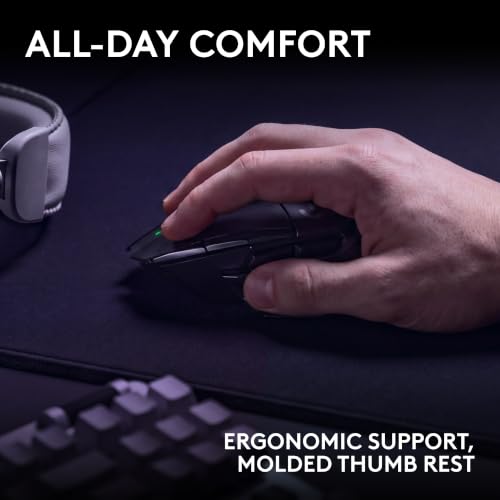
The wide shell has a clear tradeoff. If you grip mainly with your fingertips or pull the mouse back with your fingers during an aim correction, the thumb rest takes up space you may want clear. And 13 controls can be overkill if you use two thumb binds. For a smaller mouse that still travels between computers, start with the G309.
2. Logitech G PRO X SUPERLIGHT 2 — Best lightweight FPS pick
The 60 g PRO X SUPERLIGHT 2 makes the strongest case when your mouse spends part of a match in the air. At low sensitivity, you’re more likely to reach the edge of your pad and lift to reset. A 60 g mouse gives you less mass to move on each reset. A reason to buy it even at ordinary DPI.
The standard shell measures 125 × 63.5 × 40 mm. It looks symmetrical, but the two thumb buttons are on the left flank, where a right thumb can reach them. Logitech lists a HERO 2 sensor, USB-C charging and a maximum 8,000 Hz report rate. Its documentation says advanced features require G HUB. You can start with the report rate you already use and keep the sensitivity you know while you get used to the shape.
Price is the main hurdle. This is a spare layout for pointing, clicking, and a couple of thumb actions. If you use the scroll tilt and extra top controls on a G502, think through where you’ll put each bind before changing mice. If you use your left hand, look at the PRO 2. It has the same published outer dimensions and gives your thumb a button pair it can actually reach.
3. Logitech G203 LIGHTSYNC — Best budget wired
The G203 LIGHTSYNC is a practical first gaming mouse. It has six buttons, a 200 to 8,000 DPI range and a manufacturer-listed 1,000 Hz USB report rate. The shell is 116.6 mm long and Logitech lists its weight at 85 g. If the back of a long mouse gets in the way when you curl your fingers, this shorter body gives you another shape to try at a low price.
The 2.1 m cable earns its keep when your computer sits under the desk. Route it so there’s slack through a full swipe to either side, and keep the surplus behind the monitor or desk. On a shallow desk where the cord crosses other leads, the G309 can make more sense even if the G203 itself fits your hand.
G HUB lets you set DPI, remap the six buttons, and save preferences to onboard memory. That’s handy if you share a PC or take the mouse to another desk. The G203 also has LIGHTSYNC lighting if you want to coordinate the desk. For anyone weighing the same budget across brands, our budget gaming mouse guide covers other price tiers and shapes.
4. Logitech G309 LIGHTSPEED — Best for a desktop and a laptop
Pick the G309 when your main PC has a free USB-A port and you also use a Bluetooth laptop. Leave the LIGHTSPEED receiver plugged into the desktop, then use Bluetooth on the laptop when you’re away from that setup. One less receiver to move or lose. The mouse has six programmable buttons, so there’s room for a couple of thumb shortcuts on a relatively simple shell.
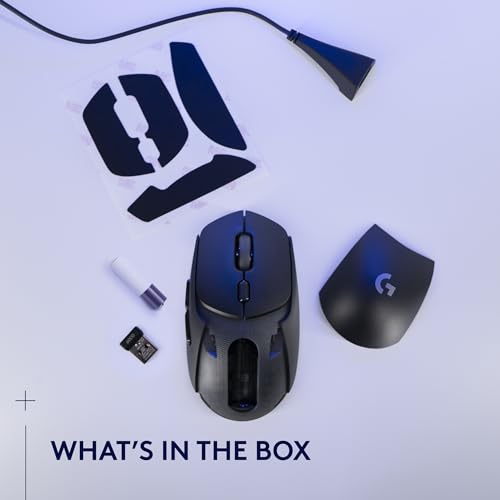
Pay attention to the weight in listings. Logitech specifies 86 g with a single AA installed and 68 g when you use its compatible POWERPLAY system without the AA. Compare the 86 g figure if you intend to travel with it or use a regular pad. The replaceable battery is handy if you keep a spare in your bag. If you prefer plugging in a USB-C cable when the charge runs low, choose a rechargeable model such as the PRO 2.
At the price we found, the G309 is a sensible step up from the G203 for somebody who actively wants to lose the cable. It’s also a simpler fit than the G502 X LIGHTSPEED for players who already have their game controls covered by the keyboard and use the thumb cluster for basic navigation.
5. Logitech G PRO 2 LIGHTSPEED — Best for left-handed play
A symmetrical shell can still have its side buttons on the left only. The PRO 2 LIGHTSPEED goes further with magnetic buttons that you can configure on either flank. Set it up for your left hand by putting your thumb controls on the right. That way you can keep an ability or voice-chat bind under your thumb without reaching around the mouse.
Logitech lists an 80 g weight and four to eight programmable buttons, depending on your setup. The body measures 125 × 63.5 × 40 mm and charges over USB-C. The matching dimensions make it easy to compare with the SUPERLIGHT 2 on paper, but the two mice put their priorities in different places. The PRO 2 gives your thumb more layout options, while the SUPERLIGHT 2 takes 20 g out of the build.
The PRO 2 is worth the premium when you’ve struggled to find a wireless mouse with right-side thumb buttons. It also makes sense on a shared PC if players use different hands. If you’re right-handed and want a simpler layout for a lot less money, the G309 already covers basic shortcuts and adds a Bluetooth connection.
How we evaluated these Logitech mice
We compared Logitech’s published dimensions, control layouts, power options, and connection modes, then checked that each exact model had a current new offer in the US. The Amazon price snapshot on November 25, 2026 ran from about $20 for the G203 to $154 for the PRO X SUPERLIGHT 2. The G309 was about $45, the G502 X LIGHTSPEED about $100, and the PRO 2 about $120. Those figures show where each step up sat on the day. Prices can move independently.
We matched each mouse to a practical reason to buy it: reachable shortcuts, less mass to lift, a low wired price, two ways to connect, or thumb buttons for the left hand. We used the weight in the power configuration a buyer is likely to use. Sensor and report-rate figures come from published specs.
How to choose a Logitech gaming mouse
Where do your thumb and palm land?
Put your hand on your current mouse and notice where you rest your thumb when you aren’t reaching for a button. Then see whether you can hit your favorite side bind without moving the rest of your grip. For a quick fit comparison, measure the current shell’s length and compare photos from the side. The hump’s position often tells you more about where the palm will meet the shell than height alone. Our guide to choosing a gaming mouse goes deeper into fit and controls.
Which inputs do you actually use?
List the commands you reach for in your main game. Back and forward in the browser plus one push-to-talk bind may be all you need across different profiles. In a game with a lot of equipment and utility binds, a wheel tilt or extra top input can free up a finger on the keyboard. If you already use a full thumb keypad, count the visible button positions on the G502 before assuming its 13 controls can replace the pad. That total includes wheel and top inputs.
How should the mouse connect and charge?
Look at your ports before you pick a wireless mouse. If the computer you’re buying for has only USB-C, plan for a compatible adapter for its USB-A receiver or choose a mouse with Bluetooth for that machine. A wired mouse makes sense at one fixed desk. With USB-C charging, decide where the cable will live. With a replaceable AA, decide where you’ll keep the spare.
What would you gain from a lighter shell?
Think about how often you pick up the mouse and how far it travels. A short pad or low in-game sensitivity leads to more resets, where the SUPERLIGHT 2’s low weight is a meaningful spec. If you play with short wrist movements and spend half the day working in the browser, button reach and wheel feel may matter more. The gaming mousepad materials guide explains how to decide whether you want more glide or control from the surface too.
Frequently asked questions
Is the G502 X LIGHTSPEED the same as the G502 HERO or G502 X PLUS?
They’re three listings. The G502 HERO is a wired G502. The G502 X LIGHTSPEED is the USB-receiver model covered here. The G502 X PLUS is the wireless G502 X variant with RGB lighting. Check the full name on the listing, especially during a sale when two or three versions appear next to each other.
Is a symmetrical Logitech mouse good for left-handers?
It can be if all you need are the main clicks and wheel. For thumb shortcuts, check which flank has buttons. The PRO 2 LIGHTSPEED lets you configure magnetic side buttons, which is why it’s the better pick here for left-handed play. The standard PRO X SUPERLIGHT 2 keeps its thumb buttons on the left flank.
Should I use the maximum DPI or polling rate?
Pick your DPI by how far you want the pointer or camera to move when you move your hand. A high ceiling gives you more settings to choose from. Polling rate describes how often the mouse reports to the computer. Keep your familiar settings when you first switch mice so you can judge the grip and button layout, then change one setting at a time if you want to adjust the feel.
Bottom line
Start with the G502 X LIGHTSPEED if you’re right-handed and will use its extra buttons and dual-mode wheel. Buy the G203 if you want to spend as little as possible, or the G309 if you want a receiver for your desktop and Bluetooth for another computer. For an easy-to-lift shooter mouse, choose the PRO X SUPERLIGHT 2. For thumb binds you can reach with your left hand, get the PRO 2 LIGHTSPEED.


























Write Your Review
No reviews yet. Be the first to share your experience!