

The best gaming hard drive for most desktop owners who already have an SSD is the 4TB Seagate IronWolf. It gives you a second place for older games, captures, and mod archives, and its conventional recording makes sense for a library you regularly update. If you mainly want to keep a lot of games downloaded, the 8TB BarraCuda doubles that capacity and had a lower cost per terabyte among these picks.
Keep Windows, your current rotation, and any title that requires an SSD on solid-state storage. Bethesda, for example, lists 125 GB of available space and an SSD for Starfield. If the games you bought the drive for have similar requirements, start with a budget gaming SSD. The five mechanical drives below cover the storage jobs that are left, from a spare desktop bay to a laptop with only a USB port available.



Quick comparison of the best gaming hard drives
| Drive | Capacity | Connection | Best use | Main trade-off |
|---|---|---|---|---|
| Seagate IronWolf | 4TB | 3.5-inch SATA | Desktop library that changes often | Less room than the 8TB drive |
| Seagate BarraCuda desktop | 8TB | 3.5-inch SATA | Games and files you mostly read | SMR can slow repeated writes |
| Seagate IronWolf Pro | 16TB | 3.5-inch SATA | A large archive in one bay | Highest upfront cost of these picks |
| WD My Passport | 5TB | External USB | Adding storage without opening the PC | The game library depends on a USB connection |
| Seagate BarraCuda laptop | 2TB | 2.5-inch SATA, 7 mm | A compatible slim SATA bay | Limited capacity and SMR writes |
Seagate IronWolf 4TB for an everyday desktop library
The 4TB IronWolf, model ST4000VN006, is a 3.5-inch SATA drive with a 5,400 RPM spindle and conventional magnetic recording, or CMR. Seagate sells it for network storage, but you can connect it directly to a desktop motherboard with a SATA data cable and power it from the power supply. That makes it a straightforward second drive when you have the bay and cables already available.
I’d start here if you download older titles, maintain a folder of mods, or occasionally move games between drives. CMR is a sensible choice for those writes because it doesn’t have the overlapping tracks of a shingled drive. Installs and updates will still take time on a mechanical disk, especially when a launcher changes lots of small files. Keep the game you’re actively modding on the SSD and use the HDD to hold the original downloads and previous versions.
Four terabytes works best when you can name what goes on it. If your folder already totals close to 4 TB, price the 8TB drive before buying. If you’re replacing your only boot drive, choose an SSD first. The IronWolf makes the most sense alongside the storage you already use every day.
Seagate BarraCuda 8TB for a library you mostly read
The desktop ST8000DM004 BarraCuda is an 8TB, 3.5-inch SATA HDD rated at 5,400 RPM. It uses shingled magnetic recording, or SMR. Its capacity and price make sense if your plan is to load it with older games, installers, or finished recordings and leave those files in place for weeks at a time.
With SMR, tracks overlap. Rewriting part of a shingled area can require the drive to reorganize a larger area, which can make sustained or repeated writes less consistent. Think about patch day. If your routine involves installing several big titles, patching them, and recording gameplay to the same disk over an evening, I’d put that workload on an SSD or favor a CMR drive for the storage that has to stay mechanical. If you mostly open files you already stored, there are fewer opportunities for that write penalty to matter.
The 8TB drive is also useful when downloading a game again would be a bigger hassle than moving a local copy. Leave free space for launcher updates and transfers. Even with plenty of room on paper, a drive stuffed with rarely opened files gives you little flexibility when a game needs temporary space.
Seagate IronWolf Pro 16TB for a one-bay archive
The ST16000NT001 IronWolf Pro offers 16TB, 7,200 RPM, and CMR in a 3.5-inch SATA drive. Its case for a gaming PC is simple. One drive bay, one SATA port, and one power lead. That’s useful in a system that also stores a large capture collection, game installers, and other media and only has room for one hard drive.
Seagate rates this model for NAS workloads. For a gaming desktop, the capacity and recording method are the main reasons to choose it. The higher spindle speed can shorten rotational waiting time, but game loading involves seek time and other work too. Our guide to hard drive RPM explains what the number can tell you about a drive. Use an SSD for a game that streams assets throughout a session.
The high upfront price makes more sense once you’ve measured your files and found that an 8TB drive would fill up too soon. Plan for a separate copy of anything you’d hate to lose. You can download many games again. Your recordings, custom mods, and local saves may be harder to recover.
WD My Passport 5TB for portable USB storage
The black WD My Passport 5TB, model WDBPKJ0050BBK-WESN, is a portable USB hard drive that includes a USB-A cable. It makes the most sense if your case has no spare bay, you use a laptop, or you want to carry a library between desks. Check the ports on a thin laptop before you order. If it only has USB-C, you’ll need the appropriate data cable or adapter.
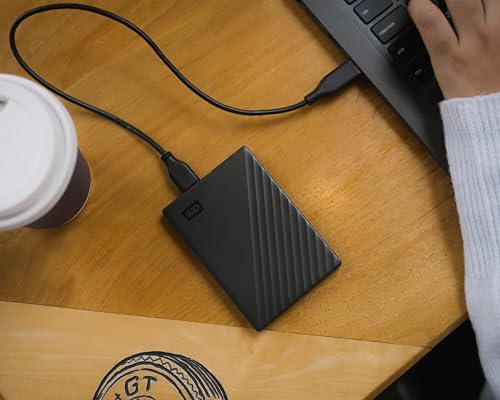
On a Windows PC, I’d give a frequently used external library a consistent drive letter so the launcher can find it again. Plug the drive in before opening the launcher and close any games or transfers before ejecting it. If a game supports a hard drive, you can install it to the My Passport when the launcher supports that location. An SSD is the better place for frequently played games that are sensitive to storage latency.
Budget some desk space for the drive and cable, even if you bought it for a laptop. A portable disk can get unplugged during a transfer if you’re moving the computer around. If you need more room and plan to keep the drive on one desk, compare it with the desktop options in our external hard drive guide.
Seagate BarraCuda 2TB for a slim SATA bay
The ST2000LM015 BarraCuda is a 2TB, 5,400 RPM SMR drive in a 2.5-inch shell that’s 7 mm thick. That last number is worth checking twice. Other drives in the same family can be 15 mm thick, and a slim laptop bay may have no clearance for one. Check the service manual for the supported drive height and whether the bay needs a cable or mounting bracket.
This pick is for a compatible older laptop or small PC that already boots from a separate SSD and has a spare 2.5-inch SATA bay. Use the BarraCuda for lighter games and local copies of large files. If your machine has one 2.5-inch bay and boots from the drive you plan to remove, put your money toward a 2.5-inch SATA SSD first. Some laptops only have M.2 slots, so check the connector as well as the space inside.
Consider the price of a 2TB SATA SSD before buying this model. A small price gap favors solid-state storage if you’ll install and patch games on the drive regularly. The BarraCuda earns its place when the mechanical option saves enough money and you specifically need the slim SATA form factor.
How we evaluated these hard drives
We matched each listing to a manufacturer model and used manufacturer documentation for the capacity, form factor, connection, and recording method where published. We compared new U.S. offers available on November 25, 2026, and used price per terabyte alongside upfront price to judge value. Prices and availability can change.
We favored a different job for each drive. For a desktop library that changes often, recording method mattered. For a large one-bay archive, capacity took priority. A portable drive needed its own USB enclosure, and the laptop pick needed a documented 7 mm body. Published spindle and interface figures describe the hardware. Game loading also depends on the title and the rest of the system, so the picks are based on documented features and how you intend to use the drive.
How to choose a hard drive for your gaming PC
What do you want to keep installed?
Start with the sizes your launcher reports for the games you want available. Then add captures, mods, leftovers from old installs, and room for updates. Twenty games at an average of 100 GB each account for about 2 TB before you save a single recording. A 2TB drive would be tight for that example. Four terabytes gives you more room to work with, while 8TB is easier to justify when you also keep raw footage or share the drive with a large file collection.
If you already capture gameplay, check the size of a few typical clips before estimating. For example, if a one-hour recording from your current setup takes up 20 GB, thirty hours would take about 600 GB. Add that to your game library estimate. You might discover that deleting unused footage or moving completed projects solves more of the space problem than buying room for another dozen installs.
Where can you connect it?
For a 3.5-inch drive, look for a free bay and a motherboard SATA port you can use with your current M.2 configuration. Some boards disable particular SATA ports when certain M.2 slots are populated. The motherboard manual will tell you which ones. Check that there’s also a SATA power lead from the power supply. If you prefer USB, look at the plug on the included cable and where the drive will sit while connected.
A new bare drive may appear in Windows Disk Management before it shows up in File Explorer. On a new, empty disk, initialize it as GPT, create a New Simple Volume, and choose NTFS for a Windows-only library. Identify the new drive by its capacity before formatting. Give it a clear name such as Games Archive so you can recognize it when a launcher asks where to install a game.
Will you mostly read files or rewrite them?
A read-heavy collection can be a good fit for a cheaper SMR drive. If you move games back and forth every week or regularly replace large recording files, I’d favor CMR for the hard drive and leave the busiest work on the SSD. A launcher may have to unpack an update and rewrite parts of the installation. The download finishing is only one step in that process.
What would you miss if the disk failed?
Keep a separate copy of local saves, captures, settings, and original mods that you can’t recreate. Check what your launcher syncs, since some titles only sync some files or offer no cloud saves. A second copy on a separate device. That matters most on the 16TB pick because it’s easy to gather a lot of irreplaceable files in one place.
Gaming hard drive FAQ
Can you play PC games directly from a hard drive?
Yes, if the game supports a hard drive and the launcher can install or locate it there. Older and lighter games are sensible candidates. Check the publisher’s storage requirement for each game and move it to an SSD if it needs faster access during play. A USB connection won’t make a mechanical disk perform like an SSD.
Can you move a Steam game to another drive?
Yes. In Steam’s Storage settings, add a library on the destination drive, select the games on the current drive, and choose Move. Let Steam manage the transfer so it can update the library location. Before moving a game with local mods or saves, make a separate copy and check the mod manager’s paths afterward.
Why does my new drive show less space in Windows?
Drive makers count 1 TB as one trillion bytes. Windows commonly reports capacity using binary units, so a marketed 4TB drive can show roughly 3.64 TB in Windows before accounting for formatting overhead. If a large new internal disk shows only around 2 TB of usable space, check whether Windows Disk Management recognizes it as GPT. Microsoft recommends GPT to address the full capacity of drives larger than 2 TB.
Bottom line
Buy the 4TB Seagate IronWolf for a desktop that already has an SSD and needs a second drive for a library you update regularly. Pick the 8TB BarraCuda if you mostly want more room for files you’ll leave in place. Choose the 16TB IronWolf Pro when one bay has to hold a much bigger archive, or the My Passport when USB is your easiest way to add space. The slim 2TB BarraCuda is worth comparing with a SATA SSD when your machine has a compatible 7 mm bay.


























Write Your Review
No reviews yet. Be the first to share your experience!