

Buy the WD Blue SN5100 2TB if your gaming laptop accepts a bare M.2 2280 NVMe drive and you want more room for games, downloads and recordings. It was within about $15 of the lowest-priced drive here when we checked US offers, and Sandisk lists the 2TB model at up to 7,100 MB/s sequential read and 6,700 MB/s sequential write.
For a secondary slot that mainly holds games, the Crucial E100 2TB makes sense when it saves you money. If the same drive will also handle regular video imports or large project exports, put the Samsung 990 PRO on your shortlist. First, check the service manual for your exact laptop configuration. A spare slot can have different mounting points, lane counts or cooling hardware from the one holding Windows.



Pros
- Rated 7,450 MB/s sequential read pushes close to the PCIe Gen4 x4 ceiling for game loads.
- Rated 6,900 MB/s sequential write helps large file transfers and 4K editing scratch workflows.
- Samsung claims 55 percent random IOPS uplift vs the 980 PRO, benefiting bot and app launch responsiveness.
Cons
- Limited owner feedback available at time of writing, so long-term reliability signal remains thin.
- TBW endurance rating not specified in listing, worth confirming for sustained write workloads.
- No heatsink on this SKU, sustained Gen4 writes may need a motherboard M.2 cooler to avoid throttling.
The Samsung 990 PRO 2TB is a high-end PCIe Gen4 NVMe SSD in the M.2 2280 form factor, rated up to 7,450 MB/s sequential read and 6,900 MB/s sequential write. It targets desktop gamers, PS5 upgraders, and content creators who want Gen4 headroom without stepping up to a Gen5 drive.
The defining pitch is near-ceiling Gen4 bandwidth paired with a claimed 55 percent uplift in random IOPS over the 980 PRO. In practice, drives at this tier typically shave a second or two off open-world level loads and accelerate DirectStorage titles, though real-world gaming deltas over solid Gen4 rivals remain modest.
Gen4 flagships like this tend to run hot under sustained sequential writes, and the bare version without a heatsink relies on motherboard M.2 cooling to hold peak speeds. TBW endurance is not specified in the listing, so buyers running heavy write workloads should confirm the rating from Samsung's own datashet.
Buy this if you want a top-shelf Gen4 drive for a gaming PC, editing rig, or PS5 with a well-cooled M.2 slot. Skip this if you already own a fast Gen4 SD, need Gen5 bandwidth for scratch work, or want a factory heatsink model included in the box.
Sequential throughput: Samsung rates the 990 PRO at up to 7,450 MB/s sequential read and 6,900 MB/s sequential write over PCIe Gen4 x4. That is close to the practical Gen4 x4 ceiling near 7,500 MB/s, so large file copies are limited more by the source disk than by this drive.
Random performance: The listing calls out a 55 percent improvement in random performance versus the 980 PRO. Random 4K IOPS drives OS snappiness, shader cache loads, and small file operations, so the uplift matters more day to day than the sequential headline for most users.
Form factor and platform: The drive uses M.2 2280 single-sided layout and PCIe Gen4 x4, dropping into standard desktop M.2 slots, most Gen4 laptops, and the PS5 storage bay. Capacity spans 1TB to 4TB in the family, with this SKU at 2TB for a balanced game library.
Power and thermals: Samsung claims up to 50 percent better performance per wat versus the 980 PRO, helping in fanless laptop bays and compact ITX builds with limited airflow. Under sustained writes, this bare version benefits from a motherboard M.2 heatsink to avoid thermal throttling on long transfers.

Check the laptop before choosing a drive
Find your model and the slot you’ll use. Look up the full model code from the laptop’s label or system information, then open the storage and removal sections of the maker’s manual. Check whether the second connector is actually available on your configuration and whether the SSD bracket, screw and thermal pad are included. Parts can vary within one laptop family.
Confirm M.2 2280 and PCIe NVMe. The number 2280 means 22 mm wide and 80 mm long. A bay that stops at 42 mm needs a shorter 2242 drive. M.2 describes the form factor, and the storage interface is a separate specification. Our NVMe and SATA SSD comparison explains the distinction if your manual lists both kinds of storage. Check the stated capacity and board clearance for the specific bay, especially if the manual calls for a single-sided module.
Check the slot’s PCIe generation and lanes. A Gen4 x4 drive in a compatible older NVMe bay runs within the host’s link limits. Lenovo, for example, lists a Gen3 x2 2280 slot on certain IdeaPad Gaming 3 15ACH6 configurations. Lenovo lists 2280 configurations up to 1TB for that model, so confirm capacity separately. The example shows how an older slot can cap throughput well below the Gen4 numbers in the table. The Gen4 and Gen5 SSD comparison explains what an interface upgrade buys you.
Measure clearance with the factory hardware in mind. Check whether a shield covers the slot and whether there’s a thermal pad under it. The picks here are the versions without a raised factory heatsink. The existing laptop shield still needs to fit as the manufacturer intended. If the cover bows, a pad shifts or the board flexes when you secure it, stop and check the fit.
The five 2TB laptop SSD picks at a glance
| Pick | 2TB drive | Rated read / write | Best for | Trade-off |
|---|---|---|---|---|
| Best overall | WD Blue SN5100 | 7,100 / 6,700 MB/s | Windows and a game library | Older slots cap its peak speed |
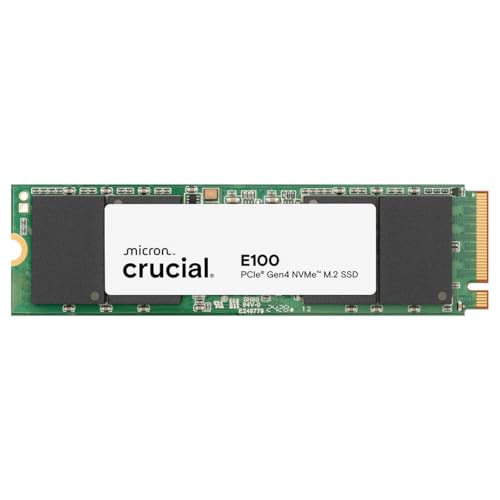
| Lowest price checked | Crucial E100 | 5,000 / 4,500 MB/s | A dedicated game drive | Small savings when the SN5100 is close in price |
| Thin-label alternative | TEAMGROUP MP44L | 4,800 / 4,400 MB/s | Buyers seeking a documented 2.25 mm profile | 640 TBW rating trails the SN5100 |
| Best for heavy writes | Samsung 990 PRO | 7,450 / 6,900 MB/s | Games plus frequent large file writes | Higher price and more reason to check cooling |
| Two PCIe link modes | Samsung 990 EVO | 5,000 / 4,200 MB/s | A compatible Gen5 x2 bay at the right price | Cost more than the PRO when checked |
These are manufacturer-rated sequential peaks for the specific 2TB models. Copying a large file, patching a game and loading a save each put different demands on storage. A laptop’s available bandwidth, cooling and free space can all change the result.
WD Blue SN5100 2TB — Best overall
The SN5100 suits a laptop that uses one SSD for Windows, game installs, screen recordings and everything else. Sandisk lists the 2TB WDS200T5B0E as a Gen4 M.2 2280 drive with 900 TBW of rated endurance and a thickness of about 0.09 inches. Its 7,100 MB/s read and 6,700 MB/s write ratings give it more headroom for large transfers than the cheaper E100 on paper.
The US offer was about $280 when checked. For roughly $15 more than the E100 at the time, it’s the one I’d choose for a main drive that sees a mix of work. For a secondary bay in a Gen3 laptop, or if you mostly replay the same handful of games, the capacity matters more than the difference between those peak numbers. Take the cheaper compatible drive if the gap grows.
Use the model number at checkout. The label on the exact offer says WD Blue, and the manufacturer specification is listed by Sandisk. The family also comes in other capacities with different speed and endurance figures.
Crucial E100 2TB — Best lower-cost game drive
The E100 was the lowest-priced of these five, at about $265 when checked. Crucial’s product sheet lists the CT2000E100SSD8 as a bare 80 mm NVMe module with up to 5,000 MB/s reads and 4,500 MB/s writes. It fits the use case where Windows stays on the original SSD and an empty compatible bay gets the game library.
Think about what that second drive will do after you’ve moved the library over. If it mostly reads game files, the E100’s appeal is its capacity for the money. If you’re repeatedly moving large captures or using the same drive for big project files, the SN5100’s higher published write ceiling and documented 900 TBW rating make it easier to justify a small premium.
You can also use the E100 as the boot drive in a compatible laptop. I’d choose it for that job when the price gap is large enough to matter, especially if the laptop’s older PCIe link narrows the difference between drives.
TEAMGROUP MP44L 2TB — Thin-label alternative
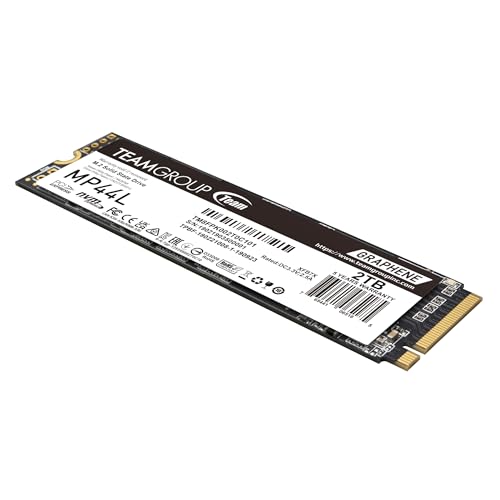
TEAMGROUP lists the 2TB MP44L at 80 × 22 × 2.25 mm, including a thin graphene-coated label. The listing for part TM8FPK002T0C101 specifies Gen4 x4, up to 4,800 MB/s sequential read and 4,400 MB/s sequential write, and 640 TBW. That height gives you a useful dimension to compare with the service manual if your laptop puts the SSD under a low shield.
The catch is price. At about $290 when checked, the MP44L cost a little more than the SN5100, which has higher published peaks and a higher endurance rating. It makes more sense when your installation benefits from the documented profile or when a sale puts it below the SN5100. Keep the laptop’s original pad and shield arrangement if the manual calls for it.
Search for the exact MP44L name and part number. The MP44, MP44Q and MP44L are separate models, and the 1TB MP44L has different speed and endurance ratings from the version here.
Samsung 990 PRO 2TB — Best for gaming and heavy writes
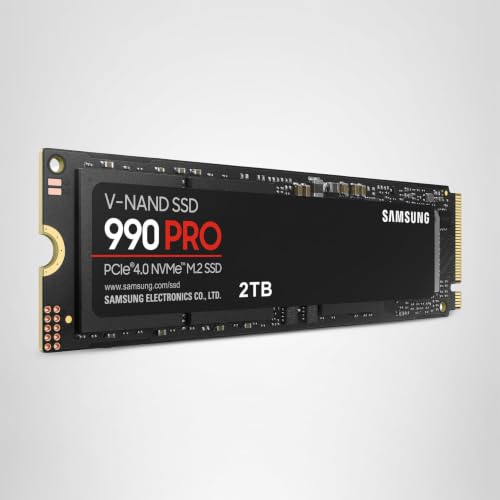
The bare 990 PRO is the pick for a laptop that spends its time on large game installs, local video captures and creative projects. Samsung’s datasheet lists 2 GB of onboard LPDDR4, 1,200 TBW, and rated sequential speeds of 7,450 MB/s read and 6,900 MB/s write. Its 2.3 mm maximum board height applies to the bare model. The version with a factory heatsink is a separate product.
At about $385 in the US snapshot, it carries a premium of more than $100 over the SN5100. The higher endurance rating and onboard memory are the better reasons to spend that money if you regularly generate large files. The peak write spec applies within a defined cache window, so use it as a ceiling when comparing drives. Samsung also recommends proper airflow in the datasheet. The laptop’s bay and thermal hardware matter when the drive is busy for long stretches.
Before migrating Windows to it, check the installed firmware using Samsung Magician. If all you need is extra room for a game launcher and a library, the cheaper drives are the better buys.
Samsung 990 EVO 2TB — An option for a two-lane Gen5 bay
The original 990 EVO supports PCIe 4.0 x4 and PCIe 5.0 x2 on the same M.2 2280 drive. It’s worth a look if your machine’s manual explicitly lists a compatible two-lane Gen5 storage bay or if you plan to move the drive between compatible systems. Samsung rates the 2TB MZ-V9E2T0B/AM at up to 5,000 MB/s read and 4,200 MB/s write. Those are the figures to compare, whichever listed link mode you use.
At about $400 when checked, the EVO was more expensive than the 990 PRO. For a conventional Gen4 x4 laptop, I’d take the SN5100 for general use or the PRO if the extra endurance makes a difference to the work. Reconsider the EVO if it falls below those prices and you can use its link flexibility. Make sure the listing says 990 EVO. The 990 EVO Plus has a different spec sheet.
How We Evaluated
We compared bare 2TB M.2 2280 models using the manufacturer specifications for each capacity and exact part number. We ranked them for laptop use by fit, interface, peak transfer ratings, documented write endurance where available and the price of a new, in-stock US offer. The November 2026 snapshot ran from about $265 to $400. Availability and seller prices can change.
A peak rate helps compare file-transfer headroom. An endurance rating measures the amount of data written under the manufacturer’s rating terms. Neither gives a laptop temperature or a game load time, so the recommendations focus on what each spec changes about a purchase. For a closer look at the figures, see the Sandisk SN5100 specifications and the Samsung 990 PRO datasheet.
How to choose and install your 2TB upgrade
How much of 2TB can you use?
A marketed 2TB is two trillion bytes, or roughly 1.82 TiB before formatting. Windows often displays that binary figure with a TB label. A new boot drive also has to hold Windows, recovery partitions, apps and whatever you clone from the old drive. A game-only second drive gives more of that space to the library.
For a rough budget, eight games averaging 125 GB each use 1,000 GB. Add another 300 GB for recordings, mods and other files and you still have about 700 GB of the advertised capacity before formatting and other overhead. Leave space for large updates that need temporary working room. A little breathing room between installs.
Adding a second drive or replacing the boot drive?
One empty bay. That’s the easy upgrade if your chassis supports it. Follow the service manual’s shutdown and battery procedure and keep the original SSD in place. On Windows, initialize and format the new, blank drive in Disk Management, then add a library on that volume in your game launcher. Double-check which disk you selected before formatting.
If the laptop has one slot, plan for a clone or a fresh install. Back up files and retrieve the BitLocker or device-encryption recovery key before opening the machine. For cloning, you may need a USB enclosure that specifically supports NVMe. Our guide to migrating Windows to an NVMe SSD covers the decision. Keep the original SSD intact until the new drive boots and you’ve checked that your files and games are accessible.
Frequently asked questions
Will a faster SSD raise my gaming frame rate?
Buy this upgrade for space, shorter waits where storage is the bottleneck, or faster large file transfers. When you already have an NVMe SSD, a higher rated sequential speed alone is a poor reason to expect higher average FPS. CPU and GPU limits still govern rendering in most games, and any change in load times depends on the title and the drive you started with.
Do I need to add a heatsink?
Use the laptop’s specified cooling hardware. Some models use a fitted metal cover and thermal pad, and those parts can be specific to one bay. Confirm the correct thickness and placement in the manual. A raised desktop heatsink can interfere with the cover or bracket, so check the exact SKU when the same SSD is sold with and without one.
Can I use one of these in a PCIe Gen3 laptop?
Yes, if the slot supports NVMe, the drive’s size and clearance, and the capacity you’re buying. Expect the link to run at the host’s lower speed. Check firmware and boot support in the manual if you’re moving the operating system, especially on an older model.
Bottom Line
Get the WD Blue SN5100 2TB for a compatible laptop that needs room for Windows and a growing game library. Buy the Crucial E100 if the second bay is mainly for games and the savings are meaningful. Pay for the Samsung 990 PRO if you also write large volumes of data and the laptop has suitable cooling. Check the bay size and clearance before you order.



























Write Your Review
No reviews yet. Be the first to share your experience!