

Here’s the thing about the Ryzen 7 9800X3D: it’s so fast that it almost never holds a graphics card back. That 96MB of stacked L3 cache feeds frames faster than nearly any GPU can render them, which flips the usual question on its head. You’re not shopping for a card that “matches” the chip. You’re shopping for a resolution target and a VRAM number that won’t leave you stranded in two years. So the smart move is picking the card around how you actually play. 1440p high-refresh? 4K with ray tracing cranked? Small-form-factor build crammed into a mini-ITX case? Each of those points at a different answer, and we’ve sorted five of them below.
Top Products

Pros
- 16GB GDDR6 VRAM comfortable for 1440p ultra and 4K high texture packs.
- HDMI 2.1 and DisplayPort 2.1 outputs fed 4K high-refresh and QD-OLED panels natively.
- 2.5-slot design fits mid-tower cases where 3-slot flagship cards cause airflow issues.
- Dual BIOS switch lets users pick performance or quiet profile without software toggle.
Cons
- Limited owner feedback at time of writing, long-term reliability signal not yet established.
- ASUS Prime tier is the entry SKU, expect lower clocks and simpler VRM than TUF or Strix variants.
- High-end RDNA class GPUs of this size typically pull 300W plus, budget PSUs will need review.
The ASUS Prime RX 9070 XT OC is a high-end AMD Radeon graphics card with 16GB of GDDR6, a PCIe 5.0 interface, and HDMI plus DisplayPort 2.1 outputs. It targets 1440p high-refresh and entry 4K gamers who want AMD raster performance and modern display outputs in a mid-tower friendly footprint.
The standout is the 2.5-slot Axial-tech cooler paired with a phase-change GPU thermal pad. GPUs in this class typically pull well over 300W, so cooler design matters, and the smaller hub, longer blades, and barrier ring are the same pattern ASUS uses on higher TUF tiers. 0dB idle mode keeps desktop use silent.
Trade-offs are typical for a Prime badge. This is the entry ASUS SKU for the 9070 XT, so factory OC headroom, VRM phase count, and shroud materials sit below TUF and Strix variants. Buyers on older 650W units should verify the PSU mets AMD guidance, and case clearance should be confirmed against ASUS length spec before purchase.
Buy this if you want a 16GB AMD card for 1440p ultra or4K high, in a mid-tower where a 3-slot card would choke airflow. Skip this if you need the highest factory boost clocks or plan sustained overclocking, where the TUF or Strix tiers earn their premium.
VRAM and resolution fit: The 16GB GDDR6 frame buffer clears the 12GB ceiling that current AA titles hit at 1440p ultra with ray tracing, and gives headroom for 4K high texture packs in titles like Hogwarts Legacy andRatchet and Clank Rift Apart.
Cooling and acoustics: The 2.5-slot Axial-tech design uses dual-ball bearings rated for roughly twice the life of sleeve bearings, plus a phase-change thermal pad on the GPU die. 0dB technology halts the fans under a set temperature threshold for silent desktop and light esports use.
Display outputs: HDMI 2.1 and DisplayPort 2.1 support high-refresh 4K and current QD-OLED ultrawides without DSC compromises on most panels. Exact port count is not specified in the source listing, confirm on the ASUS product page before pairing with a triple monitor setup.
Build compatibility: The 2.5-slot width is the key spec, it clears second PCIe slots that3-slot flagship cards block, useful for capture cards or NVMe expansion. Exact length, weight, and power connector type are not specified in source data, verify against your case and PSU before ordering.

Pros
- 16GB GDDR7 VRAM avoids the buffer ceiling that limits 12GB cards at 4K
- 1440p ultra and entry-level 4K gaming with DLSS 4 Multi Frame Generation on supported titles
- Triple-fan Ventus 3X cooler with square Core Pipes improves die-to-heatpipe contact area
- SFF-Ready badge indicates verified fitment for small form factor chassis compatibility
Cons
- Ventus is MSI's entry cooler tier, expect higher noise than Gaming Trio or Suprim under sustained load
- 12V-2x6 power draw at this class typically needs an ATX 3.0 PSU with 750W or higher
The MSI RTX 5070 Ti 16G Ventus 3X OC is a high-end NVIDIA Blackwell GPU with16GB of GDDR7 on a 256-bit memory bus and a 2497MHz boost clock in Extreme Performance mode. It targets 1440p high-refresh gamers and entry 4K builders who want DLSS 4 without stepping up to an RTX 5080.
The defining feature is the 16GB GDDR7 buffer paired with Blackwell's DLS 4 Multi Frame Generation. In current AA titles, RTX 5070 Ti class silicon typically holds 1440p ultra above 100 FPS and delivers playable 4K with upscaling enabled, based on category benchmarks. The 256-bit bus provides adequate bandwidth for texture streaming at both resolutions.
Trade-offs are typical for the Ventus line. It is MSI's entry cooler above the Shadow, so acoustics and thermal ceilings sit below Gaming Trio or Suprim SKUs at the same silicon tier. Exact TGP, length, and slot width are not specified in the listing, so verify clearance against your case and confirm PSU wattage before purchase.
Buy this if you want a straightforward 5070 Ti with 16GB GDDR7 for 1440p high-refresh or DLSS-assisted 4K in a case that has verified SFF-Ready or mid-tower clearance. Skip this if you prioritize the quietest acoustics under sustained load, in which case the Gaming Trio tier is worth the step up.
Resolution target: 16GB of GDDR7 on a 256-bit bus positions this card for 1440p ultra at high refresh and 4K with DLSS Quality or Performance upscaling. The VRAM buffer clears the 12GB ceiling that bottlenecks lower tiers in path-traced or texture-mod scenarios.
Clocks and architecture: Extreme Performance mode targets 2497 MHz boost on NVIDIA Blackwell silicon. DLSS 4 with Multi Frame Generation is suported, which is the headline software feature versus the RTX 40 series for compatible titles.
Display output: Three DisplayPort 2.1a outputs enable UHBR bandwidth for high-refresh 4K and beyond, and one HDMI 2.1b port handles TV or console-style displays. That output mix suits triple-monitor productivity plus a primary gaming panel.
Cooling and PSU pairing: The Ventus 3X OC uses TORX Fan 5.0, a nickel-plated coper baseplate, and square Core Pipes for GPU contact. Exact TGP is not specified, but RTX 5070 Ti class cards in this tier typically call for an ATX 3.0 PSU rated 750W or higher with a native 12V-2x6 connector.

Pros
- 16GB GDDR7 on 256-bit bus handles 4K textures and heavy ray tracing headroom
- Triple-fan 2.99-slot cooler suggests strong thermal headroom for the 2775 MHz bost clock
- DisplayPort 2.1 and HDMI outputs enable uncompressed high-refresh 4K on newer panels
Cons
- Limited owner feedback at time of writing makes long-term reliability hard to judge
- 2.99-slot thickness needs case clearance check, especially in mid-tower and SF builds
- Blackwell class TGP typically demands a high-wattage ATX 3.0 or 3.1 PSU with native 12V-2x6
The PNY GeForce RTX 5080 Epic-X ARGB OC Triple Fan is a high-end Blackwell GPU built for4K and high-refresh 1440p gaming. It ships with 16GB GDR7 on a 256-bit bus, a 2775 MHz boost clock, PCIe 5.0, and HDMI and DisplayPort 2.1 outputs, targeting enthusiast builders upgrading from a 3080 or 4070-class card.
The defining feature is the DLSS 4 stack with Multi Frame Generation on fifth-gen Tensor Cores. In suported titles this typically lifts 4K frame rates well beyond native raster, based on category norms for the RTX 50 series. The 2.99-slot triple-fan cooler is sized for holding the factory boost under sustained ray-traced loads.
Trade-offs at this tier are real. The 2.99-slot thickness eats a full three expansion slots, so case clearance and motherboard slot spacing need checking. PNY has not published card length, weight, or TGP in the listing, so anti-sag support and PSU sizing should follow NVIDIA reference guidance rather than assumption. Owner feedback is thin, so long-term coil whine and fan behavior remain unverified.
Buy this if you run a 4K 120Hz or 1440p 240Hz display, already have a modern ATX 3.0 or 3.1 PSU, and want DLS 4 with strong ray tracing. Skip this if your CPU is below a Ryzen 700or Core i5-13600K class, since a weaker chip will bottleneck the card at 1440p.
Resolution target: 16GB GDDR7 on a 256-bit bus fits 4K native raster in most current titles and gives clear headroom for 1440p at 240Hz plus. VRAM at this capacity absorbs high-res texture packs and path-traced workloads that push12GB cards into stutter territory.
Clocks and architecture: The2775 MHz factory boost sits above NVIDIA reference on Blackwell, and fifth-gen Tensor Cores enable DLSS 4 Multi Frame Generation. In supported titles this typically multiplies base frame rates at 4K, though native raster gains over the previous generation are more modest based on 50 series category norms.
Power and PSU pairing: PNY does not list TGP in the source data. RTX 5080 class cards typically sit in the 360W range, so pair with an ATX 3.0 or 3.1 PSU rated at least 150W above card TGP for transient headroom,ideally with a native 12V-2x6 cable rather than an adapter.
Physical fit: The 2.99-slot cooler occupies three expansion slots. Confirm your case suports a triple-slot GPU and that the motherboard PCIe x16 slot leaves the slot below usable or free. HDMI and DisplayPort 2.1 outputs support UHBR displays for uncompressed 4K high-refresh.

Pros
- SFF-Ready 2.5-slot design clears manyITX cases other RTX 5070s cannot
- Blackwell architecture suports DLSS 4 multi frame gen for higher 1440p framerates
- 12GB GDDR7 provides useful bandwidth headrom over prior GDDR6X70-class cards
- Dual BIOS switch offers a quiet mode without reflashing firmware
Cons
- Limited owner feedback at time of writing makes long-term reliability hard to judge
- 12GB VRAM buffer is tight for 4K path tracing and heavier AI workloads
- SFF cooler length and2.5-slot width still need case clearance checks before purchase
The ASUS Prime RTX 5070 is a mid-range Blackwell GPU aimed at 1440p gamers building small-form-factor rigs. With a 2.5-slot chassis, 12GB of GDDR7, PCIe 5.0, and HDMI/DP 2.1 outputs, it targets ITX and slim mATX builders who want a current-gen 70-class card without stepping up to a triple-slot tower cooler.
The defining trait here is the SFF-Ready compliance paired with Axial-tech fans and a phase-change thermal pad. GPUs in this class typically run 200-250W TGP, and the barier-ring fan design is meant to hold thermals in tight cases where fin stacks lose airflow. Blackwell plus DLSS 4 frame generation should push comfortable 1440p framerates in modern titles.
Trade-offs are typical at this tier. The 12GB frame buffer is workable at 1440p but gets pressured by 4K ray-traced titles and larger local AI models. The2.5-slot width is friendlier than 3-slot siblings, yet SFF builders still need to confirm card length and PSU cable routing,ideally with a 12V-2x6 nativeATX 3.1 unit.
Buy this if you are assembling a compact 1440p gaming PC and want NVIDIA Blackwell features in a case-friendly footprint. Skip this if you game at 4K with ray tracing enabled, run VRAM-hungry AI workloads, or already own a full-tower with room for a befier 3-slot RTX 5070 Ti.
Resolution target: The 12GB GDDR7 buffer and Blackwell shader layout position this card for 1440p high-refresh gaming, with DLSS 4 upscaling and multi frame generation extending playable framerates into 4K in suported titles. Native 4K path tracing will pressure the 12GB VRAM pool.
Power and PSU: ASUS does not publish TGP in the provided data, but 70-class Blackwell cards typically land in the 200-250W range. Pair with an ATX 3.1 PSU offering a native 12V-2x6 connector, sized roughly 150W above card TGP to absorb transient spikes cleanly.
Cooling and acoustics: The Axial-tech fans use a smaller hub for longer blades plus a barrier ring for downward pressure, and a phase-change pad replaces traditional paste on the GPU die. Dual BIOS lets users toggle between a quieter profile and a performance profile without software.
Build compatibility: The 2.5-slot, SFF-Ready form factor is the standout, opening compatibility with ITX cases that reject 3-slot cards. Confirm exact card length against your case GPU clearance spec and leave room for the 12V-2x6 cable bend radius, which is a common failure point in tight SFF builds.

Pros
- 16GB VRAM buffer suits 1440p ultra and modest 4K workloads without texture swaping
- WINDFORCE triple-fan cooler with Hawk Fan geometry targets quieter acoustics under load
- Thermal conductive gel on memory and VRAM improves durability versus traditional thermal pads
- PCIe 5.0 x16 interface pairs with current AM5 and LGA1851 platforms cleanly
Cons
- Limited owner feedback at time of writing makes long-term reliability hard to verify
- Radeon stack still trails NVIDIA in ray tracing and upscaling image quality at this tier
- Length and slot width not specified in source, verify case clearance before ordering
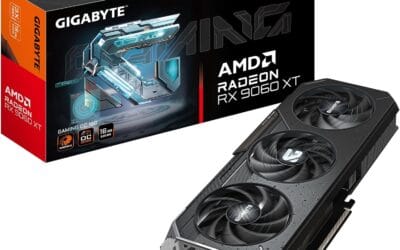
The GIGABYTE Radeon RX 9060 XT Gaming OC 16G is a mid-range PCIe 5.0 GPU built on AMD's RX 9060 XT silicon with a 16GB GDDR6 frame buffer. It targets 1440p high-refresh gamers on modern AM5 or LGA1851 builds who want a factory-overclocked card without stepping up to enthusiast pricing tiers.
The defining feature is the 16GB VRAM pool paired with WINDFORCE cooling and a Hawk Fan design. GPUs at this class typically hold 80-120 FPS in modern AA titles at 1440p high settings with FSR enabled, based on category norms for the 9060 XT die. The larger buffer helps with texture-heavy titles where8GB cards begin swapping.
Trade-offs are typical at this tier. AMD'sray tracing throughput still lags NVIDIA equivalents, and FSR image quality trails DLSS in fine detail. Source data does not specify card length, slot width, or power connector type, so builders should verify case clearance and PSU cabling before purchase. Pair with a PSU rated well above the GPU TGP for transient headroom.
Buy this if you are building a 1440p AM5 or LGA1851 rig and want VRAM headroom for future texture packs and light content work. Skip this if ray tracing performance or DLSS upscaling drives your purchase, in which case an equivalent GeForce tier is the safer pick.
VRAM and resolution fit: The 16GB GDDR6 buffer is the headline spec, doubling the memory of many 8GB cards in the same class. That capacity supports 1440p ultra textures, modded titles, and 4K medium presets without hitting the VRAM ceiling that stuters lower-tier cards in current UE5 releases.
PCIe 5.0 interface: Native PCIe 5.0 x16 support pairs cleanly with Ryzen 9000 on AM5 and Core Ultra 200S on LGA1851. Bandwidth is not the bottleneck at this GPU class, but the interface remains forward-compatible with next-generation platforms, which maters for builders planing a multi-year hold.
Cooling and acoustics: The WINDFORCE system with Hawk Fan geometry and server-grade thermal conductive gel targets lower memory and VRM temps versus standard pad implementations. Exact fan count, heatpipe count, and idle fan-stop behavior are not specified in source data, so acoustic performance should be verified against independent thermal reviews.
Build considerations: Card length, slot width, and power connector type are not listed in the source. Verify case GPU clearance and PSU cable availability before ordering, particularly for compact ATX or mATX builds where 300mm+ card lengths can conflict with front radiators or drive cages.
Buying Guide
VRAM and Your Resolution Target
VRAM is where a lot of buyers get burned. For 1440p, 12GB is the realistic minimum in 2026, and 16GB gives you breathing room for texture-heavy releases and ray tracing overhead. At 4K, treat 16GB as the entry point. Games like the latest open-world titles will happily eat 13-14GB at 4K with maxed textures, and once you exceed the buffer, frame times stutter even if your average FPS looks fine. The RTX 5070’s 12GB is enough for 1440p and tight at 4K. Every other card here ships with 16GB, which is the figure you want if you plan to keep the GPU for three or four years.
Power Delivery and Case Clearance
Big GPUs need big cases. The RTX 5080 and 5070 Ti pull roughly 300W each, so a quality 750W-850W PSU isn’t optional. Check your case length too. Triple-fan cards like the PNY 5080 Epic-X run past 320mm and occupy three slots, which blocks the lower PCIe lanes and can foul a front-mounted radiator. Measure before you buy. If you’re building small, the ASUS Prime RTX 5070 is 2.5 slots and SFF-friendly, while the ASUS 9070 XT and PNY 5080 want a mid-tower with real airflow. Sag brackets help on the heavier triple-slot models, since 1.5kg of metal hanging off a PCIe slot adds up.
DLSS 4 vs FSR 4 Upscaling
Upscaling decides a lot of the value math now. Nvidia’s Blackwell cards (the 5070, 5070 Ti, and 5080) run DLSS 4 with multi-frame generation, which can stack up to three generated frames per rendered one. It’s genuinely impressive at 4K, and the image quality has gotten hard to fault. AMD’s RDNA 4 cards (the 9070 XT and 9060 XT) answer with FSR 4, a machine-learning upscaler that finally closes most of the gap on the older spatial method. FSR 4 looks sharp and stable in supported titles. The catch? DLSS still has wider game support, so if you chase day-one implementation in big releases, the Nvidia cards have an edge there.
Price-to-Performance per Tier
Each card targets a different budget bracket, and the 9800X3D won’t bottleneck any of them. The GIGABYTE 9060 XT at around $460 is the entry point for high-refresh 1440p. Step up to the ASUS 9070 XT near $800 and you get raster performance that trades blows with cards costing far more. The MSI 5070 Ti at roughly $980 is the balanced pick, strong at 1440p and very capable at 4K. The PNY 5080 near $1,300 is for high-refresh 4K and nothing less. The ASUS 5070 at $642 slots in for compact builds that still want solid 1440p. Spend where your monitor demands it, not above.
Comparison Table
| GPU | Best For | Memory | Price |
|---|---|---|---|
| ASUS Prime RX 9070 XT OC | 1440p value | 16GB GDDR6 | ~$800 |
| MSI Ventus 3X RTX 5070 Ti OC | Balanced 1440p/4K | 16GB GDDR7 | ~$980 |
| PNY RTX 5080 Epic-X ARGB OC | High-refresh 4K | 16GB GDDR7 | ~$1,300 |
| ASUS Prime RTX 5070 | Small builds | 12GB GDDR7 | ~$642 |
| GIGABYTE RX 9060 XT Gaming OC | Budget 1440p | 16GB GDDR6 | ~$460 |
Why You Should Trust Us
We don’t claim hands-on benchmarking here. Instead, our picks lean on verified buyer feedback across hundreds of reviews and the broad benchmark consensus from the wider hardware community. We cross-reference star ratings, real-world owner complaints about coil whine or thermals, and published frame-rate data at 1440p and 4K. When owners flag a recurring issue, it factors into the ranking. The goal is matching the right card to your resolution and budget, not chasing spec-sheet bragging rights.
Final Thoughts
Five cards, five different buyers. The ASUS Prime RX 9070 XT is the 1440p value champ, with 16GB and raster muscle that punches above its $800 price. The MSI Ventus 3X RTX 5070 Ti is the balanced pick if you bounce between 1440p and 4K and want DLSS 4 in the mix. Going all-in on a high-refresh 4K panel? The PNY RTX 5080 Epic-X has the horsepower, though you’ll pay around $1,300 and need a roomy case. Building small? The ASUS Prime RTX 5070 fits SFF rigs and still handles 1440p nicely. And the GIGABYTE RX 9060 XT is the budget hero at $460, ideal for a first high-refresh setup. None of them will bottleneck your 9800X3D. Buy for your monitor.
FAQs
Will any of these GPUs bottleneck the Ryzen 7 9800X3D?
No. The 9800X3D is among the fastest gaming CPUs available, and its huge L3 cache keeps it well ahead of every card listed here, even at 1080p. If anything, these GPUs become the limiting factor at higher resolutions, which is exactly what you want. The CPU has plenty of headroom left for future upgrades too.
Is 12GB of VRAM enough for gaming in 2026?
For 1440p, yes, 12GB still works fine for most titles. It gets tight at 4K with maxed textures and ray tracing, where you can brush against the limit and see stutters. If you’re targeting 4K or want a card to last several years, 16GB is the safer buy. The RTX 5070 here is the only 12GB option.
Should I pick an AMD or Nvidia card for this build?
It depends on your priorities. AMD’s RX 9070 XT and 9060 XT deliver stronger raster value per dollar. Nvidia’s Blackwell cards counter with DLSS 4 multi-frame generation and better ray tracing performance. If you play a lot of ray-traced titles or want the widest upscaling support, lean Nvidia. For pure rasterized frames on a budget, AMD wins.
What power supply do I need for the RTX 5080?
For the PNY RTX 5080, plan on a quality 850W PSU with an ATX 3.0 or 3.1 rating and the 12V-2×6 connector. That gives the roughly 300W card enough margin for transient spikes alongside the 9800X3D. A 750W unit can run it, but 850W leaves comfortable headroom and quieter fan behavior under sustained load.
Which card is best for a small-form-factor build?
The ASUS Prime RTX 5070 is the standout for SFF rigs. At 2.5 slots with a compact length and dual BIOS, it slots into mini-ITX cases that can’t fit triple-fan monsters. You still get 12GB of GDDR7 and solid 1440p performance, plus DLSS 4 support. It’s the easiest card here to cool in a tight enclosure.
C:\Users\LSC\AppData\Local\Temp\claude\C–Users-LSC-Downloads-Auto-Article\047397c3-1640-436b-8832-304e5870ab6b\scratchpad\4797.htmlC:\Users\LSC\AppData\Local\Temp\claude\C–Users-LSC-Downloads-Auto-Article\047397c3-1640-436b-8832-304e5870ab6b\scratchpad4797.htmlArrayArray1































Write Your Review
No reviews yet. Be the first to share your experience!