

If you’ve shopped for a graphics card lately, you’ve seen the number splashed across every box: 8GB, 12GB, 16GB. That figure is the VRAM, and it’s one of the most misunderstood specs in the whole PC. People treat it like a horsepower rating, assuming more is always better and a bigger number means a faster card. The truth is messier, and it matters a lot for how your games actually run.
VRAM decides whether your GPU can hold everything a scene needs at once, or whether it starts choking and stuttering when the textures pile up. It’s why two cards with similar raw power can feel wildly different at 4K. If you’re weighing options right now, our roundups of the best GPU deals and the best GPU for 4K gaming lean heavily on this one number, and after reading this you’ll understand exactly why. Let’s break down what VRAM does, when you need more of it, and when you’re just paying for a bigger sticker.
The short answer
VRAM (video RAM) is the dedicated memory soldered onto your graphics card. It holds the data the GPU needs instantly: textures, frame buffers, shadow maps, geometry, and the working set for whatever’s on screen. Think of it as the GPU’s personal desk. System RAM is the filing cabinet across the room. When everything a frame needs fits on the desk, rendering stays smooth. When it doesn’t, the card has to keep walking to the cabinet, and that trip is slow enough to cause stutter.
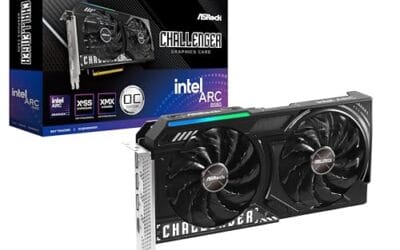
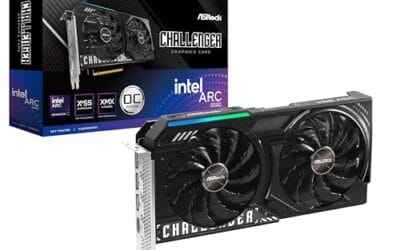
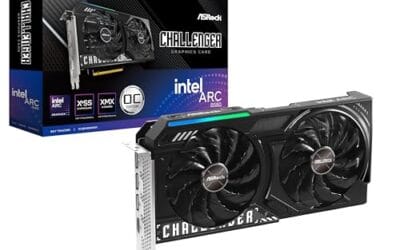
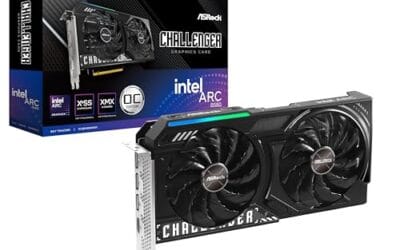
That’s the whole concept in one sentence: VRAM is fast local storage that keeps the GPU fed. A budget card like the ASRock Intel Arc B580 pairs 12GB of GDDR6 across a 192-bit bus at $309.99, and that capacity is a big reason it punches above its price for a $300-ish card. It won’t win a raw-speed contest against pricier hardware, but it doesn’t run out of room at 1080p or 1440p the way an 8GB card can.

Pros
- 12GB VRAM on 192-bit bus gives headroom over8GB rivals at 1440p.
- Single 8-pin connector and 650W PSU target means broad build compatibility.
- DisplayPort 2.1 with UHBR13.5 suports high-refresh QHD and 4K panels natively.
- 2-slot 249mm length fits compact ATX and many mATX chassis without clearance issues.
Cons
- Limited owner feedback at time of writing makes long-term reliability signals thin.
- PCIe 4.0 x8 interface can bottleneck slightly on older PCIe 3.0 platforms.
- Intel Arc driver maturity in older DX9/DX11 titles still trails NVIDIA and AMD.
The ASRock Arc B580 Challenger 12GB OC is a mid-range 1440p GPU built on Intel's Xe2-HPG architecture with 20 Xe cores, 160 XMX engines, and a 2740MHz boost clock. It targets QHD gamers and content creators who want more VRAM than 8GB competitors offer at this bracket, without moving up to a 200W-plus card.
The defining feature is the 12GB GDDR6 pool on a 192-bit bus running at 19 Gbps, which gives real texture and framebuffer headroom at1440p. Combined with XeSS 2 AI upscaling and DirectX 12 Ultimate support, Arc B580 cards in this tier typically handle modern raster titles at high settings QHD, based on Intel's reference silicon behavior.
Trade-offs are typical for Intel Arc at this stage. The PCIe 4.0 x8 interface can shave frames on PCIe 3.0 boards, and driver polish on legacy DX9/DX11 games still lags competing vendors. The card requires a single 8-pin, 650W recommended PSU, and 249mm length, so verify chassis clearance and rail headroom before pairing with older bronze-tier supplies.
Buy this if you want a 1440p card with 12GB VRAM, DP 2.1 outputs, and XeSS 2 support on a modern PCIe 4.0 platform. Skip this if your library leans heavily on older DirectX 9 or 11 titles, or your motherboard is PCIe 3.0.
Resolution target: With 12GB GDDR6 on a 192-bit bus at 19 Gbps, this card is positioned for 1440p high settings in modern raster titles, with XeSS 2 upscaling extending playable framerates in heavier ray-traced workloads. 1080p esports at high refresh is well within scope.
Power and PSU pairing: ASRock lists a 650W recommended PSU and a single 8-pin connector. GPUs in this class typically draw around 190W board power, so pair with a quality 650W to 750W unit to leave transient headroom on ATX 3.0 or olderATX 2.x rails.
Build clearance: The2-slot cooler measures 249mm long, 132mm wide, and 41mm high. That fits most mid-towers and many mATX cases, but confirm front-radiator or HDD-cage clearance in compact builds beforeordering, especially SFF chassis rated under 250mm GPU length.
Display outputs: Three DisplayPort 2.1 ports (one primary up to UHBR13.5) plus one HDMI 2.1a drive up to four displays with resolutions up to 8K. UHBR13.5 suports high-refresh 4K and 1440p panels natively without DSC compromises.
The longer explanation
Every frame your GPU draws is assembled from assets that have to live somewhere the chip can reach in nanoseconds. Textures are usually the biggest chunk. A modern game at high settings might load hundreds of high-resolution texture maps for a single environment, plus normal maps, roughness maps, and lighting data layered on top. All of that gets staged in VRAM before the GPU renders a single pixel. Add the frame buffer (the finished image waiting to hit your monitor) and depth buffers for effects like ambient occlusion, and the memory fills up fast.
Here’s the part people miss. VRAM capacity doesn’t make your card compute faster. It changes what happens when you run out. A GPU with plenty of headroom keeps assets resident and renders each frame without hunting. A GPU that’s short on memory has to evict data and reload it over the PCIe bus from system RAM, which is many times slower than the on-card memory. You feel that as texture pop-in, sudden frame drops, or that gross hitch when you spin the camera into a new area. The card isn’t weak. It’s out of desk space.
How it works
The memory itself has gone through generations. Older cards used GDDR5, most current gaming cards use GDDR6, and the newest high-end parts use GDDR7. The ASUS TUF Gaming RTX 5070, for instance, ships with 12GB of GDDR7, a faster generation than the GDDR6 on that ASRock Arc card. Newer memory moves more data per second, which matters as much as the raw gigabyte count in many workloads.
Two numbers govern real-world VRAM performance: capacity and bandwidth. Capacity is how much data fits, measured in gigabytes. Bandwidth is how fast the GPU can read and write that data, and it’s set by the memory speed multiplied by the bus width. That’s why bus width shows up on spec sheets. A 192-bit bus, like the one on the Arc B580, moves less data per cycle than a 256-bit or wider bus, so a card can carry 12GB and still be bandwidth-limited if the bus is narrow and the clocks are modest. Capacity keeps you from running out. Bandwidth keeps you from bottlenecking once the data is there.
Why it works this way
GPUs are massively parallel. A single card runs thousands of tiny cores at once, and every one of them may need to read texture and geometry data on the same frame. System RAM simply can’t feed that many requests fast enough, and the trip across the PCIe bus adds latency the GPU can’t hide. So card makers solder dedicated memory right next to the processor, wired with a wide, high-frequency interface built for exactly this pattern of access.
That physical proximity is the point. On-card VRAM answers a request in a fraction of the time a round trip to system memory would take. The tradeoff is cost and flexibility: you can’t upgrade VRAM later the way you can add a stick of system RAM, because it’s baked into the board. What you buy is what you keep. That permanence is why picking the right capacity up front matters, and why builders pairing a GPU with a strong chip like a Ryzen 9800X3D obsess over it. Our guide to the best GPU for a 9800X3D weighs memory heavily for that reason.
When you’d want more VRAM
Resolution is the biggest driver. At 1080p, 8GB still covers most games, and 12GB is comfortable. Push to 1440p with high textures and you’ll want 12GB as a baseline. At 4K, frame buffers and texture demands balloon, and 12GB starts to feel tight in the most demanding titles, with 16GB the safer target. If you game at 4K or plan to soon, capacity should sit near the top of your priority list, and it’s the thread running through our 4K gaming picks.
The other big driver is what you do besides gaming. Streaming, video editing, 3D rendering, and running local AI models all lean on VRAM hard, sometimes harder than games do. If you stream while you play, the encoder and the game compete for memory, which is why our best GPU for gaming and streaming list favors roomier cards. The ASUS TUF Gaming RTX 5070 at $749.99, carrying 12GB of fast GDDR7 with PCIe 5.0 and HDMI 2.1, is aimed squarely at that high-refresh 1440p and entry-4K crowd who want headroom for both. It holds a 4-star rating from early owners.

Pros
- GDDR7 memory on a 12GB frame suits 1440p high-refresh and early 4K workloads without hitting VRAM ceiling quickly.
- 0dB fan-stop below 50C keeps the card silent during desktop use, browsing, and light gaming sessions.
- Dual-ball bearing fans rated for roughly twice the lifespan of sleeve-bearing alternatives, reducing long-term maintenance concerns.
- NVIDIA DLSS 4 support enables frame generation and upscaling, recovering performance in ray-tracing-heavy titles.
Cons
- 3.125-slot footprint requires verifying case GPU clearance before ordering, particularly in mid-tower and mATX builds.
- TGP not explicitly listed in source data; pair with a PSU rated at least 150W above GPU draw for transient headroom, typical recommendation at this tier is 850W or above.
The ASUS TUF Gaming RTX 5070 OC is a high-end discrete GPU built on NVIDIA's Blackwell architecture. With 12GB GDDR7 memory and PCIe 5.0 interface, it targets enthusiast builders running 1440p high-refresh or early 4K setups who want a card that can sustain load without thermal throttling.
The standout feature is the thermal stack. ASUS combines a phase-change GPU thermal pad, MaxContact heat spreader with 5% increased surface area, and three Axial-tech fans spinning on dual-ball bearings. Based on the design specs, the phase-change pad should outperform traditional paste under extended gaming or GPU-compute sessions where die temperatures stabilize near TDP ceiling.
The 3.125-slot width is a real consideration, not a marketing point. Builders in tighter mATX or ITX cases need to confirm GPU slot clearance before purchasing. TGP figures are not listed in source data, but GPUs at this tier typically land between 200W and 250W, so a quality 850W PSU is the minimum sensible pairing. The conformal PCB coating and military-grade capacitors address durability concerns but do not offset the need for adequate airflow in the host case.
Buy this if you are building a dedicated 1440p or 4K gaming rig on PCIe 5.0 and want a card with above-average long-term component reliability. Skip this if your case has less than 3.125 slots of GPU clearance or your PSU is below 750W, as headroom for transient power spikes becomes a real stability risk.
VRAM and Resolution Fit: The 12GB GDDR7 frame is well-positioned for 1440p at maximum settings and 4K at medium-to-high presets in current titles. GDDR7 bandwidth reduces memory bottlenecks compared to GDDR6X at equivalent capacity, which matters in texture-heavy and ray-traced workloads.
Upscaling and Frame Generation: DLSS 4 support includes multi-frame generation, which is significant for GPU-limited scenarios at 4K with ray tracing enabled. Buyers targeting high-refresh 1440p esports titles will find DLSS 4 largely unnecessary at this GPU tier, but ray-tracing users benefit directly.
Slot and Clearance Requirements: The 3.125-slot design requires a minimum of four physical PCIe slot spaces free in the case. Card length is not specified in source data; confirm chassis GPU length clearance against ASUS product page measurements before purchasing.
Power and Connector: Connector type is not specified in source data. GPUs at this tier typically use a 16-pin 12VHPWR or 12V-2x6 connector. Verify PSU connector availability and target a PSU with at least 150W above measured GPU TGP for safe transient headroom.
What to look for in a graphics card
Don’t shop for VRAM in isolation. A card with 16GB bolted onto a weak GPU is a marketing trap; you’ll run out of compute long before you run out of memory. Match the capacity to the class of card. For a mainstream 1440p build, 12GB on a genuinely capable GPU is the sane target, and prebuilt shoppers can find that pairing in machines like the ones in our RTX 5060 Ti prebuilt and RTX 5070 Ti prebuilt guides. Step up to 4K and you’re looking at 16GB-class cards like those in RTX 5080 prebuilt systems.
Check the memory generation and bus width too, not just the gigabyte number. GDDR7 on a wide bus feeds a hungry GPU better than GDDR6 on a narrow one. And be honest about your monitor. If you’re on a 1080p 144Hz panel, spending for 16GB you’ll never fill is money that belonged in a faster GPU or a better CPU. Buy the capacity your resolution and workload actually demand, then put the rest of the budget where it moves frames.
Common misconceptions
The most stubborn myth is that more VRAM equals a faster card. It doesn’t. Capacity prevents stutter when you’re memory-limited, but it adds zero frames per second once you have enough. Reviewers have shown the same GPU in 8GB and 16GB versions posting nearly identical numbers in games that fit in 8GB, with the larger card only pulling ahead once the smaller one runs dry. Capacity is insurance, not horsepower.
The second myth is that games report their true VRAM need. That in-game usage meter usually shows allocated memory, not required memory. A game will happily reserve 11GB on a 12GB card because the space is there, then run fine on a 10GB card that forces it to be tidier. Allocation isn’t the same as need. Judge a card by real frame-time behavior in the titles you play, not by a usage bar, and lean on independent benchmarks rather than the number a game chooses to display.
Frequently asked
How much VRAM do I need in 2026?
For 1080p, 8GB works and 12GB is comfortable. For 1440p, aim for 12GB. For 4K or heavy creative and AI work, target 16GB or more. Those are baselines, not ceilings, and demanding new titles keep nudging them upward.
Is more VRAM always better?
No. Beyond what your games and resolution actually use, extra VRAM sits idle and adds no performance. A balanced card matches memory to GPU power. Overbuying capacity on a slow chip wastes money you could’ve spent on raw speed.
Can I add more VRAM to my graphics card?
You can’t. VRAM is soldered to the board and isn’t user-upgradeable like system RAM. The amount you buy is fixed for the life of the card, so choose your capacity carefully up front.
Does VRAM affect anything besides gaming?
Yes, a lot. Video editing, 3D rendering, streaming, and local AI models all consume VRAM, sometimes more aggressively than games. If you do creative work, capacity matters even at lower display resolutions.
What’s the difference between VRAM and system RAM?
VRAM is dedicated memory on the GPU for graphics data, wired for extreme bandwidth. System RAM serves the CPU and the rest of the machine. They’re separate pools, and the GPU relies on its own VRAM first because reaching into system RAM is far slower.



























Write Your Review
No reviews yet. Be the first to share your experience!