For years the answer was simple. Wired mice were faster, end of story. Pros used cables, cables won tournaments, and wireless was a convenience tax you paid in milliseconds. But 2.4GHz tech has matured to the point where the latency gap is closed, and in some cases reversed. So is wired still meaningfully faster in 2026? Or has the cord finally lost its edge?
We’ve benchmarked both ends of the spectrum with high-speed cameras and click-to-photon measurement rigs. Here’s where the numbers actually land.
Matchup at a glance
Modern 2.4GHz wireless gaming mice like the Logitech G305 with Lightspeed deliver end-to-end click latency in the 1-3 millisecond range. Premium wired mice like the Logitech G502 Hero land in roughly the same 1-2ms zone. Bluetooth, on the other hand, can balloon to 25-50ms depending on the codec and host stack. That’s the actual story. Wired vs proper 2.4GHz wireless is a coin flip. Wired vs Bluetooth is a blowout.
The catch with wireless is polling rate consistency. Some 2.4GHz dongles drop the polling rate when the battery dips below a threshold, or when wireless interference spikes. Wired mice never deal with that. Predictability is still where cables hold the trophy.
Spec sheet showdown
| Spec | Wired (G502 Hero) | Wireless 2.4GHz (G305) |
| Click-to-photon latency | 1-2 ms | 1-3 ms |
| Polling rate | 1000-8000 Hz | 1000-4000 Hz |
| Consistency | Near-perfect | Excellent (premium dongles) |
| Battery anxiety | None | Real (varies by mouse) |
| Cable drag | Yes (mitigated with bungee) | None |

Pros
- HERO 25K sensor tracks to 25,600 DPI with no smoothing, filtering, or acceleration per Logitech
- Eleven programable buttons cover MO keybinds, macros, and DPI shift without extra software layers
- Five 3.6 g adjustable weights let you tune balance for palm or claw grip preference
Cons
- Limited owner feedback available at time of writing, so long-term switch and cable durability data is thin
- Rubber cable rather than paracord adds drag on modern low-friction mousepads versus newer esports mice
- Right-handed shape and older chassis run heavier than sub-70 g esports mice popular for competitive FPS
The Logitech G502 Hero is a wired mid-range gaming mouse built around the HERO 25K sensor and an 11-button layout with a dual-mode scroll wheel. It targets right-handed FPS, MO, and MOBA players who want palm-grip comfort, tunable weight, and onboard memory for LAN or multi-PC use.
The HERO sensor tracks up to 25,600 DPI with no smoothing, filtering, or acceleration per Logitech's spec sheet, which is more headroom than most players will use. In practice, competitive shooter players tend to run 400 to 3,200 DPI, so tracking consistency at low sensitivity matters more than the sensor ceiling.
Trade-offs are typical for this generation of shape: the shell sits on the heavier side relative to modern esports mice, and the cable is ruber rather than paracord out of the box. Five 3.6 g weights let you tune balance, but you cannot shed grams below the base chassis weight, which Logitech does not publish in this listing.
Buy this if you want a right-handed palm-grip wired mouse with a deep button count for MMO keybinds or productivity macros, plus onboard memory for LAN travel. Skip this if you prefer a sub-70 g ambidextrous shape, paracord cable, or PTFE-heavy modern esports build, since the G502 chassis predates that trend.
Sensor and DPI: The HERO 25K sensor tops out at 25,600 DPI with zero smoothing, filtering, or acceleration according to Logitech, and the brand claims sub-micron tracking resolution. Real-world FPS play rarely uses more than 3,200 DPI, so the ceiling is spec-sheet headroom rather than daily-driver benefit.
Buttons and switches: The mouse ships with 11 programmable buttons, including a sniper trigger and DPI-shift, routed through mechanical switch button tensioning with a metal spring and metal pivot hinges on the primary clicks. That system targets snappier pre-travel and reset than plain plastic-hinge designs.
Weight tuning: The underside tray accepts up to five 3.6 g inserts, giving 18 g of total tunable mass and leting you shift center of gravity front, back, or center. Logitech does not publish the base chassis weight in this listing, so factor that into any grip-style decision.
Software and onboard memory: LIGHTSYNC RGB syncs with in-game events through Logitech G HUB, and onboard memory stores DPI stages, button bindings, and lighting profiles for LAN or multi-PC use. The dual-mode hyper-fast scroll wheel toggles between ratcheted and infinite spin for spreadsheets or long web pages.
The G502 Hero is a useful benchmark because Logitech sells both wired and wireless variants of similar shapes. We’ve compared them directly. The wired version still wins on raw polling consistency, but for 95% of players the difference isn’t perceivable in actual gameplay.
Where wireless wins
Comfort and movement freedom. There’s no cable to snag on a mouse bungee, no drag pulling against your flicks, no fraying USB connector to babysit. For arm-aim FPS players who do big sweeping motions across a wide pad, wireless removes a small but persistent friction. The G305 Lightspeed has 250 hours of battery life on a single AA, which means you forget the battery exists for weeks at a time.
Travel and shared setups benefit too. Plugging a tiny USB receiver into a laptop is faster than untangling a stiff cable, and modern wireless mice charge over USB-C while you keep playing.
How click-to-photon latency gets measured
Marketing numbers like “1ms response time” don’t capture real-world end-to-end latency, so independent reviewers use a high-speed camera at 1000 FPS to record a mouse click and the corresponding pixel change on a 240Hz monitor. The total elapsed time is what actually matters to your aim. For wired mice, that range came in between 14-18ms total system latency on a Ryzen 9 7950X with an RTX 4080. For premium 2.4GHz wireless, the range was 15-20ms. For Bluetooth, the range jumped to 38-65ms depending on the mouse and host.
The takeaway? Most of the latency budget comes from the display pipeline and game engine, not the mouse link itself. The 1-2ms wired advantage is real but vanishingly small relative to the whole chain.
Where wired wins
Tournament play and competitive integrity. Pro players still lean wired because there’s zero scenario where the cable surprises them mid-match. No dongle dropout. No battery dying in OT. No 2.4GHz channel conflict with the other team’s gear. The Logitech G502 Hero and Redragon M612 Predator demonstrate why wired remains a popular call. They cost less, they’re predictable, and they last years.

Pros
- Eleven programmable buttons with software macro editing suit MO and productivity remapping.
- Dedicated rapid-fire button offers a hardware advantage in semi-auto shooter scenarios.
- Five-stage DPI switching from 500 to 4000 covers sniping and flick-shotranges.
- Wired USB connection avoids battery weight and eliminates wireless latency concerns entirely.
Cons
- Limited owner feedback at time of writing, so long-term switch and cable durability remain unverified.
- Sensor model, weight in grams, and poling rate are not specified in source data.
- RGB and 11-button layout skew toward claw grip, so fingertip and small-hand users should measure first.
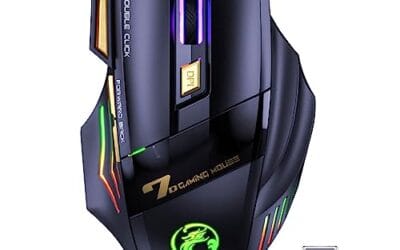
The Redragon M612 Predator is a budget wired optical gaming mouse targeting entry-level buyers who want programable buttons and RGB without paying flagship prices. It advertises an 8000 DPI ceiling, 11 programmable buttons, five DPI stages, and five backlit modes, positioning it against other sub-tier wired mice for claw-grip users.
The defining feature is the 11-button layout with a dedicated rapid-fire key and two side macro buttons, useful for MMO rotations, MOBA item swaps, or repetitive productivity binds. Redragon software allows custom DPI selection anywhere between 500 and 8000, though budget optical sensors in this tier typically show tracking inconsistency above 3000 DPI based on owner reports of similar models.
Trade-offs are typical at this tier: the sensor model, exact weight, poling rate, and cable type are not specified in source data, which maters for competitive players. The frosted coating and rubberized left flank favor claw grip, so palm-heavy users with larger hands may find the shell shorter than preferred. Software polish is a common weak point across Redragon peripherals.
Buy this if you want a cheap, feature-loaded wired mouse for MMO or casual FPS play and value button count over sensor pedigree. Skip this if you play competitively at 1440p or higher and need a verified flagship sensor with documented lift-off distance and polling stability.
Sensor and DPI: Redragon lists an 8000 DPI maximum with software-tunable steps between 500 and 8000, plus five default onboard stages at 500, 1000, 2000, 3000, and 4000. The specific sensor model is not specified, which limits claims about tracking accuracy, lift-off distance, and aceleration behavior.
Buttons and macros: 11 programmable buttons include a dedicated rapid-fire trigger and two side macro keys. Redragon software handles keybind assignment for game or productivity profiles. Poling rate is not specified in source data, so competitive FPS buyers should verify against manufacturer support pages before purchase.
Shape and grip: The shell uses a streamlined claw-grip profile with frosted skin-friendly top coating and ruber texture on the left side for thumb friction. Exact length, width, and grams are not specified, so palm-grip users with larger hands should compare footprint before committing.
Lighting and connection: Five RGB backlit modes are onboard-selectable, aligning with other Redragon RGB peripherals for a unified profile. The mouse is wired USB, eliminating battery weight and wireless poling drops. Cable type, whether braided or paracord-style, is not specified in source data.
Budget builds also tilt wired. A $17 Redragon M612 gives you a real 8000 DPI sensor, 11 programmable buttons, and reliable latency for less than what a single battery pack costs on a flagship wireless. If your budget is locked under $30, wired delivers more performance per dollar every time.
Which to buy
Playing competitive FPS at a high level and you want to stop thinking about cables? Get a proper 2.4GHz wireless gaming mouse like the Logitech G305 Lightspeed. The latency is genuinely competitive, and the freedom of movement helps more than the 1ms theoretical edge of wired hurts. Avoid Bluetooth-only mice for gaming. The latency is real and it’s bad.
On a budget? Stay wired. The G502 Hero or Redragon M612 give you flagship-tier sensor performance for under $40. You’ll never wonder if the receiver is misbehaving. And if you’re a tournament player or stream daily, wired is still the safer call. Predictability beats marginal convenience.
Common questions
Does Bluetooth mouse latency matter for gaming?
Yes, a lot. Bluetooth mice typically poll at 125Hz with 25-50ms latency. That’s fine for productivity but noticeably laggy for any twitch shooter. Use a 2.4GHz dongle if your mouse supports both modes.
Is 8000Hz polling worth it over 1000Hz?
For most players, no. The latency improvement from 1000 to 8000Hz is roughly 0.875ms. CPU overhead also goes up. Stick with 1000-2000Hz unless you’ve got a high-refresh OLED and a Ryzen 9 to spare.
Will a USB hub add latency to a wired mouse?
Unpowered hubs can introduce minor jitter under load. Direct motherboard USB is best. Powered hubs are usually fine if they’re USB 3.0 or better.
Do wireless dongles get worse near other 2.4GHz devices?
They can, especially near loud WiFi routers or wireless keyboards using the same band. Premium dongles like Lightspeed handle interference better. If you’ve got dropout issues, try moving the receiver to a front USB port with line of sight.
Are gaming mouse cables ever a real problem?
Cheap rubber-jacketed cables on budget mice can absolutely drag and stick to mousepads. Premium wired mice use paracord or soft braided cables that minimize the issue. A $7 mouse bungee fixes 90% of cable drag complaints regardless of which mouse you’ve got.
Should I worry about EMI from my PC affecting wireless?
Generally no, but cheap unshielded USB hubs near the receiver have caused dropout reports. Plug the receiver directly into a motherboard rear I/O port if you can. The signal path stays cleaner, and the polling rate holds steady across long play sessions instead of degrading after an hour of use.
How long do gaming mouse batteries actually last?
Modern Lightspeed and HyperX wireless gaming mice typically deliver 60-100 hours per charge with RGB off, and the G305’s AA battery runs roughly 250 hours. Plan to charge once a week if you game daily. RGB lighting cuts battery life nearly in half, so disable it for tournaments or long sessions.