

The Acer Nitro 85 N85-100-UR37 is the Acer gaming desktop I’d pick for a 1440p setup that might move to 4K. Its Radeon RX 9070 XT has 16 GB of graphics memory, and this configuration was about $770 cheaper than the RTX 5070 Ti Predator Orion 6000 when we checked. The main compromise is the single 16 GB stick of system memory.
If you’re putting together a 1080p desk, start with the RTX 5060 Nitro 60 and keep the savings for your monitor. If your favorite games support NVIDIA DLSS, there are two GeForce options above it, plus a 2 TB Nitro 60 for a library you’d rather keep installed. Use the model code when you shop. Two Acers with the same case and family name can have different GPUs, memory and storage.


Acer gaming desktops at a glance
These are five factory configurations. Match the model suffix and the GPU in the listing before comparing prices.
| Pick | Acer model | Graphics | RAM and SSD | Main trade-off |
|---|---|---|---|---|
| Best overall | Nitro 85 N85-100-UR37 | Radeon RX 9070 XT, 16 GB | 16 GB DDR5, 1 TB | One RAM stick as shipped |
| GeForce for 1440p | Nitro 85 N85-600-UR35 | GeForce RTX 5070, 12 GB | 16 GB DDR5, 1 TB | Less VRAM than the Radeon Nitro 85 |
| 1080p value | Nitro 60 N60-640-UR21 | GeForce RTX 5060, 8 GB | 16 GB DDR5, 1 TB | Less room for demanding texture settings |
| Premium GeForce | Predator Orion 6000 PO6-605-UR15W | GeForce RTX 5070 Ti, 16 GB | 32 GB DDR5, 1 TB | Only 1 TB at a premium price |
| Biggest SSD | Nitro 60 N60-181-UR26 | GeForce RTX 5070 Ti, 16 GB | 32 GB DDR5, 2 TB | Costs more than the Orion at the checked prices |
1. Acer Nitro 85 N85-100-UR37 for the best overall buy
Choose this Nitro 85 if you want to play demanding games at 1440p now and would like the option to try 4K later. The Ryzen 9 9900X and Radeon RX 9070 XT are the main reasons to buy it. At roughly $2,010 when we checked, it was about $190 above the RTX 5070 Nitro 85. That buys you the Radeon GPU with 16 GB of graphics memory and a different processor, while the two models ship with the same RAM and SSD capacities.
The GPU’s memory is especially relevant if you play with high-resolution textures or use large texture packs. For demanding games at 4K, start by adjusting ray tracing and use an upscaling mode if the game supports one. Your settings will matter as much as the number on the monitor box. If the games you play most favor DLSS or you need an application that specifically requires CUDA, the GeForce picks deserve the closer look.
Acer lists the N85-100-UR37 with a single 16 GB DDR5 module and a 1 TB PCIe 4.0 SSD. If you usually keep a game, a browser, voice chat and capture software open together, price a compatible 32 GB memory configuration before checkout. The case is 19.5 inches deep, so measure the shelf with room for power and display cables. Acer’s N85-100-UR37 specifications.
2. Acer Nitro 85 N85-600-UR35 for 1440p with DLSS
The Intel Nitro 85 is the middle step for someone with a 1440p monitor who specifically wants GeForce features. It pairs a Core Ultra 7 265F with the desktop RTX 5070 and 12 GB of graphics memory. The roughly $1,820 offer puts it well above the RTX 5060 Nitro 60 and well below the RTX 5070 Ti Orion. Check whether your regular games support the DLSS modes you want before spending the difference.
DLSS Super Resolution is the feature I’d look for first. In compatible games it gives you another way to balance image quality and frame rate at 1440p. Frame generation is a separate setting and works best when the game already responds well to your inputs. If you mostly play competitive games at lower settings, compare the $1,165 Nitro 60 first. That gap is big enough to change the rest of your desk budget.
The apparent twin of the AMD Nitro 85 ships with a single 16 GB DDR5 module, a 1 TB SSD, Wi-Fi 7 and 2.5 Gigabit Ethernet. It uses an Intel processor and a GeForce card, so keep the full code handy when looking up drivers or memory support. If you have roughly $200 more to spend and care most about 16 GB of graphics memory, move the Radeon Nitro 85 to the top of your list. Acer’s N85-600-UR35 specifications.
3. Acer Nitro 60 N60-640-UR21 for 1080p value
This is the Acer I’d buy for a regular 1080p setup. The Core i5-14400F, RTX 5060, 16 GB of DDR5 and 1 TB SSD make it a sensible starting point for a mix of esports, indie games and larger single-player releases. At about $1,165, it was roughly $655 less than the next Acer on this list. A meaningful gap if you’re also buying a display.
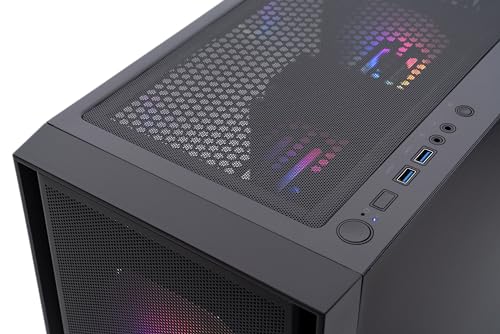
The RTX 5060 has 8 GB of graphics memory. In a demanding game, start with sensible texture and ray-tracing settings and raise them once you’re happy with how it plays. If you’re buying a 1440p monitor for upcoming, graphics-heavy games and want more room for texture settings, the 12 GB RTX 5070 Nitro 85 is the GeForce step up. For buyers with a firm spending limit, the gaming PC picks under $1,500 give you more systems to compare against this Acer.
Acer lists this Nitro 60 at 14.9 inches deep, with Wi-Fi 6 and Gigabit Ethernet. That makes it the easier starting point for a shallow desk than either Nitro 85. Check the carton or product listing for a keyboard and mouse if you’re starting from scratch, and give the case some breathing room wherever you put it. Acer’s N60-640-UR21 specifications.
4. Acer Predator Orion 6000 PO6-605-UR15W for premium GeForce gaming
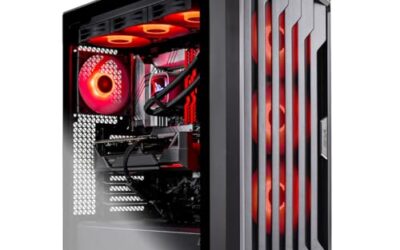
The white Orion 6000 is the Acer I’d choose for 4K gaming with NVIDIA features if the budget reaches roughly $2,780. This exact model combines a Core Ultra 7 265KF and RTX 5070 Ti with 32 GB of DDR5. You get 16 GB of graphics memory and twice the system RAM of either Nitro 85. That’s handy if you want to run a game alongside capture software or use heavy mods without planning a memory purchase from day one.
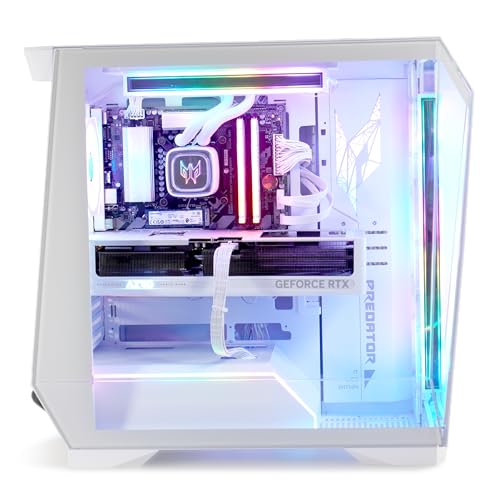
The RTX 5070 Ti makes sense here if you’re buying for an existing 4K display and will use supported DLSS modes in demanding games. For older or lighter games, the RTX 5070 Nitro 85 can leave far more in your budget. Use the games you expect to play to decide whether the Predator is worth the premium. You can also compare it with our picks for 4K prebuilt gaming PCs before committing.
The Orion still ships with a 1 TB SSD. A few large releases plus recordings can make that feel small. If your spending plan includes extra storage anyway, compare the delivered cost of this tower and a compatible SSD with the 2 TB Nitro 60 below. Acer also lists Wi-Fi 7 on the Orion if a wired connection is inconvenient. Acer’s PO6-605-UR15W configuration details.
5. Acer Nitro 60 N60-181-UR26 for a larger installed game library
This Nitro 60 is for buyers who want an RTX 5070 Ti, 32 GB of RAM and 2 TB of SSD space in one purchase. Its Ryzen 9 7900 is a 12-core processor, and Acer lists a PCIe 4.0 NVMe drive. It’s the one I’d consider if I switch among several large games every week or want room for local recordings without opening a new PC to fit another drive.
At roughly $2,980, it was about $200 more than the Orion 6000. Both have the same GPU model and RAM capacity, so the extra money here is easier to justify for the ready-to-use drive space than for a gaming upgrade. If you keep just two or three games installed and already have a wired setup, the cheaper Orion is the better starting point. If you need 2 TB from the start, work out what it would cost you to add storage and whether you’d do that yourself.
The N60-181-UR26 is only 14.9 inches deep according to Acer. That’s helpful if you want a 5070 Ti machine for a shallow desk and still need cable clearance. The listed network hardware is Wi-Fi 6 and Gigabit Ethernet. Check the whole SKU carefully because the lower-cost RTX 5060 system is also called Nitro 60. Acer’s N60-181-UR26 specifications.
How we evaluated
We compared complete desktop configurations, starting with the graphics card and the price of the tower. We checked the model suffix, processor, memory, SSD and networking against Acer’s documentation, then used AMD and NVIDIA specifications for the GPU memory and supported graphics features. Prices are rounded snapshots of new U.S. retail offers from November 25, 2026. They can change with the seller and availability.
The recommendations weigh what you get at the target resolution, where the factory configuration makes a compromise and which upgrades you’d have to pay for yourself. We used documented specifications and offers to make those comparisons. Expected fit for a resolution depends on the game, settings and display. AMD Radeon specifications and NVIDIA GeForce specifications.
How to choose an Acer gaming desktop
What resolution will you actually use?
Start with the monitor you’re keeping, or price the replacement in the same budget. For a 1080p screen, the RTX 5060 is the sensible starting point here. If you’re moving to 1440p, consider the RTX 5070 if DLSS matters or the RX 9070 XT if you’d rather have 16 GB of graphics memory. For 4K with a GeForce card, put the RTX 5070 Ti systems on the shortlist. Our 1440p prebuilt buying guide gives you a cross-brand price check at the middle tier.
Will you pay for more RAM or storage later?
Keep system RAM and graphics memory separate when you compare listings. Adding DDR5 won’t increase the VRAM on the graphics card. If you want 32 GB of system RAM because you stream, mod games or tend to leave a lot open, include that cost when comparing a Nitro 85 with an Orion. For storage, add up the installation sizes of the games you want available at once and budget space for Windows, updates and captures. That will tell you more about the value of 2 TB than the spec alone.
How much clearance and connectivity do you need?
Measure the proposed spot from wall to front edge and account for plugs and airflow. A tower that’s 19.5 inches deep can be awkward even when the width looks fine. Check that the graphics card has an output that matches your monitor and use a cable suited to the resolution and refresh rate you want. If you’re connecting over Ethernet, check that the router or switch can use the link speed you’re paying for.
Frequently asked questions
Are Acer Nitro and Predator prebuilts good for gaming?
Yes, when the model matches the games and display you’re buying for. The RTX 5060 Nitro 60 is a practical 1080p example, while the RTX 5070 Ti Orion comes with more graphics memory and twice the system RAM. An Aspire desktop with integrated graphics can work for lighter games, but for this list we chose Acer towers sold with dedicated gaming graphics.
Can you upgrade the graphics card or SSD later?
Check Acer’s documentation for the exact model, along with the board layout, available slots and installed components. For a new GPU, verify card length and thickness, power connectors and PSU capacity. For an SSD, ask whether the listed M.2 interfaces include an occupied storage slot or a wireless slot. An interface count by itself won’t tell you how many drives you can add.
Bottom line
Buy the Nitro 85 N85-100-UR37 if you want 16 GB of graphics memory for 1440p and occasional 4K gaming without paying Orion prices. A 1080p desk on a tighter budget? Choose the RTX 5060 Nitro 60. Spend more on the Orion if you want the desktop RTX 5070 Ti and 32 GB of RAM, or choose the 2 TB Nitro 60 if extra factory storage is worth the price difference to you.

























Write Your Review
No reviews yet. Be the first to share your experience!