

A 120 mm AIO makes sense when your case has room for a radiator at one vent but leaves little height above the CPU. It moves the heat exchanger to the edge of the case, giving you another way to cool a compact desktop. The catch is that a 120 mm fan mount can be too tight for a radiator, its end tanks and the tubing.
The Thermalright Aqua Elite 120 V3 is our first pick for most of these builds. At $33.90 in our price check, it combined a low entry price with documented mounting support for current AMD and Intel sockets. The other picks serve different needs, from a screen you can see through the side panel to mounting support for an older motherboard.
One fan. One radiator. If your case can fit a taller air cooler or a 240 mm radiator, price those options before committing. The value of a 120 mm cooler is that it can fit where the other options won’t.
120 mm AIO coolers at a glance
| Pick | Cooler | Defining feature | Best for | Main tradeoff |
|---|---|---|---|---|
| Best for most builds | Thermalright Aqua Elite 120 V3 | 25 mm PWM fan and AM5/LGA1851 support | Affordable compact builds | Check clearance for the 53.8 mm pump housing |
| Best mirror lighting | Thermaltake TH120 V2 ARGB Sync | Rotatable infinity mirror cap and 460 mm tubes | Visible builds with a longer tube route | $69.99 at our price check |
| Best with a screen | Thermalright FW SE 120 ARGB Black | 2-inch, 320 × 240 display | Small cases with a view of the CPU block | Extra clearance and cable routing to check |
| Best for older platforms | greenDracaena Dracaena.io 120 mm AIO | Documented LGA1366 and AM3 mounting support | Repairs and upgrades on older boards | Uses the original AMD backplate |
| Low-cost white option | Generic white 120 mm ARGB AIO | White finish and square mirror block | Color-matched builds with room to spare | Limited documentation and inconsistent gallery images |
Thermalright Aqua Elite 120 V3 for most builds
Start here if you need a single-fan liquid cooler and would rather put the rest of your budget toward the CPU or graphics card. Thermalright documents support for AMD AM4 and AM5 and Intel LGA115x, 1200, 1700 and 1851. That’s useful when you’re rebuilding a compact PC and want a straightforward way to check that its motherboard is covered.

The selected version uses one 25 mm-thick TL-C12B-S V2 fan. Thermalright rates it for up to 1,500 RPM, with a tolerance of ±10%, and specifies four-pin PWM and three-pin 5 V ARGB connectors. Those details help you plan the fan and lighting connections before you close up a cramped case. Fan speed alone doesn’t tell you how loud the complete cooler will be under sustained load.
The pump housing is 53.8 mm tall according to Thermalright. In a case with a side-mounted power supply or a radiator bracket just above the socket, measure vertically from the CPU and leave room for the fittings and tube exit as well. If the block clears and your case lists 120 mm radiator support at the intended position, this is the first model we’d price for a modest-power build. Thermalright specifications and installation guide.
Thermaltake TH120 V2 ARGB Sync for mirror lighting
The TH120 V2 is the pick for a windowed case where you want the pump face to match the other lighting. Its infinity mirror cap rotates, so you can orient the logo after you’ve worked out which way the hoses need to turn. A three-pin 5 V addressable lighting header lets you sync the cooler with a compatible motherboard. Check that header before you buy, especially on a board with a 12 V RGB connector.

Thermaltake specifies a 157 × 120 × 27 mm radiator, one 25 mm CT120 ARGB fan and 460 mm tubes. Budget 52 mm for the radiator and fan together before allowing for any bracket, screw heads and hose clearance. The long tubes can help when the case mount is some distance from the socket, but you’ll need somewhere to put the slack in a short enclosure. A case panel should close without pinching either tube.
At $69.99, this was the most expensive cooler in the shortlist. The premium buys a particular look, specified dimensions and a known tube length. If the block will sit behind a solid panel and the hose route is short, the Aqua Elite is the better place to start. Thermaltake product specifications.
Thermalright FW SE 120 ARGB Black for a built-in screen
Choose this one if you’d like a display on the CPU block and your case still limits you to a single 120 mm radiator. The exact retail listing identifies a 2-inch, 320 × 240 display and a 2,000 RPM ARGB fan. It lists AM4 and AM5 on the AMD side, plus Intel LGA115x, 1200, 1700 and 1851. Check for the 120 mm black version at checkout since the similar names on larger models are easy to confuse.

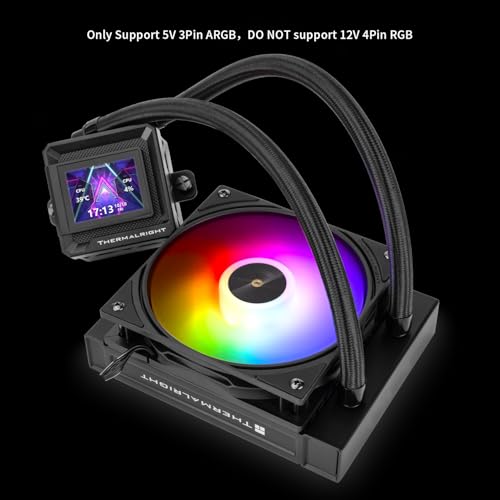
At $49.09 in our price check, it cost about $15 more than the Aqua Elite. Before paying that difference, picture where the screen will face once the GPU, cooler bracket and panel are installed. A side-mounted radiator or a vertically mounted graphics card can block the view you expected. Make sure there is room for the block and its cabling, and confirm the display’s controls and connections with the seller if those features matter to you.
You’re paying for a display here. We found no comparable cooling measurements to justify the extra spend on thermal grounds.
greenDracaena Dracaena.io 120 mm AIO for an older socket
Check this model if you’re replacing a failed cooler on an older system and the current choices don’t document your mount. Dracaena’s black 120 mm model has one PWM fan, and the manufacturer lists Intel LGA1366 and LGA2011 alongside more common sockets. It also lists AMD AM3 and AM4 among its supported AMD platforms. Match the full socket name to the documentation before you order, especially if the board uses a less common variant.

The manufacturer says its AMD setup uses the original motherboard backplate. This matters if the PC was bought secondhand or its previous cooler used a different plate. Look behind the socket first, then check whether the plate and mounting hardware are still present. Replacing a missing bracket can erase the savings on a repair.
Dracaena documents a lighting controller and remote for the black model. If you’re buying specifically for that accessory, confirm the contents of the current listing. At $39.99, the main reason to pick this cooler over the Aqua Elite is its documented legacy mounting support. For a new AM5 build, choose a model whose manufacturer explicitly lists your socket. Dracaena product and mounting details.
Generic white 120 mm ARGB AIO for a color-matched build
This is the white option to consider if the visible cooler in an otherwise white build is a priority and you have room to double-check fit. The main listing image shows a white radiator and hoses with a square, illuminated block. The listing identifies one 120 mm radiator and names Intel LGA1700 and AMD AM5 among its mounting options. Those socket claims come from the seller, and the full radiator and block measurements need confirmation.

At $30.89 it saved only about $3 versus the Aqua Elite. Some alternate photos show a darker assembly, so ask the seller to confirm the finish and supplied brackets for the exact listing. Get the overall radiator length, assembled thickness and tube exit direction before buying for a case with tight tolerances.
Consider it if the seller can answer those fit questions and the color change is worth it to you. For a build you need to finish on a fixed schedule, start with a model that has a published installation guide and a known mounting kit.
How we evaluated
We checked new US offers on November 25, 2026. The five selected listings ranged from $30.89 to $69.99, before tax and shipping. We compared the exact versions, verified physical and mounting details where the manufacturers documented them, and treated retailer-only features as listing claims. Promotions and inventory can change, so use those prices to understand the tradeoffs at the time of comparison.
We prioritized documented socket support, usable clearance information and a meaningful reason to choose each product. A screen, a certain finish or a specified tube length can change the buying decision. Advertised fan RPM and cooler wattage ratings don’t tell you what CPU temperatures or sound levels to expect in a particular case.
How to choose a 120 mm AIO
Does the case support a radiator at that mount?
Start with the case manual. A rear panel with four 120 mm fan holes may still leave too little space for the radiator’s end tanks above and below the fan. Check the radiator length and thickness in the actual mounting direction, then account for nearby heatsinks, the GPU and its power cable. If the radiator will sit at the rear, check whether it overlaps the motherboard’s top edge or makes the CPU power connector inaccessible.
Can the tubes reach without a hard bend?
Work out the route before you tighten any hardware. Where the cooler design and chassis permit, keep the pump below the highest point of the radiator so air can collect away from the pump. A front-mounted radiator with the tubes at the bottom can work well when the hoses reach comfortably. Check the actual location of the pump, since some designs place it away from the CPU block. Use your cooler’s instructions alongside our AIO installation guide. Corsair’s radiator mounting guidance.
How long will the CPU be under heavy load?
A PC that mostly plays games and handles short bursts of work puts different demands on a cooler than one that spends hours rendering or compiling. Check your CPU’s sustained power behavior, including the motherboard’s default limits. If you need sustained high-power operation and the case has room, start with our 240 mm AIO shortlist. If the case can only fit 120 mm, decide whether you’re comfortable using the CPU’s supported lower-power settings to keep heat and fan speeds in check.
Do you have space for a good air cooler instead?
If the case has enough clearance above the socket, a suitable tower cooler gives you another option and avoids adding a pump to the build. In a shallow enclosure, compare the exact height of a low-profile heatsink against the combined radiator and fan clearance at the vent. The space available at those two points is what decides which format is practical. See our comparison of air and liquid CPU cooling.
Frequently asked questions
Is a 120 mm AIO enough for a gaming CPU?
It can be for a modest-power processor with clear radiator airflow. The socket match tells you it can mount, while the power the CPU sustains in your own workloads determines how much heat needs to leave the case. A high-power chip in a restrictive chassis is a poor match if you’re also trying to keep fan speeds down.
Can I replace the radiator fan later?
Usually, if the replacement matches the mounting pattern and the radiator accepts its thickness and screws. Check the original fan’s size, power connection and lighting connection before ordering. Use the fasteners specified for the radiator and the chosen fan thickness. A screw that extends too far can damage the radiator.
Do I need to refill a 120 mm AIO?
These are sold as closed-loop coolers for ordinary use without routine refills. Follow the model’s instructions if you see a leak or suspect a pump fault. If a cooler that used to work begins making unusual sounds, check pump speed, mounting orientation and trapped air with our AIO pump noise guide.
Bottom line
Buy the Thermalright Aqua Elite 120 V3 if you want an inexpensive 120 mm AIO with documented modern socket support and your case has the clearance. Pick the Thermaltake for its mirror cap and longer tubing, the FW SE for a screen, or the Dracaena for a legacy socket you can verify. The generic white option makes sense only after the seller confirms the exact kit. Take the case measurements first. It’s the step most likely to change which cooler you buy.



























Write Your Review
No reviews yet. Be the first to share your experience!