

Picking a power supply is the least glamorous part of a build and one of the easiest to get wrong. Undersize it and your rig crashes under load; oversize it and you’ve wasted cash on capacity you’ll never draw. The unit also feeds every other component, so a cheap one puts a GPU and CPU worth ten times its price at risk. This walkthrough breaks the choice into clear steps: work out your wattage, pick an efficiency tier, match the right connectors for a modern GPU, and confirm the physical size fits. If you want context on specific tiers, our guides to the best 1000W units and the best ATX 3.1 supplies for 2026 go deeper on the shortlists.
What you’ll need
You don’t need much to make this decision, just information. Have your GPU and CPU model handy, since they set the power ceiling. Know your case format, because a small-form-factor build needs an SFX unit while a standard tower takes ATX. A wattage calculator, the kind PSU makers and sites like OuterVision host, gives you a starting estimate in two minutes. And decide whether you want fully modular cabling, where every cable detaches, for cleaner routing and easier airflow. That’s the whole toolkit. Numbers and a little planning.

Pros
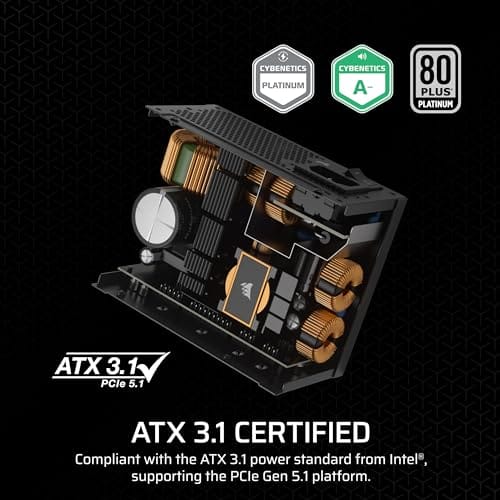
- ATX 3.1 compliant with PCIe 5.1 support, resists transient spikes from RTX 50 and RX 9000 series GPUs.
- Zero RPM Mode eliminates fan noise at low and medium loads, a real advantage in acoustically sensitive SFF builds.
- Fully modular design with short SFX cables reduces cable management friction in sub-10-liter cases.
- 105 degree C Japanese capacitors indicate quality component selection typical of high-tier SFX units.
Cons
- Limited owner feedback at time of writing; real-world noise, ripple, and transient performance are unverified by community data.
- Short SFX cables are unsuitable for mid-tower or full-tower cases without aftermarket cable extensions.
- 750W ceiling may fall short for extreme SFF builds pairing a 300W-plus TGP GPU with a high-core-count CPU.
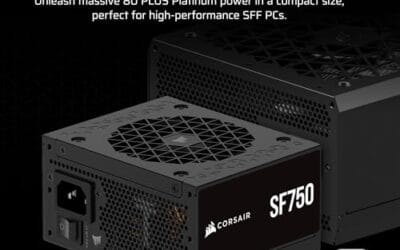
The Corsair SF750 (2024) is a high-end SFX PSU targeting SFF builders who need substantial wattage in a compact footprint. With 80 Plus Platinum certification and ATX 3.1 compliance, it sits at the upper tier of the SFX market, aimed at builders pairing it with current-gen discrete GPUs inside sub-10-liter cases.
The most defining specification here is ATX 3.1 compliance combined with PCIe 5.1 readiness. This means the unit is rated to handle the sharp transient power spikes that RTX 50 and RX 9000 series GPUs can produce, where non-compliant PSUs may trigger overcurrent protection. At 750W, it covers most single-GPU SFF configurations without derating concerns.
The honest trade-off is the review data gap. At time of writing, no substantial owner feedback exists to validate Corsair's noise and ripple claims under real load. The Zero RPM Mode claim and 92mm fan acoustics are based on spec sheets only. Buyers should also note that SFX cable lengths are intentionally short and will not reach connectors in mid-tower or larger cases without extensions.
Buy this if you are building an SFF PC around a single high-TGP GPU and need confirmed ATX 3.1 compliance in a modular SFX unit. Skip this if you want a large ATX case build, need more than 750W for a dual-component high-wattage system, or require extensive owner testing before purchasing.
Form Factor and Mounting: This is a standard SFX form factor PSU, not SFX-L. Verify your case specifies SFX compatibility before purchasing. An SFX-to-ATX bracket is included, allowing installation in ATX-footprint cases, though short cable lengths will require extensions in anything larger than a compact SFF enclosure.
Power Standard and Connector: ATX 3.1 compliant with PCIe 5.1 readiness. The unit supports the 12V-2x6 connector standard, relevant for RTX 40 and RTX 50 series GPUs as well as AMD RX 7000 and RX 9000 cards with high transient draw. Non-ATX 3.1 units can trigger OCP shutdowns above 150 percent peak load spikes.
Efficiency and Thermal Operation: 80 Plus Platinum certification indicates roughly 92 percent efficiency at 50 percent load under 115V. The 92mm PWM fan uses a fluid dynamic bearing and Zero RPM Mode activates at low loads, which in SFF cases where airflow is restricted can noticeably reduce system acoustic output.
GPU Wattage Pairing: At 750W, this PSU pairs appropriately with GPUs up to approximately 300W TGP when combined with a mid-range CPU. For a 320W-plus TGP GPU alongside a 65W-plus CPU, headroom becomes tight and a higher-wattage SFX unit should be considered instead.
Step 1: Add up your real power draw
Start with the two components that dominate consumption: the graphics card and the processor. Look up each part’s rated power, add them, then add roughly 100 to 150 watts for the motherboard, drives, fans, and RAM. That total is your system’s approximate peak draw. A build pulling around 500 watts at peak is common for a mainstream gaming rig with a mid-range GPU.
Manufacturer wattage calculators make this easy, but plug in honest numbers. Pick your actual GPU and CPU, not the ones you wish you had, and include every drive and fan. The estimate the tool spits out is your baseline. If you’re unsure between two figures, round up, since underestimating is the mistake that causes crashes and overestimating just costs a few dollars more. A high-end card like an RTX-class GPU can spike well past its nominal rating, so build the number around your real hardware.
Now add headroom. You want the supply to run around 50 to 70 percent of its rating at typical load, because that’s where most units sit at their quietest and most efficient. So a 500-watt peak build pairs nicely with a 650 to 750-watt supply. The Corsair SF750, as its name says, delivers 750 watts, which comfortably covers that scenario with room for a GPU upgrade later. Don’t just match your draw, leave slack.
A word on why headroom isn’t waste. A supply loafing at half load runs cooler, ages slower, and often keeps its fan off entirely, which means a quieter PC. Running a unit near its ceiling does the opposite: the fan screams, heat builds, and the components inside wear faster. So the headroom you buy isn’t idle capacity, it’s efficiency, quiet, and longevity working for you. It also future-proofs the build. Drop in a hungrier GPU in two years and you won’t be shopping for a new PSU at the same time.
Step 2: Pick an efficiency and quality tier
The 80 Plus rating tells you how much wall power actually reaches your components versus what’s lost as heat. The ladder runs Bronze, Gold, Platinum, and Titanium, each one wasting less. Higher tiers cost more up front but run cooler and often quieter, since less waste heat means the fan spins less. For a build you’ll keep for years, Gold is the sensible baseline and Platinum is a genuine step up.
The Corsair SF750 carries an 80 Plus Platinum rating, which puts it near the top of the efficiency ladder. That matters most in a small case where heat has nowhere to go. Efficiency isn’t only about your power bill; a cooler-running unit is a longer-lived unit. If you’re building for overclocking headroom, our notes on the best budget supplies for overclocking weigh this tradeoff too. Don’t skimp on the tier that keeps everything else alive.
Efficiency also ties into build quality in a practical way. A unit that earns a high 80 Plus tier usually uses better internal components, higher-grade capacitors and tighter voltage regulation, because those are what let it hit the rating in the first place. That’s why the tier is a rough proxy for overall quality, not just efficiency. It’s not a perfect rule, and a trusted brand and model matter more than the badge alone, but a Platinum unit from a known maker is rarely a cheaply built one. Read a couple of reviews to confirm the specific model’s reputation before you commit.
Step 3: Match the connectors to a modern GPU
Recent graphics cards changed the power game. Many now use the 12VHPWR or 12V-2×6 connector defined by the PCIe 5.x and ATX 3.x specs, rather than a pile of old 8-pin plugs. If your PSU doesn’t support the current standard, you’re stuck with adapters that add failure points. So check that the unit is ATX 3.1 compliant and PCIe 5.x ready, which means it delivers the transient power spikes modern GPUs demand without tripping.

This is where the Corsair SF750 earns attention: it’s ATX 3.1 compliant and PCIe 5.1 ready, so it speaks the current GPU power language natively. That saves you from dodgy adapter chains and handles the momentary power surges high-end cards throw at the rail. A fully modular design means you only connect the cables your build needs, which keeps the case tidy and airflow clean. Verify the connectors before you buy, not after the card won’t power on.
Transient spikes deserve a plain explanation, because they trip up a lot of builders. A modern GPU can momentarily draw far more than its rated wattage for a fraction of a second, and an older supply that isn’t built for those spikes may read that as a fault and shut down, even though its total wattage looks adequate on paper. The ATX 3.x spec exists specifically to handle these bursts, which is why matching the standard matters as much as the raw wattage number. If you’re pairing a current high-end card, an ATX 3.1 unit isn’t optional, it’s the thing that keeps your PC from randomly cutting out mid-game.
Step 4: Confirm the form factor fits
A powerful supply is useless if it won’t physically fit. Standard mid-towers take ATX-format units, while compact and small-form-factor builds need the smaller SFX size. The two aren’t interchangeable without a bracket, so measure your case’s PSU bay or check its spec sheet before ordering. Getting this wrong is the most avoidable mistake in the whole process.
The Corsair SF750 is an SFX unit, built for small-form-factor cases where space is tight, and it ships with a bracket that lets it mount in a standard ATX bay too. That flexibility is handy: you can run it in a mini rig now and move it to a larger case later. If you’re in a full tower, a native ATX unit may cost less per watt, so match the format to your chassis. Little detail, big consequence.
Step 5: Weigh noise, warranty, and price
With wattage, efficiency, connectors, and size settled, the last step is the finishing details. Many quality units run a zero-RPM or low-noise fan mode at light loads, so the PSU stays silent until it’s genuinely working. The Corsair SF750 is marketed as low noise, which pairs well with its Platinum efficiency in a quiet build. A longer warranty, common on higher tiers, signals the maker’s confidence and protects a part that guards everything else.
Then look at price in context. At $159.99, the SF750 sits above a basic Gold ATX unit, and that premium buys the SFX size, Platinum efficiency, ATX 3.1 support, and fully modular cabling. Whether that’s worth it depends on your case and how long you’ll keep the build. For a small, high-end system it’s an easy call. For a budget tower, a plainer ATX Gold unit may serve you fine. Decide by build, not by hype.
Also consider cable length and orientation before final assembly. SFX supplies often ship with shorter cables, perfect for compact cases but sometimes tight in a large tower, even with an ATX bracket. Lay the unit and cables in the case before mounting everything else, route the 24-pin and CPU 8-pin first, then add GPU power last. A fully modular unit makes this much cleaner because unused cables stay in the box instead of crammed behind the side panel.
Troubleshooting common issues
The PC won’t power on at all
First confirm the wall switch on the PSU is flipped to on and the cable is seated at both ends. Then check that the 24-pin motherboard connector and the CPU 8-pin are fully clicked in, since these back out easily during a build. A modular unit needs its cables attached at the PSU side too, which people forget. If it still won’t post, a paperclip jump-start check on the 24-pin verifies the unit itself responds.
Random shutdowns under heavy load
This usually means the supply is undersized or its transient response can’t handle GPU power spikes. If you sized it too tight, the fix is a higher-wattage or ATX 3.x-compliant unit that tolerates those surges. Overheating from poor case airflow can trigger the same behavior, so confirm the PSU fan spins and the case isn’t choking on dust before blaming the unit.
Coil whine or a constantly spinning fan
A faint electrical whine under load is coil whine, usually harmless though annoying, and more common in cheaper units. A fan that never stops may simply lack a zero-RPM mode, or the unit is loaded heavily enough to keep it running. Efficient supplies like a Platinum-rated SF750 tend to stay quieter because they generate less waste heat. If whine is severe from a new unit, it’s grounds for a return.
Wrapping up
Choosing a PSU comes down to five checks in order: total your real draw, add headroom, pick an efficiency tier, match the connectors to your GPU, and confirm the form factor fits your case. Nail those and the rest is detail. A unit like the Corsair SF750, with 750 watts, 80 Plus Platinum efficiency, ATX 3.1 compliance, and a fully modular SFX design, covers a modern small-form-factor build with room to grow. Buy the supply that fits your case and your card, leave sensible headroom, and it’ll quietly power your system for years while everything flashier gets the attention.
One last piece of advice: never cheap out on the PSU to save twenty dollars. It’s the one part that can take the rest of the build with it if it fails badly, so a trusted unit with proper protections is money well spent. Get this component right once and you’ll carry it through several upgrades without a second thought.
























Write Your Review
No reviews yet. Be the first to share your experience!