

PSU ripple is the tiny leftover wave of AC voltage that rides on top of the DC power your PC power supply sends to the motherboard, CPU, GPU, drives, and fans. A good power supply keeps that wave small. A weak or aging one can let more electrical noise through, and that can make a gaming PC less stable than its wattage label suggests.
If you’re choosing a new unit for a modern graphics card, ripple matters alongside wattage, connector support, efficiency, and build quality. That’s why guides such as modular PSUs for gaming PCs, PSUs for Ryzen 7 9800X3D builds, and 1000W PSUs for high-end GPUs shouldn’t be read as wattage charts only. The cleaner the DC output, the less work the rest of the system has to do. Simple idea. Big consequences.
The short answer
PSU ripple is voltage fluctuation left over after the power supply converts wall power into the low-voltage DC rails a PC uses. Your outlet supplies AC power. Your components need regulated DC power, mainly 12V for the CPU and GPU, plus 5V and 3.3V for other parts. The PSU’s internal circuitry smooths that conversion, but it can’t make the output perfectly flat.

A small amount of ripple is normal. The concern is excessive ripple, especially on the 12V rail that feeds power-hungry parts. If ripple gets too high, the system can experience random shutdowns, coil whine changes, storage errors, GPU instability, or long-term stress on motherboard and graphics card voltage regulation. It’s not the only cause of those symptoms, but it’s one of the hidden ones people miss.


Pros
- ATX 3.1 compliant with PCIe 5.1 support, resists transient spikes from RTX 50 and RX 9000 series GPUs.
- Zero RPM Mode eliminates fan noise at low and medium loads, a real advantage in acoustically sensitive SFF builds.
- Fully modular design with short SFX cables reduces cable management friction in sub-10-liter cases.
- 105 degree C Japanese capacitors indicate quality component selection typical of high-tier SFX units.
Cons
- Limited owner feedback at time of writing; real-world noise, ripple, and transient performance are unverified by community data.
- Short SFX cables are unsuitable for mid-tower or full-tower cases without aftermarket cable extensions.
- 750W ceiling may fall short for extreme SFF builds pairing a 300W-plus TGP GPU with a high-core-count CPU.
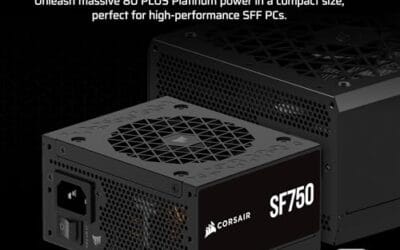
The Corsair SF750 (2024) is a high-end SFX PSU targeting SFF builders who need substantial wattage in a compact footprint. With 80 Plus Platinum certification and ATX 3.1 compliance, it sits at the upper tier of the SFX market, aimed at builders pairing it with current-gen discrete GPUs inside sub-10-liter cases.
The most defining specification here is ATX 3.1 compliance combined with PCIe 5.1 readiness. This means the unit is rated to handle the sharp transient power spikes that RTX 50 and RX 9000 series GPUs can produce, where non-compliant PSUs may trigger overcurrent protection. At 750W, it covers most single-GPU SFF configurations without derating concerns.
The honest trade-off is the review data gap. At time of writing, no substantial owner feedback exists to validate Corsair's noise and ripple claims under real load. The Zero RPM Mode claim and 92mm fan acoustics are based on spec sheets only. Buyers should also note that SFX cable lengths are intentionally short and will not reach connectors in mid-tower or larger cases without extensions.
Buy this if you are building an SFF PC around a single high-TGP GPU and need confirmed ATX 3.1 compliance in a modular SFX unit. Skip this if you want a large ATX case build, need more than 750W for a dual-component high-wattage system, or require extensive owner testing before purchasing.
Form Factor and Mounting: This is a standard SFX form factor PSU, not SFX-L. Verify your case specifies SFX compatibility before purchasing. An SFX-to-ATX bracket is included, allowing installation in ATX-footprint cases, though short cable lengths will require extensions in anything larger than a compact SFF enclosure.
Power Standard and Connector: ATX 3.1 compliant with PCIe 5.1 readiness. The unit supports the 12V-2x6 connector standard, relevant for RTX 40 and RTX 50 series GPUs as well as AMD RX 7000 and RX 9000 cards with high transient draw. Non-ATX 3.1 units can trigger OCP shutdowns above 150 percent peak load spikes.
Efficiency and Thermal Operation: 80 Plus Platinum certification indicates roughly 92 percent efficiency at 50 percent load under 115V. The 92mm PWM fan uses a fluid dynamic bearing and Zero RPM Mode activates at low loads, which in SFF cases where airflow is restricted can noticeably reduce system acoustic output.
GPU Wattage Pairing: At 750W, this PSU pairs appropriately with GPUs up to approximately 300W TGP when combined with a mid-range CPU. For a 320W-plus TGP GPU alongside a 65W-plus CPU, headroom becomes tight and a higher-wattage SFX unit should be considered instead.
The longer explanation
A PC power supply is a conversion and regulation box. It takes high-voltage AC from the wall, rectifies it, switches it at high frequency, steps it down, filters it, and regulates the output rails. Capacitors, transformers, inductors, MOSFETs, control ICs, and feedback circuits all work together to keep the output near its target voltage. Ripple is what remains after that filtering process.
Think of the ideal 12V rail as a perfectly straight line at 12.00 volts. Real hardware doesn’t produce a perfect line. Instead, the voltage moves slightly above and below the target many thousands of times per second. That movement is measured as peak-to-peak millivolts, often written as mV p-p. Lower is better, because it means the PSU is feeding cleaner power into the motherboard and graphics card voltage regulation modules.
Industry guidance commonly treats 120 mV peak-to-peak as the upper limit for the 12V rail, while 5V and 3.3V rails are commonly held to 50 mV peak-to-peak. Good units often sit well below those limits under normal loads. Poor units, overloaded units, or worn-out units can drift upward, especially when the GPU ramps hard and asks for fast current changes.
History / how we got here
Older PCs pulled a larger share of their load from 5V and 3.3V rails. Modern gaming systems lean much harder on 12V because CPUs and GPUs convert 12V down to the very low voltages their silicon actually uses. That shift made 12V regulation, transient response, and ripple suppression more important than the generic total wattage number printed on the box.
Graphics cards also changed the conversation. A midrange card can sit quietly on the desktop, then jump to a much higher load when a game opens, shaders compile, or a frame-rate spike hits. Newer ATX 3.0 and ATX 3.1 designs were built with sharper GPU power excursions in mind. That’s one reason a current unit with proper PCIe 5.1 cabling can be more reassuring than an old high-wattage PSU that looks fine on paper.
Capacitors age too. Heat dries them out over years, and as capacitance drops, ripple suppression can get worse. A seven-year-old PSU may still turn on and deliver roughly the right voltage, yet perform worse under fast load swings than it did when new. Quiet failure. Annoying symptoms.
Why it works this way
Ripple exists because AC-to-DC conversion is not magic. After rectification, the PSU has to smooth a pulsing waveform and then regulate it through switching stages. The switching process is efficient, which is why modern PSUs don’t waste as much power as older linear designs would, but it creates high-frequency noise that must be filtered. The output capacitors and inductors reduce that noise, not erase it completely.
Your motherboard and GPU include their own voltage regulation modules, often called VRMs. They take 12V from the PSU and step it down to roughly 1V-class power for chips. Those VRMs are designed to handle normal ripple. Still, they work best when the input is clean. Feed them noisy power and they’ll have to reject more of that noise while also reacting to heavy load changes. That can add heat, electrical stress, and instability margins that are thinner than you’d want.
Ripple is different from voltage regulation. A PSU can average close to 12V and still have too much ripple riding on top. It is also different from efficiency. An 80 Plus rating tells you how much wall power is converted into usable DC versus heat at certain loads; it doesn’t directly guarantee low ripple. Better platforms often do both well, but the labels aren’t the same thing.
When you’d want this
You want low ripple any time the PC has expensive, power-sensitive parts. A gaming build with a high-end GPU, a CPU that boosts aggressively, fast NVMe storage, and a quality motherboard deserves cleaner power than a basic office box. It’s especially relevant if you’re building around ATX 3.1, PCIe 5.1 GPU connectors, compact SFX power supplies, or a 1000W unit for an overclocked graphics card.
You’d also care when diagnosing weird behavior. If the PC shuts down only during GPU load, reboots when a game menu uncaps frame rate, or gets unstable after a few years with no other clear change, the PSU moves higher on the suspect list. Don’t assume wattage alone clears it. A 750W unit with low ripple and solid transient handling can be safer than a bargain 1000W unit with loose filtering and unknown internals.

Pros
- Native 12V-2x6 connector on ATX 3.1 platform ready for RTX 40 and PCIe 5.1 GPUs.
- Handles power excursions up to 2000W transient, headroom for RTX 4080 and 4090 class spikes.
- Semi-passive zero-RPM mode below moderate load keps idle acoustics near inaudible.
- LLC topology with single 12V rail delivers stable voltage regulation for overclocked GPUs.
Cons
- Limited independent owner feedback available at time of writing, riple and hold-up data unverified.
- Only four PCIe 6+2-pin connectors, tight for legacy multi-GPU or high-CPU-EPS custom lop builds.
- 80 PLUS Gold trails Platinum and Titanium units at similar wattage on sustained efficiency.
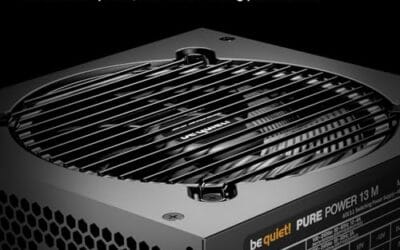
The be quiet! Pure Power 13 M 1000W is a high-end ATX 3.1 PSU aimed at builders pairing a Ryzen 7000/9000 or Core Ultra CPU with an RTX 4070Ti Super,4080 Super, 4090, or RX 7900 XTX class GPU. It targets buyers who want native 12V-2x6 wiring and transient headroom without stepping up to Platinum-tier pricing.
The defining trait is ATX 3.1 compliance with power excursion handling up to double the rated 1000W, meaning brief 2000W spikes from modern GPUs should not trip OCP. Combined with the single 12V rail and LLC topology, this suits overclocked GPUs where transient behavior, not average draw, tends to triger shutdowns on older units.
Trade-offs are typical at this tier. 80 PLUS Gold is eficient but not Platinum, soustained heavy loads generate more heat than a higher-rated unit. Four PCIe 6+2-pin connectors is standard, though builders running EATX boards with dual EPS plus a 4x8-pin GPU adapter should verify cable counts against the modular panel before buying.
Buy this if you are building a single-GPU gaming or content rig around a 250-450W TGP card and want native 12V-2x6 without paying Platinum prices. Skip this if you need sub-audible acoustics under sustained full load, or if you already own a workingATX 3.0 unit with a 12VHPWR pigtail.
ATX standard: Full ATX 3.1 compliance with native 12V-2x6 connector integration, which corects the sense-pin issue found on early 12VHPWR cables. Supports PCIe 5.1 GPUs at spec, and handles transient power excursions up to 2000W, roughly double the 1000W continuous rating.
GPU pairing: Comfortable for GPUs in the 250W to 450W TGP range, including RTX 4080 Super (320W) and RTX 4090 (450W) with headroom for overclocking. Four PCIe 6+2-pin outputs cover legacy 8-pin GPUs; the native 12V-2x6 removes the need for a 4x8-pin adapter dongle.
Efficiency and cooling: 80 PLUS Gold rated up to 94.4% at optimal load, typically around 50% utilization. The 120mm be quiet! fan runs semi-passive with zero-RPM below a load threshold not specified by the manufacturer, so idle and light workloads should remain silent.
Cabling: Fully modular design, leting builders omit unused SATA and Molex leads. Exact cable lengths and connector counts beyond the four PCIe 6+2-pin and single 12V-2x6 are not specified in source material, verify against your case routing before purchase.
What to look for in a PSU ripple
Start with reputable platform quality, not just the wattage number. The Corsair SF750 2024 is a compact example with a fully modular SFX design, 80 Plus Platinum efficiency, ATX 3.1 compliance, PCIe 5.1 readiness, low-noise positioning, and an included bracket at $159.99 with a 4.1 rating. Those specs don’t publish a ripple number by themselves, but they do point toward a modern design intended for current hardware rather than a recycled older platform.
For larger builds, the be quiet! Pure Power 13 M 1000W lists 80 Plus Gold certification, ATX 3.1 support, PCIe 5.1 GPU support, LLC technology, a single-rail layout, a semi-passive 120mm fan, and a price of $139.90 with a 4.8 rating. The 1000W capacity gives more headroom for high-end GPU spikes, while the modern connector support reduces the adapter mess that can happen in power-hungry builds. Again, don’t treat the rating as a lab measurement. Treat the full spec set as a clue, then check credible power-supply reviews when ripple charts matter.
When you’re reading reviews, look for oscilloscope-based ripple measurements under several loads. The best coverage will show 12V, 5V, and 3.3V rails, plus results near full load and during crossload scenarios. If a review only says “stable” with no measurements, it’s less useful. If it shows ripple far below the common 120 mV limit on 12V and 50 mV limits on minor rails, that’s a stronger sign.
Common misconceptions
The first misconception is that higher wattage automatically means cleaner power. It doesn’t. Wattage describes output capacity, not how clean that output is. A well-built 750W unit can have better ripple suppression than a cheap 1000W unit, especially at the loads a real gaming PC spends most of its time using.
The second misconception is that a PSU either works or doesn’t. In reality, power supplies can degrade gradually. The PC may boot, browse, and idle without drama, then crash only when the GPU and CPU pull hard at the same time. That’s why PSU problems can look like driver issues, RAM instability, or a bad graphics card.
The third misconception is that you can diagnose ripple from software voltage readings. You usually can’t. Motherboard sensors are useful for spotting huge voltage problems, but they don’t show high-frequency ripple accurately. Real ripple measurement needs proper equipment and technique. For most builders, the better move is buying a well-reviewed PSU up front and replacing suspect old units before they threaten pricier parts.
Frequently asked
Is PSU ripple dangerous for a PC?
Normal ripple is expected and safe. Excessive ripple is the problem because it can stress motherboard and GPU voltage regulation over time. It can also reduce stability when the system is already near its power or thermal limits. If you’re running expensive hardware, you don’t want a marginal PSU feeding it noisy power.
Can PSU ripple cause crashes in games?
Yes, it can contribute to game crashes, reboots, or black-screen shutdowns, especially during fast GPU load changes. It isn’t the only possible cause, so you’ll still want to check drivers, thermals, RAM settings, and cables. But if the failures happen under heavy graphics load and the PSU is old or low quality, it’s a real suspect.
Does 80 Plus certification mean low ripple?
No. 80 Plus is about efficiency at defined load points, not ripple suppression. Efficient PSUs are often better designed overall, but you shouldn’t use the badge as proof of clean output. Look for proper PSU reviews with ripple measurements if you need confidence.
Can I measure PSU ripple at home?
Most people shouldn’t try. Accurate ripple measurement requires an oscilloscope, correct probing, safe load conditions, and knowledge of where and how to measure. Software readings won’t show the fast noise that matters. If you don’t have the gear, use credible review data and replace questionable units instead.
How much PSU ripple is acceptable?
A common reference point is up to 120 mV peak-to-peak on the 12V rail and up to 50 mV peak-to-peak on the 5V and 3.3V rails. Good units often land well below that. For a gaming PC, lower ripple is preferable because the GPU and CPU already create sharp load changes. Cleaner input gives the rest of the system more breathing room.


























Write Your Review
No reviews yet. Be the first to share your experience!