

A $1,000 tower can be a good Fortnite PC, but it matters where that money goes. If you’ve got a 144Hz monitor and play Battle Royale on competitive settings, start with the STGAubron desktop with a Core i5-13400F and an RTX 3050. It leaves more room in the budget than the $999.99 builds, and the listing names the exact CPU. If you prefer a sharper image at 1440p, the MXZ with an RTX 3060 is the more interesting option, provided the seller confirms its graphics memory and storage.
Different priorities, different builds. The five desktops below suit players who already own a monitor as well as first-time buyers who need room for a screen or peripherals. The $1,000 ceiling is for the tower before tax and shipping. If it needs to cover your entire setup, start with one of the two $800 picks.


Quick Comparison
| Pick | Desktop | CPU and GPU | Best for | Main tradeoff |
|---|---|---|---|---|
| Best for competitive settings | STGAubron Gaming PC Desktop | Core i5-13400F, RTX 3050 6GB | 1080p Performance Mode | 512GB SSD |
| Graphics-first pick | MXZ Gaming Desktop Computer | Ryzen 5 5500, RTX 3060 | 1440p with adjusted settings | Confirm VRAM and SSD capacity |
| Best value with 1TB | ZYNEEX Prebuilt Gaming Desktop PC | Ryzen 5 5500, RTX 3050 6GB | 1080p plus room for other games | 6GB of graphics memory |
| AM5 pick | iBUYPOWER Element SE | Ryzen 5 8400F, RTX 3050 6GB | DDR5 and a future upgrade | Almost the full budget |
| Best documented PSU and Wi-Fi | ZOTAC MEK Gaming PC Desktop | Ryzen 5 5500, RTX 3050 6GB | Wi-Fi 6E and a specified PSU rating | 500GB SSD |
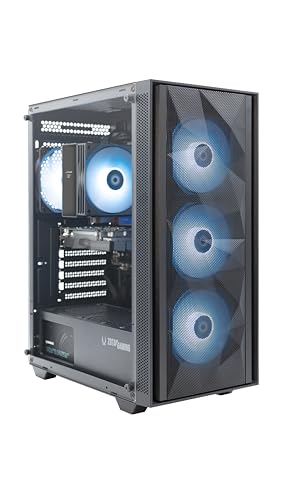
STGAubron Gaming PC Desktop for Competitive Settings
The STGAubron pairs Intel’s Core i5-13400F with a 6GB RTX 3050, 16GB of DDR4 and a 512GB SSD. We found this configuration at $869.99. It’s the first one I’d shortlist for competitive Fortnite at 1080p, where it makes sense to turn down visual effects. Intel lists six performance cores and four efficiency cores for this chip. Having the exact model also makes it easier to evaluate the system than a listing that says only “Core i5.”
The RTX 3050’s 6GB is a good reason to start with Performance Mode. If you buy a 240Hz display later, try higher frame caps and judge how the machine behaves in actual Battle Royale matches, especially late circles with lots of builds nearby. A high reading on an empty Creative island is easy to get excited about and a poor basis for spending more on a monitor.
The practical compromise is 512GB of storage. For a Fortnite-first PC, I’d take it and see how much of my library fits. If you’ve already got a long list of games to install, the ZYNEEX includes a 1TB SSD out of the box for less money.
MXZ Gaming Desktop Computer for Higher Visual Settings
At $998, the MXZ combines a Ryzen 5 5500, desktop RTX 3060 and 16GB of DDR4. It’s the one I’d look at if I already had a 1440p screen and wanted to keep more detail in the image. Lowering shadows and leaving the heaviest lighting effects off should be the first adjustments. At 1440p the GPU has about 78% more pixels to render than at 1080p, so a visual preset that feels fine at one resolution can be too demanding at the other.
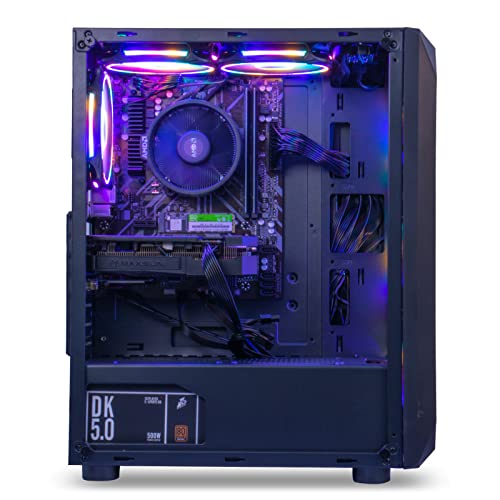
Ask the seller two specific questions before you order. Which RTX 3060 is installed, and what capacity is the SSD? NVIDIA documents both 8GB and 12GB RTX 3060 desktop variants, and the configuration title leaves those details open. At this price, I’d hold off if the seller can’t confirm them.
I’d pick the STGAubron first if I were buying for competitive settings and cared less about the way foliage, shadows and reflections look. The MXZ makes more sense when extra graphics capacity will actually get used. It costs close enough to the full budget that there may be little room left for a storage upgrade or a replacement peripheral.
ZYNEEX Prebuilt Gaming Desktop PC for the Best Value With 1TB
The ZYNEEX is a $799.98 tower with a Ryzen 5 5500, RTX 3050 6GB, 16GB of DDR4 and a 1TB NVMe SSD. That’s the easiest combination on this list to justify for a shared family PC or a first desktop. You get a dedicated GPU and enough local storage to leave several games installed while keeping about $200 of the tower budget available for the rest of the setup.
A straightforward 1080p setup. If you’re coming from a console and prefer a clean-looking picture, start with modest settings in the standard DirectX 12 mode. For competitive play, try Performance Mode first and adjust the frame cap based on a few matches. Either approach is a more sensible starting point than planning to run the Epic preset on this 6GB card.
Check whether the advertised 16GB comes as two sticks before buying. I’d prefer two 8GB modules here, especially for a system chosen to run at lower graphics settings with a higher frame-rate target. If you’re planning to buy extra memory immediately, compare the full cost of the tower and memory with the other options first.
iBUYPOWER Element SE for AM5 and DDR5
The Element SE configuration to look for is ESA5N3501. It lists a Ryzen 5 8400F, RTX 3050 6GB, 16GB of DDR5 and a 1TB NVMe SSD. A keyboard and mouse are included. At $999.99, much of the appeal is the AM5 platform and getting those pieces in one purchase. The ZYNEEX gives you the same advertised graphics card and storage capacity for about $200 less.
Consider the Element SE if you want to start on DDR5 and can see yourself upgrading the PC over time. AMD identifies the 8400F as an AM5 processor. Before putting any value on a future CPU upgrade, ask for the exact motherboard model and find its CPU support list. For a graphics upgrade, check the power supply label and how much room the case offers for a longer card. The socket alone tells you very little about what the assembled tower can take.
If your plan is to play at 1080p for a few years and replace the whole machine later, I’d pocket the difference and buy the ZYNEEX. If you need the included peripherals and value the newer platform, the Element SE has a clearer reason to cost more.
ZOTAC MEK Gaming PC Desktop for Wi-Fi 6E and a Specified PSU
The ZOTAC MEK lists a Ryzen 5 5500, RTX 3050 6GB, 16GB of DDR4 and a 500GB NVMe SSD for $799.99. Its distinguishing details are Wi-Fi 6E and a listed 650W 80 Plus Gold power supply. Those are worth knowing if you’re shopping at this price, where a lot of listings say little about what goes into the case.
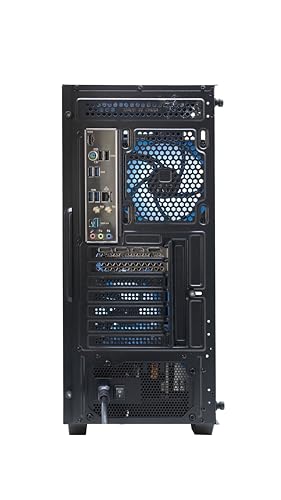
I’d take it over the ZYNEEX if I already had a compatible Wi-Fi 6E router and couldn’t run a cable to my desk, or if the stated power supply rating mattered more to me than drive capacity. The efficiency certification doesn’t tell you whether the supply has the connectors for a future GPU. Confirm that separately before buying an upgrade.
For a wired setup with a bigger game library, the ZYNEEX offers twice the listed storage capacity at practically the same price. If you’re having trouble with wireless Fortnite, check whether the issue shows up as network latency before you replace the whole PC. Work through the steps for diagnosing high ping to narrow it down.
How We Evaluated
We shortlisted new U.S. desktop offers below $1,000 with a named CPU, a dedicated GPU and at least 16GB of system memory. The prices were checked on November 25, 2026 and can change. Confirm the exact configuration and the checkout total before ordering. We gave extra weight to clear listings and called out missing details that could affect a purchase.
The rankings combine Epic’s published Fortnite requirements, Intel and AMD processor specs, NVIDIA graphics specifications and the components listed for each tower. Epic’s general PC recommendations include 16GB of RAM and an NVMe SSD. Those requirements don’t tell you how a given build will perform in a stacked endgame. We used the specs to judge fit for different settings and resolutions, and treated refresh rates as targets.
How to Choose a Fortnite Prebuilt Under $1,000
What monitor will you use?
With a 1080p 144Hz screen, build around getting a frame rate you can sustain. If fights feel uneven even when the average looks fine, watch for repeated dips in busy scenes. A lower frame cap that the PC can hold may feel better than chasing the largest number on the counter. At 240Hz the display refreshes roughly every 4.17 milliseconds, compared with 6.94 milliseconds at 144Hz. There’s less time to deliver each new frame, so the difference between a peak and a sustainable frame rate matters more.
If you’re choosing between a faster screen and a higher-resolution one, the 1440p 144Hz versus 1080p 240Hz comparison explains what each format buys you. For a 1440p screen you already own, start with the native resolution and lower the expensive effects first. If you still need headroom in DirectX 12, try lowering the internal render resolution or using the available upscaling settings.
Performance Mode or standard DirectX 12?
In Video settings, choose the Performance rendering option for lower graphical fidelity, apply the change and restart the game, as shown in Epic’s Performance Mode instructions. Give it a few Battle Royale matches to see what happens during a busy landing and late fights. Keep your resolution and frame cap consistent when you compare modes so you can see what difference the switch made.
Use the standard DirectX 12 option when you want more control over visuals. Epic documents features such as Nanite geometry and Lumen lighting on compatible PCs. Leave those off when establishing how the PC handles your target frame rate, then increase one setting at a time. Even on the RTX 3060 tower, I’d turn those options on only if I liked the visual change enough to give up some frame-rate headroom.
Where should the remaining budget go?
Start with the monitor or a wired network connection if either is missing. Then look at storage. A 500GB or 512GB drive can make sense when Fortnite is your main game. A 1TB drive earns its keep when you also install several large games or save clips locally, and it’s worth asking whether there’s a spare SSD slot before planning an expansion. Epic also lets Performance Mode players remove the optional high-resolution texture pack in the launcher.
Before buying a tower for future upgrades, ask for the motherboard and PSU models, the number of occupied RAM slots and GPU clearance. If the phone beside your desk already drops off Wi-Fi, prioritize a usable wired path for the tower. An upgraded graphics card can’t fix packet loss. If you play several other genres, see the broader gaming desktop guide under $1,000 for a comparison based on a more varied game library.
Frequently Asked Questions
How much FPS can a $1,000 prebuilt get in Fortnite?
There’s no single number for the whole price bracket. Start with a 144Hz-class goal at 1080p if you play on lower settings. Treat 240 FPS as something to verify with your own frame counter in the modes you play. Capture a busy stretch of a real match and pay attention to dips as well as the average. The map, season, settings and what else is running can all change the result.
Is Fortnite more CPU-heavy or GPU-heavy?
That depends on what you’re asking it to draw. At 1080p with competitive settings and a high frame-rate target, CPU performance can become important. Raising resolution, shadows or lighting quality shifts more work to the graphics card. If reducing the render resolution gives you a noticeable lift with the same cap and settings, that suggests the GPU was limiting performance in that scene.
Is 16GB of RAM enough for Fortnite and streaming?
Sixteen gigabytes is a sensible starting point for Fortnite by itself. If you’re streaming with OBS, NVIDIA’s NVENC hardware encoder is available on the RTX cards here and can handle video encoding. Your game, capture software, chat and browser still use system resources. Consider moving to 32GB if you routinely use those apps together and see that memory is filling up.
Bottom Line
I’d start with the STGAubron Core i5-13400F for a competitive 1080p setup and the ZYNEEX if I needed more storage at a lower price. The iBUYPOWER is the one to compare if you specifically want AM5, and the ZOTAC makes sense if its listed networking and power supply fit your plans. If you already play on a 1440p monitor and want more rendering headroom, ask for the MXZ’s exact RTX 3060 variant and SSD capacity before spending close to the full $1,000.

























Write Your Review
No reviews yet. Be the first to share your experience!