N-key rollover, or NKRO, means your keyboard registers every single key you press at the same time, no matter how many fingers you’ve got mashing things down. Sounds obvious. It isn’t. Plenty of keyboards still cap out at six simultaneous key registrations, and the moment you cross that threshold mid-fight, inputs start vanishing.
Here’s why the spec exists, what it actually fixes, and when you’d even notice the difference.
The short answer
NKRO lets a keyboard report unlimited concurrent key presses to your PC. Older or cheaper boards use 6KRO (six keys plus modifiers like Shift and Ctrl), which means the seventh key you hold gets ignored. For fast-paced games where you’re sprinting, crouching, reloading, and pinging an ally in the same half-second, that lost input matters.
The longer explanation
To understand why the cap exists, you’ve got to look at how keyboards talk to a PC. The USB HID (Human Interface Device) standard from the 1990s defined a basic keyboard report format: 8 bytes per packet, with room for 6 active key codes plus modifier flags. That’s where 6KRO comes from. It wasn’t a hardware limit. It was the default spec for the cheapest possible USB implementation.
NKRO boards work around that by either using a custom HID descriptor (which lets them stuff more keys per report) or by sending multiple parallel reports that the OS reassembles. The end result is the same: every key state gets transmitted, every frame, no matter how many you’re holding.
There’s also a hardware side. Cheap membrane keyboards use shared traces under the keys. When you press two specific keys at once, the circuit can misread the input – the so-called “ghost” key, where pressing A and B suddenly registers C too. Higher-end membrane boards add anti-ghosting circuits to block phantom signals, but they still can’t pass through more keys than the controller allows. Mechanical keyboards usually wire each switch on its own diode-isolated path, which makes true NKRO possible.

Pros
- Linear red switches deliver quiet, bump-free actuation suitable for fast repeats and long typing sessions.
- 87-key TKL footprint frees mouse space for low-sensitivity FPS aiming on smaller desks.
- Metal top plate and anti-slip feet keep the chassis rigid and planted during aggressive input.
Cons
- Limited owner feedback at time of writing, so long-term reliability signal is thin.
- Fixed rainbow LED modes with no per-key or software color customization on this variant.
- Non-hot-swap PCB and unspecified switch brand limit upgrade paths versus Cherry or Gateron boards.
The Redragon K552 is an entry-level tenkeyless mechanical keyboard aimed at first-time mechanical buyers, dorm setups, and secondary rigs on a tight budget. It ships with linear red switches, an 87-key TKL layout, a metal top plate, and fixed rainbow LED backlighting across six preset lighting modes.
The linear red switches are the defining spec, giving light, quiet, bump-free actuation that suits fast key repeats in shooters and long typing sessions. Boards at this tier typically use unbranded Outemu or Redragon-labeled clones rather than Cherry MX, so expect a slightly scratchier feel than mid-tier mechanical boards.
Trade-offs are typical for this tier: fixed rainbow LED patterns with no per-key software control, a non-hot-swap PCB, and stock ABS keycaps that will shine over time. Redragon lists full anti-ghosting and N-key rollover, though 6KRO over USB is common at this price and NKRO claims often depend on firmware.
Buy this if you want a cheap, plug-and-play TKL for casual gaming, a starter mechanical for a teen, or a spare board for a second desk. Skip this if you need hot-swap sockets, per-key RGB with software profiles, PBT keycaps, or genuine Cherry MX or Gateron switches.
Switch feel: Linear red switches with rapid actuation and no tactile bump, tuned for quiet, smooth travel over fast key repeats. Manufacturer switch brand is not specified, and boards in this bracket typically use Outemu or Redragon-labeled clones rather than Cherry MX Red or Gateron Red.
Layout and build: The 87-key tenkeyless format removes the numpad, saving desk width for larger mousepads and off-center posture in competitive FPS play. The frame uses a metal top plate over a plastic base with anti-slip feet. Hot-swap sockets, dedicated media keys, and USB passthrough are not listed in the source.
Lighting and software: Rainbow LED backlighting runs six preset modes including breathing, wave, ripple, and reactive effects, with brightness adjusted by keyboard shortcut only. The description states this rainbow variant does not support software color customization, despite a separate claim about driver-based key remapping and macros, which is internally inconsistent.
Input and connectivity: Full anti-ghosting and N-key rollover across all 87 keys are claimed for simultaneous inputs during multi-key gaming combos. Connection is wired USB via a braided cable, plug-and-play across Windows, macOS, and Linux, with no wireless or Bluetooth support and no polling-rate figure disclosed.
Why it works this way
The 6KRO default stuck around because it covers what office typing actually needs. Even a fast touch typist rarely holds more than three keys at once. The USB standard committee figured six was generous and left it. For decades, that was fine.
Gaming changed the math. Hold W to run, A to strafe, Shift to sprint, Ctrl to crouch, Space to jump, and tap E or R – you’re already at six modifier-plus-key combinations. Add a voice chat push-to-talk, a quick-cast ability, or a grenade throw, and a 6KRO board starts dropping inputs without warning. The keyboard isn’t broken. The protocol just refused to forward the seventh signal.
NKRO fixes it by changing how the keyboard talks, not by changing the switches. You can have NKRO on PS/2 (old purple-plug connector), USB with a custom descriptor, or wireless via a dongle. The underlying switches don’t care.
When you would want this
Competitive shooters and MMOs are the obvious case. Anyone playing Valorant, Apex, Overwatch, FFXIV, or World of Warcraft holds enough simultaneous keys to brush the 6KRO ceiling.
Rhythm games are the extreme case. osu! mania, Stepmania, and similar titles regularly have you hitting 4-8 simultaneous notes. Drop one input, lose the chain. NKRO is non-negotiable for that crowd.
Music production matters too. Anyone playing MIDI through a computer keyboard or using a DAW with custom key chord shortcuts benefits from knowing every press registers. Same for piano simulators and tracker software.
And typing fast doesn’t usually need it. If you’re a writer or coder, 6KRO works. You’d have to chord 7 keys at once intentionally to notice a problem.

Pros
- Kailh BOX tactile switches offer dust and spill resistance rare at this budget tier.
- Double-shot PBT pudding keycaps hold up better than ABS against shine and legend fade.
- Dual-mode 2.4GHz wireless and USB-C wired connectivity works with both Windows PC and Mac.
Cons
- Limited owner feedback at time of writing makes long-term reliability and battery life hard to verify.
- Single-color white backlight only, no RGB per-key lighting for users wanting deper customization.
- No wired Bluetooth mode listed, so mobile and tablet multi-device pairing is not supported.
The Hexgears X5 is a budget-tier full-size wireless mechanical keyboard built around a 108-key ANSI layout with Kailh BOX 3.0 tactile switches. It targets buyers who need a numpad for productivity, want a mechanical feel over membrane, and prefer wireless flexibility without paying flagship prices for RGB or QMK firmware.
The defining feature is the Kailh BOX switch housing, which encloses the stem to resist dust and light liquid intrusion. Tactile variants in this family typically sit around 45 to 55 grams actuation with a defined mid-travel bump, based on Kailh reference data, giving a typing fel closer to Cherry MX Brown than a linear red.
Trade-offs are typical at this tier. The backlight is single-color white only, source data does not list battery capacity, polling rate, or hot-swap PCB support, and the 2.4GHz dongle is the only wireless option with no Bluetooth listed. Full-size boards also occupy more desk depth than a TKL or 75percent layout.
Buy this if you want a wireless full-size mechanical with dust-resistant tactile switches and PBT pudding caps for mixed typing and casual gaming. Skip this if you need per-key RGB, Bluetooth multi-device pairing, hot-swap sockets, or verified competitive-tier wireless latency figures.
Switch and fel: Kailh BOX 3.0 tactile switches use an enclosed stem housing rated by Kailh for dust and splash resistance. Tactile BOX variants typically actuate near the midpoint of a 3.6mm travel with a rounded bump, giving a softer landing than clicky BOX Whites while retaining fedback for typing accuracy.
Layout and keycaps: The 108-key full-size layout includes numpad, function row, and navigation cluster. Double-shot PBT pudding keycaps resist the greasy shine that ABS develops within months, and the translucent sidewalls channel the white backlight downward across the plate for a cleaner glow than top-shot legends.
Connectivity and gaming: Dual-mode operation covers USB-C wired for zero-latency play and 2.4GHz wireless via dongle for cable-free desks. NKRO is supported for anti-ghosting on complex inputs. Source data does not specify polling rate in either mode, so competitive esports users should treat latency as unverified.
Extras and lighting: Backlight is single-color white across 16 preset effects switched via Fn combinations, with no per-key RGB. A detachable wrist rest is included, useful for full-size boards where hand travel to the numpad increases wrist extension over long sessions.
Common misconceptions
NKRO doesn’t mean faster. It means more inputs at once. Latency is a separate spec, usually driven by polling rate (how often the board reports to the PC, typically 125 Hz, 500 Hz, or 1000 Hz) and switch debounce time. A 6KRO board polling at 1000 Hz is faster than an NKRO board at 125 Hz.
It’s not exclusive to <a href="/best-mechanical-gaming-keyboard/”>mechanical keyboards. Some high-end membrane and rubber-dome boards include NKRO. It’s just rarer because the wiring’s harder.
USB NKRO isn’t always “true” NKRO. Some boards advertise NKRO but cap at 14 or 16 keys due to descriptor limits. For 99% of users that’s plenty, but if you’ve got a specific chord that’s failing, check the spec sheet rather than the marketing copy.
And anti-ghosting isn’t the same thing. Anti-ghosting prevents phantom keys from appearing. NKRO prevents real keys from being suppressed. A board can have anti-ghosting and still be 6KRO. Check both specs.
Pros
- Hot-swap sockets allow switch experimentation without soldering tools or PCB risk
- Metal top plate delivers firmer typing feel than plastic budget boards at this tier
- Full-key rollover and linear red switches handle rapid inputs for casual gaming
Cons
- Limited owner feedback at time of writing, so long-term reliability is unproven
- RGB is restricted to side lighting only, per-key backlight is fixed rainbow patterns
- ABS keycaps typical at this tier tend to shine and wear faster than PBT
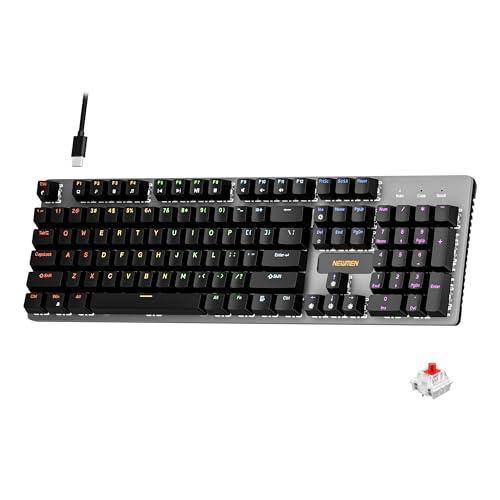
The Newmen GM325Pro is a budget full-size 104-key wired mechanical keyboard aimed at first-time mechanical buyers and casual gamers who want a hot-swap PCB without moving up to enthusiast pricing. It ships with linear red switches, a metal top plate, ABS keycaps, and side-edge RGB lighting.
The defining feature here is the hot-swap socket combined with linear red switches. That gives new users a low-friction path to swap inactile or silent switches later without soldering. Typing fel on metal-plate boards at this tier is usually firmer and less hollow than all-plastic budget pers, based on category norms.
Trade-offs are typical for the price class. Per-key RGB is not suported, only side lighting is true RGB while the top backlight runs 13 preset rainbow effects. ABS keycaps tend to develop shine within months of heavy use, and Newmen does not publish switch lifecycle, polling rate, or NKRO wired specs in the source data.
Buy this if you want a cheap full-size hot-swap platform to learn on and plan to upgrade switches or keycaps later. Skip this if you need per-key RGB, PBT caps, a documented polling rate, or a keyboard with a dep owner review history to validate QC.
Switches and layout: Linear red switches on a full 104-key ANSI layout, with full-key rollover claimed by the manufacturer. Actuation force, travel, and switch brand are not specified in the source. Linear reds typically sit near 45g actuation and 4m total travel in this category.
Hot-swap PCB: Sockets accept standard MX-style switches, so tactile, clicky, or silent linear options from third parties drop in without soldering. Pin compatibility (3-pin vs 5-pin) is not specified, buyers should confirm before ordering replacement switches.
Build and lighting: Metal top plate over ABS black keycaps. RGB is limited to the side edge, while the top backlight cycles through 13 preset rainbow patterns rather than per-key addressable RGB. Case material below the plate is not specified.
Connectivity and software: Wired only via a detachable 1.8m USB cable. FN combos cover F1 to F11 media and calculator shortcuts. Customization software suports key remap, macro recording, and lighting tweaks, though poling rate and software platform support are not specified.
Frequently asked
How do I check if my keyboard has NKRO?
Use a key rollover checker online. Sites like Aqua Key Check let you hold down keys progressively and watch the count climb. If you can press 7+ keys and they all light up on screen, you’ve got NKRO. If they stop at 6, you’ve got 6KRO.
Can I toggle NKRO on and off?
Some keyboards include a switch (often Fn + a function key) that flips between 6KRO and NKRO modes. The 6KRO mode exists for compatibility with older systems, BIOS menus, or KVM switches that don’t handle custom HID descriptors. Most users leave NKRO on permanently.
Does wireless support NKRO?
Modern 2.4 GHz wireless boards with dedicated USB dongles handle NKRO fine. Bluetooth is hit or miss – the protocol limits report size, so some BT keyboards fall back to 6KRO when paired that way. If you care, look at the spec sheet for the connection mode you’ll actually use.
Is NKRO worth paying extra for?
If you game competitively or play rhythm titles, yes. The feature’s standard on most mechanical boards above $40, so you rarely pay a real premium. For pure productivity use, 6KRO is fine and saves you nothing meaningful by buying NKRO.