

The MXZ Ryzen 5 5600X desktop was the lowest-priced RTX 4070 prebuilt PC we found among the five configurations below. It’s a practical starting point for a 1440p setup if you’re happy with 16GB of system memory and a 1TB drive. Spend more only if you can point to something you’ll use, such as a roomier SSD, more memory for editing, or an AM5 motherboard you plan to keep for a later CPU upgrade.
All five towers ship with the desktop GeForce RTX 4070 and its 12GB of graphics memory. They differ substantially in what surrounds it. Compare each listing with a similarly equipped RTX 5070 system before ordering. At a small price gap, the newer option should be part of the decision, especially if the older tower also needs an immediate memory or storage upgrade.


RTX 4070 prebuilts at a glance
These are U.S. listing prices observed on November 25, 2026, before tax and shipping. Confirm the selected configuration and price at checkout, since a single listing may offer several CPU and GPU combinations.
| Pick | Desktop | CPU, RAM, SSD | Observed price | Main tradeoff |
|---|---|---|---|---|
| Lowest price | MXZ Ryzen 5 5600X | 5600X, 16GB DDR4, 1TB | $1,369 | Older AM4 platform |
| AM5 starting point | MXZ Ryzen 7 7700 | 7700, 16GB DDR5, 1TB | $1,599 | $230 more for the same GPU |
| Intel with Wi-Fi 6 | WIWB Core i7-14700KF | 14700KF, 16GB DDR5, 1TB | $1,599.99 | Confirm the installed cooler and PSU model |
| Zen 5 option | MXZ Ryzen 7 9700X | 9700X, 16GB DDR5, 1TB | $1,699 | Same RAM and storage as the 7700 model |
| Most RAM and storage | iBUYPOWER Y40 | 14700F, 32GB DDR5, 2TB | $1,899.99 | Close to newer-GPU shopping territory |
MXZ Ryzen 5 5600X for the lowest entry price
At $1,369, this is the first configuration to price if you specifically want an RTX 4070. The listing pairs a six-core, twelve-thread Ryzen 5 5600X with 16GB of DDR4 and a 1TB NVMe SSD. The savings make sense for someone who already owns a monitor and mainly wants to install a few games. If you’re moving over from a console and buying the whole desk setup, the $230 difference between this and the Ryzen 7 7700 model helps cover a display or peripherals. AMD Ryzen 5 5600X specifications
The compromise is AM4. A future move to an AM5 processor would also require a different motherboard and DDR5 memory. There’s still a case for buying the cheaper tower and leaving it alone for a few years. If the games you play fit comfortably on its drive and you rarely run demanding software alongside them, the included parts are easier to live with. Check how the 16GB is installed before assuming you can add memory without replacing the existing kit.
MXZ Ryzen 7 7700 for an AM5 starting point
Same GPU, different platform. This $1,599 desktop lists an eight-core Ryzen 7 7700, a B650 motherboard, 16GB of DDR5, and a 1TB NVMe SSD. The B650 board is the most useful difference for a buyer who expects to keep the case and motherboard through a later CPU change. Ask for the exact board model and look up its CPU support list and BIOS requirements before counting on a specific upgrade. AMD Ryzen 7 7700 specifications and AMD AM5 chipset information
Consider this configuration if you like the idea of starting with a working desktop and changing one component at a time. You’ll still begin with the same amount of RAM and storage as the 5600X tower. If you already know you’ll need 32GB or a second SSD, price those changes now and ask about free slots. A modestly more expensive tower can make sense if it already includes both upgrades and saves you the work.
WIWB Core i7-14700KF for an Intel tower with Wi-Fi 6
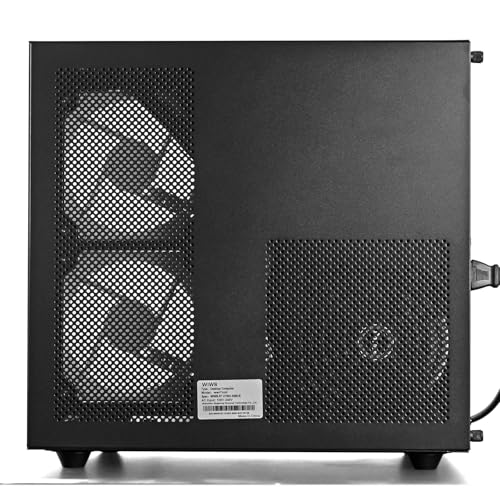
This $1,599.99 listing combines a Core i7-14700KF with 16GB of DDR5, a 1TB SSD and Wi-Fi 6. Intel documents eight performance cores and twelve efficiency cores. That mix is worth considering if your PC will handle CPU-heavy exports or other work between gaming sessions. If your workload also keeps large projects or several applications open, budget for memory as well. Intel Core i7-14700KF specifications
Get the exact cooler and power supply models from the seller before ordering. A CPU name tells you which chip is included. Sustained behavior also depends on the case, cooler and power settings, so we haven’t assigned a noise or rendering-speed advantage to this system. The KF processor has no integrated graphics. Connect your monitor to the RTX 4070’s outputs, and keep in mind that diagnosing a future graphics-card issue may require a spare card. Intel’s processor graphics list
MXZ Ryzen 7 9700X for a Zen 5 CPU
The $1,699 configuration lists a Ryzen 7 9700X, a B650 board, 16GB of DDR5 and a 1TB NVMe SSD. AMD identifies the 9700X as an eight-core, sixteen-thread Zen 5 chip. This is the MXZ to consider if a game or creative application you care about gives you a concrete reason to choose that processor. Look for results for the application you actually use, with comparable memory and graphics settings. AMD Ryzen 7 9700X specifications
$100 more for the CPU. That’s the premium over the 7700 tower in the price snapshot, with the listed GPU, memory capacity and drive capacity held constant. If your usual problem is running out of space every time you install another large game, the 7700 model and an SSD upgrade address it more directly. If you’re paying extra for the 9700X, make sure the CPU is the part you want to improve.
iBUYPOWER Y40 for 32GB of RAM and a 2TB SSD
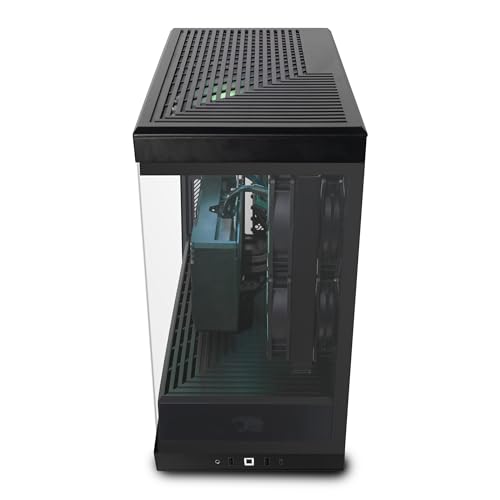
The Y40 configuration to look for is Y40BI7N4703. It includes a Core i7-14700F, 32GB of DDR5 and a 2TB SSD alongside the RTX 4070. That combination is useful if you keep several games installed and regularly have a browser, chat client, and editing software open. Measure your desk or cabinet first, especially if there’s limited room around the tower for cables and airflow.
At $1,899.99, the convenience comes at a premium. The difference over the WIWB is $300, and the Y40’s clearest advantages in this shortlist are twice the included system RAM and twice the SSD capacity. Compare the finished cost with an RTX 5070 desktop that has the same capacities. You can also check our prebuilt gaming PCs under $2,000 for systems that reach that budget with a different mix of parts.
How we evaluated these desktops
We looked for complete new desktop towers with the base RTX 4070, a current U.S. offer, and enough listing detail to compare the actual configuration. We checked the CPU and platform against manufacturer specifications where available and used the seller’s stated RAM, storage and connectivity for the exact retail configuration. The ranking weighs the total asking price, what’s included and how easily a buyer can identify the parts they might need to change.
Case listings and product names often cover several builds. We treated the configuration label and model number as more informative than a family name like Y40. Availability was checked by exact configuration. An offer that was out of stock or awaiting a future stock date was excluded. The comparisons are based on documented specifications and prices.
How to choose an RTX 4070 prebuilt PC
What will you play, and at what resolution?
Start with your monitor and two or three games that set the bar for your purchase. At 1440p, watch for comparisons that match the visual settings you’d use, especially if you intend to turn on ray tracing. For a high-refresh esports setup, pay particular attention to the CPU used in those comparisons. If you already own a 4K screen, decide whether you’d be comfortable adjusting settings or using upscaling. The GPU’s ability to send a 4K signal simply describes its display output. For a broader look at system pairings, see our 1440p prebuilt gaming PC guide.
How much memory and storage will you actually use?
Check the space taken by your current games, folders and applications. If you’re already approaching a terabyte, build a larger drive into the purchase price. Find out whether the motherboard has an accessible, unused M.2 slot or whether an upgrade would mean moving Windows and your files. For RAM, ask whether 16GB comes as one module or two and how many slots are available. Those answers tell you whether an upgrade is a simple addition or a kit replacement.
Would you buy the same tower with a newer GPU?
Compare like for like. A tower with a newer GPU and less memory might cost more to finish if you need to replace its RAM immediately. Conversely, a DDR5 kit you’ll never fill has limited value if most of the budget goes toward running demanding games. Compare the checkout total with tax, delivery and any immediate upgrades. If the totals converge, compare the GPUs and the return terms on their own merits. Our RTX 5070 versus RTX 4070 Super comparison covers the Super model separately.
On the same date as the table, a Skytech Azure 3 with an RTX 5070, Core i7-14700F, 16GB of DDR4 and a 1TB SSD was listed at $1,699.99. That’s $100 above the WIWB, with a different CPU and memory platform. An MSI Codex R2 with an RTX 5070, Core i5-14400F, 32GB of DDR5 and a 1TB SSD was listed at $1,783. That gives the $1,899.99 Y40 a concrete comparison. If you’ll use the Y40’s extra terabyte and prefer its processor, give those parts a value in your own budget. If you mostly play games and already have enough storage, the MSI’s smaller drive may be an easy compromise.
Which details matter before you order?
Get the motherboard and power supply model names, the included cooler, and a description of the Wi-Fi hardware if wired Ethernet is impractical. Check whether the listing identifies components that can vary. For a machine that must fit under a desk shelf, check the tower’s dimensions and leave space for the power and display cables to bend naturally. Finally, check who handles returns and whether you’ll need the original packaging for service.
Keep the listing’s configuration name and spec sheet with your order. Once the PC arrives, you can compare them with the CPU, GPU and memory shown in Windows Task Manager. On the Performance tab, select the GPU and look for the model name and dedicated GPU memory. Check system memory separately. A listing with 32GB of system RAM and a 12GB graphics card should show those figures under different entries. Microsoft’s guide to GPU data in Task Manager
Frequently asked questions
What’s the difference between an RTX 4070, 4070 Super, 4070 Ti and 4070 Ti Super?
NVIDIA lists 5,888 CUDA cores on the base desktop RTX 4070, 7,168 on the 4070 Super, 7,680 on the 4070 Ti and 8,448 on the 4070 Ti Super. The first three have 12GB of VRAM, while the Ti Super has 16GB. Those figures identify the models. To decide whether the extra cost makes sense, check how each handles your games at the same resolution and settings. NVIDIA desktop RTX 4070 family specifications
Is an RTX 4070 laptop the same as a desktop RTX 4070 PC?
The desktop GPU in this guide has 12GB of VRAM. NVIDIA lists 8GB for the RTX 4070 Laptop GPU and specifies laptop power separately. If portability matters, compare complete laptops by exact model and power configuration. For any offer in this guide, confirm the listing describes a complete desktop and includes the CPU, RAM and SSD. NVIDIA RTX 40-series laptop specifications
Does the desktop RTX 4070 support DLSS Frame Generation?
Yes, in supported games. DLSS Super Resolution reconstructs a higher-resolution image from a lower-resolution input. Frame Generation inserts generated frames for smoother motion. NVIDIA lists Multi Frame Generation separately for the RTX 50 series. Keep the underlying rendered frame rate in mind when comparing how responsive a game feels. NVIDIA’s DLSS feature guide
When is an open-box RTX 4070 PC worth considering?
If you’re shopping a discounted open-box unit, ask who inspected it, whether it includes the GPU and accessories as listed, and how long you have to return it. Compare its delivered price with a new configuration of the same spec. A lower sticker price can lose its appeal if the seller charges return freight for a full tower.
Bottom line
Start with the MXZ Ryzen 5 5600X if the complete tower still costs meaningfully less than an RTX 5070 alternative and you’re comfortable with AM4, 16GB of memory and 1TB of storage. The Ryzen 7 7700 model makes sense when you’ve budgeted for a future AM5 upgrade. The Y40 is the simplest way to get 32GB and 2TB from this list if its total price still holds up. Check the exact configuration at checkout. With an older GPU, the savings have to survive the rest of the build.



























Write Your Review
No reviews yet. Be the first to share your experience!