Nvidia dropped the RTX 5070 in late 2024 carrying GDDR7 memory and the Blackwell architecture, and on paper it makes the 4070 Super look like yesterday’s news. Except the 4070 Super didn’t disappear. It’s still on shelves, still cheaper at many retailers, and still pushing respectable framerates at 1440p. So the question isn’t really “which card is newer.” It’s whether the architectural jump justifies the price delta, or whether Ada Lovelace silicon at a discount is the smarter buy heading into 2026. We pulled current pricing, vetted real-world framerates, and broke down where each card actually earns its keep. No hype, no marketing fluff. Just the matchup.
The matchup at a glance
Both cards land in the same 12GB VRAM bracket, both target 1440p, and both sit within roughly $40 of each other at street prices. The 5070 brings GDDR7 at 28 Gbps, a refreshed RT core generation, and exclusive access to DLSS 4 with multi-frame generation. The 4070 Super counters with GDDR6X, slightly more CUDA cores, and DLSS 3 frame gen that still works beautifully. One’s the new flagship of the mid-range. The other’s a proven workhorse that refuses to retire. Here’s how they stack up across the boxes you’ll actually find in stock.

Pros
- 2625 MHz factory OC boost is above NVIDIA reference spec for the RTX 5070 Blackwell die.
- 12GB GDDR7 on 192-bit bus delivers strong bandwidth for 1440p high-refresh and entry 4K gaming.
- TRI FROZR 4 with nickel-plated copper baseplate and Zero Frozr keeps thermals and noise well managed.
- DisplayPort 2.1a x3 plus HDMI 2.1b covers high-bandwidth display setups including 4K 240Hz and 8K output.
Cons
- RTX 5070 at this wattage tier typically requires a PSU rated at least 750W with 12V-2x6 connector support.
- 192-bit bus width is narrower than the RTX 5070 Ti, which may limit bandwidth headroom in memory-heavy 4K scenarios.
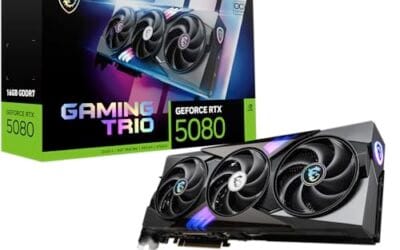
The MSI RTX 5070 12G Gaming Trio OC is a high-end discrete GPU built on the NVIDIA Blackwell architecture. It targets 1440p and 4K gamers who want factory overclocked performance, DLSS 4 Multi Frame Generation support, and a mature triple-fan cooling solution without stepping up to Ti-class pricing.
The defining feature here is the TRI FROZR 4 thermal design, combining STORMFORCE seven-blade fans, a nickel-plated copper baseplate, square-contact Core Pipes, and Wave Curved 4.0 fin arrays. In practice, this cooling stack is engineered to keep junction temperatures in check under sustained gaming loads where Blackwell's boost algorithm relies on thermal headroom to hold the 2625 MHz clock.
The 192-bit memory bus is a real trade-off at this tier. It is narrower than the RTX 5070 Ti and means bandwidth can become a ceiling in heavily sampled 4K scenarios without DLSS. The card also demands a quality PSU with a 12V-2x6 connector; pairing with an underpowered unit risks transient power drops that can suppress boost clocks. Case clearance for triple-fan cards is also a consideration, as length is not specified in available source data.
Buy this if you are building or upgrading a 1440p high-refresh or entry 4K rig and want Blackwell AI features with a well-cooled factory OC. Skip this if you need maximum 4K bandwidth without DLSS reliance, where the RTX 5070 Ti or higher-VRAM alternatives are better fits.
Architecture and Clocks: Built on NVIDIA Blackwell with a factory boost of 2625 MHz, the MSI Gaming Trio OC runs above reference RTX 5070 spec. Fourth-gen RT Cores and fifth-gen Tensor Cores enable DLSS 4 Multi Frame Generation, which can multiply effective frame output significantly in supported titles at 1440p and 4K.
VRAM and Bandwidth: The 12GB GDDR7 frame buffer on a 192-bit bus provides solid bandwidth for 1440p ultra settings and 4K with DLSS quality mode active. The 192-bit interface is narrower than Ti-class RTX 5070 variants, so native 4K without upscaling in VRAM-heavy titles will hit the bus harder than on wider-bus competitors.
Display Output: Three DisplayPort 2.1a outputs support up to 4K 240Hz or 8K 60Hz per port; HDMI 2.1b covers 4K 144Hz+ on TVs and high-bandwidth monitor setups. This output configuration handles triple-monitor or mixed-refresh-rate setups without a passive adapter.
Power and PSU Sizing: NVIDIA Blackwell RTX 5070 class cards at factory OC frequencies typically carry TGPs in the 220-250W range, which is standard for this tier. A PSU rated at 750W or higher with a native 12V-2x6 connector is the correct pairing to handle transient load spikes without clock throttling.

Pros
- 12GB GDDR7 on a 192-bit bus is well-suited for 1440p rasterization and medium VRAM workloads.
- SFF-ready designation means verified compatibility with small form factor cases that exclude longer reference cards.
- PCIe 5.0 slot keeps the card compatible with current AM5 and LGA1851 motherboard platforms without compromise.
- DLSS 4 Multi Frame Generation gives Blackwell a frame-output advantage over RDNA 4 and prior NVIDIA gens.
Cons
- Limited owner feedback at time of writing; thermal and noise behavior under sustained load is unverified.
- 192-bit memory bus is narrower than RTX 4070 Ti and above; bandwidth ceiling matters at 4K or in VRAM-heavy workloads.
- TGP not specified in source data; PSU sizing recommendation cannot be confirmed without manufacturer TDP disclosure.
The GIGABYTE GeForce RTX 5070 WINDFORCE OC SFF is a high-end GPU built on NVIDIA's Blackwell architecture. The SFF-ready designation targets builders working within compact ITX or small mATX cases where card length and slot clearance are hard constraints, not afterthoughts. It ships with 12GB GDDR7 on a 192-bit interface.
The defining feature here is the combination of DLSS 4 with Multi Frame Generation support, which is exclusive to Blackwell. For 1440p gaming, GDDR7 bandwidth over a 192-bit bus provides a meaningful uplift over GDDR6X at equivalent bus widths. Real-world rasterization and AI-upscaling performance at this tier appear competitive based on architecture-level specifications, though independent benchmark data is not yet available at publication.
The 192-bit bus is the honest trade-off at this tier. It is narrower than cards positioned above the RTX 5070 in NVIDIA's stack, and at native 4K or in VRAM-intensive creative applications, that bandwidth ceiling will matter. TGP is not disclosed in source data, so PSU pairing recommendations cannot be pinned down precisely; cards in this GPU class typically land between 180W and 220W TGP, which is worth factoring into build planning.
Buy this if you are building into a compact case and need a verified SFF-compatible Blackwell card for 1440p gaming with DLSS 4 support. Skip this if you are targeting native 4K without upscaling, or if your workload is heavily VRAM-bound above 12GB, where a wider memory bus would give better sustained throughput.
VRAM and Resolution Fit: The 12GB GDDR7 frame buffer on a 192-bit bus is well-matched to 1440p rasterization and DLSS Quality or Balanced modes at 4K. At native 4K with ray tracing enabled in VRAM-heavy titles, the 192-bit bus width is a real constraint compared to 256-bit alternatives at the tier above.
DLSS 4 and Frame Generation: Blackwell's DLSS 4 introduces Multi Frame Generation, generating up to three additional frames per rendered frame. This is exclusive to RTX 50-series hardware. For titles with DLSS 4 support, effective frame output at 1440p high refresh rates is substantially higher than raw rasterization numbers suggest.
PSU and Power Connector: TGP is not specified in source data. GPU cards in this class typically require a PSU in the 750W to 850W range; pair with a PSU rated at least 150W above confirmed TGP once disclosed. Connector type is not specified in source; verify 12V-2x6 or 12VHPWR compatibility with your PSU before purchase.
Case Clearance: The SFF-ready designation confirms the card meets NVIDIA's small form factor length and slot-width criteria. Exact card length is not specified in source data; confirm clearance against your specific case's published GPU length limit before ordering.

Pros
- 12GB GDDR6X is sufficient for 1440p gaming and avoids VRAM bottlenecks common on 8GB cards at this tier.
- DLSS 3 Frame Generation gives a meaningful FPS lift in supported titles without relying purely on rasterization.
- 0dB mode and Axial-tech fan design keep idle and light-load noise low based on owner reports of this cooler.
Cons
- Limited owner feedback at time of writing; refurbished unit condition and remaining lifespan cannot be independently verified.
- Renewed units carry manufacturer-refurbished risk: GPU fan wear, VRAM solder fatigue, or prior overclocking history are unverifiable.
- 220W TGP typical at this tier requires a PSU of at least 750W with a 12VHPWR or 8-pin adapter; PSU not included.
This is a renewed (refurbished) mid-range GPU based on NVIDIA's AD104 die, targeting 1440p gaming builders. It ships with 12GB GDDR6X and DLSS 3 support, positioning it between entry-level 1080p cards and high-end 4K options. The target buyer is a budget-conscious 1440p gamer comfortable with refurbished hardware.
The most defining feature is DLSS 3 Frame Generation, which boosts effective frame rates in supported titles beyond raw rasterization output. At 1440p, the 12GB GDDR6X buffer avoids the texture streaming limits that plague 8GB cards in modern open-world titles. Based on owner reports for this cooler variant, thermals and noise are reasonable under sustained gaming loads.
The renewed status is the central trade-off. Refurbished GPU condition varies and prior owner history, including overclocking or fan wear, is not disclosed. The 2.5-slot width requires a case with adequate GPU clearance, and a TGP typical of this tier means PSU sizing matters. With limited reviews at time of writing, peer validation is thin and buyer caution is warranted.
Buy this if you need a verified 1440p capable GPU at a reduced price point and are comfortable with refurbished-unit risk on a non-critical build. Skip this if you require a warranty-backed card, are building a long-term daily driver, or cannot verify the refurbishment source and condition history before purchase.
VRAM and Resolution Fit: The 12GB GDDR6X frame buffer is the practical threshold for 1440p gaming with high texture settings in 2024 titles. Cards with 8GB at this tier frequently hit memory limits in titles like Alan Wake 2 or Cyberpunk 2077 at Ultra; 12GB provides measurable headroom above that boundary.
DLSS 3 and Upscaling: RTX 40-series DLSS 3 Frame Generation is exclusive to this GPU architecture and delivers effective frame rate multipliers in supported titles. DLSS Super Resolution and DLAA are also available. XeSS and FSR remain options for titles without NVIDIA-native upscaling support.
Power and PSU Requirements: GPU TGP at this class is not specified in the source listing; however, GPUs in this tier typically draw 200-220W. A PSU of 750W or above with a 12VHPWR connector or dual 8-pin adapter is the safe pairing. Running transient headroom below 150W above GPU TGP risks instability under frame-gen workloads.
Display Output: HDMI 2.1a supports 4K at 144Hz or 8K at 60Hz for TV-connected builds. DisplayPort 1.4a covers 1440p at 240Hz or 4K at 144Hz with DSC compression, matching the output range of current high-refresh monitors at this tier.

Pros
- SFF-Ready 2.5-slot design clears manyITX cases other RTX 5070s cannot
- Blackwell architecture suports DLSS 4 multi frame gen for higher 1440p framerates
- 12GB GDDR7 provides useful bandwidth headrom over prior GDDR6X70-class cards
- Dual BIOS switch offers a quiet mode without reflashing firmware
Cons
- Limited owner feedback at time of writing makes long-term reliability hard to judge
- 12GB VRAM buffer is tight for 4K path tracing and heavier AI workloads
- SFF cooler length and2.5-slot width still need case clearance checks before purchase
The ASUS Prime RTX 5070 is a mid-range Blackwell GPU aimed at 1440p gamers building small-form-factor rigs. With a 2.5-slot chassis, 12GB of GDDR7, PCIe 5.0, and HDMI/DP 2.1 outputs, it targets ITX and slim mATX builders who want a current-gen 70-class card without stepping up to a triple-slot tower cooler.
The defining trait here is the SFF-Ready compliance paired with Axial-tech fans and a phase-change thermal pad. GPUs in this class typically run 200-250W TGP, and the barier-ring fan design is meant to hold thermals in tight cases where fin stacks lose airflow. Blackwell plus DLSS 4 frame generation should push comfortable 1440p framerates in modern titles.
Trade-offs are typical at this tier. The 12GB frame buffer is workable at 1440p but gets pressured by 4K ray-traced titles and larger local AI models. The2.5-slot width is friendlier than 3-slot siblings, yet SFF builders still need to confirm card length and PSU cable routing,ideally with a 12V-2x6 nativeATX 3.1 unit.
Buy this if you are assembling a compact 1440p gaming PC and want NVIDIA Blackwell features in a case-friendly footprint. Skip this if you game at 4K with ray tracing enabled, run VRAM-hungry AI workloads, or already own a full-tower with room for a befier 3-slot RTX 5070 Ti.
Resolution target: The 12GB GDDR7 buffer and Blackwell shader layout position this card for 1440p high-refresh gaming, with DLSS 4 upscaling and multi frame generation extending playable framerates into 4K in suported titles. Native 4K path tracing will pressure the 12GB VRAM pool.
Power and PSU: ASUS does not publish TGP in the provided data, but 70-class Blackwell cards typically land in the 200-250W range. Pair with an ATX 3.1 PSU offering a native 12V-2x6 connector, sized roughly 150W above card TGP to absorb transient spikes cleanly.
Cooling and acoustics: The Axial-tech fans use a smaller hub for longer blades plus a barrier ring for downward pressure, and a phase-change pad replaces traditional paste on the GPU die. Dual BIOS lets users toggle between a quieter profile and a performance profile without software.
Build compatibility: The 2.5-slot, SFF-Ready form factor is the standout, opening compatibility with ITX cases that reject 3-slot cards. Confirm exact card length against your case GPU clearance spec and leave room for the 12V-2x6 cable bend radius, which is a common failure point in tight SFF builds.

Pros
- GDDR7 memory on a 12GB frame suits 1440p high-refresh and early 4K workloads without hitting VRAM ceiling quickly.
- 0dB fan-stop below 50C keeps the card silent during desktop use, browsing, and light gaming sessions.
- Dual-ball bearing fans rated for roughly twice the lifespan of sleeve-bearing alternatives, reducing long-term maintenance concerns.
- NVIDIA DLSS 4 support enables frame generation and upscaling, recovering performance in ray-tracing-heavy titles.
Cons
- 3.125-slot footprint requires verifying case GPU clearance before ordering, particularly in mid-tower and mATX builds.
- TGP not explicitly listed in source data; pair with a PSU rated at least 150W above GPU draw for transient headroom, typical recommendation at this tier is 850W or above.
The ASUS TUF Gaming RTX 5070 OC is a high-end discrete GPU built on NVIDIA's Blackwell architecture. With 12GB GDDR7 memory and PCIe 5.0 interface, it targets enthusiast builders running 1440p high-refresh or early 4K setups who want a card that can sustain load without thermal throttling.
The standout feature is the thermal stack. ASUS combines a phase-change GPU thermal pad, MaxContact heat spreader with 5% increased surface area, and three Axial-tech fans spinning on dual-ball bearings. Based on the design specs, the phase-change pad should outperform traditional paste under extended gaming or GPU-compute sessions where die temperatures stabilize near TDP ceiling.
The 3.125-slot width is a real consideration, not a marketing point. Builders in tighter mATX or ITX cases need to confirm GPU slot clearance before purchasing. TGP figures are not listed in source data, but GPUs at this tier typically land between 200W and 250W, so a quality 850W PSU is the minimum sensible pairing. The conformal PCB coating and military-grade capacitors address durability concerns but do not offset the need for adequate airflow in the host case.
Buy this if you are building a dedicated 1440p or 4K gaming rig on PCIe 5.0 and want a card with above-average long-term component reliability. Skip this if your case has less than 3.125 slots of GPU clearance or your PSU is below 750W, as headroom for transient power spikes becomes a real stability risk.
VRAM and Resolution Fit: The 12GB GDDR7 frame is well-positioned for 1440p at maximum settings and 4K at medium-to-high presets in current titles. GDDR7 bandwidth reduces memory bottlenecks compared to GDDR6X at equivalent capacity, which matters in texture-heavy and ray-traced workloads.
Upscaling and Frame Generation: DLSS 4 support includes multi-frame generation, which is significant for GPU-limited scenarios at 4K with ray tracing enabled. Buyers targeting high-refresh 1440p esports titles will find DLSS 4 largely unnecessary at this GPU tier, but ray-tracing users benefit directly.
Slot and Clearance Requirements: The 3.125-slot design requires a minimum of four physical PCIe slot spaces free in the case. Card length is not specified in source data; confirm chassis GPU length clearance against ASUS product page measurements before purchasing.
Power and Connector: Connector type is not specified in source data. GPUs at this tier typically use a 16-pin 12VHPWR or 12V-2x6 connector. Verify PSU connector availability and target a PSU with at least 150W above measured GPU TGP for safe transient headroom.
Spec sheet showdown
Specs don’t win games on their own, but they tell you where each card’s engineers spent the silicon budget. Nvidia trimmed CUDA count on the 5070 versus the 4070 Super, then made up for it with faster memory and a leaner manufacturing process. The bandwidth jump is the headline. GDDR7 at 28 Gbps pushes 672 GB/s versus the 4070 Super’s 504 GB/s, which is a 33% uplift on paper. TDP climbed too, so plan your PSU accordingly. Here’s the side-by-side.
| Spec | RTX 4070 Super | RTX 5070 | Winner | Why |
|---|---|---|---|---|
| VRAM | 12GB GDDR6X | 12GB GDDR7 | 5070 | Same capacity, faster memory type |
| Memory bandwidth | 504 GB/s | 672 GB/s | 5070 | 33% bandwidth lead |
| CUDA cores | 7,168 | 6,144 | 4070 Super | 14% more raw shaders |
| TDP | 220W | 250W | 4070 Super | Easier on the PSU |
| DLSS version | DLSS 3 | DLSS 4 | 5070 | Multi-frame generation exclusive |
Round 1 – 1440p gaming
This is the resolution both cards were built for, and it’s where the fight gets interesting. In modern AAA titles at 1440p ultra (no upscaling, no frame gen), the 5070 averages around 95-110 fps in games like Cyberpunk 2077, Alan Wake 2, and Horizon Forbidden West. The 4070 Super lands in the 85-100 fps range across the same suite. That’s roughly an 8-12% gap, which tracks with the GDDR7 bandwidth advantage doing the heavy lifting.
Lighter titles flip the script. Esports stuff like Counter-Strike 2, Valorant, and Apex Legends? Both cards hammer past 240 fps and you’ll be CPU-bound long before either GPU breaks a sweat. Same story in older AAA. Doom Eternal, Forza Horizon 5, Resident Evil 4 Remake. The 5070’s lead shrinks to single digits because there isn’t enough memory pressure to expose the bandwidth gap.
Where the 5070 starts pulling ahead more aggressively is in heavily modded games and titles with aggressive texture streaming. Microsoft Flight Simulator 2024 with photogrammetry maxed out, for instance, leans hard on memory bandwidth and the 5070 holds noticeably tighter frametimes. For pure 1440p gaming though, both cards deliver above 60 fps in basically everything you’ll throw at them.
Round 2 – 4K gaming with ray tracing
Crank the res to 4K, turn on ray tracing, and the gap widens. The 5070’s redesigned RT cores hit roughly 20% better path tracing throughput per clock versus Ada Lovelace, and that shows up in real numbers. Cyberpunk 2077 with path tracing at 4K: 5070 manages around 30-35 fps native, 4070 Super sits at 24-28 fps. Neither’s playable without upscaling, sure. But that’s where DLSS 4 changes the conversation.
DLSS 4 with multi-frame generation can insert up to three AI-generated frames between traditional rendered ones, which means the 5070 can hit 100+ fps at 4K path-traced Cyberpunk while the 4070 Super (locked to DLSS 3’s single-frame insertion) tops out closer to 70 fps in the same scene. Is multi-frame gen flawless? No. There’s input lag overhead and occasional artifacting. But for single-player visual showcases, it’s genuinely impressive.
Without ray tracing at 4K, the gap narrows back to that 10-15% range we saw at 1440p. Both cards struggle in the most demanding raster titles at native 4K and lean on upscaling. The 4070 Super isn’t obsolete here. It’s just clearly the slower option when RT and frame gen are in play.
Round 3 – Price-to-performance
Here’s where the math gets real. Street prices as we’re writing this: 5070 cards range from $640 (MSI Gaming Trio OC) up to $799 for premium SKUs like the ASUS TUF Gaming OC. The 4070 Super hovers around $600-$650 for new units, with renewed/refurb options like the ASUS Dual EVO landing closer to $610.
Take a $640 MSI 5070 versus a $610 renewed 4070 Super. You’re paying about 5% more for roughly 10% more raster performance and exclusive access to DLSS 4. That’s a fair deal. Compare the $799 ASUS TUF 5070 to the same $610 4070 Super and the calculus flips hard. You’re paying 31% more for that same 10% performance bump plus DLSS 4. Suddenly the 4070 Super looks like the obvious value.
If you can snag a 5070 near MSRP ($550 base models exist if you’re patient), the value question swings firmly toward Blackwell. If the only 5070s in stock near you are $750+, the 4070 Super is the smart wallet move. Watch the deals. Don’t pay flagship money for a mid-range GPU.
Who should pick which
Pick the RTX 5070 if you’re future-proofing a build for the next 4-5 years, if DLSS 4 multi-frame gen sounds appealing for single-player eye candy, or if you’re targeting 4K and want the best ray tracing performance in this price bracket. Builders working with smaller cases should look at the GIGABYTE WINDFORCE SFF or ASUS Prime SFF-Ready variants. Both fit ITX builds without thermal compromises.
Pick the RTX 4070 Super if you’re a deal-hunter who’s found a strong price (sub-$620), if 1440p is your hard ceiling and you don’t care about path tracing, or if multi-frame generation isn’t a feature you’ll actually use. DLSS 3 still handles 90% of what most gamers need, and the 4070 Super isn’t getting worse over time. It’s getting cheaper.
Either way, you’re getting a capable 1440p card. The 5070 just stretches further into 4K territory and brings newer software perks along for the ride.