

Running a Plex server sounds simple until you actually try to stream 4K to three rooms at once. The machine has to decode, sometimes transcode, keep files organized, and stay quiet enough that nobody notices it humming in a closet. Most “best mini PC for Plex” lists point you at tiny NUC-style boxes, but those often choke the moment two family members hit play on different shows. A prebuilt desktop with real cooling and room for drives handles that load without breaking a sweat.
We researched five prebuilt desktops that make sensible Plex hosts across very different budgets, from a $499.99 office tower to a $2,999.99 ZOTAC build. None of these are literal palm-sized mini PCs, and we’ll be upfront about that. They’re compact-to-standard towers that give you the CPU headroom and storage flexibility a media server actually needs. If you also want ideas for a general home rig, our roundup of the best prebuilt gaming PC picks for 2026 pairs well with this guide, and folks eyeing a truly small footprint should skim our best mini PC for home server writeup before committing.
Pros
- 512GB SSD bot drive avoids the HDD bottleneck common in budget prebuilts
- RX 590 8GB VRAM buffer handles 1080p textures better than 4GB budget cards
- Complete bundle with RGB peripherals means no extra spend to start using
- Genuine Windows 11 Home 64-bit preinstalled, no activation hassle out of box
Cons
- Limited owner feedback at time of writing, verify seller reputation before purchase
- Core i7-4770 is Haswell era LGA150, no upgrade path and weak IPC versus modern CPUs
- Windows 11 on 4th-gen Intel is unsupported by Microsoft and may miss feature updates
- No CD/DVD-ROM support and RAM/GPU generation limits future workload headroom
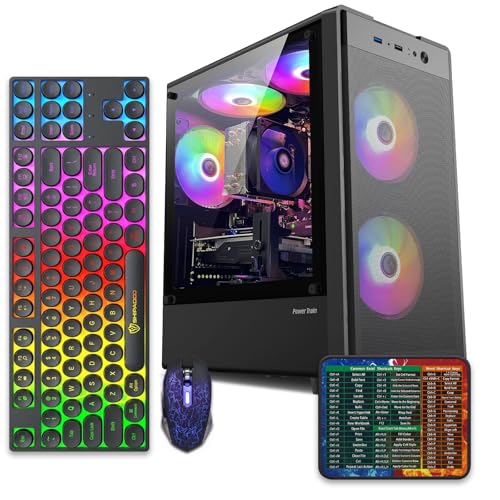
This is an entry-tier prebuilt tower built around an Intel Core i7-4770 Haswell CPU, 16GB RAM, a 512GB SSD, and an AMD Radeon RX 590 8GB GDDR5 GPU. It targets budget buyers who need a working office and light gaming PC with peripherals bundled, not enthusiasts chasing current-gen performance.
The defining feature is the RX 590 8GB paired with a 512GB SSD, an uncommon combo at this price band. Cards in this class typically handle 1080p esports titles at 60+ FPS on medium to high, matching the vendor claim for CS:GO, League of Legends, Apex, and Overwatch. Newer AA titles will need lowered settings.
Trade-offs are significant. The i7-4770 launched in 2013, so IPC, single-thread performance, and platform features like NVMe bot, PCIe Gen4, and modern USB are limited. Windows 11 runs here but sits outside Microsoft's official supported CPU list. There is no realistic CPU or socket upgrade path on LGA1150.
Buy this if you need a plug-and-play 1080p esports and office tower with keyboard, mouse, and RGB included at a low outlay. Skip this if you want current-gen platform support, sustained AA 1440p gaming, or a build with a meaningful upgrade runway.
GPU class: The AMD Radeon RX 590 8GB GDDR5 is a Polaris-refresh card roughly equivalent to a GTX 1060 6GB tier. Expect 1080p 60+ FPS in esports titles like CS:GO, Overwatch, Apex, League, and Fortnite on medium settings, matching the listing's claims.
AAA and modern titles: The vendor lists GTA V, Warzone, Hogwarts Legacy, and The Division 2. Realistically, these run at 1080p low to medium with FSR upscaling where suported.Ray tracing is unsupported on RX 590. No DLSS, no frame gen, no AV1 encode.
CPU bottleneck: The Core i7-4770 quad-core with 8threads at up to 3.9GHz will bottleneck the RX 590 in CPU-heavy titles like Warzone and Escape from Tarkov. Expect frame time inconsistency in large team fights even when average FPS looks aceptable.
Storage and RAM fit: 512GB SSD holds Windows plus 3 to 5 modern game installs before space pressure. 16GB DR3-era RAM is adequate for current esports but leaves no headroom for heavy streaming, browser tabs, and OBS NVENC alongside a game session.

Pros
- Ryzen 5 3500X 6-core CPU bosts to 4.1GHz for smooth 1080p esports CPU load.
- Discrete RX 560 4GB handles DirectX 12 and Vulkan esports titles better than integrated graphics.
- 512GB SSD as bot drive keps Windows load times and app launches snappy out of box.
Cons
- Limited owner feedback at time of writing, no verified reviews to validate build quality.
- RX 560 is a legacy entry-tier GPU, skip if you want modern AAA at 1080p high.
- Ryzen 5 3500X sits on aging AM4, upgrade path is caped at Zen 3 with a BIOS update.
The WIWB is a budget prebuilt tower built around a Ryzen 5 3500X, RX 560 4GB, 16GB DDR4, and a 512GB SSD. It targets students, home office users, and casual gamers who want a plug-and-play box for esports at 1080p rather than a rig for current AAA titles.
The defining pairing here is the 3500X and RX 560. The 6-core, 6-thread CPU bosting to 4.1GHz is still competent for League, CS2, Valorant, and Overwatch, and typically pushes well above 100FPS at 1080p low-to-medium when paired with this GPU class. The RX 560 4GB is the bottleneck for anything heavier.
Trade-offs are typical at this tier. The RX 560 predates FSR frame generation and struggles with modern UE5 titles even at 1080p low. AM4 with a 3500X caps future CPU upgrades at Zen 3, and the case, PSU wattage, VRM phases, and included cooler are not specified, so headroom for a stronger GPU later is unclear.
Buy this if you need a cheap, pre-assembled Windows tower for schoolwork, browsing, and light esports at 1080p. Skip this if you plan to play current AAA releases, stream at 1080p60, or want a platform with a real multi-year upgrade path.
CPU workload: The Ryzen 5 3500X is a 6-core, 6-thread Zen 2 part with a 3.6GHz base and 4.1GHz boost. It stays viable for 1080p esports and light productivity like image editing and IDE work, but lacks SMT, which hurts streaming and modern CPU-bound AA titles.
GPU class and resolution fit: The RX 560 4GB GDDR5 is an entry esports card. Expect high frame rates in CS2, League, and Overwatch at 1080p low-to-medium, and playable frame rates in older AAA titles at 1080p low. 1440p and modern AA at medium are outside its envelope.
Memory and storage: 16GB DDR4 is the current baseline for gaming and multitasking, and the 512GB SSD covers Windows plus roughly 3 to 5 modern game installs. Exact DDR4 speed, dual-channel status, and SSD interface (SATA vs NVMe) are not specified.
Connectivity and upgrade path: WiFi 6 is included, and the board exposes an M.2 slot plus spare DDR4 slots for later expansion. PSU wattage, connector layout, case clearance, and waranty length beyond the stated 1-year coverage are not specified, so plan GPU upgrades cautiously.

Pros
- 16GB GDDR7 VRAM on the 5060 Ti avoids texture pool limits at 1440p.
- 9700X on AM5 leaves a clear upgrade path to future Ryzen X3D chips.
- 360mm AIO is oversized for a 65W-class 9700X, giving quiet acoustic headroom.
- 850W 80+ Gold PSU hasample transient headroom above the GPU TGP class.
Cons
- Limited owner feedback at time of writing, real-world reliability data is thin.
- 1TB NVMe fills fast once two or three modern AA titles are installed.
- DR5-6000 is the AM5 sweet spot but no CL timing or QVL is specified.
The ZOTAC MEK is a mid-range AM5 prebuilt aimed at 1080p and 1440p gamers who want a turnkey box without sourcing parts. It pairs a Ryzen 7 9700X with an RTX 5060 Ti 16GB GDDR7, 32GB DDR5-6000, and a 1TB NVMe SSD inside a tempered glass chassis with a built-in system info display.
The defining feature is the 16GB VRAM buffer on the 5060 Ti. That extra headroom over 8GB variants maters for 1440p ray tracing and DLSS 4 Multi Frame Generation, where texture pools and frame buffers scale with resolution. Cards in this class typically land in the 1440p high toultra range on current AAA titles, with frame generation extending headroom in suported games.
Trade-offs are typical at this tier. The 1TB NVMe is tight for a modern game library, and the source does not specify RAM CL timings, motherboard chipset, or case GPU clearance, so upgrade planing requires opening the box first. The 360mm AIO is overspecified for a 9700X, which is welcome for noise but ads cost that could have gone to a 2TB drive.
Buy this if you want a plug and play AM5 system for 1440p gaming with an upgrade path to future Ryzen chips. Skip this if you need 4K native performance, high capacity storage out of the box, or documented component-level specifications before purchase.
GPU class and resolution fit: The RTX 5060 Ti 16GB GDDR7 sits in the 1080p high refresh and 1440p high tier. The 16GB VRAM buffer avoids the texture streaming issues seen on 8GB cards at1440p with ray tracing enabled, and DLSS 4 Multi Frame Generation extends headroom in suported titles.
CPU pairing: The Ryzen 7 9700X with 8 cores, 16 threads, 32MB L3 cache, and a 5.5GHz boost is well matched to the 5060 Ti. At 1440p the GPU is the bottleneck in most titles, so the 9700X has cycles left for OBS NVENC streaming or background workloads without frame time impact.
Memory and storage: 32GB DDR5-6000 is the AM5 sweet spot for FCLK 1:1 operation, though CL timings are not specified. The single 1TB NVMe M.2 SSD covers Windows 11 Home plus roughly three to five modern AAA installs before capacity becomes a constraint.
Thermals and power: A 360mm AIO with three 120mm fans is oversized for the 9700X 65W-class TDP, leaving quiet acoustic margin under sustained gaming loads. The 850W 80+ Gold PSU provides comfortable transient headroom above the 5060 Ti TGP class with room for GPU upgrades.

Pros
- RTX 5080 16GB GDDR7 delivers current-generation ray tracing and DLSS 4 support for 4K workloads.
- Clean Windows 11 Pro install with no bloatware and 360mm AIO cooling for sustained performance.
- Includes 1-Year system warranty and 3-Year GPU warranty with no registration required per the listing.
Cons
- Prebuilt configuration limits easy internal upgrades compared to custom builds.
- No user benchmarks or independent reviews available in the product data to verify real-world thermals or noise.
This is a high-end prebuilt gaming desktop from ZOTAC that combines an RTX 5080 16GB GDDR7 graphics card with an AMD Ryzen 7 9800X3D processor. It targets 4K gamers and creators who want a complete system ready for immediate use with Windows 11 Pro.
The RTX 5080 uses NVIDIA Blackwell architecture with DLSS 4 Multi Frame Generation and fourth-generation ray tracing cores. This tier typically targets high-refresh 4K gaming in current titles when paired with DLSS and frame generation features.
The chassis uses a vertical design with three tempered glass panels and includes a 360mm AIO liquid cooler plus three 120mm Infinity fans for airflow. Cable management and screwless filters aid maintenance and dust control.
At this price tier the fixed configuration means limited options for immediate customization and no independent thermal or acoustic test data is provided in the listing.
Buy this if you want a turnkey 4K-capable desktop with modern NVIDIA features. Skip this if you prefer building your own system or need verified performance numbers before purchase.
| Processor | AMD Ryzen 7 9800X3D up to 5.2GHz |
| Graphics | NVIDIA GeForce RTX 5080 16GB GDDR7 |
| Memory | 32GB DDR5-6000MHz |
| Storage | 2TB NVMe M.2 SSD |
| Power Supply | 850W 80+ Gold |
| Cooling | 360mm AIO liquid cooler with three 120mm Infinity fans |
| Networking | WiFi 6E, 5-Gigabit LAN, Bluetooth 5.3 |
| Ports | HDMI 2.1b, DisplayPort 2.1b, USB 3.2 Gen 2 |
| OS | Windows 11 Pro |

Pros
- Ryzen 7 9700X on AM5 gives a long upgrade runway through future Zen generations.
- 360mm AIO is oversized for the 9700X 65W TDP, keping fan noise low.
- DDR5-6000 matches the AMD-recommended 1:1 FCLK ratio for optimal latency.
- WiFi 7, Bluetooth 5.4, and PCIe 5.0 M.2 slot future-proof the storage and networking side.
Cons
- Limited owner feedback at time of writing makes long-term reliability hard to assess.
- RTX 5060 8GB VRAM is tight for 1440p ray tracing and heavy texture packs.
- 650W 80+ Gold PSU leaves modest headroom if you later upgrade to a higher-TGP GPU.
The KOTIN prebuilt is a mid-range AM5 gaming tower built around the Ryzen 7 9700X and an RTX 5060 8GB, backed by 16GB DDR5-6000, a 1TB PCIe 4.0 NVMe SSD, and a 360mm AIO. It targets 1080p high-refresh and entry 1440p gamers who want a plug-and-play Windows 11 system without sourcing parts.
The defining pairing is the 9700X, an 8-core Zen 5 CPU that rarely bottlenecks the RTX 5060 at these resolutions. Expect comfortable triple-digit FPS in esports titles and 60to 100 FPS in AAA games at 1080p high, with DLSS 4 Multi Frame Generation extending playability at 1440p in supported engines.
Trade-offs are typical at this tier. The RTX 5060 ships with 8GB GDDR7, which is fine for 1080p but strains at 1440p ultra with ray tracing and high-res texture packs. The 650W 80+ Gold PSU suits the current build but leaves limited transient headroom for a future200W-plus GPU swap. AIO longevity on prebuilt-grade pumps is worth watching past year two.
Buy this if you want a 1080p to 1440p RTX system with a strong CPU flor for streaming or light creator work, assembled and warantied in the US. Skip this if you plan to game at 1440p ultra ray tracing or drop in a flagship GPU inside two years.
Resolution target: RTX 5060 8GB is dialed in for 1080p high to ultra at high refresh, and 1440p high with DLSS Quality in most modern titles. The 9700X provides enough CPU headroom that competitive esports titles should sustain well above 240 FPS on a matching monitor.
GPU power and PSU pairing: The 650W 80+ Gold PSU is sized for the RTX 5060 class, which typically lands near 145W TGP. That gives roughly 400W of headroom above the GPU, comfortable for the 9700X 65W TDP but tight if you later upgrade to a 250W-plus GPU.
Memory and storage: 16GB DDR5-6000 hits the AM5 1:1 FCLK sweet spot, which is where Zen 5 sees best gaming latency. The 1TB PCIe 4.0 NVMe rated up to 6,000MB/s handles DirectStorage titles, and the PCIe 5.0 M.2 slot leaves room for a faster secondary drive.
Thermals and connectivity: A 360mm ARGB AIO is generous for a 65W CPU, so fan curves can stay quiet under sustained loads. WiFi 7 and Bluetooth 5.4 cover wireless peripherals and low-latency online play, and the 11.3-inch smart display surfaces live CPU and GPU telemetry.
Who this guide is for
This guide is for anyone who wants a dedicated box to host Plex, Jellyfin, or Emby without renting cloud storage or tying up their main gaming PC. Maybe you’ve got a growing library of movies and shows on external drives and you’re tired of the whole house buffering when someone streams. Or you want a machine that can pull double duty: quiet media server by day, casual gaming rig on the weekend. That flexibility is exactly why we leaned toward prebuilt desktops over sealed mini PCs here.
It skips the true enthusiast who’s building a 20-drive NAS from scratch. If you need dozens of bays and ZFS, you want a proper server chassis, not a tower. But for the vast majority of people who stream to a handful of devices and just want it to work, one of these five will do the job for years. We picked across price tiers so a $500 budget and a $3,000 budget both find a real answer.
What to look for in a Plex server PC
Transcoding is the headline concern. When a client can’t play a file natively, Plex converts it on the fly, and that leans on either the CPU or a modern GPU’s hardware decoder. A capable processor like the Ryzen 7 9700X or an Intel Core i7 gives you comfortable margin for multiple streams. Direct-play setups need less muscle, but you can’t always control what device your kids use, so headroom matters.
Storage comes next. A fast NVMe SSD keeps the operating system and Plex metadata snappy, while your actual media can live on larger drives you add later. The builds here ship with 512GB, 1TB, or 2TB SSDs, and every one of them has room to expand. Wi-Fi 6, 6E, or Wi-Fi 7 helps if the box can’t sit next to your router, though a wired connection is always steadier for a server. Noise, power draw, and warranty round out the list. A media server runs around the clock, so efficiency isn’t just a nice-to-have.
How we evaluated
We researched these five prebuilt desktops by cross-checking their listed specs against what Plex actually demands under real household use: concurrent streams, occasional 4K transcodes, and a library that keeps growing. We weighed each machine’s CPU decode capability, included storage, expansion room, and networking, then balanced all of that against price. Value carried the most weight, because a media server is a background appliance and nobody wants to overspend on one.
Ratings and owner feedback factored in too. Where a build carries a 4.7 or 4.8 average, that consistency tells us the vendor ships a stable product. We did not run these machines ourselves, and we’re not claiming a lab result. What we’re offering is a researched read on which prebuilt fits which kind of Plex user, with honest notes on where a compact tower diverges from the tiny mini PC the keyword implies.
Our top picks
Best Overall: KOTIN Ryzen 7 9700X RTX 5060 Build
At $1,349.99 with a stellar 4.8 rating, the KOTIN prebuilt hits the strongest balance for Plex duty in this group. It pairs a Ryzen 7 9700X with an RTX 5060 16GB, DDR5 memory, a 1TB SSD, and Wi-Fi 7. That combination is almost overkill for pure media serving, and that’s the point: the modern GPU handles hardware transcoding of multiple 4K streams effortlessly, while the eight-core CPU never becomes the bottleneck. Wi-Fi 7 also future-proofs the networking if you can’t run Ethernet.
The honest tradeoff is that you’re paying for gaming-grade horsepower a lightweight Plex box doesn’t strictly require. If your library only ever direct-plays to smart TVs, this is more machine than you need. But that surplus is exactly why it earns Best Overall. It doubles as a genuine gaming rig, the 4.8 rating suggests owners are happy, and the 1TB SSD leaves plenty of room for the OS plus metadata before you bolt on bulk storage. For most people who want one box to do everything, this is the pick.
Best Budget: abytespark Intel Core i7 Office Tower
The abytespark Prebuilt Desktop lands at $499.99 with a 4.4 rating, and it’s the entry point for anyone who just wants a reliable always-on server. Built around an Intel Core i7 in a business office tower form, it’s aimed at productivity, but that same i7 is perfectly capable of handling direct-play streams and light transcoding for a room or two. At this price you’re not getting a discrete gaming GPU, so heavy simultaneous 4K transcoding isn’t its lane.
Who should buy it? Anyone standing up a first Plex server on a tight budget, or someone whose devices mostly play files natively. The tower layout means you can add drives and RAM down the road, which beats a sealed mini PC you can never touch. It won’t dazzle anyone, and the 4.4 rating reflects a solid-if-unremarkable product rather than a standout. That’s fine. For $500, a real desktop you can expand is a smart foundation, and you can always upgrade the graphics later if your transcoding needs grow.
Best Value: WIWB Ryzen 5 White Tower
The WIWB prebuilt asks $569.99 and carries an impressive 4.7 rating, which is why it slots in as our value pick. You get a Ryzen 5 boosting up to 4.1GHz, an RX 560 4GB graphics card, 16GB of DDR4, a 512GB SSD, and Wi-Fi 6, all in a clean white tower. For a media server, that Ryzen 5 plus a discrete GPU gives you more transcoding flexibility than the pure-CPU budget option, and 16GB of RAM is comfortable for Plex plus a few background apps.
The RX 560 is an older card, so don’t expect it to crush a stack of concurrent 4K transcodes. It’s better suited to 1080p streams and lighter 4K workloads. The 512GB SSD is also the smallest here, meaning you’ll want external or added storage sooner. Still, for under $600 with a 4.7 rating and a white aesthetic that looks tidy on a shelf, this is a lot of capable hardware. Value shoppers who want a bit more than bare-bones get it here.
Best Mid-Range: ZOTAC MEK RTX 5060 Ti Build
ZOTAC’s MEK at $1,799.99 with a 4.6 rating is the sweet middle of this lineup for people who want serious transcoding muscle without the top-tier price. It runs a Ryzen 7 9700X up to 5.5GHz, an RTX 5060 Ti 16GB GDDR7, 32GB of DDR5, a 1TB NVMe SSD, an 850W 80+ Gold PSU, Wi-Fi 6E, and ships with Windows 11 Home. The RTX 5060 Ti’s modern encoder chews through multiple 4K transcodes, and 32GB of RAM is generous for a server that also multitasks.
Compared to the KOTIN, you’re paying $450 more for a bit more GPU and double the memory, so the value proposition is a touch softer if Plex is your only workload. Where it justifies itself is mixed use: a household that games at higher settings and runs a demanding media server at the same time. The 850W Gold PSU signals a build meant to run hard and stay efficient, and the 4.6 rating backs up ZOTAC’s reputation. A strong choice for the enthusiast who wants margin to spare.
Best Premium: ZOTAC MEK RTX 5080 Ryzen 9800X3D
If money isn’t the constraint, the $2,999.99 ZOTAC MEK is the flagship. It carries an RTX 5080 16GB GDDR7, a Ryzen 7 9800X3D up to 5.2GHz, 32GB DDR5, a roomy 2TB NVMe SSD, an 850W 80+ Gold PSU, Wi-Fi 6E, and Windows 11 Pro. The 9800X3D is a gaming-focused chip with huge cache, and the RTX 5080 has more encoding and raw power than any Plex library will ever fully use. The 2TB SSD is also the largest here, so you can hold a meaningful chunk of media before adding drives.
Its 4.3 rating is the lowest in the group, which is worth noting, though small sample sizes on high-end builds can swing an average. The real caveat is obvious: this is wildly more than a Plex server needs, and you’re buying it for the gaming and creative work it enables on the side. As a pure media host, it’s overkill. As a do-it-all powerhouse that happens to serve Plex flawlessly in the background, it’s the premium answer, and Windows 11 Pro adds nicer remote and management features for an always-on machine.
Buying mistakes to avoid
The biggest mistake is overbuying on the assumption that Plex is demanding. For most households, it isn’t. A single 4K transcode is well within reach of a mid-tier CPU or any modern GPU decoder, so dropping $3,000 when a $570 tower would serve your five devices is money you didn’t need to spend. Match the machine to your actual stream count and whether your clients direct-play. Be honest about that before you buy.
The second mistake is ignoring storage strategy. None of these ship with a huge media drive, and that’s normal. Plan to add large HDDs or connect external storage, and keep the SSD for the OS and metadata so browsing stays fast. Also don’t rely purely on Wi-Fi for a server if you can avoid it. Even Wi-Fi 7 on the KOTIN is best treated as a backup to a wired link. A stable Ethernet connection prevents the mid-movie stutter that ruins a Plex setup.
Bottom line
For the widest range of Plex users, the KOTIN Ryzen 7 9700X RTX 5060 build at $1,349.99 is the pick we’d steer most people toward. It’s got the CPU and GPU headroom to transcode without complaint, Wi-Fi 7 for flexible placement, and a 4.8 rating that suggests owners stay happy. It’s also a legitimate gaming PC, so nothing goes to waste on the days you’re not streaming.
On a tight budget, the $499.99 abytespark i7 tower or the $569.99 WIWB Ryzen 5 build both make sensible starter servers, with the WIWB’s discrete GPU and 4.7 rating giving it the edge for transcoding. Need it to also be a high-end gaming or creative rig? The ZOTAC RTX 5060 Ti at $1,799.99 or the RTX 5080 flagship at $2,999.99 scale up from there. Pick the tier that matches your streams, not the biggest number on the page.
Common questions
Are these actually mini PCs?
No, and we want to be straight about that. These are compact-to-standard prebuilt towers, not palm-sized NUC boxes. We chose them because a real desktop gives a Plex server far better cooling, transcoding power, and drive expansion than a sealed mini PC. If footprint is your top priority, a dedicated mini PC or NAS is the better shape, but you’ll trade away upgrade room.
How many 4K streams can these handle?
It depends on the model and whether clients direct-play or transcode. The GPU-equipped builds, especially the ZOTAC RTX 5060 Ti and RTX 5080, can transcode several 4K streams at once thanks to modern hardware encoders. The budget i7 tower is happier with one transcode or several direct-play streams. Direct play barely taxes any of them.
Do I need a discrete GPU for Plex?
Not always. Many Intel CPUs include Quick Sync, which handles hardware transcoding well on its own. A discrete GPU like the RX 560 or an RTX card helps when you need many simultaneous transcodes or want extra margin. For light, single-stream setups, a capable CPU alone is often enough.
Will these run quietly in a closet?
Under a typical media-serving load, none of these push hard, so fans stay calm most of the time. The 850W Gold PSUs on the ZOTAC builds run efficiently at low draw, which keeps heat and noise down. Just give any tower a bit of ventilation. A sealed cabinet with no airflow will make even a quiet machine warm up.
Can I add more storage later?
Yes, and you should plan on it. Every one of these is a tower with room for additional drives, which is a big reason we favored them over sealed mini PCs. Keep the included SSD for your OS and Plex metadata, then add large hard drives or external storage for the media library itself. That keeps browsing fast while your collection grows.


































Write Your Review
No reviews yet. Be the first to share your experience!