

Choose a console if you mostly want to play on a TV and the games you care about are available there. Choose a gaming PC if you also need a computer, want to run specific mods, or care enough about graphics settings and frame rates to pay for a setup you control. If your friends already play together, check whether your games support cross-play across their platforms and yours before spending anything.
The useful comparison is between two setups you’d actually use. A console next to a TV you own is a different purchase from a tower, monitor, keyboard, and mouse. And if you already have a capable computer or a library of PC games, the math can go the other way.
PC gaming vs. console gaming at a glance
| What matters | Gaming PC | Console |
|---|---|---|
| Upfront cost | Price the tower, display, and any inputs you need. | One box and a controller get you started if you own a compatible screen. |
| Ongoing cost | Budget for games and optional subscriptions. | Include an online membership if your games require one. |
| Performance | Depends on the parts, the game, and the settings you choose. | Depends on the console model and modes the game offers. |
| Upgrades | Many desktops take replacement parts, subject to compatibility. | Storage can expand on some models. A faster GPU usually means a different console. |
| Games and mods | Multiple storefronts and community mods for supported games. | Platform-specific catalogs, backward compatibility, and mod support vary. |
| Day-to-day use | Works for gaming, school, work, and streaming from the same machine. | Controller-first menus suit a shared TV and quick play sessions. |
What you’re buying
A gaming PC
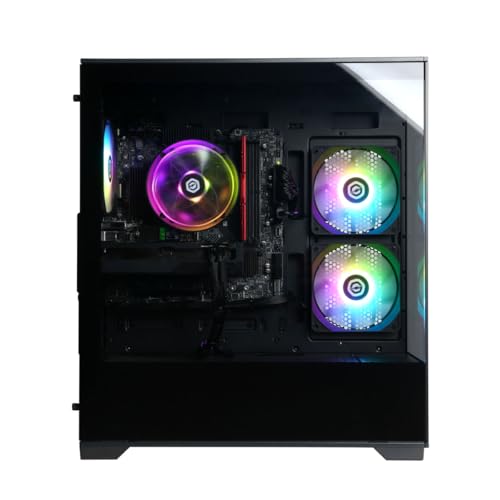
A gaming desktop combines a processor, graphics hardware, memory, and storage in a machine that also runs regular desktop apps. You can build one or buy a prebuilt. For a concrete example, the CyberPowerPC Gamer Xtreme VR configuration below lists a Core i5-13400F, GeForce RTX 5060 8GB, 16GB of DDR5, and a 1TB SSD. That gives you a parts list to compare with the games’ requirements and with other desktops at the same price.

A console
A console gives you a fixed hardware configuration, a controller, and a game store designed around that hardware. Pay attention to the model name. The white 512GB Xbox Series S is all-digital, so used discs can’t help offset what you spend on games. Sony’s 1TB PS5 with a disc drive can play supported PS5 and PS4 discs and download games from the PlayStation Store. Check the storage capacity and disc support on the exact version in your cart. Xbox Series S specifications and Sony’s PS5 model guide.
What it’ll cost to get started
If you already have a TV, a console purchase can come down to the box and your first game. Add a second controller only if the games you play support local multiplayer. That’s a useful distinction if you’re buying the system for two people in the same room, since two controllers do little for a game with online-only co-op.
On the PC side, start with what you already own. A spare monitor and a working keyboard and mouse make a prebuilt easier to price. If you’d also need a computer for school or work, compare the gaming desktop with the combined cost of a basic computer and a console. One computer can cover both jobs if you need them in the same room. If you’re shopping for a tower, use our gaming PC guide for budgets up to $1,500 to compare configurations.
Games, subscriptions, and the cost of switching
Price the next three years around the games you expect to play. Sony says PlayStation Plus is required for online play in the majority of purchased PlayStation games, with most free-to-play games exempt. Xbox lists online console multiplayer as a Game Pass benefit. On PC, check the game for its own subscription or account requirements. For easy math, a hypothetical $50 annual membership adds $150 over three years. If you mostly play offline or stick to games that are exempt, that line in your budget may be zero. PlayStation Plus terms and FAQ and Xbox Game Pass plan details.
Then price the games you’d actually buy. A disc drive can make used copies and lending practical. Digital sales can save money too, although you’ll want to check which storefront lets you play a purchase on your next device. Microsoft supports shared purchases and saves across Xbox and Windows for eligible digital titles through Xbox Play Anywhere. The label matters if you’re counting on moving your library or keeping a long-running save. Xbox Play Anywhere eligibility and FAQ.
Frame rates, displays, and upgrades
Start with one game and one screen. On a 60Hz TV, choose between the game’s available console modes based on how much detail and motion smoothness matter to you. On PC, you can often adjust settings individually. You might lower shadows and effects in a multiplayer shooter to leave more room for a steady frame rate. The result still depends on the game, processor, and graphics card. It’s worth comparing the pixel load before picking a GPU or monitor. See our guide to 1080p vs. 1440p gaming.
A console’s advertised output is a capability. Microsoft lists up to 120 fps on Series S, so check that your game offers a compatible mode and your screen accepts that refresh rate over HDMI. On PC, check display settings and monitor support as well. When comparing frame-rate claims, pay attention to whether the figures count frames generated by software, since those frames don’t cause the game to read your inputs more often. Xbox Series S video capabilities and NVIDIA’s RTX 5060 and DLSS feature overview.
When a desktop needs more performance, you can often upgrade one part at a time. Before buying a graphics card, check case clearance, the power supply’s capacity, and which connectors it has. Compact or proprietary prebuilts can narrow your choices. Console upgrades mainly give you more space for games. A PS5 can run games from a compatible M.2 NVMe SSD with suitable heat dissipation. That helps if you’re running out of room for big installs. Sony’s PS5 SSD requirements.
Game libraries, friends, and mods
Make a list of the three games you’re most likely to play in the next few months. Check which storefront carries each one, whether friends on other platforms can join your party, and whether the version you want supports your preferred controls. Cross-play and cross-save are separate features. You may be able to join a friend’s match without bringing over your progression from a different account or edition.
Old games deserve the same check. Sony says most PS4 games play on PS5, and a compatible PS4 disc needs a PS5 with a disc drive. On PC, an older title may need an update or compatibility settings to run properly on a modern operating system. If there’s one old favorite you can’t leave behind, look up that exact title before switching. Sony’s PS4 backward compatibility guide.
If rebuilding a game’s maps, adding community campaigns, or changing its interface is part of the fun, look up mod support before buying the game. Valve’s Steam Workshop lets players find and subscribe to community content in games that implement the feature. Available mods depend on the game and sometimes the storefront version. If you play online, check what your server or multiplayer mode allows. Valve’s Steam Workshop documentation.
What works in your room?
One screen for the whole household. A console fits that setup because you can navigate from the couch with the controller and put the system away from the desk. A desktop can also connect to a TV. Plan for where you’ll leave a keyboard and mouse, though. A controller may work inside the game while a launcher or sign-in screen still needs a pointer.
Then consider what happens when someone else wants the TV. A PC at a desk gives you another place to play, particularly if you prefer a mouse for strategy games or want a second screen for chat. For streaming, OBS Studio on a PC can combine game capture with a webcam, microphone, and overlays. If you need a specific adaptive input or button layout, check support in the game as well as the platform settings. OBS Studio’s capture and streaming features.
Which should you buy?
- Choose a console if you already have a good TV, mostly play with a controller, and your games and friends are available there. Price the subscription and decide whether you want a disc drive.
- Choose a gaming PC if you’ll use the same machine for desktop apps, want a modded library, or have a specific resolution and frame-rate target. Set the budget for the screen and controls alongside the tower.
- Keep your current setup if it already plays your favorites well. If a single game prompted the upgrade, check its recommended hardware and available platform versions first.
Same games, same friends. If both setups cover those basics, choose the one you can see yourself sitting down to use on a weeknight. The extra PC flexibility pays off when you can name what you’ll do with it.
Frequently asked questions
Can I use an Xbox controller on a Windows PC?
Yes. Microsoft’s current Xbox Wireless Controller can pair over Bluetooth with Windows 10 and 11 PCs. Check whether the game supports a controller, particularly if you’ll be playing from a couch. For more options, see our PC gaming controller guide.
Do I need a dedicated graphics card to try PC gaming?
Some games can run on integrated graphics. Look up your processor’s exact graphics hardware and compare it with the game’s requirements before buying a new tower. If you own the game already, try it on the system you have at the resolution you intend to use.




























Write Your Review
No reviews yet. Be the first to share your experience!