

“How much mini PC do you need” is really a question about matching compute to your actual workload, not chasing the biggest spec sheet. A mini PC is a tiny desktop, often the size of a paperback, that trades upgrade room and raw power for a small footprint, low noise, and low power draw. The trick is figuring out how much processor, memory, and storage your tasks demand, then buying just past that line so you’ve got a little headroom without paying for power you’ll never touch.
This explainer walks through how to size a mini PC to your needs, from light office duty up through media servers and casual gaming. We’ll be upfront: the two products we researched for reference are compact prebuilt tower desktops, not palm-sized mini PCs, so we’ll use them to illustrate compute tiers rather than pass them off as mini PCs. For ranked small-machine picks, our guides to the best mini PC for office work and the best mini PC for Plex in 2026 go deeper. Here, let’s figure out what you actually need.
The short answer
How much mini PC you need comes down to your heaviest regular task. For web browsing, email, and office documents, a modest CPU with 8GB to 16GB of RAM and a small SSD is plenty. For a media server, 1080p gaming, or light content work, you want a stronger processor, 16GB of memory, and more storage. Buy for your peak workload, not your average one, then add a small margin.

To anchor the mid tier, consider a compact prebuilt like the WIWB desktop at $569.99 with a 4.7 rating. It pairs a Ryzen 5 CPU boosting up to 4.1GHz with an RX 560 4G graphics card, 16GB of DDR4, a 512GB SSD, and Wi-Fi 6. It’s a small tower rather than a true mini PC, but its spec balance shows what “enough for casual gaming and home office” looks like: a capable CPU, 16GB of RAM, and a fast SSD.
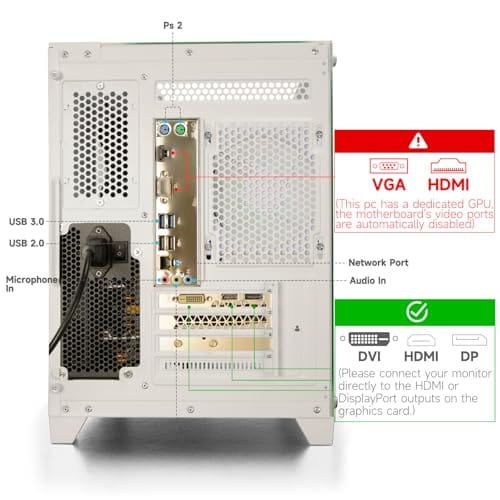

Pros
- Ryzen 5 3500X 6-core CPU bosts to 4.1GHz for smooth 1080p esports CPU load.
- Discrete RX 560 4GB handles DirectX 12 and Vulkan esports titles better than integrated graphics.
- 512GB SSD as bot drive keps Windows load times and app launches snappy out of box.
Cons
- Limited owner feedback at time of writing, no verified reviews to validate build quality.
- RX 560 is a legacy entry-tier GPU, skip if you want modern AAA at 1080p high.
- Ryzen 5 3500X sits on aging AM4, upgrade path is caped at Zen 3 with a BIOS update.
The WIWB is a budget prebuilt tower built around a Ryzen 5 3500X, RX 560 4GB, 16GB DDR4, and a 512GB SSD. It targets students, home office users, and casual gamers who want a plug-and-play box for esports at 1080p rather than a rig for current AAA titles.
The defining pairing here is the 3500X and RX 560. The 6-core, 6-thread CPU bosting to 4.1GHz is still competent for League, CS2, Valorant, and Overwatch, and typically pushes well above 100FPS at 1080p low-to-medium when paired with this GPU class. The RX 560 4GB is the bottleneck for anything heavier.
Trade-offs are typical at this tier. The RX 560 predates FSR frame generation and struggles with modern UE5 titles even at 1080p low. AM4 with a 3500X caps future CPU upgrades at Zen 3, and the case, PSU wattage, VRM phases, and included cooler are not specified, so headroom for a stronger GPU later is unclear.
Buy this if you need a cheap, pre-assembled Windows tower for schoolwork, browsing, and light esports at 1080p. Skip this if you plan to play current AAA releases, stream at 1080p60, or want a platform with a real multi-year upgrade path.
CPU workload: The Ryzen 5 3500X is a 6-core, 6-thread Zen 2 part with a 3.6GHz base and 4.1GHz boost. It stays viable for 1080p esports and light productivity like image editing and IDE work, but lacks SMT, which hurts streaming and modern CPU-bound AA titles.
GPU class and resolution fit: The RX 560 4GB GDDR5 is an entry esports card. Expect high frame rates in CS2, League, and Overwatch at 1080p low-to-medium, and playable frame rates in older AAA titles at 1080p low. 1440p and modern AA at medium are outside its envelope.
Memory and storage: 16GB DDR4 is the current baseline for gaming and multitasking, and the 512GB SSD covers Windows plus roughly 3 to 5 modern game installs. Exact DDR4 speed, dual-channel status, and SSD interface (SATA vs NVMe) are not specified.
Connectivity and upgrade path: WiFi 6 is included, and the board exposes an M.2 slot plus spare DDR4 slots for later expansion. PSU wattage, connector layout, case clearance, and waranty length beyond the stated 1-year coverage are not specified, so plan GPU upgrades cautiously.
The longer explanation
Sizing a small machine means looking at three things: processor, memory, and storage, in that order of impact. The CPU sets your ceiling for responsiveness and for how many things you can do at once. A modest chip handles browsing and documents smoothly, while a Ryzen 5 or Core i7 class part opens up light gaming, media transcoding, and multitasking. Memory is the second lever. 8GB works for basic use, but 16GB is the comfortable modern baseline once you keep a browser with many tabs open alongside other apps.
Storage is the third piece, and it’s where a mini PC’s limits bite. Many are hard to upgrade, so you buy the capacity you’ll need up front. A 512GB SSD suits general use; a media server wants far more. The catch with true mini PCs is that everything is soldered or tightly packed, so unlike a tower you often can’t add RAM or drives later. That’s precisely why sizing correctly at purchase matters more with a mini PC than with a full desktop you can crack open and upgrade.
How we got here
Mini PCs took off as processors got efficient enough to run a full desktop OS without a big cooler or power supply. Intel’s NUC line popularized the format, showing that a machine the size of a sandwich could handle real work. As laptop-class chips improved, so did mini PCs, and today a small box can drive multiple 4K displays, run a home server, or handle 1080p gaming, jobs that used to demand a tower.
That progress is exactly why “how much do you need” became a real question. When mini PCs were weak, you bought one for basic tasks and a tower for everything else. Now the range is huge, from bargain boxes for a TV to potent units rivaling mid-range desktops. The compact prebuilt towers we’re using for reference sit in the same performance conversation, which is what makes them useful yardsticks even though they’re bigger than a palm-sized mini PC.
Why it works this way
Small machines force tradeoffs because physics doesn’t bend. Less volume means less room for cooling, which caps how much sustained power the chips can draw before they throttle. That’s why a mini PC with a capable CPU on paper may run slower under a long load than a tower with the same chip and better airflow. It also explains the limited upgrade paths: there’s simply no space for extra RAM slots or drive bays in the smallest units.
So the design centers on efficiency. Mini PCs favor low-power components that run cool and quiet, which is perfect for an office desk, a living-room media box, or an always-on home server sipping electricity. When you need more sustained grunt, a compact tower like our reference units gives the chips room to breathe and adds upgrade slots, at the cost of size. Understanding that size-versus-power tradeoff is the key to sizing correctly. You’re really deciding how much performance you can fit in how small a box.
When you’d want this
You’d size up when your workload includes anything sustained or demanding: transcoding video for a Plex server, running virtual machines, editing photos, or gaming at 1080p. Those tasks reward a stronger CPU, 16GB or more of RAM, and generous SSD space, and they’re where a bottom-tier mini PC starts to feel cramped. If you do any of these regularly, buy toward the upper tier so the machine doesn’t choke under your peak load.
You’d size down when your tasks are light and steady: browsing, email, streaming video, office apps, or a simple always-on server. Here a modest chip and 8GB to 16GB is genuinely enough, and paying for more just wastes money and generates heat. For an entry point, the abytespark prebuilt at $499.99 with a 4.4 rating shows the value tier: an Intel Core i7 in a compact business office tower. It’s a small desktop rather than a mini PC, but as a reference it marks where an affordable Core i7 machine lands for office and general use.
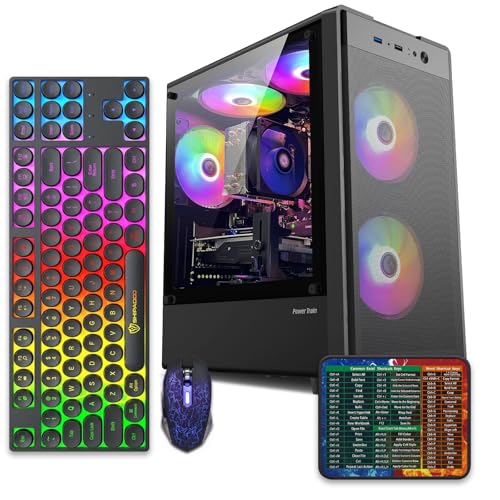
Pros
- 512GB SSD bot drive avoids the HDD bottleneck common in budget prebuilts
- RX 590 8GB VRAM buffer handles 1080p textures better than 4GB budget cards
- Complete bundle with RGB peripherals means no extra spend to start using
- Genuine Windows 11 Home 64-bit preinstalled, no activation hassle out of box
Cons
- Limited owner feedback at time of writing, verify seller reputation before purchase
- Core i7-4770 is Haswell era LGA150, no upgrade path and weak IPC versus modern CPUs
- Windows 11 on 4th-gen Intel is unsupported by Microsoft and may miss feature updates
- No CD/DVD-ROM support and RAM/GPU generation limits future workload headroom
This is an entry-tier prebuilt tower built around an Intel Core i7-4770 Haswell CPU, 16GB RAM, a 512GB SSD, and an AMD Radeon RX 590 8GB GDDR5 GPU. It targets budget buyers who need a working office and light gaming PC with peripherals bundled, not enthusiasts chasing current-gen performance.
The defining feature is the RX 590 8GB paired with a 512GB SSD, an uncommon combo at this price band. Cards in this class typically handle 1080p esports titles at 60+ FPS on medium to high, matching the vendor claim for CS:GO, League of Legends, Apex, and Overwatch. Newer AA titles will need lowered settings.
Trade-offs are significant. The i7-4770 launched in 2013, so IPC, single-thread performance, and platform features like NVMe bot, PCIe Gen4, and modern USB are limited. Windows 11 runs here but sits outside Microsoft's official supported CPU list. There is no realistic CPU or socket upgrade path on LGA1150.
Buy this if you need a plug-and-play 1080p esports and office tower with keyboard, mouse, and RGB included at a low outlay. Skip this if you want current-gen platform support, sustained AA 1440p gaming, or a build with a meaningful upgrade runway.
GPU class: The AMD Radeon RX 590 8GB GDDR5 is a Polaris-refresh card roughly equivalent to a GTX 1060 6GB tier. Expect 1080p 60+ FPS in esports titles like CS:GO, Overwatch, Apex, League, and Fortnite on medium settings, matching the listing's claims.
AAA and modern titles: The vendor lists GTA V, Warzone, Hogwarts Legacy, and The Division 2. Realistically, these run at 1080p low to medium with FSR upscaling where suported.Ray tracing is unsupported on RX 590. No DLSS, no frame gen, no AV1 encode.
CPU bottleneck: The Core i7-4770 quad-core with 8threads at up to 3.9GHz will bottleneck the RX 590 in CPU-heavy titles like Warzone and Escape from Tarkov. Expect frame time inconsistency in large team fights even when average FPS looks aceptable.
Storage and RAM fit: 512GB SSD holds Windows plus 3 to 5 modern game installs before space pressure. 16GB DR3-era RAM is adequate for current esports but leaves no headroom for heavy streaming, browser tabs, and OBS NVENC alongside a game session.
What to look for in a mini PC
Check the processor first, since it sets the ceiling. Match the CPU class to your work: a modest chip for office duty, a Ryzen 5 or Core i7 class part for media serving and light gaming. Confirm the RAM, and prefer 16GB unless your use is truly basic; also check whether it’s upgradeable, because many mini PCs solder it down. Storage next: get enough SSD up front, and see if there’s a spare M.2 or 2.5-inch bay for later expansion.
Then look at connectivity and cooling. Modern Wi-Fi like Wi-Fi 6, enough USB ports, and the right video outputs for your monitors all matter in a machine you can’t easily expand. Consider the cooling design too, since a well-ventilated unit holds performance longer under load. And weigh whether a true mini PC or a compact tower fits better; if you want upgrade room, a small tower like our reference units trades footprint for flexibility. Size for your peak task, add a margin, and don’t overbuy.
Common misconceptions
The first myth is that mini PCs are only for basic tasks. That’s outdated. Today’s units handle 4K media, home servers, and 1080p gaming, so the format spans a wide performance range. The real limit is sustained heavy load, where cooling and power caps hold a tiny box back compared to a tower with the same chip.
Another misconception is that more specs are always better. If your workload is light, a high-end mini PC just burns money and runs warmer for no benefit. Buy for your peak task plus a small margin. People also assume every mini PC is upgradeable like a desktop. Many aren’t; RAM and storage are often fixed, which is why sizing right at purchase matters. And don’t confuse a compact tower with a true mini PC. The towers here are useful yardsticks, but they’re bigger and more upgradeable than a palm-sized unit.
Frequently asked
How much RAM does a mini PC need?
16GB is the comfortable modern baseline for most users, since it handles a browser full of tabs plus other apps without slowing down. 8GB works for truly basic office and browsing use. Only go higher if you run virtual machines or heavy multitasking, and check whether the unit lets you upgrade later, because many don’t.
Can a mini PC handle gaming?
Light gaming, yes, especially at 1080p with a capable CPU and integrated or entry graphics. A machine in the class of our Ryzen 5 plus RX 560 reference handles casual titles fine. For demanding modern games at high settings, you’ll want a proper desktop with a dedicated GPU, since a tiny box can’t fit or cool one.
Is a mini PC good for a media server?
It can be, if you size it right. Media serving and transcoding reward a stronger CPU, 16GB of RAM, and plenty of storage. A low-end box may struggle with multiple transcodes at once. Check the processor’s transcoding ability and make sure you have enough drive space, since server libraries grow fast.
Why can’t I upgrade most mini PCs?
Space. The smallest units pack everything tightly, so RAM is often soldered and there may be no spare drive bay. That’s the tradeoff for the tiny footprint. If upgradeability matters to you, look at models that expose an M.2 slot and a memory socket, or step up to a compact tower that opens like a normal desktop.
Mini PC or compact tower: which should I get?
Choose a mini PC for the smallest footprint, lowest noise, and lowest power draw when your tasks fit its limits. Choose a compact tower, like our reference units, when you want more sustained performance, better cooling, and room to upgrade RAM or storage later. It comes down to how much you value size versus flexibility and headroom.


































Write Your Review
No reviews yet. Be the first to share your experience!