

Keep your PCIe 4.0 motherboard if it already gives your graphics card a full x16 link and you’re happy with the rest of the PC. A PCIe 5.0 graphics card can run in that slot at Gen 4 speeds. The important question is how many lanes the card will actually get. Put a card wired for eight lanes in that same slot and you’ll have a Gen 4 x8 connection.
If you’re building from scratch, a Gen 5 graphics slot is worth choosing when otherwise comparable boards cost about the same. If you’re upgrading an older PC, check the card’s lane count, the motherboard manual, and the games you play before deciding what to replace.
PCIe 4.0 vs. 5.0 at a glance
| GPU link | PCIe 4.0 | PCIe 5.0 |
|---|---|---|
| Signaling rate per lane | 16 GT/s | 32 GT/s |
| x16 bandwidth | 31.5 GB/s | 63.0 GB/s |
| x8 bandwidth | 15.8 GB/s | 31.5 GB/s |
| x4 bandwidth | 7.9 GB/s | 15.8 GB/s |
| GPU of the other generation | A Gen 5 GPU can operate at Gen 4 | A Gen 4 GPU still operates at Gen 4 |
The bandwidth figures are theoretical ceilings in one direction after 128b/130b encoding and before packet overhead. Both generations can send and receive simultaneously. Notice the two links rated at about 31.5 GB/s. Gen 5 x8 and Gen 4 x16 offer the same theoretical throughput even though their lane counts differ. PCI-SIG data rates by generation
PCIe 4.0
Gen 4 supplies about 2 GB/s per lane in each direction before packet overhead. A graphics card with a full x16 interface gets twice the bandwidth of a card that uses eight lanes at the same generation. Both can fit in the same full-length motherboard slot.
PCIe 5.0
Gen 5 doubles the signaling rate per lane, so the improvement is easiest to see when you hold lane width constant. It helps when data moving between the system and GPU is holding up the workload. A game can also spend most of its time waiting on the CPU, GPU rendering, or work inside the card’s video memory. The faster link can sit partly idle in any of those cases.
Why a full-length slot can give you eight lanes
Same slot shape. Different lane counts. A specification like “x16 slot, x4 mode” describes a full-length connector wired for four lanes. The graphics card can have its own limit, too. The GeForce RTX 5060 Ti uses eight lanes, so it negotiates Gen 4 x8 in a full-width Gen 4 slot. NVIDIA offers the GPU with either 8 GB or 16 GB of GDDR7. Check which version you’re looking at before comparing prices. NVIDIA GeForce RTX 5060 family specifications
Motherboards sometimes share lanes between expansion slots or between a GPU slot and an M.2 socket. On the ASUS ROG Strix B650E-E Gaming WiFi, for example, the manual’s Ryzen 7000 configuration shows that installing an SSD in M.2_3 cuts the top graphics slot to x8. That same board has a lower Gen 4 slot that looks like x16 and operates at x4. If you’ve just added a drive or moved a card, check the slot table before buying anything. ASUS motherboard manual
When more bandwidth changes performance
In Black Myth: Wukong at 4K, GamersNexus measured 85.5 FPS on an RTX 5090 at Gen 5 x16 and 84.7 FPS at Gen 4 x16. The publication put that gap within normal run-to-run variation. That result is a useful guide if you’re considering a flagship GPU for an existing Gen 4 x16 desktop. An x8 card or a VRAM-heavy game deserves a closer look. GamersNexus RTX 5090 benchmarks
When textures and other assets exceed the available VRAM, a game may rely more heavily on transfers to and from system memory. An eight-lane card has less room for that traffic on Gen 4 than on Gen 5. TechSpot found that the 8 GB RTX 5060 Ti recovered some performance when it moved from Gen 4 to Gen 5 in Ratchet & Clank: Rift Apart. In its Indiana Jones and the Great Circle scenario, raising the link speed did little to help the 8 GB card. Start by reducing texture quality if you’re seeing stutter at a heavy preset. If you’re still shopping, look at benchmarks for your settings and the exact memory variant. TechSpot’s 8 GB and 16 GB RTX 5060 Ti comparison
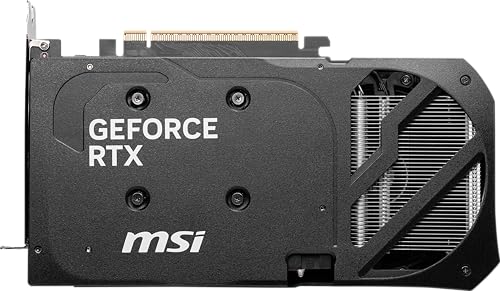
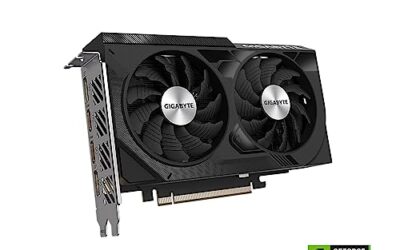
The 8 GB MSI Shadow 2X listing below is an example to help you identify that memory variant. If you want to use high-resolution texture packs on a Gen 4 system, it’s worth comparing the 16 GB version before ordering.

Workstation performance depends on what moves across the link. Puget Systems found similar results in DaVinci Resolve on an RTX 5090 at Gen 4 x16, Gen 5 x8, and Gen 5 x16. Narrower links did worse in that application, while its Blender and Octane rendering workloads changed little. If a video capture card shares lanes with your GPU, check the layout against benchmarks for your editor and workflow. Puget Systems’ content-creation benchmarks
Will a PCIe 5.0 graphics card work in a PCIe 4.0 slot?
Yes. PCIe devices and slots negotiate a mutually supported speed and lane width. A Gen 5 card can also link at Gen 3 in a compatible older PC, where an x8 card is capped near 7.9 GB/s in each direction. A Gen 4 card in a Gen 5 board stays at Gen 4. Check the CPU and motherboard specifications together because the same board can offer different slot modes with different processors. PCI-SIG backwards compatibility guidance
Compatibility still has a physical side. Check case clearance, slot thickness, and the power supply’s capacity and connectors. A compact prebuilt may have room for a short card and lack clearance for a longer cooler or its power cable. For an older system, check the manufacturer’s firmware and graphics-card support guidance, too.
How to check your GPU’s active connection
- Find the recommended graphics slot in the manual and check which lanes your CPU supplies. Look for footnotes covering storage and secondary cards.
- Open GPU-Z on Windows and look at Bus Interface. The part before the
@shows the card’s capability and the part after it shows the current link. Idle clocks and link power saving can make the speed look low. - Run GPU-Z’s small render workload and read the field again. For example,
PCIe x8 5.0 @ x8 4.0under load is consistent with a Gen 5 x8 graphics card installed in a Gen 4 slot.
If a card that supports x16 stays at x8, check whether the motherboard is sharing lanes, confirm the card is seated, and compare the reading against the manual for that exact CPU and slot. How to check PCIe lanes on your PC · GPU-Z
Vertical mounts and riser cables
A riser adds another connection to the path. If you’ve paired a Gen 5 GPU and motherboard with a Gen 4 riser and the PC loses video or becomes unstable, try the card directly in the board. If direct mounting works, set the graphics slot to Gen 4 in firmware before reconnecting the Gen 4 riser, where the board offers that setting. If you specifically want Gen 5 operation in a vertical mount, use a riser rated for it. How to mount a GPU vertically
Which PCIe generation should you choose?
- Upgrading a gaming PC with Gen 4 x16: Keep the board if the CPU and other features suit your needs. Choose the GPU by performance at your resolution, VRAM, price, and fit.
- Upgrading from Gen 3 or buying an x8 card: Look up benchmarks for the same GPU and memory capacity on your link. Pay attention to frame-time consistency and 1% lows alongside the average.
- Building a new PC with multiple drives or expansion cards: Favor Gen 5 at a similar total price, and check the lane map with every slot you intend to use. A board that preserves the GPU link and fits your other devices may be worth more to you than a faster spec on the front of the box.
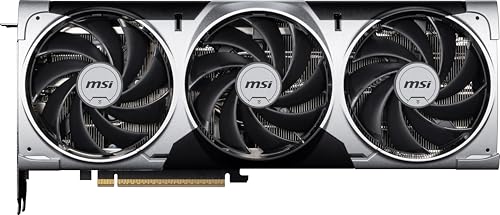
Use the graphics card buying guide by price tier to narrow your options. As a fit example, MSI lists its Gen 5 RTX 5070 Ventus 3X OC at 302 mm long with one 16-pin power connector. Compare those details with your case and power supply before ordering, even when the motherboard slot is compatible. MSI Ventus 3X OC specifications
Frequently asked questions
Does Resizable BAR require PCIe 5.0?
No. Resizable BAR lets the CPU access more of the GPU’s frame buffer at once. NVIDIA supported it on the RTX 30 series before its Gen 5 graphics cards. It depends on compatible hardware and firmware. Enabling it leaves the link’s generation and lane count unchanged. NVIDIA’s Resizable BAR guidance
Does a Gen 5 M.2 slot tell me what the GPU slot supports?
No. The M.2 socket and graphics slot have their own specifications. A board can offer Gen 5 for an SSD and Gen 4 for the GPU. Read the expansion slot entry separately from the storage section.
Bottom line
For an existing Gen 4 x16 gaming PC, put the upgrade money toward the graphics card you actually need. For a new build, buy Gen 5 if the price is close and the board gives you the slot layout you want. In either case, write down the link you’ll get with your chosen GPU and drives installed. That’s the bandwidth you can plan around.

























Write Your Review
No reviews yet. Be the first to share your experience!