

If $800 is your ceiling, shop for a gaming laptop by its graphics chip first. The strongest option here for 1080p gaming is a renewed Acer Nitro V 15 with an RTX 4050. It just qualifies at the price we checked. If you want a new laptop and room in the budget for a memory upgrade, start with the Lenovo LOQ Essential with an RTX 3050.
There’s also a renewed HP Victus with 16GB already installed. That’s worth a look if you want to play with voice chat and a browser open without buying an extra part. The tradeoff with the Radeon configuration is its smaller pool of dedicated graphics memory. On every pick, confirm the GPU and condition on the exact offer before ordering. The same laptop name can cover several very different machines.


Gaming Laptops Under $800 at a Glance
| Pick | Laptop | Graphics | Best for | Tradeoff |
|---|---|---|---|---|
| Best GPU | Acer Nitro V 15 (renewed) | RTX 4050 Laptop GPU | 1080p games with optional DLSS Frame Generation | 8GB RAM and a price close to the cap |
| Best with 16GB included | HP Victus 15 Radeon (renewed) | Radeon RX 6550M | Gaming with other apps open | 4GB of graphics memory |
| Best new value | Lenovo LOQ Essential 15 | RTX 3050 Laptop GPU | Leaving room for upgrades in the budget | Seller’s memory and drive descriptions need confirmation |
| New option with 6GB VRAM | HP Victus 15 Performance Blue | RTX 3050 Laptop GPU, 6GB | A clearly specified NVIDIA configuration | 8GB RAM with little room for a same-day upgrade |
| New Ryzen alternative | HP Victus 15 Mica Silver | RTX 2050 Laptop GPU, 4GB | Lighter games at 1080p | Small price gap to the RTX 3050 Victus |
1. Acer Nitro V 15 Renewed for the Strongest GPU
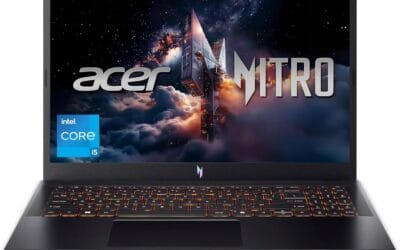
This is the pick for someone who’d put the full budget toward graphics. The renewed Nitro V 15 pairs an Intel Core i5-13420H with an RTX 4050 Laptop GPU, a 15.6-inch Full HD 144Hz IPS screen, 8GB of DDR5 RAM and a 512GB SSD. NVIDIA specifies 6GB of dedicated graphics memory for the laptop RTX 4050. The GPU also supports DLSS Frame Generation in compatible games. That gives you another setting to work with once you’ve found a base frame rate that already feels responsive. NVIDIA’s RTX 40-series laptop specifications.
Very little room left in the budget. The qualifying renewed offer came in just below $800 before tax, so there isn’t money left for a separate RAM purchase if the cap is firm. Keep your first few games on the internal drive, and plan any memory upgrade after you check the exact model number and slot layout. This is the first pick if the GPU matters most and you’re comfortable with the seller’s return terms. If you want a new unit or need 16GB on day one, start with the Lenovo or Radeon Victus below, depending on your condition preference.
2. HP Victus 15 Radeon Renewed for 16GB Out of the Box
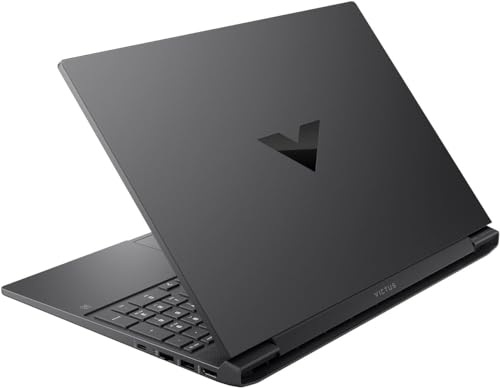
The renewed Radeon Victus is the straightforward choice if you want 16GB of system memory included. The listed configuration combines a Ryzen 5 7535HS, a discrete Radeon RX 6550M, a 512GB SSD and a 15.6-inch Full HD 144Hz screen. That combination makes sense for someone who alternates between school or work, gaming and a few background apps. You can start with the advertised memory capacity the day it arrives.
One limit to keep in mind. The RX 6550M has 4GB of dedicated graphics memory, and the 16GB of system RAM doesn’t change that. In games that ask for more video memory, try a lower texture preset before dropping the whole resolution. If your priority is getting NVIDIA’s Frame Generation in supported titles, choose the Acer. The main reason to buy this Victus is the $100 gap versus the renewed Nitro at the prices we saw, with twice the system RAM already included. Check the seller’s condition description and confirm the included charger before ordering.
3. Lenovo LOQ Essential 15 for the Best New Value
This LOQ Essential offer puts a Core i5-12450HX and a GeForce RTX 3050 in a 15.6-inch Full HD 144Hz laptop. At about $700 when checked, it leaves roughly $100 between the laptop price and the cap. That’s useful if you’d rather buy new and spend some of the difference on the part you actually need. For lighter games, you may be able to start with the listed 8GB and decide whether you need more after you’ve used your own applications.
Read the Lenovo listing closely. The headline and description disagree on the installed memory and storage. Lenovo documents the LOQ Essential 15IAX9E family with a single DDR5 SO-DIMM slot, so confirm the model number and be prepared to replace the installed module if that slot layout applies. Ask the seller to confirm the usable internal SSD capacity and the installed memory before you pay. We’d choose the LOQ if the seller confirms those details and the lower price holds. The blue Victus is the easier new RTX 3050 offer to compare if the seller leaves those details unresolved.
4. HP Victus 15 Performance Blue for 6GB of VRAM on a New Laptop
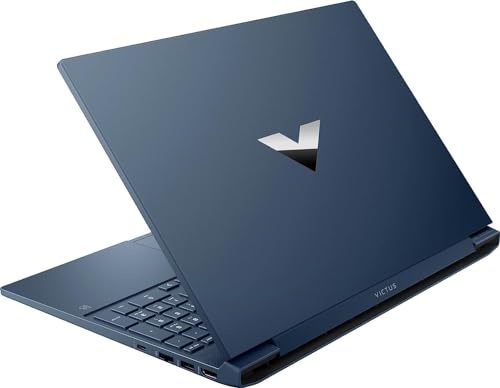
Look for the Performance Blue Victus with a Core i5-13420H, RTX 3050 Laptop GPU with 6GB of GDDR6, 8GB of DDR4 and a 512GB SSD. It has a 15.6-inch Full HD 144Hz display. This is the easier pick if you’re buying new and want a listing that explicitly states the graphics memory. That matters because the RTX 3050 name alone doesn’t tell you which laptop configuration you’re getting.
Compared with the renewed Radeon Victus, the blue model gives you more dedicated graphics memory but half the system RAM as sold. Think about which limit shows up in your own use. High texture settings in a graphics-heavy game put pressure on video memory. Running other applications alongside the game uses system memory too. The blue Victus was close to the cap, so add the cost of any DDR4 upgrade before deciding. It makes the most sense when you want the documented NVIDIA configuration, prefer to buy new and can start at 8GB.
5. HP Victus 15 Mica Silver for Lighter Games
The new Mica Silver Victus combines a Ryzen 5 7535HS, an RTX 2050 Laptop GPU, 8GB of RAM and a 512GB SSD. Its 15.6-inch Full HD screen is listed at 144Hz. Consider it if you mostly play lighter games and want a new Ryzen-based laptop at a fixed budget. When choosing between two similarly named silver Victus listings, check for the words RTX 2050. The renewed Radeon model above is a separate configuration.
The RTX 2050 has 4GB of dedicated graphics memory. If pricing stays close, the Performance Blue Victus is the better starting point for graphics-heavy games thanks to its 6GB RTX 3050 configuration. The silver model was about $11 cheaper when checked. It’s a sensible alternative if that difference gets you under a firm spending limit, if the RTX 3050 offer sells out, or if the price gap grows. If you want 16GB installed and you’re open to renewed, the Radeon Victus gives you more room for background apps while costing less at the checked prices.
How We Evaluated These Gaming Laptops
We looked for complete Windows gaming laptops with a dedicated GPU, a Full HD screen and an in-stock US offer below $800 before tax. The shortlist includes new and renewed machines, with condition called out alongside the pick. We checked offers on November 25, 2026. If the featured offer changes, check the price for the same configuration and condition before ordering.
GPU model and dedicated video memory were the starting point. After that, we weighed the installed RAM and SSD, screen refresh rate, upgrade options where the manufacturer documents them, and what the price leaves for upgrades. We used manufacturer specifications to check what a model family can support and retail listings to identify the configurations on sale. The picks reflect those specifications and the value of the offers. Exact frame rates depend on the game, settings and laptop configuration.
How to Choose a Gaming Laptop Under $800
Which GPU fits the games you actually play?
Make a short list of the games you expect to spend the most time in. Look at their publishers’ recommended specs and decide whether you want to prioritize responsiveness, sharper textures or visual effects. If your library is mostly lighter competitive games, you can put more of the budget toward a comfortable setup or extra memory. A newer graphics-heavy single-player game gives you a stronger reason to favor the GPU and start with moderate graphics settings.
Look for the words Laptop GPU when comparing specs. Desktop results for a similarly named GPU can give you the wrong purchase expectation. Even two laptops with the same graphics chip can allocate different amounts of power to it. If the manufacturer lists a graphics power limit for your exact model, compare that figure alongside VRAM and the full configuration.
Can you get to 16GB of RAM within the budget?
Eight gigabytes can make sense on a cheaper machine, especially when your game library is light and you’re comfortable closing other apps. If you keep a voice chat, browser and launcher open while gaming, 16GB is the more comfortable target. Epic, for example, lists 8GB as the minimum and 16GB as its recommendation for Fortnite on PC. That distinction gives you a better buying target than the minimum alone. Epic’s Fortnite system requirements.
Check whether there’s a free slot or whether you’d have to replace the installed memory. The cost of one replacement module can erase a small price advantage once you compare complete configurations. Our guide to laptop SO-DIMM memory explains the module format. Use the service documentation for your exact model to check the supported memory type and capacity before buying parts.
How big does the SSD need to be?
With 512GB, start by checking the installed sizes of the games you expect to keep around at the same time. Windows, updates, apps and personal files all use some of the advertised capacity. A short rotation is manageable if you’re willing to uninstall a game when you’re done. If you juggle several large downloads and share the machine with someone else, more space can save regular housekeeping.
Verify whether the manufacturer documents a spare M.2 slot and whether it accepts the SSD length you’re considering. Replacing the boot drive may involve migrating Windows or reinstalling it. If storage is expandable, there’s little reason to give up the GPU you want just for a bigger drive on day one.
What does a 144Hz screen get you?
A 144Hz screen can refresh up to 144 times per second. How often the game delivers a new frame is a separate question. You’ll benefit most in games where your chosen settings sustain a high frame rate, and you’ll still want consistent motion in heavier titles that run below that ceiling. If you’re choosing between a faster panel and a better laptop GPU, think about which one is likely to limit the games you play.
If you do photo work or play in a bright room, look up brightness and color coverage for the exact panel. Those are separate specifications from refresh rate. For a machine that’ll spend most days at a desk, you can also compare gaming desktops in the same $800 price bracket. Include the display and other gear you’d need to buy separately.
Frequently Asked Questions
Can an $800 gaming laptop handle newer games?
It depends on the game. Start at native 1080p with a moderate preset, check how the game feels during busy scenes, and adjust the expensive options one at a time. If you want a higher frame rate, try lowering shadows first. If the game shows a video-memory warning, try reducing texture quality. Look up each game’s recommended specifications before choosing a laptop for it.
Does more VRAM mean the laptop has more RAM?
They’re separate. An RTX laptop with 6GB of dedicated graphics memory and 8GB of system RAM still has 8GB for Windows and applications. A memory upgrade can give the system more room while the GPU keeps its original amount of video memory. Compare both figures when two offers appear close.
What should I check when buying renewed?
Read the condition description and return terms for the exact offer. Check whether the correct charger is included, whether the seller provides any battery condition information and how it handles missing accessories. When the laptop arrives, confirm the CPU, GPU, RAM and SSD against the listing, inspect the display and ports, and make sure the supplied charger works. Do that while your return window is still open.
When is it worth going above $800?
Raise the cap only if the next offer solves a specific problem, such as a GPU shortfall in a game you care about or the need to buy new with 16GB installed. Compare the higher price with the total for a cheaper machine plus any upgrades. If you can spend more, our gaming laptop guide for a $1,000 budget covers the next price tier.
Bottom Line
Choose the renewed Acer Nitro V 15 if your priority is graphics and the same offer stays under $800. The Lenovo LOQ Essential is the new option to compare first if the seller confirms the configuration. For 16GB without opening the laptop, the renewed Radeon Victus is the better fit. Check the current price, the exact GPU and the condition together before you order.


























Write Your Review
No reviews yet. Be the first to share your experience!