

For a 2560 × 1440 240Hz monitor, the PowerColor Reaper Radeon RX 9070 XT is our first pick for a mix of competitive shooters and demanding single-player games. It gives you more room to raise settings than the less expensive Radeons here, and the two-slot design makes it easier to fit than several of the alternatives. If you mainly play with ray tracing enabled, start with the PNY RTX 5070 Ti instead.
The monitor can refresh 240 times a second. Your PC has about 4.17 milliseconds to produce each frame if you want to feed it 240 fresh frames per second. That’s a realistic goal in some competitive games with the right CPU and settings. In demanding games, a steady lower frame rate with variable refresh can make better use of the hardware than chasing the number on the box.
Five cards for five different builds. The prices below are a November 26, 2026 snapshot of new U.S. Amazon offers and can move considerably. The least expensive card here is still expensive for its performance tier, so consider the gaps between picks before buying.


Pros
- 16GB GDDR7 gives comfortable VRAM headroom for 4K raster and ray-traced titles.
- 3.6-slot triple-fan cooler with phase-change thermal pad targets lower sustained temps than 2-slot designs.
- Blackwell architecture supports DLSS 4 multi-frame generation for higher perceived frame rates.
Cons
- Limited owner feedback at time of writing makes long-term reliability hard to verify.
- 3.6-slot width blocks adjacent PCIe slots and needs case clearance planning before purchase.
- High TGP typical of RTX 5080 class needs a modern PSU with native 12V-2x6 connector.
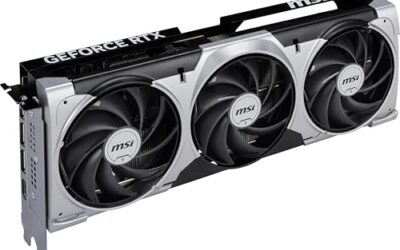
The ASUS TUF Gaming RTX 5080 OC is a high-end Blackwell-generation GPU with 16GB of GDDR7 memory and a factory overclock over reference clocks. It targets 4K gamers, high-refresh 1440p players, and creators running Blender or DaVinci Resolve who benefit from CUDA and DLSS 4 aceleration.
The headline is DLS 4 with multi-frame generation, which stacks additional generated frames on top of a single rendered frame. Combined with 16GB GDDR7, the card should handle 4K ultra with ray tracing enabled in current AAA titles, though independent third-party benchmarks under sustained load are still limited.
Trade-offs are real. The 3.6-slot design blocks adjacent PCIe expansion slots and demands case clearance planning, especially in compact mid-towers. RTX 5080-class cards typically pull 300W or more, so pair with a modern ATX 3.0 or 3.1 PSU that has a native 12V-2x6 connector rather than adapter cables.
Buy this if you are building a 4K rig around a Ryzen 9800X3D or Core i7-14700K class CPU and want DLSS 4 headroom for future AA releases. Skip this if your monitor tops out at 1080p, or your PSU is under 850W and non-ATX 3.0.
Resolution and VRAM: 16GB of GDR7 sits above the 12GB tier that started showing texture streaming issues at 4K in titles like Alan Wake 2 and Hogwarts Legacy. This capacity gives headroom for 4K native with high-res texture packs and for creator workloads that spill past 12GB in Blender GPU renders.
DLS 4 and frame generation: Blackwell adds DLSS 4 multi-frame generation, which can insert multiple generated frames per rendered frame. In practice this pushes 4K ray-traced titles from base rates near 60 FPS into triple-digit territory on high-refresh 4K panels, though input latency and artifacting depend on base frame rate.
Cooling and acoustics: The 3.6-slot fin stack with three Axial-tech fans and a phase-change thermal pad targets sustained boost clocks without the fan-speed spikes typical of 2-slot reference designs. Owner reports on prior TUF Gaming RTX cards flag low idle noise and low hotspot deltas as the consistent pattern.
Build compatibility: At 3.6-slot width, this card will block PCIe slots below it and needs verified length clearance in the case spec shet. Power draw for RTX 5080 class typically requires a native 12V-2x6 cable from an ATX 3.0 or 3.1 PSU rated 850W or higher for transient headroom.


Quick comparison
| Pick | Graphics card | Defining spec | Best for | Main drawback |
|---|---|---|---|---|
| Best overall | PowerColor Reaper RX 9070 XT | 16GB GDDR6, two-slot design | Competitive play and traditional rendering in AAA games | GeForce alternatives have more ray-tracing headroom |
| Fastest of these picks | ASUS TUF Gaming RTX 5080 OC | 16GB GDDR7, 348 mm long | High graphics settings and heavy ray tracing | More than twice the price of the Reaper in this snapshot |
| Ray tracing and DLSS | PNY RTX 5070 Ti OC Triple Fan | 16GB GDDR7, DLSS support | Mixed gaming with ray tracing in supported titles | Costs roughly $470 more than the Reaper |
| Lower-cost all-rounder | XFX Swift RX 9070 OC | 16GB GDDR6, 256-bit bus | Players willing to tune demanding games | XFX lists an 800 W minimum PSU for this model |
| Lowest-cost esports pick | XFX Swift RX 9060 XT OC 16GB | 16GB GDDR6, one 8-pin connector | Competitive settings and modest power supplies | Less rendering headroom in GPU-heavy games |
Best overall: PowerColor Reaper Radeon RX 9070 XT
Pick the Reaper if your time is split between competitive games and visually demanding releases where you prefer high settings with ray tracing off. AMD lists 64 compute units and 16GB of GDDR6 on a 256-bit bus for the 9070 XT. You get more rendering resources than the standard RX 9070, and you keep a GPU that can take advantage of FSR upscaling where your game supports it.
PowerColor lists a length of 304 mm including the bracket, a two-slot design, two 8-pin power connectors and a 750 W minimum PSU. That slim profile is helpful when you need to keep a nearby expansion slot accessible, though front-mounted fans or a radiator can still take away the length you need. Measure the usable clearance in your actual build.
At about $1,000 in our snapshot, the Reaper cost $140 more than the XFX RX 9070 and about $470 less than the PNY RTX 5070 Ti. The extra over the RX 9070 makes more sense if you regularly run into a GPU limit. If you dial down settings for every ranked match and spend little time in demanding games, put the difference toward a CPU upgrade or keep it in your budget.
Fastest pick: ASUS TUF Gaming GeForce RTX 5080 OC
The ASUS TUF is the choice here for players who spend most of their time in graphics-heavy games and want the most rendering headroom of these five cards. NVIDIA specifies 16GB of GDDR7 and 360 W total graphics power for the RTX 5080. ASUS lists its TUF OC card at 348 × 146 × 72 mm, calls for an 850 W PSU and uses a 16-pin power connector. Leave room for the connector and cable at the side panel as well as the card itself.
In Tom’s Hardware’s GPU hierarchy, the RTX 5080 averaged about 128 fps in the 1440p Ultra raster suite and 74 fps in the separate 1440p Ultra ray-tracing suite. Those are results for the GPU tier in two particular workloads. They show why a 240Hz monitor can still spend plenty of time below its ceiling even with a fast card.
At roughly $2,052, this board cost about $582 more than the 5070 Ti on our list. That premium is difficult to justify for esports or lighter games. Consider it if you can point to specific games where the 5070 Ti’s performance falls short of your target and you have the case and PSU to support the ASUS board.
Best for ray tracing and DLSS: PNY GeForce RTX 5070 Ti OC Triple Fan
The PNY is the GeForce to look at first if ray tracing is a regular part of how you play. It has 16GB of GDDR7 on a 256-bit bus, and the listed cooler occupies nearly three slots. NVIDIA specifies 300 W total graphics power and a 750 W system power requirement for the RTX 5070 Ti. Check your cable setup and clearance against the documentation for the exact board you buy.
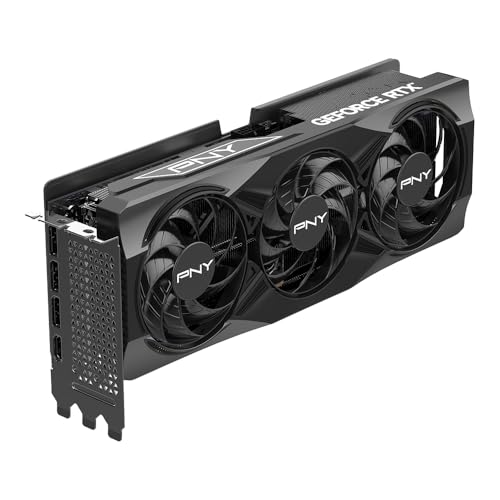
The 5070 Ti finished close to the RX 9070 XT in the 1440p Ultra raster suite cited above and ahead of it in the separate ray-tracing suite. The price difference buys a capability that matters most if you enable those effects often. Look up whether your specific games support DLSS Super Resolution and which ray-tracing options they offer. The premium is much harder to justify if you spend most of your time in games with traditional rendering.
Start with DLSS Quality in a supported game if native rendering is too slow. If it still feels sluggish, lower the ray-tracing preset and reassess the underlying frame rate before enabling frame generation. Extra displayed frames can make a camera pan look smoother while the underlying game still responds at its own pace.
Lower-cost all-rounder: XFX Swift Radeon RX 9070 OC
The XFX Swift RX 9070 is the step down I’d consider first if the 9070 XT stretches your budget. It keeps 16GB of GDDR6 and a 256-bit memory bus, with 56 compute units to the XT’s 64. At about $860, it makes sense for someone who wants more room than the 9060 XT offers and is comfortable adjusting settings in the hardest games.
Check the board before treating the RX 9070 as the easy fit. AMD recommends a 650 W PSU for its reference specification, but XFX lists an 800 W minimum for this specific Swift OC model, along with two 8-pin connectors and a 3.5-slot card profile. The Reaper RX 9070 XT can be the easier fit if you have a 750 W supply and limited room around the PCIe slot.
For a new build, price the RX 9070 with any PSU upgrade it requires. If that erases most of the savings over the Reaper, you have a better reason to step up. If your case and power supply already fit the XFX card, the savings are easier to keep.
Lowest-cost esports pick: XFX Swift Radeon RX 9060 XT OC 16GB
Consider the Swift RX 9060 XT if you play mostly competitive shooters at tuned settings and already have a CPU that can deliver high frame rates. This is the 16GB version, with a 128-bit bus and 32 compute units. XFX lists a dual-slot profile, one 8-pin power connector and a 450 W minimum PSU for the model here. At 290 mm long, it still needs a case clearance check.
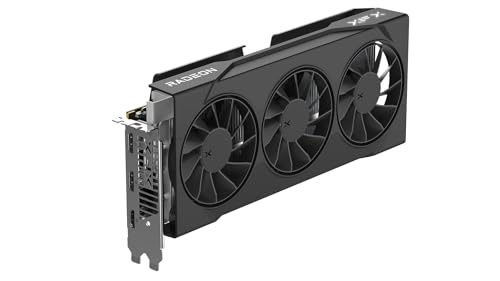
The lower system power requirement is the best reason to pick it from this list. At around $750 it was only $110 below the RX 9070, an upgrade worth considering if your build can handle it and you play heavier games. Keep the 9060 XT on your shortlist if that upgrade would also mean replacing your PSU or if your main games are light enough to make the extra rendering capacity unnecessary.
For occasional single-player games, keep the native output resolution and start with a sensible preset. Lower expensive effects such as volumetrics or ray tracing before cutting texture quality across the board. The card’s 16GB gives you room for textures when a game needs it, while its smaller GPU still sets a limit on how quickly it can render each frame.
How we evaluated
We compared new, in-stock offers for the exact desktop cards listed here and checked model specifications against manufacturer documentation. For relative performance, we used published 1440p results with traditional rendering and ray tracing reported separately. Those results help place each GPU in a performance tier. Your games, CPU and settings determine which tier is worth paying for.
Our first pick balances price, rendering headroom and physical fit. The other picks cover a higher graphics ceiling, ray tracing at a lower price than the 5080, a less expensive all-rounder and a card with simpler power requirements. Price and stock reflect a single retail snapshot, so compare current listings for the same model and condition before checkout.
How to choose a GPU for 1440p at 240Hz
Which games deserve the budget?
Pick two or three games you play most and decide what settings you’d actually use. For a competitive shooter, look for results from gameplay with comparable settings and a similar CPU. For a large single-player game, choose your minimum acceptable frame rate with your preferred visual effects. Our broader 1440p graphics card guide covers GPUs for a wider range of refresh targets.
Are you limited by the CPU or GPU?
With frame generation off, compare the same repeatable section at your regular settings and at a much lower render resolution. If frame rates improve substantially, the GPU was likely a major constraint. If little changes, check for a frame cap and watch GPU utilization. A lightly loaded GPU with the cap disabled can point to a CPU or game-engine limit. Our 1440p gaming CPU guide can help if your processor is holding the upgrade back.
Averages also hide dips. Look at frame-time spikes or 1% lows during fights and busy areas, when consistent delivery is most valuable. If counting frames in a quiet practice area gives a different result from playing a full match, use the match to make your decision.
Is the display actually set to 240Hz?
In Windows, go to Settings → System → Display → Advanced display, select the correct monitor, and confirm that 2560 × 1440 and 240Hz are active together. Use the input and cable that your monitor manual specifies for that mode. If 240Hz is missing, try a direct GPU-to-monitor connection before diagnosing performance around a dock, switch or adapter.
Check variable refresh support and enable it if you prefer smoother motion when frame delivery fluctuates. If you’re shopping for the display too, see our 1440p gaming monitor picks and confirm each model’s input limits before ordering.
Frequently asked questions
Can the RX 9070 XT reach 240 fps at 1440p?
It can in some games with a fast enough CPU and suitable settings. If you want 240 fps for ranked play, use data from the game and mode you care about. A steady 240 fps in a light shooter and 240 fps in a new ray-traced game are very different workloads.
Does frame generation count toward 240 fps?
It can raise the displayed frame count by inserting frames between rendered ones. For competitive play, judge responsiveness from the real rendering rate and how steadily frames arrive. For single-player games, start with a base frame rate you can comfortably play at, then try frame generation if you want smoother motion.
Do you need DisplayPort 2.1?
Some 1440p 240Hz monitors support the full mode over DisplayPort 1.4. LG’s 27GR83Q-B also supports it over HDMI 2.1. The monitor model, selected input and display settings determine what modes are available, so check the monitor manual before buying a new cable or card.
Is 16GB required for 1440p?
Memory needs vary with the game and settings. High-resolution texture packs and ray tracing can increase the pressure on VRAM, which is why 16GB is useful if you play a wide range of games. When a game already fits in memory, the GPU’s rendering speed and the rest of the system matter more to frame rate than spare capacity.
Bottom line
Start with the PowerColor Reaper RX 9070 XT for a mix of competitive and single-player gaming. Choose the PNY RTX 5070 Ti if you regularly use ray tracing and DLSS, and reserve the costly ASUS RTX 5080 for cases where you can justify the extra headroom. The XFX RX 9070 is the sensible step down if your system fits it. The RX 9060 XT is the lowest-cost option here for esports-focused builds that need simpler power requirements.
One last check before you buy. Compare frame rates in your own games at the settings you’ll use, and ask whether the money goes further toward the GPU, the CPU or both.

























Write Your Review
No reviews yet. Be the first to share your experience!