

Start with Acer Aspire and ASUS Vivobook if you need an affordable Windows laptop. If you carry it all day, put Acer Swift and ASUS Zenbook on the same shortlist. For gaming, compare Acer Nitro with ASUS TUF before you stretch to Predator or ROG. The answer changes with the configuration, especially when two listings use the same GPU name.
For a quick decision, buy the cheaper machine if both meet your requirements for memory, screen and ports. Pay more for an upgrade you’ll notice every week. A brighter display for a window seat. A second SSD slot for a growing game library. That’s where the choice between Acer and ASUS gets easier.
Acer and ASUS laptops at a glance
| What you need | Acer line to check | ASUS line to check | What to compare on the listing | What can justify paying more |
|---|---|---|---|---|
| Everyday Windows use | Aspire | Vivobook | RAM, SSD capacity and screen resolution | Enough memory for the apps you keep open |
| A laptop to carry daily | Swift | Zenbook | Laptop and charger weight, brightness and USB-C charging | A smaller travel kit or a screen you can read by a window |
| Gaming on a set budget | Nitro or Nitro V | TUF Gaming | Laptop GPU, graphics power and SSD space | A better GPU configuration or room for more games |
| Higher-end gaming | Predator Helios | ROG Strix or Zephyrus | Resolution, cooling design and dimensions | A display or chassis that fits where you play |
| Web-first schoolwork | Acer Chromebook | ASUS Chromebook | Required apps, keyboard and update end date | Local storage or a convertible hinge you will actually use |
Where each laptop lineup fits
Acer
Aspire is Acer’s everyday family. It’s a reasonable place to look for a Windows laptop that spends most of the week on homework, spreadsheets and video calls. Swift is the thinner, lighter family, so compare its weight and screen if your laptop comes along on a commute. Nitro covers gaming, while Predator Helios gives you another place to look when your budget allows for a higher-end configuration. See Acer’s laptop lineup and our guide to Acer Nitro and Predator laptops.
ASUS
Vivobook is the broad everyday range, while Zenbook is the place to start when you want a more portable design. TUF Gaming gives you a gaming option outside the Republic of Gamers lineup. Within ROG, Zephyrus is aimed at buyers who want a thinner gaming machine, and Strix is where I’d look when most sessions happen at a desk. ASUS also lists ProArt for creators, but a buyer editing photos should still check the panel’s color coverage on the exact model. Compare ASUS’s home laptop families and the ROG gaming ranges.

Gaming performance depends on the configuration
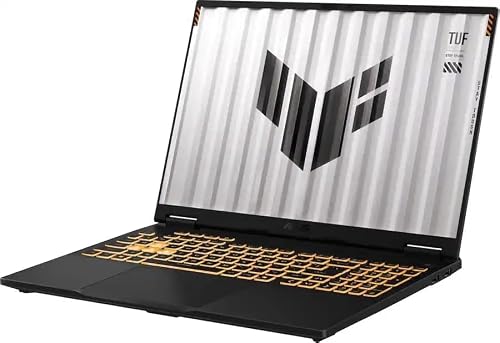
The Acer Nitro V 16S AI ANV16S-41-R2AJ and ASUS TUF Gaming A16 FA608PM-WB73 are useful examples. Both retail listings pair an RTX 5060 Laptop GPU with 32 GB of DDR5 memory and a 1 TB SSD. They list different processors, a Ryzen 7 260 for Acer and a Ryzen 7 8745HX for ASUS. Acer documents an 85-watt maximum graphics power for that Nitro model on its Canadian spec sheet. ASUS’s U.S. table lists 115 watts for a FA608PM configuration, with 15 watts of that total supplied by Dynamic Boost. That U.S. configuration lists a different processor, so confirm the graphics power on the WB73 before you use 115 watts to make your decision. See the Acer model specification and ASUS A16 configuration table.
If you mostly play competitive games plugged in at your desk, check how the exact CPU and GPU hold up in independent reviews of the games you play. Also check the resolution you intend to use. Driving an external 2560 × 1440 monitor asks the GPU to draw more pixels than either of these 1920 × 1200 laptop screens. If you only plan to use the built-in display, Acer documents a 180 Hz panel for this Nitro. A refresh ceiling tells you how often the screen can update, so compare it with what your games can actually deliver.

Price and value for school or work
On November 26, 2026, the U.S. retail offers we checked were $1,758.88 for the Nitro and $1,799.99 for the TUF. That’s a $41.11 difference on these two listings. If you need the Nitro’s microSD reader or its documented screen, that’s a concrete reason to choose it at those prices. If the TUF has a port or gaming feature you need, verify it on the listing or ask the seller before paying the difference. Compare the checkout totals and return terms because both offers can change.
For a first-year student who’ll spend most of the week in a browser, PDFs and an office suite, I’d put 16 GB of RAM and a 512 GB SSD ahead of a dedicated GPU. Those are useful shopping targets if you have the budget, especially if the memory is soldered. When one Aspire or Vivobook costs more, find the upgrade in the product sheet. A dim screen or a cramped keyboard can affect every assignment, even when the processor spends most of its time idle. Our laptop guide for college students helps narrow those needs by workload.
Design, portability and getting connected
For train rides and shared desks, compare the footprint and weight of the charger as well as the laptop. Acer lists this Nitro at about 4.63 pounds before accessories. That’s useful for a gaming shortlist, but if you’re carrying a laptop five days a week and rarely play PC games away from home, compare it with a Swift or Zenbook before deciding. A smaller bag and more room to open the lid can matter more than a bigger display on a crowded commute.
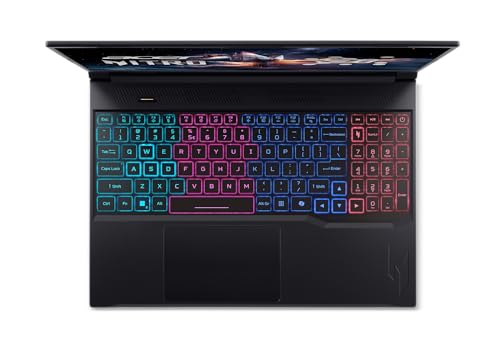
For a one-cable desk setup, read the port descriptions before ordering a dock. Confirm which USB-C port carries video, whether it accepts charging and what wattage the laptop expects. A gaming laptop may still need its supplied power adapter for demanding games. If you transfer photos directly to the laptop, check the card format, too. The Acer example has a microSD reader, so a full-size camera card still needs an adapter or another reader.
Product variety and app compatibility
Both companies sell Chromebooks. They can make sense for an all-browser workload, but check for Windows-only software before you trade an Aspire or Vivobook for ChromeOS. For example, ask your department which desktop apps and exam software it requires. If those are covered, look up the exact Chromebook model’s update end date, particularly on clearance stock. Google publishes dates by model in its ChromeOS update policy.
Check the processor platform on Windows laptops as well. If the machine uses an Arm processor and you rely on an older printer, a specialized audio interface or a required desktop app, check the accessory or software vendor’s compatibility information first. Do that before comparing battery claims or screen options. Our laptop buying guide for work and play has other starting points if neither lineup carries the combination you need.
Warranty and customer support
Look up the written terms for the exact model, seller and country. Acer’s U.S. support page accepts a serial number or SNID and links to warranty and repair information. ASUS describes checking warranty expiration through its regional inquiry page or MyASUS. Those tools help you confirm coverage for an individual machine. For a laptop you need for work tomorrow, compare the seller’s exchange window, whether repairs are mail-in and who pays for shipping. If you’re buying from a marketplace seller, ask for the coverage terms in writing before checkout. See Acer U.S. support and ASUS warranty lookup instructions.
Which should you buy?
- For basic Windows work: Shortlist Aspire and Vivobook. Take the better-priced model once you’ve checked the RAM, screen and return policy.
- For daily travel: Put Swift and Zenbook side by side with the charger included in your weight comparison. Check screen brightness if you often work near windows.
- For gaming: Start with Nitro and TUF. At similar prices, compare the laptop GPU’s power limit, the built-in panel and independently reported performance for the actual configurations. Look at Predator and ROG when a specific display, chassis or GPU warrants the added cost.
The fastest way to settle Acer vs ASUS is to bring two full model numbers to the comparison. If the cheaper laptop meets your requirements, buy it. If you can name a difference that will help with your games, commute or work, pay for that difference.
Frequently asked questions
Can I add RAM or a second SSD after purchase?
Check the service documentation for the full model number. For RAM, find out whether any memory is soldered and whether a socket is already occupied. For storage, look for an unoccupied M.2 slot and check the supported drive length. A listing that says 1 TB only tells you the capacity it ships with.
Can I reuse an Acer laptop charger with an ASUS laptop?
Check the power requirements before sharing a charger. With USB-C Power Delivery, both laptops need to support charging through that port and the adapter and cable must supply the required power. For a barrel charger, use a manufacturer-approved replacement for the exact model.

























Write Your Review
No reviews yet. Be the first to share your experience!