

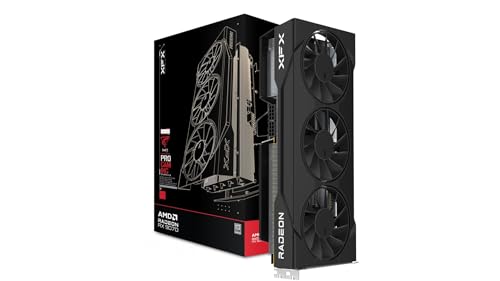
The XFX Swift Radeon RX 9070 XT is the GPU I’d pair with a Ryzen 7 7800X3D for a 1440p monitor or a mix of 1440p and 4K gaming. It gives you 16GB of graphics memory, and the price step from the RX 9070 was about $170 when we checked. The catch is physical fit. This Swift card is 325 mm long, and XFX calls for an 850W power supply.
If you already have the 7800X3D, start with the games and settings your current PC struggles to run. A 4K campaign with demanding lighting effects calls for a different upgrade than a competitive shooter at low settings. We picked five new desktop cards for those different needs, including a much shorter GeForce and a Radeon that costs less to buy and can fit a less demanding power budget.


Five GPU pairings at a glance
| Pick | Graphics card | VRAM | Card length | Main trade-off |
|---|---|---|---|---|
| Best overall | XFX Swift Radeon RX 9070 XT | 16GB GDDR6 | 325 mm | 850W PSU minimum from XFX |
| Premium 4K | ASUS Prime GeForce RTX 5080 OC | 16GB GDDR7 | 304 mm | Large price jump |
| Lower-cost 16GB | XFX Swift Radeon RX 9070 OC | 16GB GDDR6 | 290 mm | XFX still calls for 800W |
| Short-case GeForce | MSI GeForce RTX 5070 Shadow 2X OC | 12GB GDDR7 | 231 mm | 12GB at close to RX 9070 XT pricing |
| Lowest-priced pick | XFX Swift Radeon RX 9070 GRE | 12GB GDDR6 | 301 mm | Less memory than the RX 9070 |
XFX Swift Radeon RX 9070 XT for most 7800X3D builds
Start here if you’re replacing an older card for a 1440p high-refresh display and also want the option to play at 4K. The RX 9070 XT has 64 compute units and 16GB of GDDR6 on a 256-bit bus. The RX 9070 below has the same memory capacity and bus width, with 56 compute units. The XT’s higher tier makes sense when your games are already running up against the graphics card and the two prices are close.
XFX lists two PCIe 8-pin connections, an 850W minimum power supply and a 325 × 150 × 65 mm body. That last dimension matters if you use a capture card or another device in a slot just below the GPU. In a case with a front radiator, measure from the rear expansion bracket to the radiator or fan assembly. A nominal 330 mm allowance can get tight quickly once the case is fully assembled.
Already shopping for a new PSU? Add it to the checkout total before comparing this card with the RX 9070 GRE. I’d take the XT if the computer can accommodate it and you expect to spend most of your time at high graphics settings. If the games you care about already reach your refresh target at 1440p, put the money back in your pocket.
ASUS Prime GeForce RTX 5080 OC for a premium 4K upgrade
This is the pick for a 4K display that gets regular use in demanding games, especially if you’ve already checked that your favorite titles support the DLSS or ray-tracing options you want. The Prime OC has 16GB of GDDR7 and measures 304 × 126 × 50 mm. ASUS lists a single 16-pin power connector and recommends an 850W PSU. It’s shorter and thinner than the XFX RX 9070 XT in this guide, although the side panel still needs room for the cable.
The upgrade from the Radeon is a purchase of additional graphics capability and access to NVIDIA features in supported games. Both cards have 16GB of VRAM. If your current problem is a specific game overrunning a memory budget with texture mods, check what that game requires before spending more on a card with the same capacity. If your problem is a GPU-heavy lighting preset at 4K, the 5080 is where I’d look among these five picks.
At the prices we saw, this ASUS card cost well over twice as much as the XFX XT. That’s hard to justify on a 1440p screen unless your game settings make an unusually strong case for it. Our 4K graphics card guide covers more options for buyers choosing around the display.
XFX Swift Radeon RX 9070 OC for lower-cost 16GB
The RX 9070 OC is the sensible step down if you’re shopping for 1440p and still want 16GB for large texture packs. It runs on the same 256-bit memory bus as the XT. Pick this model if the cost difference matters or the case has room for a 290 mm card and can’t accommodate the XT’s extra 35 mm. It’s still a thick card. XFX lists a 3.5-slot profile and 59 mm depth, so check the clearance below the slot as well.
Don’t assume AMD’s base GPU recommendation is the one to use for your shopping list. AMD lists 650W for the reference RX 9070. XFX calls for 800W and two 8-pin PCIe connections on this specific Swift OC model. Follow the model-specific figure when you’re figuring out whether the installed power supply can stay.
The RX 9070 was about $120 above the GRE and about $170 below the XT in our snapshot. That’s a worthwhile middle ground for someone who wants the 16GB memory tier and already has the power supply. If the XT gets closer in price and it fits, the case for the 9070 is mostly about size and what you already own.
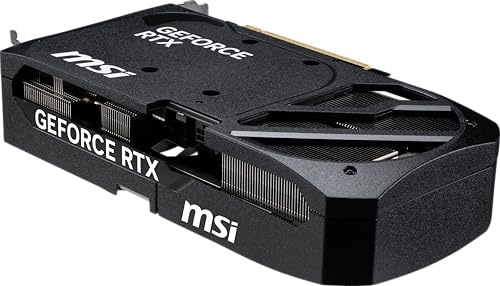
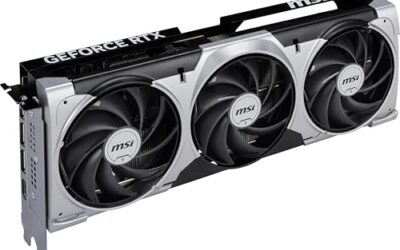
MSI GeForce RTX 5070 Shadow 2X OC for a shorter case
At 231 mm long, the MSI Shadow 2X OC is the shortest card here by 59 mm. That can be the difference between keeping a front fan in place and having to rethink an entire small build. The other two dimensions are 126 × 50 mm, and the card uses a 16-pin power connection with a 650W PSU recommendation. A short card can still foul a side panel if the cable or its bend needs more space than the case provides.
The second reason to choose it is DLSS in the games you play. As an example, DLSS Super Resolution can reduce the internal rendering workload while targeting a 1440p output. Frame generation is a separate option in supported games. Set the graphics and upscaling options for a responsive base frame rate before deciding whether you like what the generated frames add.
The drawback is that this model’s 12GB of GDDR7 came at only a slightly lower price than the 16GB RX 9070 XT. I’d choose it for the shorter body if it saves a case swap, or for a specific GeForce feature I know I’ll use. Otherwise, the Radeon pairings make more sense for a roomy case and a texture-heavy game library.
XFX Swift Radeon RX 9070 GRE for the lowest upfront cost
The 9070 GRE is the starting point if you’re moving to 1440p and care about keeping the purchase price down. Look for the letters GRE in the listing. This version has 48 compute units and 12GB of GDDR6 on a 192-bit bus, so it gives up memory capacity and bandwidth compared with the 16GB RX 9070. If you’re happy to adjust texture quality when a game demands it, the savings make sense.
XFX lists a 650W minimum and two 8-pin PCIe power connections for this model. That makes it the first Radeon here I’d check if the PC already has a suitable 650W unit. A longer card than you might expect. The GRE is 301 mm long and 59 mm thick, so the cheaper option actually needs more front-to-back clearance than the non-GRE RX 9070 listed above.
I’d take the 16GB RX 9070 if the price gap closes or if you routinely install big texture packs and have the PSU for it. The GRE is better suited to someone whose total upgrade budget has to cover a monitor, too. If your 7800X3D already drives the games you play at the quality you want, there’s also a good case for waiting until the price of the whole upgrade drops.
How We Evaluated These GPUs
We matched current U.S. retail listings for new desktop cards to manufacturer specifications for the exact models. We compared video memory, clearance in three dimensions, power connections, PSU guidance and the features that could change the choice at 1440p or 4K. The U.S. price comparisons are from November 25, 2026. The offers can change, and a replacement power supply or case belongs in your upgrade budget.
The picks reflect those specifications and buying constraints. We excluded the RTX 5090 because the new offers we saw were over $7,000. The RTX 5070 Ti is worth comparing if you want 16GB and DLSS, but the new offers we saw started above $1,500. At that price I’d verify the feature support for my games before paying that much over the Radeon XT. No promised frame rates. Games and settings can move the limit from the graphics card to the CPU, even within the same session.
How to choose a GPU for your 7800X3D
Which frame-rate problem are you solving?
Use a scene you know well, turn off any frame cap or sync setting that would conceal the limit, and compare your usual settings with a lower render resolution. If lowering resolution produces a clear gain, more GPU performance can help in that scene. If frame rate barely moves and GPU load is below full utilization, look at CPU-heavy settings, game-engine limits or other constraints before buying. Repeat the comparison where the slowdowns actually happen. A quiet starting area can tell a different story from a crowded city or a busy multiplayer match.
What does your monitor actually need?
On a 1440p 144Hz display, decide whether you care more about reaching your refresh ceiling in competitive games or keeping higher visual settings in slower games. You may already have enough GPU for the first use. If you’re moving to 4K, decide whether you’re comfortable with upscaling in demanding titles. That choice has a much bigger effect on the purchase than trying to assign one ideal GPU tier to every 7800X3D build.
Which settings matter enough to pay for?
Make a short list of the settings you’d actually miss. If you play with large texture packs, prioritize memory capacity and keep within the game’s VRAM budget. If you care most about reflections or demanding lighting effects, check which ray-tracing presets the game offers and whether a compatible upscaler looks good to you. People who mostly play competitive games at low settings can often spend less here and get more out of a monitor upgrade.
Include your usual display setup in that decision. If your next screen is a 3440 × 1440 ultrawide, it has about 34 percent more pixels than standard 2560 × 1440. A recommendation for the smaller resolution can be a useful starting point, but leave room in the budget or the settings menu for the added rendering work.
Will the new board fit the PC you already own?
Check length against installed front hardware, thickness against adjacent cards, and height against the side panel with the cable attached. Our GPU clearance guide walks through those measurements. Check the power supply’s exact model and cables, too. Use the cable configuration specified by the card and power supply manufacturers, and never borrow modular cables from a different PSU model unless the manufacturer explicitly lists them as compatible.
Frequently asked questions
Can I use a GeForce card with a Ryzen 7 7800X3D?
Yes. The CPU is an AM5 desktop part, and both GeForce and Radeon cards use the motherboard’s PCIe graphics slot. Look up which full-length slot the motherboard manual recommends, confirm the card and cables fit, and install the driver for the GPU you choose.
Should I replace a 7800X3D with a 9800X3D first?
Keep the 7800X3D if the GPU is what’s holding back the games you play. A CPU upgrade is worth comparing if you routinely see a CPU or engine limit at the settings you prefer, particularly when chasing very high frame rates at lower settings. If you’re still choosing between the processors, see our Ryzen 7 9800X3D versus 7800X3D comparison for the platform decision.
Does a 4K monitor require a 16GB graphics card?
There’s no universal cutoff. Memory demand varies by game, texture settings, ray tracing and mods. A 12GB card can make sense if you’re comfortable lowering memory-heavy settings in demanding games. I’d start at 16GB for a new GPU if 4K is your everyday resolution and keeping higher texture settings is part of the upgrade.
Bottom Line
Pair the Ryzen 7 7800X3D with the XFX Swift RX 9070 XT if you want one card for high-refresh 1440p and some 4K, and your case and power supply are ready for it. Choose the RX 9070 GRE to trim the bill, or the RX 9070 OC if you want 16GB in a shorter Radeon. The MSI RTX 5070 is the answer to a tight length limit. Spend on the ASUS RTX 5080 when 4K and the features your games support make that price difference worthwhile.
























Write Your Review
No reviews yet. Be the first to share your experience!