

The RTX 5080 and RTX 5090 sit at the top of Nvidia’s current lineup, and they get mixed up constantly. They share a launch generation, a similar cooler footprint on many models, and a lot of the same marketing language. But the gap between them is bigger than the two-digit difference in their names suggests. One is a very fast enthusiast card. The other is a halo product built without much regard for price. Knowing which is which saves you a lot of money, or a lot of regret.
This guide breaks down what actually separates the two, in plain terms, so you can decide what your build really needs. If you’d rather skip the loose parts and buy a machine with the work done for you, our roundup of the best RTX 5080 prebuilt PC options is a good starting point, and anyone shopping the wider stack can scan current GPU deals before committing. We’ll also point out where a cheaper card makes more sense than either of these two.
The short answer
The RTX 5090 is the faster, wider, more expensive card. It carries more CUDA cores, a larger memory bus, roughly double the VRAM, and a much higher power ceiling than the 5080. The RTX 5080 is the step down: still extremely capable, meaningfully cheaper, and far easier to fit in a normal case with a normal power supply. If your goal is maxed-out 4K with heavy ray tracing and you don’t care about cost, the 5090 wins. For almost everyone else, the 5080 delivers most of the experience for a fraction of the price.
Here’s the blunt version. The 5090 is a professional-grade halo card that happens to game. The 5080 is a gaming card that happens to be near the top. Most people asking this question are 5080 buyers who don’t know it yet. And if your budget sits below both, a card like the ASUS TUF Gaming RTX 5070 covers 1440p and entry 4K without draining the account.

Pros
- 12GB VRAM on 192-bit bus gives headroom over8GB rivals at 1440p.
- Single 8-pin connector and 650W PSU target means broad build compatibility.
- DisplayPort 2.1 with UHBR13.5 suports high-refresh QHD and 4K panels natively.
- 2-slot 249mm length fits compact ATX and many mATX chassis without clearance issues.
Cons
- Limited owner feedback at time of writing makes long-term reliability signals thin.
- PCIe 4.0 x8 interface can bottleneck slightly on older PCIe 3.0 platforms.
- Intel Arc driver maturity in older DX9/DX11 titles still trails NVIDIA and AMD.
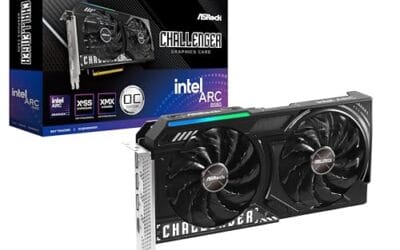
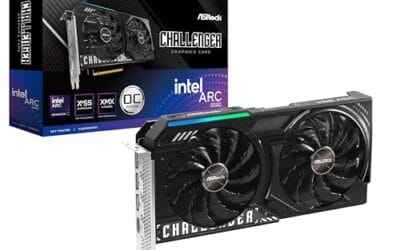
The ASRock Arc B580 Challenger 12GB OC is a mid-range 1440p GPU built on Intel's Xe2-HPG architecture with 20 Xe cores, 160 XMX engines, and a 2740MHz boost clock. It targets QHD gamers and content creators who want more VRAM than 8GB competitors offer at this bracket, without moving up to a 200W-plus card.
The defining feature is the 12GB GDDR6 pool on a 192-bit bus running at 19 Gbps, which gives real texture and framebuffer headroom at1440p. Combined with XeSS 2 AI upscaling and DirectX 12 Ultimate support, Arc B580 cards in this tier typically handle modern raster titles at high settings QHD, based on Intel's reference silicon behavior.
Trade-offs are typical for Intel Arc at this stage. The PCIe 4.0 x8 interface can shave frames on PCIe 3.0 boards, and driver polish on legacy DX9/DX11 games still lags competing vendors. The card requires a single 8-pin, 650W recommended PSU, and 249mm length, so verify chassis clearance and rail headroom before pairing with older bronze-tier supplies.
Buy this if you want a 1440p card with 12GB VRAM, DP 2.1 outputs, and XeSS 2 support on a modern PCIe 4.0 platform. Skip this if your library leans heavily on older DirectX 9 or 11 titles, or your motherboard is PCIe 3.0.
Resolution target: With 12GB GDDR6 on a 192-bit bus at 19 Gbps, this card is positioned for 1440p high settings in modern raster titles, with XeSS 2 upscaling extending playable framerates in heavier ray-traced workloads. 1080p esports at high refresh is well within scope.
Power and PSU pairing: ASRock lists a 650W recommended PSU and a single 8-pin connector. GPUs in this class typically draw around 190W board power, so pair with a quality 650W to 750W unit to leave transient headroom on ATX 3.0 or olderATX 2.x rails.
Build clearance: The2-slot cooler measures 249mm long, 132mm wide, and 41mm high. That fits most mid-towers and many mATX cases, but confirm front-radiator or HDD-cage clearance in compact builds beforeordering, especially SFF chassis rated under 250mm GPU length.
Display outputs: Three DisplayPort 2.1 ports (one primary up to UHBR13.5) plus one HDMI 2.1a drive up to four displays with resolutions up to 8K. UHBR13.5 suports high-refresh 4K and 1440p panels natively without DSC compromises.
The longer explanation
The two cards are built on the same architecture, so the difference isn’t about generation. It’s about scale. The 5090 uses a much larger slice of Nvidia’s top silicon, which means more shading units, more ray-tracing cores, and more tensor cores doing the AI upscaling work. Stack all of that together and you get a card that pulls ahead by a wide margin in raw rasterization and an even wider margin in the heaviest ray-traced scenes.
Memory is where the split gets obvious. The 5090 carries far more VRAM on a wider bus, which matters for 4K textures, high-resolution content creation, and local AI work. The 5080 has plenty for gaming at 4K, but it’s not in the same league for workloads that eat memory bandwidth. That’s the real dividing line. Gamers rarely saturate the 5090’s memory. Creators and AI hobbyists do, and that’s who the extra capacity is really for.
Then there’s power and heat. The 5090 draws substantially more wattage, runs hotter under load, and physically takes up more room. You’ll want a beefier power supply and good case airflow. The 5080 is far more forgiving on all three fronts. It’s the difference between planning your whole build around the GPU versus dropping the GPU into a build you already like.
Feature support is largely shared, so that’s not where you’ll find the split. Both cards get the same generation of upscaling, frame generation, and ray-tracing features, which is why frame-for-frame the 5080 stays close in lighter scenes. The gap opens up only when you push resolution, effects, and memory load together. That’s worth remembering. You’re not buying a different feature set with the 5090, you’re buying more raw horsepower to run those same features harder.
How we got here
For years the “80-class” card was the enthusiast pick and the “90-class” (or the old Titan slot) was the ceiling for people who wanted absolute maximum performance. That pattern held again this generation. Nvidia positioned the 5090 as the no-compromise flagship and the 5080 as the sensible high-end choice.
What changed over the last few generations is how far apart the two tiers drifted. The flagship keeps climbing in die size, power draw, and price, while the 80-class stays closer to what a mainstream enthusiast can actually justify. So the naming makes them look like siblings. In practice they’re more like a fast sedan and a track car. Both are quick. Only one needs a special garage.
Why it works this way
Nvidia segments its lineup deliberately. The flagship exists partly to set a performance headline and partly to serve professionals who’ll pay for every extra frame and every extra gigabyte of memory. The 80-class is tuned to hit a price most serious gamers will stretch to. That’s why the 5090 costs so much more for what, in pure gaming terms, is often a smaller real-world jump than the price gap implies.
Diminishing returns are the key idea. Going from a mid-range card to a 5080 transforms your gaming. Going from a 5080 to a 5090 usually buys you extra frames you may never notice on a standard monitor. The 5090’s advantage shows up most at 4K with everything cranked, in ray-traced titles, and in non-gaming work. Outside those cases, you’re paying a premium for headroom. If you pair either with a strong CPU, our notes on the best GPU for the 9800X3D explain why a balanced build matters more than one giant part.
When you’d want this
Reach for the 5090 if you run a high-refresh 4K display, play the most demanding ray-traced games, or do serious creative and AI work that leans on VRAM. Video editors handling multiple 4K or 8K streams, 3D artists, and people training or running local models will feel the difference every day. If that’s you, the price is a tool cost, not a splurge.
Pick the 5080 if you’re primarily a gamer who wants near-top performance without the flagship tax. It handles 4K gaming beautifully and gives 1440p players enormous headroom. For a broader look at what suits high-resolution play, our guide to the best GPU for 4K gaming covers the tradeoffs. And if you stream while you play, the best GPU for gaming and streaming breakdown weighs encoding against raw frames. Not every build needs a card this expensive, though. The ASUS TUF Gaming RTX 5070, at around $749.99 with a 4-star rating, PCIe 5.0, HDMI and DisplayPort 2.1, and axial-tech fans, hits 1440p and entry-level 4K for far less money.

Pros
- GDDR7 memory on a 12GB frame suits 1440p high-refresh and early 4K workloads without hitting VRAM ceiling quickly.
- 0dB fan-stop below 50C keeps the card silent during desktop use, browsing, and light gaming sessions.
- Dual-ball bearing fans rated for roughly twice the lifespan of sleeve-bearing alternatives, reducing long-term maintenance concerns.
- NVIDIA DLSS 4 support enables frame generation and upscaling, recovering performance in ray-tracing-heavy titles.
Cons
- 3.125-slot footprint requires verifying case GPU clearance before ordering, particularly in mid-tower and mATX builds.
- TGP not explicitly listed in source data; pair with a PSU rated at least 150W above GPU draw for transient headroom, typical recommendation at this tier is 850W or above.
The ASUS TUF Gaming RTX 5070 OC is a high-end discrete GPU built on NVIDIA's Blackwell architecture. With 12GB GDDR7 memory and PCIe 5.0 interface, it targets enthusiast builders running 1440p high-refresh or early 4K setups who want a card that can sustain load without thermal throttling.
The standout feature is the thermal stack. ASUS combines a phase-change GPU thermal pad, MaxContact heat spreader with 5% increased surface area, and three Axial-tech fans spinning on dual-ball bearings. Based on the design specs, the phase-change pad should outperform traditional paste under extended gaming or GPU-compute sessions where die temperatures stabilize near TDP ceiling.
The 3.125-slot width is a real consideration, not a marketing point. Builders in tighter mATX or ITX cases need to confirm GPU slot clearance before purchasing. TGP figures are not listed in source data, but GPUs at this tier typically land between 200W and 250W, so a quality 850W PSU is the minimum sensible pairing. The conformal PCB coating and military-grade capacitors address durability concerns but do not offset the need for adequate airflow in the host case.
Buy this if you are building a dedicated 1440p or 4K gaming rig on PCIe 5.0 and want a card with above-average long-term component reliability. Skip this if your case has less than 3.125 slots of GPU clearance or your PSU is below 750W, as headroom for transient power spikes becomes a real stability risk.
VRAM and Resolution Fit: The 12GB GDDR7 frame is well-positioned for 1440p at maximum settings and 4K at medium-to-high presets in current titles. GDDR7 bandwidth reduces memory bottlenecks compared to GDDR6X at equivalent capacity, which matters in texture-heavy and ray-traced workloads.
Upscaling and Frame Generation: DLSS 4 support includes multi-frame generation, which is significant for GPU-limited scenarios at 4K with ray tracing enabled. Buyers targeting high-refresh 1440p esports titles will find DLSS 4 largely unnecessary at this GPU tier, but ray-tracing users benefit directly.
Slot and Clearance Requirements: The 3.125-slot design requires a minimum of four physical PCIe slot spaces free in the case. Card length is not specified in source data; confirm chassis GPU length clearance against ASUS product page measurements before purchasing.
Power and Connector: Connector type is not specified in source data. GPUs at this tier typically use a 16-pin 12VHPWR or 12V-2x6 connector. Verify PSU connector availability and target a PSU with at least 150W above measured GPU TGP for safe transient headroom.
What to look for in a high-end GPU
Before you buy either tier, check three practical things. First, power supply. The 5090 wants a large, high-quality unit with the right connector, and even the 5080 has real requirements. Underpowering a flagship is how people end up with random shutdowns. Second, physical fit. These cards are long, thick, and heavy. Measure your case clearance and plan for the weight on the slot.
Third, the rest of your system. A top card paired with a weak CPU or a 1080p monitor wastes most of what you paid for. Match the GPU to your display resolution and refresh rate, then make sure your processor can keep up. Cooling and case airflow round it out. If you’re not sold on the very top tier, mid-stack options like the ones in our best RTX 5070 Ti prebuilt PC guide often deliver better value per dollar for pure gaming.
Common misconceptions
The biggest myth is that the 5090 is “twice as fast” because it costs about that much more. It isn’t. In most games the real-world lead is far smaller than the price gap, especially at 1440p where the CPU becomes the limit. Buying a 5090 for a 1440p 60Hz setup is money left on the table.
Another misconception is that the 5080 is a compromise card. It’s not. It’s a genuine high-end GPU that outruns most of what came before it. And plenty of buyers assume they need the flagship to future-proof. In reality, a smart mid-to-high build often ages better on total cost, because you can upgrade sooner without having sunk a fortune into one part. Budget-minded shoppers should look at value tiers first; our best RTX 5060 Ti prebuilt PC picks show how far a sensible card stretches.
Frequently asked
Is the RTX 5090 worth it over the 5080 for gaming?
For most gamers, no. The 5090’s advantage is largest at 4K with heavy ray tracing and in creative or AI workloads. If you game at 1440p or on a standard 4K display, the 5080 delivers most of the experience for far less. The extra money buys headroom you may never use in games alone.
How much more VRAM does the 5090 have?
The 5090 carries roughly double the memory of the 5080 on a wider bus. That matters most for high-resolution content creation and local AI, where memory bandwidth and capacity are the bottleneck. For gaming, the 5080’s memory is plenty at 4K, so the gap rarely limits frame rates in normal play.
Do I need a new power supply for the RTX 5090?
Very likely. The 5090 draws significantly more power than the 5080 and needs a large, high-quality unit with the correct connector. Check your current wattage and cabling before buying. The 5080 is easier on the power budget, but it still isn’t a card you’d pair with a small, cheap supply.
Will the RTX 5080 handle 4K gaming?
Yes, comfortably. The 5080 is built for high-resolution play and handles 4K with high settings across modern titles, especially with upscaling on. It’s one of the strongest 4K gaming cards available short of the flagship. For most players it’s the smarter pick, and it leaves room in the budget for a better monitor or CPU.
Is a cheaper card like the RTX 5070 good enough?
For a lot of people, yes. A card like the ASUS TUF Gaming RTX 5070, near $749.99, covers 1440p and entry 4K without the flagship price. If you’re not chasing maxed-out 4K or heavy ray tracing, stepping down a tier frees up cash for the rest of the build. Match the card to your monitor, and you’ll rarely feel shortchanged.



























Write Your Review
No reviews yet. Be the first to share your experience!