

If you’ve shopped for a graphics card in the last few years, you’ve seen the letters DLSS plastered across every box, every spec sheet, every benchmark chart. Deep Learning Super Sampling is NVIDIA’s answer to a simple problem: modern games are brutally expensive to render at high resolutions, and raw horsepower alone can’t keep frame rates smooth without help. DLSS is that help. It’s a software trick, backed by dedicated hardware, that lets your GPU render fewer pixels and then rebuild the rest with a trained neural network.
Here’s the plain-English version before we get technical. Your card draws the game at a lower internal resolution, say 1440p, then upscales the image to 4K using AI that’s been trained on thousands of high-quality frames. You get most of the visual detail of native 4K at a fraction of the rendering cost. That’s why a card like the RTX 5070 can punch far above its raw specs, and why people cross-shop it against pricier options in guides like our best GPU for 4K gaming roundup. If you’re weighing a full system instead of a bare card, the same tech shows up in our best RTX 5070 Ti prebuilt PC and best RTX 5080 prebuilt PC picks too.
The short answer
DLSS is an AI upscaler exclusive to NVIDIA RTX cards. It renders the game at a lower resolution, then uses Tensor cores and a trained neural network to reconstruct a sharper, higher-resolution image, boosting frame rates without a big hit to visual quality. Newer versions add Frame Generation, which invents entire in-between frames to push framerate even higher. It won’t turn a weak card into a monster, but it stretches good hardware a long way.
If you want a current card built specifically to lean on this feature, the ASUS TUF Gaming RTX 5070 is the obvious pick at $749.99. It carries 12GB of GDDR7, PCIe 5.0, HDMI and DP 2.1 outputs, and a chunky 3.125-slot cooler, and its 4-star rating reflects a card designed around DLSS-era gaming. It’s the kind of GPU where the AI features do most of the heavy lifting at 1440p and 4K.

Pros
- GDDR7 memory on a 12GB frame suits 1440p high-refresh and early 4K workloads without hitting VRAM ceiling quickly.
- 0dB fan-stop below 50C keeps the card silent during desktop use, browsing, and light gaming sessions.
- Dual-ball bearing fans rated for roughly twice the lifespan of sleeve-bearing alternatives, reducing long-term maintenance concerns.
- NVIDIA DLSS 4 support enables frame generation and upscaling, recovering performance in ray-tracing-heavy titles.
Cons
- 3.125-slot footprint requires verifying case GPU clearance before ordering, particularly in mid-tower and mATX builds.
- TGP not explicitly listed in source data; pair with a PSU rated at least 150W above GPU draw for transient headroom, typical recommendation at this tier is 850W or above.
The ASUS TUF Gaming RTX 5070 OC is a high-end discrete GPU built on NVIDIA's Blackwell architecture. With 12GB GDDR7 memory and PCIe 5.0 interface, it targets enthusiast builders running 1440p high-refresh or early 4K setups who want a card that can sustain load without thermal throttling.
The standout feature is the thermal stack. ASUS combines a phase-change GPU thermal pad, MaxContact heat spreader with 5% increased surface area, and three Axial-tech fans spinning on dual-ball bearings. Based on the design specs, the phase-change pad should outperform traditional paste under extended gaming or GPU-compute sessions where die temperatures stabilize near TDP ceiling.
The 3.125-slot width is a real consideration, not a marketing point. Builders in tighter mATX or ITX cases need to confirm GPU slot clearance before purchasing. TGP figures are not listed in source data, but GPUs at this tier typically land between 200W and 250W, so a quality 850W PSU is the minimum sensible pairing. The conformal PCB coating and military-grade capacitors address durability concerns but do not offset the need for adequate airflow in the host case.
Buy this if you are building a dedicated 1440p or 4K gaming rig on PCIe 5.0 and want a card with above-average long-term component reliability. Skip this if your case has less than 3.125 slots of GPU clearance or your PSU is below 750W, as headroom for transient power spikes becomes a real stability risk.
VRAM and Resolution Fit: The 12GB GDDR7 frame is well-positioned for 1440p at maximum settings and 4K at medium-to-high presets in current titles. GDDR7 bandwidth reduces memory bottlenecks compared to GDDR6X at equivalent capacity, which matters in texture-heavy and ray-traced workloads.
Upscaling and Frame Generation: DLSS 4 support includes multi-frame generation, which is significant for GPU-limited scenarios at 4K with ray tracing enabled. Buyers targeting high-refresh 1440p esports titles will find DLSS 4 largely unnecessary at this GPU tier, but ray-tracing users benefit directly.
Slot and Clearance Requirements: The 3.125-slot design requires a minimum of four physical PCIe slot spaces free in the case. Card length is not specified in source data; confirm chassis GPU length clearance against ASUS product page measurements before purchasing.
Power and Connector: Connector type is not specified in source data. GPUs at this tier typically use a 16-pin 12VHPWR or 12V-2x6 connector. Verify PSU connector availability and target a PSU with at least 150W above measured GPU TGP for safe transient headroom.
The longer explanation
Rendering a frame is the most expensive thing your GPU does. Every pixel needs lighting, shadows, textures, and effects calculated dozens of times per second. At 4K that’s over eight million pixels, and if you turn on ray tracing the cost balloons. Older brute-force fixes meant buying a bigger, hotter, more expensive card. DLSS flips that math. Instead of rendering all eight million pixels natively, the card renders maybe a third of them and lets AI fill the gaps.
The magic happens on Tensor cores, specialized units NVIDIA added to RTX cards that do nothing but AI math fast. The neural network was trained on ultra-high-resolution reference frames, so it has a very good idea of what a properly rendered scene should look like. It uses motion vectors from the game engine, plus data from previous frames, to predict where every detail belongs. That’s why DLSS looks so much cleaner than old-school upscaling, which just stretched pixels and hoped for the best. This isn’t guesswork. It’s pattern recognition trained on the real thing.
How it works, step by step
Think of the pipeline in three stages. First, the game renders at a reduced internal resolution, the part that saves all the performance. Second, the frame, its motion vectors, and depth information get fed into the DLSS model running on the Tensor cores. Third, the network outputs a reconstructed frame at your target resolution, complete with anti-aliasing baked in. All of that finishes in a couple of milliseconds, fast enough to happen every single frame without you noticing the seam.
Frame Generation adds a fourth trick on the newest cards. The AI looks at two rendered frames and generates a brand-new frame to slot between them, effectively doubling your framerate on paper. It’s not free, and it adds a touch of latency, but paired with NVIDIA Reflex it feels smooth in most games. This matters most in demanding titles where even a strong card can’t hit high refresh rates natively. It’s also why DLSS keeps showing up in creator and streaming builds, the sort of setups covered in our best GPU for gaming and streaming guide.
Why it works this way
You might wonder why NVIDIA didn’t just make cards render faster and skip the AI entirely. The answer is physics and economics. Transistors aren’t shrinking as cheaply as they used to, and ray tracing demands more compute than any reasonable GPU can deliver at native 4K with the frame rates gamers expect. Rather than fight that wall, NVIDIA offloaded part of the problem to purpose-built silicon. The Tensor cores would otherwise sit idle during gaming, so putting them to work reconstructing frames is a clever use of hardware you already paid for.
There’s a quality angle too. Because the model was trained on reference images far sharper than what real-time rendering produces, DLSS can actually resolve fine detail, like distant foliage or thin wires, better than native rendering with traditional anti-aliasing. That sounds backwards until you see it. The result isn’t just faster. In the newer versions, it’s often cleaner than the “full quality” image it replaced.
When you’d want this
DLSS earns its keep the moment you push past 1080p or turn on ray tracing. At 4K it’s close to mandatory on midrange cards. Turning it on can take a game from a choppy 40 fps to a smooth 90 or more, and at the Quality preset most people can’t spot the difference from native. If you play demanding single-player titles, or you want ray-traced lighting without dropping to a slideshow, this is the feature that makes it possible. It’s also a lifeline for older RTX cards, keeping them viable a generation or two longer than raw specs suggest.
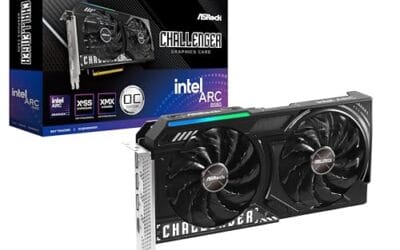
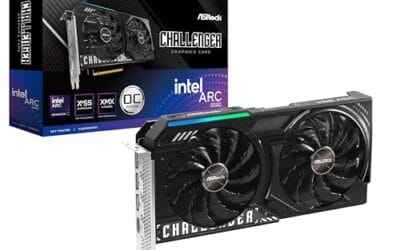
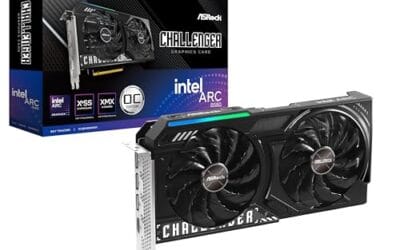
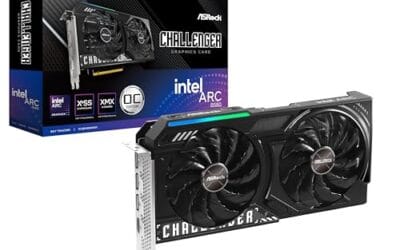
That said, DLSS is NVIDIA-only. If you’d rather not pay the NVIDIA premium, Intel’s Arc line uses its own upscaler called XeSS, which works on a similar principle. The ASRock Arc B580 Challenger at $309.99 is a strong budget example, with 12GB of GDDR6 on a 192-bit bus, a 2740MHz boost clock, PCIe 4.0, and DP 2.1 outputs. It holds a 4.3 rating and gives you AI upscaling without the DLSS badge, which is worth knowing before you assume every card does this the same way. For value hunters, it’s a card we’d flag in our best GPU deals tracking.

Pros
- 12GB VRAM on 192-bit bus gives headroom over8GB rivals at 1440p.
- Single 8-pin connector and 650W PSU target means broad build compatibility.
- DisplayPort 2.1 with UHBR13.5 suports high-refresh QHD and 4K panels natively.
- 2-slot 249mm length fits compact ATX and many mATX chassis without clearance issues.
Cons
- Limited owner feedback at time of writing makes long-term reliability signals thin.
- PCIe 4.0 x8 interface can bottleneck slightly on older PCIe 3.0 platforms.
- Intel Arc driver maturity in older DX9/DX11 titles still trails NVIDIA and AMD.
The ASRock Arc B580 Challenger 12GB OC is a mid-range 1440p GPU built on Intel's Xe2-HPG architecture with 20 Xe cores, 160 XMX engines, and a 2740MHz boost clock. It targets QHD gamers and content creators who want more VRAM than 8GB competitors offer at this bracket, without moving up to a 200W-plus card.
The defining feature is the 12GB GDDR6 pool on a 192-bit bus running at 19 Gbps, which gives real texture and framebuffer headroom at1440p. Combined with XeSS 2 AI upscaling and DirectX 12 Ultimate support, Arc B580 cards in this tier typically handle modern raster titles at high settings QHD, based on Intel's reference silicon behavior.
Trade-offs are typical for Intel Arc at this stage. The PCIe 4.0 x8 interface can shave frames on PCIe 3.0 boards, and driver polish on legacy DX9/DX11 games still lags competing vendors. The card requires a single 8-pin, 650W recommended PSU, and 249mm length, so verify chassis clearance and rail headroom before pairing with older bronze-tier supplies.
Buy this if you want a 1440p card with 12GB VRAM, DP 2.1 outputs, and XeSS 2 support on a modern PCIe 4.0 platform. Skip this if your library leans heavily on older DirectX 9 or 11 titles, or your motherboard is PCIe 3.0.
Resolution target: With 12GB GDDR6 on a 192-bit bus at 19 Gbps, this card is positioned for 1440p high settings in modern raster titles, with XeSS 2 upscaling extending playable framerates in heavier ray-traced workloads. 1080p esports at high refresh is well within scope.
Power and PSU pairing: ASRock lists a 650W recommended PSU and a single 8-pin connector. GPUs in this class typically draw around 190W board power, so pair with a quality 650W to 750W unit to leave transient headroom on ATX 3.0 or olderATX 2.x rails.
Build clearance: The2-slot cooler measures 249mm long, 132mm wide, and 41mm high. That fits most mid-towers and many mATX cases, but confirm front-radiator or HDD-cage clearance in compact builds beforeordering, especially SFF chassis rated under 250mm GPU length.
Display outputs: Three DisplayPort 2.1 ports (one primary up to UHBR13.5) plus one HDMI 2.1a drive up to four displays with resolutions up to 8K. UHBR13.5 suports high-refresh 4K and 1440p panels natively without DSC compromises.
What to look for in a DLSS-capable card
First, check the generation. DLSS 3 Frame Generation needs a 40-series card or newer, and the latest multi-frame features want a 50-series like the RTX 5070. Older 20 and 30-series cards run DLSS upscaling but skip the frame-generation tricks. Second, look at the VRAM. Upscaling to 4K still stores full-resolution frame buffers, so 12GB is a comfortable floor for high-detail play, which is exactly what both the RTX 5070 and the Arc B580 offer. Third, mind the outputs. If you’re driving a high-refresh 4K panel, you want HDMI 2.1 or DP 2.1, both present on these cards.
Don’t overbuy, though. DLSS is precisely the thing that lets a $750 card handle 4K, so pairing it with a top-tier CPU is often smart money. That’s the logic behind our best GPU for 9800X3D pairing guide, where the AI upscaling frees the GPU to keep pace with a fast chip. Match the card to your monitor and your library, not to a benchmark chart you’ll never replicate.
Common misconceptions
The biggest myth is that DLSS makes games look blurry. That was somewhat fair for the very first version back in 2019, but it hasn’t been true for years. Modern DLSS at Quality often looks equal to or sharper than native. Another misconception is that it works in every game automatically. It doesn’t. Developers have to add support, though the list now covers hundreds of major titles. People also assume Frame Generation and upscaling are the same feature. They’re not. One reconstructs resolution, the other invents whole frames, and you can run them together or separately.
Finally, plenty of folks think enabling DLSS is a last resort for weak hardware. Wrong framing. Even people running flagship cards leave it on to unlock ray tracing at playable frame rates. It’s a standard tool now, not a crutch. Turning it off usually just leaves performance on the table.
Frequently asked
Does DLSS reduce image quality?
At the Quality preset, barely if at all, and sometimes it looks better than native thanks to superior anti-aliasing. Lower presets like Performance trade a little sharpness for a bigger frame-rate jump. Most players settle on Quality at 1440p and 4K and never look back.
Do I need an RTX card to use DLSS?
Yes. DLSS runs only on NVIDIA RTX GPUs because it depends on their Tensor cores. AMD and Intel cards use their own upscalers, FSR and XeSS respectively, which are separate technologies that reach a similar goal by different means.
Is DLSS the same as Frame Generation?
No. DLSS upscaling reconstructs a higher-resolution image from a lower-resolution render. Frame Generation creates entirely new frames between rendered ones to raise framerate. Frame Generation needs a 40-series card or newer, while basic upscaling works on any RTX card.
Will DLSS add input lag?
Plain upscaling can actually lower latency because higher frame rates mean fresher frames. Frame Generation adds a small amount of latency, which NVIDIA counters with Reflex. In practice most players don’t notice it outside competitive shooters, where you’d usually leave Frame Generation off anyway.
Does every game support DLSS?
No, developers have to build it in. The good news is that support now spans hundreds of games, including most big releases, and the list keeps growing. If a title lacks it, you’ll often find FSR or XeSS as a fallback, or you can mod support into some games. Always check the graphics menu first.



























Write Your Review
No reviews yet. Be the first to share your experience!