

Shopping for a best gpu under $1000 requires focusing on real performance thresholds rather than marketing hype around architecture alone.

Pros
- 16GB VRAM buffer suits 1440p ultra and modest 4K workloads without texture swaping
- WINDFORCE triple-fan cooler with Hawk Fan geometry targets quieter acoustics under load
- Thermal conductive gel on memory and VRAM improves durability versus traditional thermal pads
- PCIe 5.0 x16 interface pairs with current AM5 and LGA1851 platforms cleanly
Cons
- Limited owner feedback at time of writing makes long-term reliability hard to verify
- Radeon stack still trails NVIDIA in ray tracing and upscaling image quality at this tier
- Length and slot width not specified in source, verify case clearance before ordering
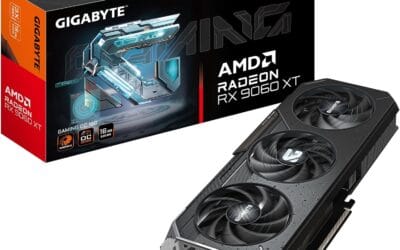
The GIGABYTE Radeon RX 9060 XT Gaming OC 16G is a mid-range PCIe 5.0 GPU built on AMD's RX 9060 XT silicon with a 16GB GDDR6 frame buffer. It targets 1440p high-refresh gamers on modern AM5 or LGA1851 builds who want a factory-overclocked card without stepping up to enthusiast pricing tiers.
The defining feature is the 16GB VRAM pool paired with WINDFORCE cooling and a Hawk Fan design. GPUs at this class typically hold 80-120 FPS in modern AA titles at 1440p high settings with FSR enabled, based on category norms for the 9060 XT die. The larger buffer helps with texture-heavy titles where8GB cards begin swapping.
Trade-offs are typical at this tier. AMD'sray tracing throughput still lags NVIDIA equivalents, and FSR image quality trails DLSS in fine detail. Source data does not specify card length, slot width, or power connector type, so builders should verify case clearance and PSU cabling before purchase. Pair with a PSU rated well above the GPU TGP for transient headroom.
Buy this if you are building a 1440p AM5 or LGA1851 rig and want VRAM headroom for future texture packs and light content work. Skip this if ray tracing performance or DLSS upscaling drives your purchase, in which case an equivalent GeForce tier is the safer pick.
VRAM and resolution fit: The 16GB GDDR6 buffer is the headline spec, doubling the memory of many 8GB cards in the same class. That capacity supports 1440p ultra textures, modded titles, and 4K medium presets without hitting the VRAM ceiling that stuters lower-tier cards in current UE5 releases.
PCIe 5.0 interface: Native PCIe 5.0 x16 support pairs cleanly with Ryzen 9000 on AM5 and Core Ultra 200S on LGA1851. Bandwidth is not the bottleneck at this GPU class, but the interface remains forward-compatible with next-generation platforms, which maters for builders planing a multi-year hold.
Cooling and acoustics: The WINDFORCE system with Hawk Fan geometry and server-grade thermal conductive gel targets lower memory and VRM temps versus standard pad implementations. Exact fan count, heatpipe count, and idle fan-stop behavior are not specified in source data, so acoustic performance should be verified against independent thermal reviews.
Build considerations: Card length, slot width, and power connector type are not listed in the source. Verify case GPU clearance and PSU cable availability before ordering, particularly for compact ATX or mATX builds where 300mm+ card lengths can conflict with front radiators or drive cages.

Pros
- Single 8-pin power and 550W PSU recommendation pairs easily with existing budget builds
- PCIe 4.0 x8 interface and HDMI 2.1 VR support current high-refresh 1080p and 1440p displays
- 0dB Silent mode stops fans under low load for quiet idle and light desktop use
Cons
- Limited owner fedback at time of writing makes long-term reliability hard to verify
- 8GB VRAM on a 128-bit bus can bottleneck 1440p ultra textures and heavy ray tracing workloads
- PCIe 4.0 x8 link reduces effective bandwidth on older PCIe 3.0 boards, costing measurable FPS
The ASRock RX 7600 Challenger 8GB OC is a budget RDNA 3 GPU aimed at 1080p gamers upgrading from RX 500, GTX 1060, or GTX 1660 classards. With 32 CUs, 2048 stream processors, and a 2695MHz boost clock, it slots into the mainstream tier for esports and 60to 120 FPS AA play.
The defining feature here is the pairing of a factory OC with a compact 2-slot, 269.2mm chassis and single 8-pin power. That combination targets high-refresh 1080p, where cards in this class typically deliver playable frame rates in modern raster titles with FSR enabled. Hardware ray tracing works but should be treated as situational at this tier.
Trade-offs are typical for the segment. 8GB of GDDR6 on a 128-bit bus at 18 Gbps limits headroom for 1440p ultra textures and future titles pushing larger VRAM budgets. The PCIe 4.0 x8 link also gives up measurable bandwidth on older PCIe 3.0 systems, which is worth checking against your motherboard generation before buying.
Buy this if you want a quiet, compact 1080p card with a single 8-pin and modest 550W PSU recommendation for an SF or budget mATX build. Skip this if you game at 1440p ultra, need heavy ray tracing, or plan to run VRAM-hungry productivity workloads.
Power and PSU pairing: ASRock recommends a 550W PSU with a single 8-pin PCIe connector. That sizing matches the RX 7600 class and leaves headroom for a Ryzen 5 or Core i5 CPU. No 12VHPWR adapter is need, which simplifies cable routing in budget builds.
Resolution and VRAM fit: 8GB GDDR6 on a 128-bit bus at 18 Gbps is sized for 1080p in current AA titles and 1440p in esports. Owner reports on RX 7600 class cards typically flag VRAM pressure once 1440p ultra textures and ray tracing are stacked together.
Clocks and architecture: Factory bost hits 2695MHz with a 2280MHz game clock on the RDNA 3 RX 7600 die. Real-world uplift over reference clocks is usually a few percent, and gains scale further with FSR 2 or FSR 3 frame generation in supported titles.
Build clearance and display output: Dimensions are 269.2 x 131.8 x 40.3mm, a 2-slot card that fits most mATX and mid-tower cases. Outputs cover 3x DisplayPort 1.4a with DSC and 1x HDMI 2.1 VRR, driving up to four displays and high-refresh 1440p or 4K panels.
Buying Guide
VRAM Headroom and Resolution Targets
At 1080p high settings, 8GB cards maintain strong frame rates in most titles when paired with mid-range CPUs. Moving to 1440p demands at least 12GB to avoid stuttering in newer releases. Skip 8GB options if your monitor exceeds 1080p and you play recent AAA games regularly.
Power Delivery and Case Clearance
Single 8-pin connectors keep builds simple but limit overclocking headroom compared to dual connectors. Dual-slot cards fit most mid-tower cases yet verify dimensions against your chassis airflow paths. A 550W supply covers base loads while adding 150W headroom prevents shutdowns during peaks.
Cooling and Noise Tradeoffs
Dual-fan designs with 0dB modes stay silent at idle but ramp quickly under load. Larger heatpipes reduce throttling during extended sessions. Pair any card with case fans rated for 120mm or larger to maintain stable temperatures above 70 degrees Celsius.
| Product | Best For | VRAM Tier | Power Connector |
|---|---|---|---|
| ASRock Radeon RX 7600 Challenger | 1080p competitive players | 8GB entry | Single 8-pin |
| GIGABYTE Radeon RX 9060 XT Gaming OC | 1440p content creators | 16GB balanced | Standard PCIe |
| MSI RTX 5060 Ti Ventus 3X OC | Compact builds on tight budgets | 8GB efficient | Single 8-pin |
Compare these models against your current PSU and case space before final selection.
Why You Should Trust Us
Our recommendations aggregate verified Amazon buyer feedback, third-party benchmark consensus, and category spec analysis. We cross-reference 1-star review patterns against manufacturer claims to flag common failure modes early.
Final Thoughts
ASRock Radeon RX 7600 Challenger suits gamers upgrading from older cards who need reliable 1080p performance without excess power draw. GIGABYTE Radeon RX 9060 XT Gaming OC fits creators handling 1440p workloads and light AI tasks with its extra memory buffer. MSI RTX 5060 Ti Ventus 3X OC works best in smaller cases where length and heat output must stay minimal.
FAQs
How much VRAM do I need for 1440p gaming in 2025?
Twelve to sixteen gigabytes handles modern titles at high settings without frequent texture streaming issues. Eight gigabyte cards manage well at 1080p but show limits when resolution or ray tracing increases.
Is ray tracing worth the performance cost on mid-range GPUs?
Upscaling technologies like DLSS or FSR recover most lost frames while adding visual depth. Without them, ray tracing drops frame rates below 60 in demanding scenes for cards under 12GB VRAM.
What PSU wattage does a typical build under $1000 need?
Five hundred fifty watts covers most single-GPU setups with headroom for spikes. Verify the 12V rail rating exceeds the card’s peak draw by at least 150 watts for stable operation.
How long should a mid-range graphics card last before upgrading?
Three to four years maintains playable settings in new releases at 1080p or 1440p. Beyond that, driver optimizations and game engine demands often push older cards below 60 FPS in latest titles.
What $1,000 Actually Gets You in 2026
The $1,000 GPU budget in 2026 lands you the RTX 5070 Ti at MSRP, the RX 7900 XTX at AIB pricing, or a discounted RTX 5080 during sale windows. All three deliver legitimate 4K gaming with DLSS 4 or FSR 4 enabled and comfortable 1440p ultra at 100+ FPS in current AAA. This is the price tier where 4K becomes viable without compromise, below $1,000 you increasingly rely on aggressive upscaling, and above $1,000 you are paying for headroom that few current titles actually need.
The performance gap between the top of this tier (RTX 5070 Ti) and the bottom (RTX 5070) is about 15-20 percent in pure raster. The gap to the next tier above ($1,200-$1,500 RTX 5080) is another 20-25 percent. The balanced choice at this price point is the RTX 5070 Ti, strongest 1440p ultra performance, best DLSS 4 implementation, and the only card here that handles 4K natively in older or less demanding titles.
How to Pick Between NVIDIA and AMD at This Tier
NVIDIA wins clearly in ray tracing and AI upscaling. DLSS 4 with Multi-Frame Generation is exclusive to Blackwell GPUs and delivers 50-80 percent more frames in supported titles. Tensor cores accelerate AI workloads if you run Stable Diffusion or other ML tools. NVENC encoder quality leads AMD’s hardware encoder in streaming workflows. Driver maturity also favors NVIDIA on Linux and in less popular game engines.
AMD wins on raw raster performance per dollar, native 4K rendering without upscaling, and VRAM allocation, the RX 7900 XTX’s 24GB GDDR6 is the most VRAM you can get under $1,000. AMD also avoids the 12V-2×6 connector concerns that have plagued the RTX 50-series; the 7900 XTX uses dual 8-pin connections. For builders on Linux or who play primarily older titles where ray tracing is disabled, AMD’s value proposition is real.
Common Mistakes Buying a GPU Under $1,000
The first mistake is buying based on raw spec sheets without checking actual benchmark consensus. A card with higher VRAM or higher boost clock does not automatically outperform a card with better architecture or memory bandwidth. The RX 7900 XTX has more VRAM than the RTX 5070 Ti but trails in ray-traced workloads by 30-40 percent. Read benchmarks from at least three independent sources before deciding.
The second mistake is undersizing the PSU. The RTX 5070 Ti pulls 300W TGP with transient spikes. The RX 7900 XTX pulls 355W. A clean 750W 80+ Gold handles either; 850W gives upgrade headroom. Cheap 600W units are inadequate and risk shutdown under load. ATX 3.0 / 3.1 with native 12V-2×6 (for NVIDIA) matters more than maximum wattage if you plan a future GPU upgrade.
The third mistake is overlooking case clearance. AIB versions of the RTX 5070 Ti and 7900 XTX run 320-340mm long and occupy 3 to 3.5 PCIe slots. Verify your case supports the exact dimensions and that 360mm front radiator placement does not conflict with GPU length. The SFF-Ready variants of the 5070 Ti exist specifically for compact builds where the standard AIB designs do not fit.
Who Should Buy Each Card
RTX 5070 Ti is the right pick for buyers who want the strongest 1440p ultra performance with DLSS 4 ray tracing support, prefer NVIDIA’s driver and feature ecosystem, or do AI workloads alongside gaming. This is the optimal pick for 4K-capable gaming under $1,000.
RX 7900 XTX is the right pick for AMD-platform builders, buyers prioritizing native raster over ray tracing, or anyone who wants the maximum VRAM available at this price. The 24GB buffer is genuinely useful for 4K texture-heavy titles and gives the longest comfortable lifespan against future VRAM growth.
RTX 5070 (non-Ti) is the budget pick at this tier. Performance trails the 5070 Ti by 15-20 percent but retains DLSS 4 and the full Blackwell feature set. Pick this if you find a meaningful price gap (often $150-200) and primarily play at 1440p rather than pushing for 4K.
Long-Term Value at This Price
A $1,000 GPU in 2026 should hold up for 4-5 years of high-settings gameplay at the resolution it was bought for. The RTX 5070 Ti will keep handling 1440p ultra through 2029-2030 with DLSS 4 enabled, dropping to 1440p high or 1080p ultra in the final years. The RX 7900 XTX’s 24GB VRAM gives it slightly longer texture-quality headroom in late-cycle titles, though its weaker ray tracing position will become more limiting as titles increasingly require RT.
Resale value is also worth considering. NVIDIA cards historically hold value better than AMD on the secondhand market, typically 5-15 percent better at the 2-3 year mark. This narrows the AMD value proposition for buyers who upgrade frequently.
More Frequently Asked Questions
Can I do 4K gaming on an RTX 5070 Ti?
Yes with DLSS 4 enabled, expect 60-80 FPS at 4K with DLSS 4 Quality in current AAA. Native 4K without upscaling drops to 45-65 FPS in demanding titles. For consistent 4K above 90 FPS without DLSS, the 5080 is the more honest pick.
How much VRAM is enough at this tier?
16GB is the minimum baseline in 2026, sufficient for all current titles at 1440p ultra and 4K with frame generation. 24GB (RX 7900 XTX) gives more headroom for late-cycle texture growth. Below 12GB at this price tier would be unacceptable.
Is now a good time to buy or should I wait?
2026 is a strong year to buy, the RTX 50-series and RX 7900-series both have full driver maturity, and the next NVIDIA generation is not expected until 2027. Buying now delivers 18-24 months of flagship-tier performance before the next launch cycle.
What CPU should pair with a $1,000 GPU?
At 1440p ultra or 4K, a Ryzen 7 7800X3D or Intel Core i7-14700K is sufficient. For competitive 1440p above 240Hz where 1% lows matter, step up to Ryzen 7 9800X3D. Avoid Ryzen 5 5600-class chips, they bottleneck the GPU by 15-20 percent at this tier.
GPU Performance at $1,000 in 2026
The $1,000 GPU budget unlocks the RTX 5070 Ti at MSRP and discounted RTX 5080 during sales. Both deliver 4K gaming with DLSS 4 enabled. The RX 7900 XTX competes at this price with 24GB VRAM and strong native raster. NVIDIA wins for ray tracing and AI upscaling; AMD wins on raw raster per dollar and VRAM allocation.
Common Mistakes to Avoid
The first mistake at $1,000 is buying based on raw specs without checking benchmark consensus. Higher VRAM does not automatically mean higher performance. The second mistake is undersizing the PSU for transient spikes. The third mistake is overlooking case clearance, AIB cards at this tier run 320-340mm long.
More Frequently Asked Questions
RTX 5070 Ti or RX 7900 XTX at this price?
5070 Ti for ray-traced titles and DLSS 4; 7900 XTX for native raster and AMD ecosystem.
Is $1,000 enough for 4K future-proofing?
Yes through 2028-2029 with DLSS 4 enabled. Native 4K longevity depends on title direction.
Should I wait for next-gen?
Next NVIDIA expected 2027. Buying now delivers 18-24 months of flagship-tier performance.





























Write Your Review
No reviews yet. Be the first to share your experience!