

The XFX Swift Radeon RX 9070 XT 16GB is my first choice for a Ryzen 5 7600X or 9600X build aimed at high-refresh 1440p or a move to 4K. If you’re staying at 1080p, start with the ASRock Radeon RX 7600. The difference is money you could put toward a better display or keep for a later upgrade.
Both Ryzen chips have six cores and 12 threads, and both use the AM5 platform with DDR5. The 7600X uses Zen 4 and the 9600X uses Zen 5. I’d shop the same five GPU options for either processor. Your monitor, favorite games, and available power supply tell you where to stop.


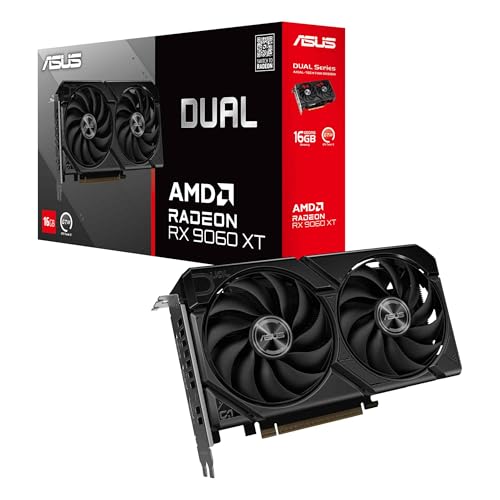


Pros
- Single 8-pin power and 550W PSU recommendation pairs easily with existing budget builds
- PCIe 4.0 x8 interface and HDMI 2.1 VR support current high-refresh 1080p and 1440p displays
- 0dB Silent mode stops fans under low load for quiet idle and light desktop use
Cons
- Limited owner fedback at time of writing makes long-term reliability hard to verify
- 8GB VRAM on a 128-bit bus can bottleneck 1440p ultra textures and heavy ray tracing workloads
- PCIe 4.0 x8 link reduces effective bandwidth on older PCIe 3.0 boards, costing measurable FPS
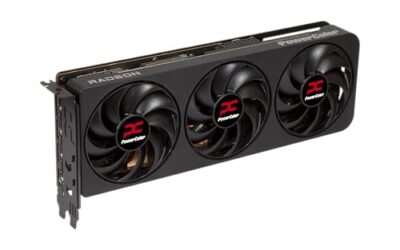
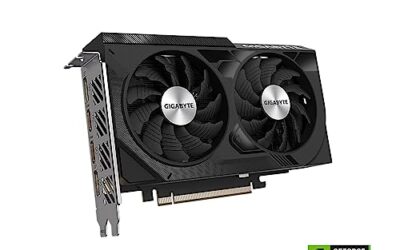
The ASRock RX 7600 Challenger 8GB OC is a budget RDNA 3 GPU aimed at 1080p gamers upgrading from RX 500, GTX 1060, or GTX 1660 classards. With 32 CUs, 2048 stream processors, and a 2695MHz boost clock, it slots into the mainstream tier for esports and 60to 120 FPS AA play.
The defining feature here is the pairing of a factory OC with a compact 2-slot, 269.2mm chassis and single 8-pin power. That combination targets high-refresh 1080p, where cards in this class typically deliver playable frame rates in modern raster titles with FSR enabled. Hardware ray tracing works but should be treated as situational at this tier.
Trade-offs are typical for the segment. 8GB of GDDR6 on a 128-bit bus at 18 Gbps limits headroom for 1440p ultra textures and future titles pushing larger VRAM budgets. The PCIe 4.0 x8 link also gives up measurable bandwidth on older PCIe 3.0 systems, which is worth checking against your motherboard generation before buying.
Buy this if you want a quiet, compact 1080p card with a single 8-pin and modest 550W PSU recommendation for an SF or budget mATX build. Skip this if you game at 1440p ultra, need heavy ray tracing, or plan to run VRAM-hungry productivity workloads.
Power and PSU pairing: ASRock recommends a 550W PSU with a single 8-pin PCIe connector. That sizing matches the RX 7600 class and leaves headroom for a Ryzen 5 or Core i5 CPU. No 12VHPWR adapter is need, which simplifies cable routing in budget builds.
Resolution and VRAM fit: 8GB GDDR6 on a 128-bit bus at 18 Gbps is sized for 1080p in current AA titles and 1440p in esports. Owner reports on RX 7600 class cards typically flag VRAM pressure once 1440p ultra textures and ray tracing are stacked together.
Clocks and architecture: Factory bost hits 2695MHz with a 2280MHz game clock on the RDNA 3 RX 7600 die. Real-world uplift over reference clocks is usually a few percent, and gains scale further with FSR 2 or FSR 3 frame generation in supported titles.
Build clearance and display output: Dimensions are 269.2 x 131.8 x 40.3mm, a 2-slot card that fits most mATX and mid-tower cases. Outputs cover 3x DisplayPort 1.4a with DSC and 1x HDMI 2.1 VRR, driving up to four displays and high-refresh 1440p or 4K panels.
Five GPUs at a glance
| Pick | Exact card | Video memory | Best fit | Main trade-off |
|---|---|---|---|---|
| Best overall | XFX Swift Radeon RX 9070 XT | 16GB GDDR6 | High-refresh 1440p or a move to 4K | Long, thick card with a high PSU requirement |
| GeForce for 1440p | PNY GeForce RTX 5070 OC Triple Fan | 12GB GDDR7 | 1440p with DLSS in supported games | Less room for VRAM-heavy settings |
| Small 16GB card | ASUS Dual Radeon RX 9060 XT 16GB | 16GB GDDR6 | Shorter cases and texture-heavy games | Paying for capacity and fit at the current price |
| GeForce for 1080p | ASUS Prime GeForce RTX 5060 OC | 8GB GDDR7 | 1080p with DLSS and a single 8-pin cable | 8GB can limit some texture settings |
| Lowest-cost pick | ASRock Radeon RX 7600 Challenger OC | 8GB GDDR6 | 1080p with a lower upfront cost | Plan to scale settings in demanding games |
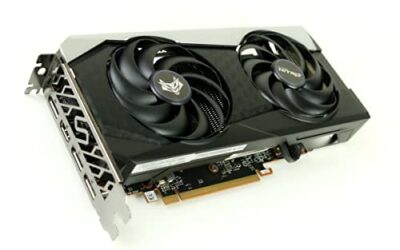
XFX Swift Radeon RX 9070 XT 16GB
Best overall for high-refresh 1440p and stepping up to 4K. The XFX Swift is the one I’d choose for a build that already has a good 1440p display and spends most of its time in graphically demanding games. It’s also the pick here I’d take to 4K, with room to dial back expensive effects or use upscaling on a per-game basis. Its 16GB of memory leaves more space for textures and other assets than the 12GB on the PNY.
Check the build around the card first. The XFX Swift board specification lists a 325 mm length, a 3.5-slot profile, and two PCIe 8-pin power connections. XFX currently lists an 850 W minimum for this SKU. AMD’s recommendation for the GPU family is 750 W, so use the board maker’s figure when choosing a PSU for this card. A case that accepts a 325 mm card on paper can still come up short once you add front radiator fans.
Plenty of card for a 1080p screen. If you mainly play competitive shooters on reduced settings, the extra spend makes sense only if you can point to a GPU limit in the game you care about or have a monitor upgrade planned. Factor the cost of a power supply into the decision if your current unit falls short.
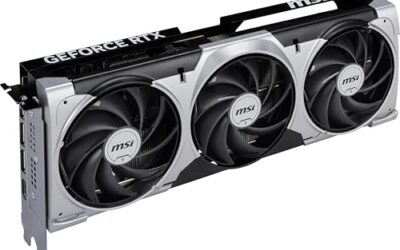
PNY GeForce RTX 5070 OC Triple Fan 12GB
Best GeForce choice here for 1440p. Buy it when DLSS is available in games where you know you’ll use it. Upscaling can help you stay closer to your preferred frame rate with demanding lighting effects enabled. For games you play with it off, weigh this card as a 12GB option against the 16GB XFX. I wouldn’t count a feature in the decision if it’s missing from the games that prompted the upgrade.
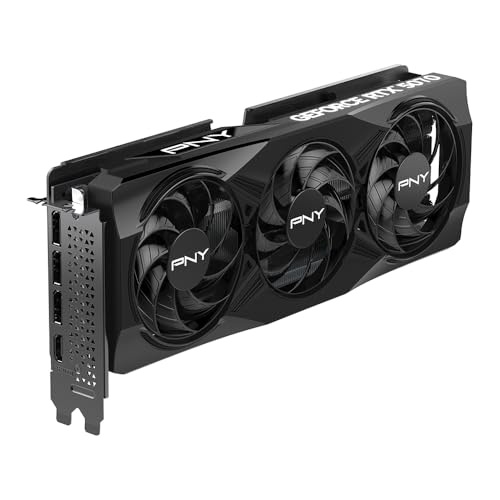
PNY lists 12GB of GDDR7, a 2.4-slot cooler, and a length of 11.8 inches, or about 300 mm. Its system power recommendation is 650 W. The card takes a 16-pin power connection, and PNY lists a two-8-pin adapter. Leave enough clearance above the socket for cable routing before counting this as a fit in a narrow case.
At the prices we found, the RTX 5070 sat close to the RX 9070 XT. On a fresh 1440p build with room for either, I’d choose the XFX if my priority were more video memory. The PNY becomes more appealing if the DLSS support matters to you or if your existing power supply meets PNY’s requirements and would need replacing for the XFX.
ASUS Dual Radeon RX 9060 XT 16GB
Best fit for a short case with room for a thick card. ASUS lists this Dual model at 202 mm long and 49 mm thick. That’s a meaningful difference if a front radiator cuts into card clearance, or if you need room to route cables around the end of the board. Check the 2.5-slot clearance too. ASUS recommends a 550 W PSU and specifies one 8-pin power connector, which makes it practical to consider if a PSU upgrade would otherwise push you over budget.
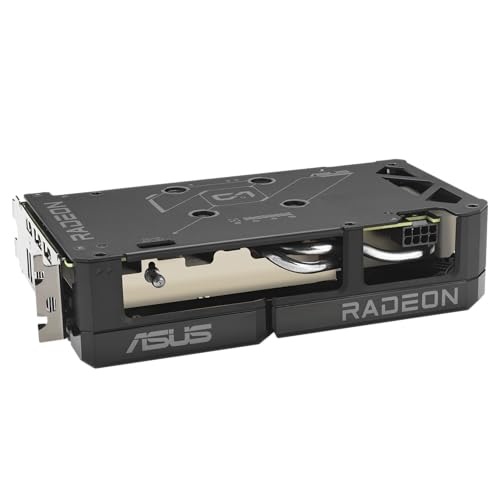
The 16GB version is worth identifying by name before ordering. If you’re building for texture-heavy games at 1080p or 1440p, the extra capacity gives game assets more space. The GPU still has to render the scene. If you’re buying for demanding 4K graphics settings, the 16GB badge alone gives you little reason to choose this over the RX 9070 XT.
At the observed price, I’d buy this ASUS for its combination of memory and dimensions. If the case accommodates the Swift and you can afford the difference including power, the larger card makes more sense for a move to 4K. If your existing monitor is 1080p and your games behave well within 8GB, the cheaper picks are where I’d start.
ASUS Prime GeForce RTX 5060 OC 8GB
Best GeForce option for staying at 1080p. This is the step up from the lowest-priced Radeon if you have a short list of games where you’ll use DLSS Super Resolution. It suits someone who already has a 1080p display and wants to keep the rest of a Ryzen build. I’d treat frame generation as a separate setting to try once the game’s regular frame rate feels responsive.
The Prime OC measures 268.3 mm long, occupies 2.5 slots, and uses one 8-pin power connector. ASUS recommends a 550 W supply for this model. That makes it worth checking before budgeting for a PSU swap. Its cooler still needs space below the card, especially if your motherboard has an add-in device close to the main slot.
The card’s 8GB of GDDR7 is the constraint I’d plan around. Start with native 1080p, set textures to a level the game can handle comfortably, then adjust expensive lighting or reflections. If you already expect to move to 1440p and load large texture packs, save for the ASUS Dual 16GB or budget for the PNY if you want GeForce.
ASRock Radeon RX 7600 Challenger 8GB OC
Lowest upfront cost among these picks. This is where I’d start for 1080p at a manageable settings mix. The 7600X and 9600X give you the same buying calculation here. If the games you play are already comfortable with medium or high textures, there’s little reason to pay several hundred dollars more just to match the processor to an equally new GPU generation.
ASRock specifies 8GB of GDDR6, a 269.2 mm length, a single 8-pin power connection, and a 550 W recommended supply. At 40.3 mm thick, it’s narrower than the ASUS Prime even though both cards are about the same length. That can matter when a controller or capture card sits below the graphics slot.
The caveat is what you expect your next monitor to do. If 1440p with high textures is already in the budget, compare the difference against the 16GB ASUS now. If 1080p is the plan for the life of the build, compare other 1080p graphics card options before paying a premium for the newer model.
How We Evaluated These GPUs
We compared manufacturer specifications for the individual boards, including memory, card dimensions, connectors, and recommended power supplies. Each pick was available new through Amazon in the U.S. when checked on November 25, 2026. The categories reflect the kind of setup each card fits. Check the delivered price against the next tier before you buy, especially if two cards that serve different use cases have ended up close in price.
We considered the cost of the whole upgrade. A cheaper card can lose its price advantage if it forces a case swap. A card with more memory can be a better buy if the games you actually play put pressure on it. The resolution labels are buying targets. Frame rate varies with the title, the scene, and the settings.
How to choose for your Ryzen 5 build
What resolution are you really buying for?
Work from the screen you’ll use over the next year. At 1080p with a moderate refresh rate, price and fit may decide the whole build. If you’re buying a 1440p monitor, use your most demanding games to decide whether you want high textures, heavy lighting effects, or a higher refresh target. The 1440p graphics card guide gives you more ways to compare that tier. At 4K, keep some flexibility for rendering settings and upscaling.
A jump from 1920 × 1080 to 2560 × 1440 adds about 78% more pixels per frame at native resolution. Going from 1440p to 3840 × 2160 more than doubles that pixel count again. Those ratios describe the workload change on the screen, and actual frame rates depend on how each game renders. If you’re unsure where to spend, set a target for one game you play often and buy for that target.
Which part is holding back your current games?
Use a repeatable scene and disable the frame cap, V-sync, dynamic resolution, and frame generation while you compare. Drop the render resolution while keeping the same scene and other settings. A clear frame-rate gain suggests the GPU was doing the limiting. A small gain with spare GPU utilization suggests looking at the CPU or the game engine before replacing the GPU. Total CPU usage can hide a busy game thread, so watch how the game responds.
Will the card and its power cable fit?
Measure from the rear expansion slots to the closest front obstruction, then check thickness against nearby cards and the case floor. Allow space between the GPU’s power socket and the side panel. Before you order, match the board vendor’s recommended wattage and required connectors against your actual PSU model. Our guide to sizing a PC power supply walks through the whole system calculation.
Would a CPU upgrade change your choice?
Only if your workload points to it. A 7600X owner aiming for cleaner 1440p graphics can start with the GPU when the current card is already fully occupied. A 9600X owner chasing high minimum frame rates in a simulation or a busy multiplayer match should check whether the game is waiting on the CPU. If that’s where you’re limited, use the 9600X and 9700X gaming comparison to weigh the CPU spend before stretching for a bigger graphics card.
Frequently asked questions
Will the Ryzen 5 7600X hold back an RX 9070 XT?
It can in games that lean on the CPU, particularly if you’re pushing very high frame rates at 1080p. In a demanding game at 1440p or 4K, the graphics load can be the bigger constraint. The same PC can hit a CPU limit in one title and a GPU limit in the next. Judge the pairing with your target games and settings in mind.
Can I run a PCIe 5.0 GPU in an AM5 board with a PCIe 4.0 slot?
Yes. PCIe devices and slots can negotiate a common link generation. Use the primary graphics slot and check the motherboard manual for its electrical lane count. A full-length secondary slot can be wired for fewer lanes, and some layouts share lanes with other devices. The slot’s physical size alone won’t tell you the connection available to the card.
Is 8GB of VRAM still enough for 1080p?
It can be. Game requirements and your texture settings matter more than resolution alone. If performance becomes uneven as you turn textures up, set them lower and replay the same area before deciding you need a new card. Choose one of the 16GB options if bigger texture packs are a regular part of what you play and the price fits.
Can I use a GeForce card with either Ryzen processor?
Yes. Both GeForce picks here are valid options for either CPU. Pick the brand by features you can use and the board by its physical and electrical fit. If you’re replacing an existing card, plug the display into the new GPU after the swap so your monitor uses its output.
Bottom Line
For either Ryzen 5, pick the XFX Swift Radeon RX 9070 XT when the goal is high-refresh 1440p or moving to 4K and the case and PSU already support it. If the XFX would force a rebuild, the 202 mm ASUS Dual is the short 16GB alternative. Choose the PNY RTX 5070 if DLSS is part of your 1440p plans. For a 1080p build, start at the ASRock RX 7600 and pay extra for the ASUS RTX 5060 if its GeForce features solve a specific problem for you.
























Write Your Review
No reviews yet. Be the first to share your experience!