

Shopping for a 1080p graphics card in 2026 is a strange exercise, because the hardware has raced far ahead of what 1920×1080 actually asks for. A modern mid-range GPU can push hundreds of frames at that resolution, so the real question isn’t “can it run 1080p” but “how much are you willing to spend before the extra money stops buying you anything you’ll notice.” We researched five cards spanning roughly $310 to $1,570, from the value-focused ASRock Arc B580 up to a pair of RTX 5080 heavyweights, and looked at where the money genuinely helps a 1080p player versus where it quietly disappears into overkill.
Here’s the honest framing before we start. For pure 1080p gaming, the cheapest card on this list is the one most people should buy, and the expensive ones make sense mainly if you plan to jump to a faster monitor or a bigger resolution later. If you’re already eyeing that upgrade path, our 1440p gaming GPU guide covers the sharper end of the market, and budget hunters should also skim our roundup of the best GPUs under $500. What follows ranks these five by what they realistically deliver at 1080p, with real prices, ratings, and the specs pulled straight from each card’s listing.

Pros
- 12GB VRAM on 192-bit bus gives headroom over8GB rivals at 1440p.
- Single 8-pin connector and 650W PSU target means broad build compatibility.
- DisplayPort 2.1 with UHBR13.5 suports high-refresh QHD and 4K panels natively.
- 2-slot 249mm length fits compact ATX and many mATX chassis without clearance issues.
Cons
- Limited owner feedback at time of writing makes long-term reliability signals thin.
- PCIe 4.0 x8 interface can bottleneck slightly on older PCIe 3.0 platforms.
- Intel Arc driver maturity in older DX9/DX11 titles still trails NVIDIA and AMD.
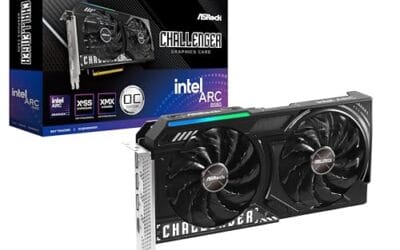
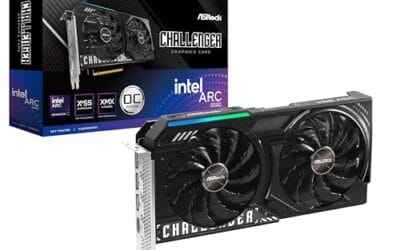
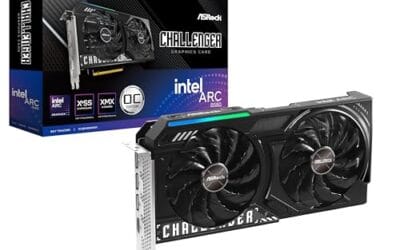
The ASRock Arc B580 Challenger 12GB OC is a mid-range 1440p GPU built on Intel's Xe2-HPG architecture with 20 Xe cores, 160 XMX engines, and a 2740MHz boost clock. It targets QHD gamers and content creators who want more VRAM than 8GB competitors offer at this bracket, without moving up to a 200W-plus card.
The defining feature is the 12GB GDDR6 pool on a 192-bit bus running at 19 Gbps, which gives real texture and framebuffer headroom at1440p. Combined with XeSS 2 AI upscaling and DirectX 12 Ultimate support, Arc B580 cards in this tier typically handle modern raster titles at high settings QHD, based on Intel's reference silicon behavior.
Trade-offs are typical for Intel Arc at this stage. The PCIe 4.0 x8 interface can shave frames on PCIe 3.0 boards, and driver polish on legacy DX9/DX11 games still lags competing vendors. The card requires a single 8-pin, 650W recommended PSU, and 249mm length, so verify chassis clearance and rail headroom before pairing with older bronze-tier supplies.
Buy this if you want a 1440p card with 12GB VRAM, DP 2.1 outputs, and XeSS 2 support on a modern PCIe 4.0 platform. Skip this if your library leans heavily on older DirectX 9 or 11 titles, or your motherboard is PCIe 3.0.
Resolution target: With 12GB GDDR6 on a 192-bit bus at 19 Gbps, this card is positioned for 1440p high settings in modern raster titles, with XeSS 2 upscaling extending playable framerates in heavier ray-traced workloads. 1080p esports at high refresh is well within scope.
Power and PSU pairing: ASRock lists a 650W recommended PSU and a single 8-pin connector. GPUs in this class typically draw around 190W board power, so pair with a quality 650W to 750W unit to leave transient headroom on ATX 3.0 or olderATX 2.x rails.
Build clearance: The2-slot cooler measures 249mm long, 132mm wide, and 41mm high. That fits most mid-towers and many mATX cases, but confirm front-radiator or HDD-cage clearance in compact builds beforeordering, especially SFF chassis rated under 250mm GPU length.
Display outputs: Three DisplayPort 2.1 ports (one primary up to UHBR13.5) plus one HDMI 2.1a drive up to four displays with resolutions up to 8K. UHBR13.5 suports high-refresh 4K and 1440p panels natively without DSC compromises.

Pros
- GDDR7 memory on a 12GB frame suits 1440p high-refresh and early 4K workloads without hitting VRAM ceiling quickly.
- 0dB fan-stop below 50C keeps the card silent during desktop use, browsing, and light gaming sessions.
- Dual-ball bearing fans rated for roughly twice the lifespan of sleeve-bearing alternatives, reducing long-term maintenance concerns.
- NVIDIA DLSS 4 support enables frame generation and upscaling, recovering performance in ray-tracing-heavy titles.
Cons
- 3.125-slot footprint requires verifying case GPU clearance before ordering, particularly in mid-tower and mATX builds.
- TGP not explicitly listed in source data; pair with a PSU rated at least 150W above GPU draw for transient headroom, typical recommendation at this tier is 850W or above.
The ASUS TUF Gaming RTX 5070 OC is a high-end discrete GPU built on NVIDIA's Blackwell architecture. With 12GB GDDR7 memory and PCIe 5.0 interface, it targets enthusiast builders running 1440p high-refresh or early 4K setups who want a card that can sustain load without thermal throttling.
The standout feature is the thermal stack. ASUS combines a phase-change GPU thermal pad, MaxContact heat spreader with 5% increased surface area, and three Axial-tech fans spinning on dual-ball bearings. Based on the design specs, the phase-change pad should outperform traditional paste under extended gaming or GPU-compute sessions where die temperatures stabilize near TDP ceiling.
The 3.125-slot width is a real consideration, not a marketing point. Builders in tighter mATX or ITX cases need to confirm GPU slot clearance before purchasing. TGP figures are not listed in source data, but GPUs at this tier typically land between 200W and 250W, so a quality 850W PSU is the minimum sensible pairing. The conformal PCB coating and military-grade capacitors address durability concerns but do not offset the need for adequate airflow in the host case.
Buy this if you are building a dedicated 1440p or 4K gaming rig on PCIe 5.0 and want a card with above-average long-term component reliability. Skip this if your case has less than 3.125 slots of GPU clearance or your PSU is below 750W, as headroom for transient power spikes becomes a real stability risk.
VRAM and Resolution Fit: The 12GB GDDR7 frame is well-positioned for 1440p at maximum settings and 4K at medium-to-high presets in current titles. GDDR7 bandwidth reduces memory bottlenecks compared to GDDR6X at equivalent capacity, which matters in texture-heavy and ray-traced workloads.
Upscaling and Frame Generation: DLSS 4 support includes multi-frame generation, which is significant for GPU-limited scenarios at 4K with ray tracing enabled. Buyers targeting high-refresh 1440p esports titles will find DLSS 4 largely unnecessary at this GPU tier, but ray-tracing users benefit directly.
Slot and Clearance Requirements: The 3.125-slot design requires a minimum of four physical PCIe slot spaces free in the case. Card length is not specified in source data; confirm chassis GPU length clearance against ASUS product page measurements before purchasing.
Power and Connector: Connector type is not specified in source data. GPUs at this tier typically use a 16-pin 12VHPWR or 12V-2x6 connector. Verify PSU connector availability and target a PSU with at least 150W above measured GPU TGP for safe transient headroom.

Pros
- 16GB GDDR7 VRAM at 28 Gbps handles 1440p path tracing and 4K texture packs without stalls.
- TRI FROZR 4 cooler with 7-blade STORMFORCE fans, double ball bearings, and nickel-plated copper base.
- Native single 16-pin 12V-2x6 connector pairs cleanly with ATX 3.0 PSUs, no adapter clutter.
Cons
- Limited owner feedback at time of writing leaves long-term reliability and coil whine signals unverified.
- At 338m length and 2.5 slots wide, clearance is tight in many mid-tower ATX cases.
- 650W PSU recommendation is thin for transient spikes when paired with 200W-plus CPUs.
The MSI RTX 5070 Ti Gaming Trio OC Plus is a high-end Blackwell GPU aimed at QHD gamers with 4K aspirations and creators needing 16GB GDDR7 VRAM. It targets buyers moving up from an RTX 3070 or RX 6800 class card who want factory overclocking and triple-fan cooling in one AIB package.
The 256-bit bus paired with 28 Gbps GDDR7 yields roughly 896 GB/s memory bandwidth, comfortable headroom for 1440p ray tracing with DLSS 4.0 frame generation. NVIDIA positions this class for 1440p ultra and entry-level 4K, and the factory OC on this SKU adds a modest boost clock bump over the reference 5070 Ti spec.
Trade-offs are physical: at 338mm long and 2.5 slots wide, mid-tower ATX cases with front radiators may block installation. The single 16-pin 12V-2x6 socket requires either an ATX 3.0 PSU or the bundled adapter, and 250W board power leaves limited transient headroom on 650W units under mixed CPU and GPU load.
Buy this if you need 16GB VRAM for 1440p ray tracing, local AI inference, or Blender and DaVinci workloads and your case clears 338m. Skip if your PSU is below 750W with native 12V-2x6, your case tops out at 2-slot cards, or a used RTX 4080 fits your budget.
Resolution and VRAM: 16GB GDDR7 at 28 Gbps on a 256-bit bus provides roughly 896 GB/s bandwidth, enough for1440p ultra with ray tracing plus DLSS 4.0 and 4K native in most current titles. VRAM headrom covers path-traced titles and heavy texture packs without pop-in.
Cooling and Acoustics: TRI FROZR 4 uses three STORMFORCE fans with 7 textured blades, double ball bearings, and ZERO FROZR idle stop below the fan threshold. Nickel-plated copper base and the Airflow Control heatsink handle the 250W TGP, though sustained-load acoustics on this specific SKU are not yet documented in owner reports.
Power and PSU: Board power is rated 250W with a single 16-pin 12V-2x6 connector. MSI recommends 650W minimum, but pairing with a Ryzen 9800X3D or Core i7 14700K under transient spikes is safer on an 850W ATX 3.0 unit with native 12V-2x6 to skip the adapter.
Fit and Connectivity: The card measures 338mm long, 2.5 slots wide, and weighs 1310g, so a support bracket is advisable in vertical or unsupported horizontal mounts. Rear I/O offers HDMI 2.1b plus three DisplayPort 2.1b, with UHBR link rates enabling 4K at 480Hz output.

Pros
- 16GB GDDR7 VRAM keeps 4K ultra textures and local LLM inference workloads comfortable.
- 2715 MHz bost OC out of the box, no manual tuning needed for uplift.
- Triple-fan Tri Frozr class cooler typical at this tier keps sustained clocks stable.
Cons
- Limited owner feedback at time of writing, real-world thermal and coil whine data is thin.
- Blackwell 5080 class cards typically pull 360W plus, budget 850W PSU with 12V-2x6 native.
- 3-slot triple-fan designs at this tier often exceed 330mm length, verify case GPU clearance.
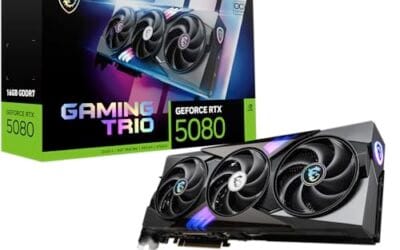
The MSI Gaming Trio OC is a high-end Blackwell RTX 5080 aimed at 4K gamers and content creators who want an AIB card with factory tuning above NVIDIA reference targets. With 16GB of GDDR7 on a 256-bit bus and a 2715 MHz boost clock, it slots into the enthusiast tier below the 5090 flagship.
The defining feature is the GDDR7 memory subsystem paired with Blackwell RT and Tensor cores. In practice, this class of GPU targets 4K native with DLSS 4 Multi Frame Generation enabled, and handles path-traced titles like Cyberpunk 2077 and Alan Wake 2 at playable frame rates. Triple DisplayPort 2.1a with UHBR20 covers 4K 240Hz OLED without DSC compromises.
Trade-offs are typical for this class. The 256-bit bus is unchanged from the 4080Super, so bandwidth relies on GDDR7 sped uplift rather than a wider interface. Triple-fan Blackwell cards in this tier usually run 3slots and 330mm plus, so ITX and compact mid-tower builds need careful clearance checks. A 12V-2x6 native PSU is strongly advised.
Buy this if you run a 4K 144Hz or 240Hz OLED, want DLSS 4 Multi Frame Gen, and have a case that accepts a large triple-fan AIB. Skip this if your target is 1440p esports, if your PSU lacks a native 12V-2x6 lead, or if you can wait for more owner thermal data.
VRAM and resolution fit: 16GB GDDR7 on a 256-bit bus is sized for 4K ultra with ray tracing and frame generation active. Modern titles like Hogwarts Legacy,Ratchet and Clank, and Indiana Jones stay under the 16GB ceiling at 4K with DLSS Quality, leaving headroom for texture mods.
Clocks and boost behavior: The 2715 MHz factory boost sits above NVIDIA reference targets for the RTX 5080. Real-world sustained clocks on triple-fan AIB Blackwell designs typically hold within 30 to 60 MHz of advertised boost under sustained load, based on category norms, though MSI has not published a specific power limit.
Display output: Three DisplayPort 2.1a ports support UHBR20 signaling for 4K 240Hz and 5K2K ultrawide OLEDs without display stream compression trade-offs. HDMI 2.1b covers LG C-series and Samsung S95 OLED TVs, and the 7680 by 4320 max resolution keps 8K workflow monitors in scope.
Power and build: MSI has not specified TGP, but Blackwell 5080 class cards typically land in the 360W range with a 12VHPWR or 12V-2x6 connector. Pair with anATX 3.0 or 3.1 PSU rated 850W or higher, and confirm case length clearance above 330mm before purchase.

Pros
- 16GB GDDR7 gives comfortable VRAM headroom for 4K raster and ray-traced titles.
- 3.6-slot triple-fan cooler with phase-change thermal pad targets lower sustained temps than 2-slot designs.
- Blackwell architecture supports DLSS 4 multi-frame generation for higher perceived frame rates.
Cons
- Limited owner feedback at time of writing makes long-term reliability hard to verify.
- 3.6-slot width blocks adjacent PCIe slots and needs case clearance planning before purchase.
- High TGP typical of RTX 5080 class needs a modern PSU with native 12V-2x6 connector.
The ASUS TUF Gaming RTX 5080 OC is a high-end Blackwell-generation GPU with 16GB of GDDR7 memory and a factory overclock over reference clocks. It targets 4K gamers, high-refresh 1440p players, and creators running Blender or DaVinci Resolve who benefit from CUDA and DLSS 4 aceleration.
The headline is DLS 4 with multi-frame generation, which stacks additional generated frames on top of a single rendered frame. Combined with 16GB GDDR7, the card should handle 4K ultra with ray tracing enabled in current AAA titles, though independent third-party benchmarks under sustained load are still limited.
Trade-offs are real. The 3.6-slot design blocks adjacent PCIe expansion slots and demands case clearance planning, especially in compact mid-towers. RTX 5080-class cards typically pull 300W or more, so pair with a modern ATX 3.0 or 3.1 PSU that has a native 12V-2x6 connector rather than adapter cables.
Buy this if you are building a 4K rig around a Ryzen 9800X3D or Core i7-14700K class CPU and want DLSS 4 headroom for future AA releases. Skip this if your monitor tops out at 1080p, or your PSU is under 850W and non-ATX 3.0.
Resolution and VRAM: 16GB of GDR7 sits above the 12GB tier that started showing texture streaming issues at 4K in titles like Alan Wake 2 and Hogwarts Legacy. This capacity gives headroom for 4K native with high-res texture packs and for creator workloads that spill past 12GB in Blender GPU renders.
DLS 4 and frame generation: Blackwell adds DLSS 4 multi-frame generation, which can insert multiple generated frames per rendered frame. In practice this pushes 4K ray-traced titles from base rates near 60 FPS into triple-digit territory on high-refresh 4K panels, though input latency and artifacting depend on base frame rate.
Cooling and acoustics: The 3.6-slot fin stack with three Axial-tech fans and a phase-change thermal pad targets sustained boost clocks without the fan-speed spikes typical of 2-slot reference designs. Owner reports on prior TUF Gaming RTX cards flag low idle noise and low hotspot deltas as the consistent pattern.
Build compatibility: At 3.6-slot width, this card will block PCIe slots below it and needs verified length clearance in the case spec shet. Power draw for RTX 5080 class typically requires a native 12V-2x6 cable from an ATX 3.0 or 3.1 PSU rated 850W or higher for transient headroom.
Who this guide is for
This guide is aimed at anyone building or upgrading a PC whose main display is a 1080p monitor, whether that’s a 60Hz office panel doing double duty or a 240Hz esports screen. If you play competitive shooters and care about frame rate above all, you’ll find picks here that slam into your monitor’s ceiling with room to spare. If you play story-driven single-player games with every setting maxed and ray tracing on, we’ve flagged which cards keep that smooth too.
What this guide skips is the assumption that spending more is always better. It isn’t, not at 1080p. We’re not going to tell a casual player to drop $1,500 on a card that spends most of its life bored. We will, though, point out who genuinely benefits from the pricier options: people who want years of headroom, creators who lean on the GPU for rendering, and gamers planning to move to 1440p or 4K without buying a second card. If none of that describes you, the top pick handles your needs and leaves cash in your pocket.
What to look for in a 1080p graphics card
VRAM matters less at 1080p than the internet sometimes claims, but 12GB has become the comfortable baseline, and every card here meets or exceeds it. Texture-heavy games and mods can nibble past 8GB even at this resolution, so the 12GB on the ASRock Arc B580 and the ASUS RTX 5070 gives breathing room, while the 16GB on the RTX 5070 Ti and both 5080 cards is frankly more than 1080p will use for years. Memory bandwidth follows the same story: the 256-bit buses on the higher cards feed frames faster than a 1080p panel can display them.
Beyond raw power, check the outputs and the physical fit. Every card on this list carries HDMI 2.1 and DisplayPort 2.1 in some revision, so high-refresh 1080p is covered across the board. Pay attention to slot width and length, though. The MSI RTX 5070 Ti runs a triple-fan TRI FROZR 4 cooler, and the ASUS RTX 5070 is a 3.125-slot design, so both eat real space in a case. Cooler quality also drives noise. The ASRock B580’s 0dB silent mode, which idles the fans under light load, is a nice touch for a quiet desk.
How we evaluated
We researched these five cards across price, published specifications, cooler design, and owner sentiment rather than making hands-on performance claims. Each product’s listing gave us the concrete details we lean on here: clock speeds, memory configuration, bus width, connectivity, and warranty terms. We weighted value heavily, because at 1080p the price-to-frames ratio is the whole ballgame, and a card that costs five times more than another rarely delivers five times the experience on a 1920×1080 screen.
Ratings gave us a rough read on owner satisfaction. On a 5-star scale, the cards here run from 4.0 on the ASUS RTX 5070 up to 4.8 on the MSI RTX 5080, and we treated those numbers as a signal about build quality and reliability rather than gaming speed. Public review counts weren’t available for these specific listings, so we won’t pretend to quote them. Everything below leans on documented specs and price, framed for how each card actually behaves at the resolution this guide targets.
Our top picks
Best Overall: ASRock Intel Arc B580 Challenger 12GB OC
At $309.99, the ASRock Arc B580 is the card most 1080p gamers should buy, and it isn’t close. It holds a 4.3-star rating and pairs a 2740MHz boost clock with 12GB of GDDR6 on a 192-bit bus, which is a genuinely healthy loadout for this resolution. That 12GB buffer means you won’t wrestle with texture stutter in modern titles, and the Xe2-HPG architecture handles current games at high settings without drama. The dual-fan cooler stays quiet, and the 0dB silent mode cuts the fans entirely when the card’s idling.
The tradeoff is that Intel’s Arc drivers, while vastly improved, still occasionally lag behind on day-one support for brand-new releases, and older DirectX 9 and 11 titles can behave inconsistently. For anything from the last several years, though, it’s smooth. If your library is mostly current games and your monitor tops out around 144Hz at 1080p, this card gives you the experience without asking you to overpay. It’s the value pick, the sensible pick, and honestly the one we’d point a friend toward first.
Best for High-Refresh Competitive: ASUS TUF Gaming RTX 5070 12GB OC
The ASUS TUF Gaming RTX 5070 runs $749.99 and holds a 4.0-star rating. For a 1080p player chasing 240Hz or higher in competitive shooters, the extra grunt over the B580 translates into frame rates that keep a fast monitor fed even in busy firefights. It carries 12GB of the newer GDDR7 memory, PCIe 5.0, and HDMI/DisplayPort 2.1 outputs, plus NVIDIA’s feature stack for people who want upscaling and frame generation in their single-player games.
Here’s the catch: at plain 1080p, a lot of that power sits unused unless your monitor and your games can actually consume it. The 3.125-slot design is chunky, and you’ll want to confirm case clearance before buying. ASUS backs it with a 3-year warranty and military-grade components with a protective PCB coating, so durability isn’t a worry. This card makes the most sense for someone with a genuine high-refresh esports panel, or a player who wants a card that’ll shrug off a future move to 1440p. For a 60Hz or 144Hz setup, it’s more than you need.
Best Future-Proof: MSI RTX 5070 Ti 16G Gaming Trio OC Plus
The MSI RTX 5070 Ti lands at $1,349.99 with a strong 4.7-star rating, and it’s where the “overkill for 1080p” label starts to stick firmly. You’re getting 16GB of GDDR7 running at 28 GB/s across a 256-bit bus, PCIe 5.0, and the TRI FROZR 4 cooler with three STORMFORCE fans. At 1920×1080, this card will bury the frame counter in almost anything, ray tracing included, and barely break a sweat doing it. The cooling is generous enough that it runs cool and quiet under a 1080p load that never really stresses it.
So why would a 1080p gamer consider it? Longevity, mostly. If you want to buy once and not think about GPUs for a long time, or you know a 1440p or 4K monitor is in your near future, the 5070 Ti gives you that runway. The weakness at this resolution is simply value: you’re paying premium money for headroom a 1080p screen can’t tap today. Buy it if you see the upgrade coming. Skip it if 1080p is your permanent home.
Best Premium: MSI RTX 5080 16G Gaming Trio OC
At $1,569.99 and a class-leading 4.8-star rating, the MSI RTX 5080 is the most decorated card on this list. It packs 16GB of GDDR7 on a 256-bit bus, a 2715MHz boost clock, three DisplayPort 2.1a outputs, HDMI 2.1b, and NVIDIA’s Blackwell architecture. For 1080p specifically, this is total overkill, and we’ll say that plainly. It’s a 4K card wearing a 1080p costume, capable of maxed ray tracing at high resolutions that a 1920×1080 panel doesn’t even approach.
The reason it appears here at all is that some buyers pair a top-tier GPU with a 1080p monitor deliberately, either for absurd competitive frame rates, for creative work like 3D rendering and video, or as the anchor of a system they’ll grow into. If that’s you, the 5080’s near-perfect owner rating and robust cooling make it a reassuring buy. For everyone playing games on a 1080p screen and nothing more, the money is better spent elsewhere. Powerful, polished, and far more card than the resolution requires.
Best Premium Value: ASUS TUF Gaming RTX 5080 16GB OC
The ASUS TUF Gaming RTX 5080 costs $1,539.99, a touch less than the MSI 5080, and holds a 4.4-star rating with 16GB of GDDR7. It’s the same top-tier Blackwell silicon in the sturdy TUF Gaming shell that ASUS builds for durability. If you’ve decided you want an RTX 5080 and you’re comparing the two on this list, this one saves you thirty dollars while keeping the rugged construction and OC-edition clocks the TUF line is known for.
The honest note is the same as its MSI sibling: at 1080p, a 5080 of any brand is spending power the resolution won’t cash in. The slightly lower owner rating here versus the MSI card is worth weighing if reliability sentiment matters to you, though 4.4 stars is still solid. Choose this if you’re set on a 5080, value ASUS’s build reputation, and want to trim a little off the price. It’s a strong card that happens to be aimed way past what 1080p gaming needs.
Buying mistakes to avoid
The biggest mistake at this resolution is overspending on raw GPU power while ignoring the rest of the system. A $1,500 card feeding a 60Hz 1080p monitor is a waste, because the screen can only show 60 frames a second no matter how many the GPU produces. If you’re buying a fast card, buy a fast monitor to match, or you’ve paid for frames you’ll never see. Match the display to the horsepower, not the other way around.
Second, don’t forget clearance and power. The triple-fan and 3-slot designs here are physically large, and cramming one into a small case without checking measurements leads to a bad afternoon. Confirm your case length, slot count, and power supply headroom before you order. And don’t chase VRAM numbers you’ll never use. Every card here has at least 12GB, which is plenty for 1080p, so paying extra purely for 16GB you won’t fill is money spent on a spec sheet, not on a better gaming experience.
Bottom line
For 1080p gaming in 2026, the ASRock Arc B580 at $309.99 is the pick we’d hand almost anyone. It delivers a strong, quiet, 12GB experience at the resolution this guide is about, and it doesn’t ask you to pay for headroom you can’t use. That’s the whole point at 1080p, where value wins.
If you’re planning ahead, the calculus shifts. A high-refresh esports player or someone eyeing a 1440p upgrade can justify the ASUS RTX 5070 at $749.99, and buyers who want to future-proof hard or do creative work will find the RTX 5070 Ti and the two 5080 cards worth the outlay, with the understanding that they’re overkill for a plain 1080p screen today. Buy for the monitor you have, or the one you’re about to get. That single decision saves more money than any spec-sheet debate.
Common questions
Do I really need a 12GB or 16GB card for 1080p?
You don’t strictly need 16GB for 1080p, but 12GB has become the comfortable baseline, and every card here meets it. Modern texture-heavy games and mods can push past 8GB even at this resolution, so 12GB gives you headroom without waste. The 16GB on the pricier cards is more than 1080p will use for years, so don’t pay extra purely for that number if gaming at 1080p is your only goal.
Is the ASRock Arc B580 good enough for high-refresh 1080p?
For most current games at 1080p, yes, the B580 keeps up nicely, especially on monitors up to around 144Hz. Its 2740MHz boost clock and 12GB of GDDR6 handle high settings well. If you’re chasing 240Hz in the most demanding competitive titles, a faster card like the RTX 5070 has more ceiling, but for the price the B580 covers the vast majority of 1080p players.
Why would anyone put an RTX 5080 on a 1080p monitor?
A few reasons. Some competitive players want the absolute highest frame rates possible at maxed settings, some creators use the GPU for rendering or video work outside gaming, and some buyers plan to upgrade to a 1440p or 4K display soon and want the card ready. For pure 1080p gaming with no upgrade plans, though, a 5080 is genuine overkill and the money is better spent elsewhere.
Will these cards fit in a small case?
Check before you buy. The ASUS RTX 5070 is a 3.125-slot card, and the MSI RTX 5070 Ti uses a large triple-fan TRI FROZR 4 cooler, so both need real space. Measure your case’s maximum GPU length and confirm you have the slot clearance. The ASRock B580’s dual-fan design is the most compact of the group and the easiest to fit in a smaller build.
Does the higher star rating mean better gaming performance?
No, star ratings reflect owner satisfaction with build quality, reliability, and value, not raw gaming speed. The MSI RTX 5080’s 4.8 stars signals happy owners, but a 1080p player would get plenty of frames from the 4.3-star B580 too. Treat ratings as a reliability and satisfaction signal, then match the actual card to your resolution and budget for the best result.



























Write Your Review
No reviews yet. Be the first to share your experience!