

The best gaming mouse in 2026 isn’t the one with the flashiest RGB or the biggest DPI number on the box. It’s the one that fits your hand, your grip, and the games you actually play. We researched five mice across a wide price range, from a $113.99 Razer flagship down to a $13.98 utility gadget, and the gap between them says a lot about where your money goes. Sensor quality, click feel, and comfort matter far more than a spec sheet suggests, and a $17 wireless mouse can surprise you if you set expectations right.
This guide pulls from owner reports, published specs, and current pricing to sort out who each mouse is really for. If wrist strain is your main worry, our companion breakdown of the best ergonomic mouse picks digs deeper into hand posture, and folks chasing cable-free speed should also read our roundup of the best wireless gaming mouse options. Here, we’re looking at value across tiers. What you get for $15 versus $70 versus $114, and where each choice makes sense.

Pros
- Focus Pro 30K sensor handles glass and reflective desks that trip up older vertical mice
- Battery rated up to 6 months, 5 minute top-up returns roughly 3 working days of use
- Three connectivity modes with up to 5 paired devices covers desktop, laptop, and tablet rotation
Cons
- Limited owner feedback at time of writing, so long-term reliability signal is not yet available
- Vertical handshake shape has a real learning curve for existing claw and fingertip grip users
- Mouse weight and max DPI are not specified in source, hard to gauge fast-tracking responsiveness
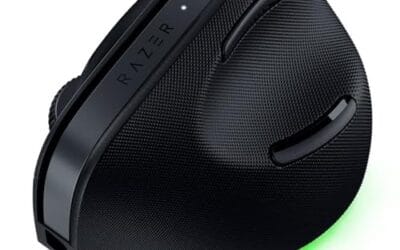
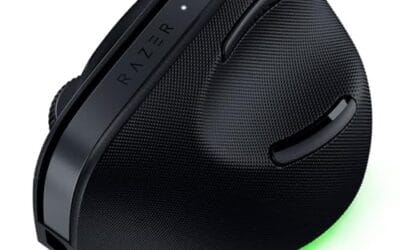
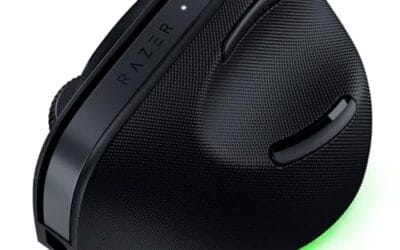
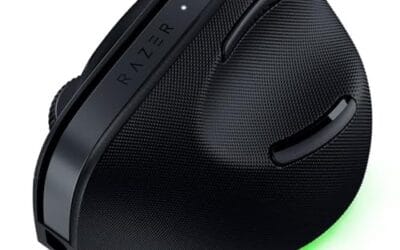
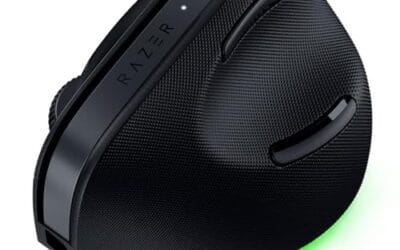
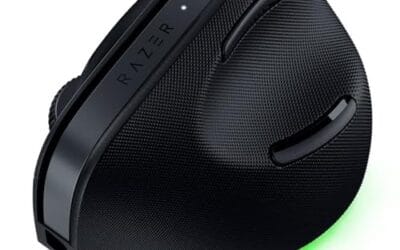
The Pro Click V2 Vertical is Razer's ergonomic wireless mouse aimed at knowledge workers and creators who log long sessions on Windows or Mac systems. The 6 button layout adds a dedicated AI prompt key tied into Razer Synapse 4 shortcuts for summarizing text and drafting emails.
The defining trait is the angled handshake shell with a wrist base that lifts your palm off the deck, reducing pronation on long days. Razer's Focus Pro 30K optical sensor handles glass and high-gloss surfaces, which vertical mice at this tier often struggle with due to older 3200 to 12000 DPI sensors.
Trade-offs are honest. Vertical shells force a handshake grip, so claw and fingertip users will fight muscle memory for a week or more. Battery is rated up to 6 months, but 18 zone Chroma with full underglow will cut that hard if you leave reactive lighting on. Mouse weight is not specified.
Buy this if you already know a vertical shape helps your wrist and you need one mouse hopping between a Windows tower, a MacBook, and a tablet over Bluetooth. Skip it if you plan to play competitive FPS titles, since vertical shells punish rapid tracking flicks and micro adjustments.
Sensor: Focus Pro 30K optical sensor with a claimed 99.8% resolution accuracy. Razer uses this same sensor family across its high-end lineup, so tracking on glass, mousepads, and gloss desks is realistic. Max DPI and polling rate are not specified in source data.
Switches and Buttons: Mechanical switches rated to a 60 million click lifecycle. Six total buttons include a dedicated AI prompt key mapped through Synapse 4 for text summarization and email drafting shortcuts on Windows.
Connectivity: Three modes ship in the box: 2.4GHz HyperSpeed via bundled dongle, Bluetooth with up to 3 host pairings, and USB-C wired. Combined device ceiling is 5, letting you rotate between desktop, laptop, tablet, and a secondary machine without re-pairing.
Battery and Charging: Rated up to 6 months under standard test conditions, with 5 minutes of USB-C charging yielding roughly 3 working days. The 18 zone Chroma RGB plus full underglow will cut that figure significantly if reactive lighting stays enabled.

Pros
- Limited public review data at time of writing, so verify current owner sentiment before purchase.
- Vertical layout targets wrist pronation strain reported by heavy office and CAD users.
- Bluetooth plus USB receiver gives flexible pairing across laptops, docks, and desktops.
- Four-month typical battery cadence reduces charging friction versus daily-charge gaming mice.
Cons
- Zero visible owner reviews in source, so long-term reliability signal is effectively absent.
- Sensor model, max DPI, poling rate, and weight not specified in source data.
- Vertical shape has a learning curve and does not suit claw or fingertip grip gamers.
The Logitech MX Vertical is an ergonomic productivity mouse aimed at office workers, developers, and creative professionals dealing with wrist or forearm discomfort. It sits in Logitech's mid-range MX ergonomic lineup, offering wireless connectivity through Bluetooth or a USB receiver and cross-platform support for Windows and Mac desks.
The defining feature is the angled vertical shell, which shifts the hand into a more neutral handshake posture and reduces forearm pronation during long sessions. Based on typical vertical-mouse ergonomics, users transitioning from a flat mouse should expect a short adjustment period before cursor precision in tasks like document editing and photo work returns to baseline.
Trade-offs are real at this tier. Logitech does not publish sensor model, max DPI, polling rate, or weight in the provided source, which maters for buyers comparing tracking specs. The shape also favors palm grip, so claw and fingertip users, and gamers chasing esports poling rates, will find it a por fit versus a symetrical gaming mouse.
Buy this if you spend long hours in office aps, code editors, or creative suites and want a vertical grip with dual Bluetooth and USB receiver support. Skip this if you need documented gaming-grade sensor specs, low click latency, or a shape optimized for claw and fingertip grip styles.
Sensor and DPI: Logitech lists only an unspecified optical sensor in the source, with no max DPI, polling rate, or lift-off distance provided. MX-series ergonomic mice at this tier typically ship with 400 to 4000 DPIranges tuned for office precision rather than the20000-plus DPI figures sen on gaming rivals.
Wireless connectivity: Dual-mode support covers Bluetooth Low Energy and a 2.4GHz USB receiver, letting one mouse move between a docked laptop and desktop without repairing. Wireless latency is not specified, but Logitech ergonomic mice at this tier areuned for productivity, not competitive first-person shooter response windows.
Battery life: Rated at roughly four months of typical use on a full charge, which lines up with once-per-quarter charging cadence for eight-hour workdays. Actual runtime will drop with heavy Bluetooth use, higher DPI settings, or frequent wake cycles across multiple paired devices during the day.
Shape and grip fit: The vertical shell is engineered around a palm grip with angled thumb rest. Weight, length, and grip width are not specified in the source, so hand-size fit should be validated in person, especially for users with hands under about 17 centimeters.

Generic Wired RGB Gaming Mouse with Optical Sensor
Pros
- Wired USB avoids wireless dropouts and battery management for plug-and-play desktop use.
- Programmable buttons add macro flexibility uncommon at this budget tier.
- RGB lighting included without inflating the entry-level price point.
Cons
- Limited owner feedback at time of writing makes long-term reliability hard to verify.
- Sensor model, DPI ceiling, poling rate, and weight are not specified by the seller.
- Generic branding means no published software suite or firmware update path is documented.
This is an entry-level wired gaming mouse from a Generic-branded seller, positioned at the budget end of the PC peripheral market. It leans on an optical sensor, RGB lighting, programable buttons, and an ergonomic shell aimed at casual gamers and office users who want more than a stock office mouse without spending on a name brand.
The defining feature is the wired USB link paired with programable buttons, which the listing frames around low latency and fast rebound. In practice, budget wired mice at this tier typically deliver aceptable 1000Hz polling and 1080p tracking for casual FPS, MOBA, and MO play, based on category norms since the seller does not publish sensor model, DPI ceiling, or poling rate.
Trade-offs are typical for this tier and worth flagging. Sensor specs, weight, cable type, and switch rating are all absent, which makes it hard to judge tracking accuracy, jitter, or click endurance. There is no documented configuration software, so button remapping may be limited to onboard profiles if suported at all.
Buy this if you want a cheap secondary or travel mouse with RGB and extra buttons for light gaming on a PC or laptop. Skip this if you play competitive shooters, need a verified sensor like PixArt PMW360 or PAW3395, or rely on tuned DPI and polling settings.
Sensor: The listing cites a high-precision optical sensor but does not name the model, list a maximum DPI, or state polling rate. Budget wired optical mice in this bracket typically ship with generic sensors capable of 1000 to 6400 DPI and 125to 1000Hz poling, which suits casual 1080p aim.
Buttons and macros: Programmable buttons are called out, though the exact count is not specified. Comparable budget mice usually expose 6 to 7 buttons including left, right, scroll click, DPI toggle, and two thumb buttons, with basic onboard macro support rather than a mature software suite.
Shape and grip: The shell is marketed as ergonomic, which in this category almost always means a right-handed contour tuned for palm and claw grips. Weight, length, and hump height are not published, so fingertip users and small-hand gamers should treat fit as unverified.
Connection and lighting: A fixed USB cable handles power and data, avoiding wireless latency and battery weight. RGB lighting is integrated, but zones, effects, and whether they are software-controled or cycle-only are not specified in the source data.

Pros
- Silent primary switches noticeably reduce click noise for shared spaces and streaming setups.
- 4800 DPI adjustable range is generous for a mouse at this budget tier.
- Rechargeable 400mAh cell with usable wired mode during charging avoids downtime.
- Broad compatibility across Windows, macOS, Linux, and Chromebook via included USB receiver.
Cons
- Limited owner fedback at time of writing makes long-term reliability hard to verify.
- Sensor model, polling rate, and weight are not specified, unusual for a gaming-labeled mouse.
- Random-cycling RGB with no software profile limits customization typical at this price tier.
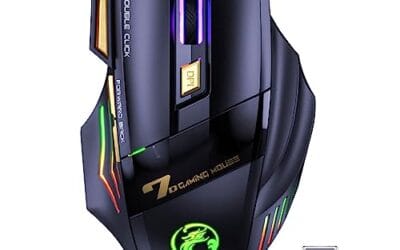
The VEGCO C26 is a budget wireless gaming mouse aimed at casual players and work-from-home users who want quiet clicks without paying flagship money. Core specs include a 4800 DPI adjustable sensor, seven buttons plus a dedicated double-click key, RGB lighting, and a 400mAh rechargeable cell. Target buyer is a light gamer or office user, not a competitive FPS player.
The defining feature here is the silent switch implementation on both primary buttons, which meaningfully cuts audible click noise during late sessions or shared rooms. The 4800 DPI ceiling is workable for 1080p and 1440p tracking in slower-paced titles. Sensor model and polling rate are not specified, so expectations for esports-tier tracking should stay modest.
Trade-offs are typical at this tier. RGB cycles randomly with no listed software suite, weight is not specified, and there is no confirmed high poling rate or PTFE fet spec. Wireless latency figures are absent from source data, so competitive shooter use is a gamble. Owner feedback volume is limited at time of writing, which weakens confidence in long-term switch and battery durability.
Buy this if you want a quiet wireless mouse for browsing, office work, and casual gaming with occasional shooter sessions. Skip this if you playranked FPS titles, need a documented sensor like PixArt PMW395, or require a lightweight sub-70g shell for claw-grip flick shots.
Sensor and DPI: Source data lists a 4800 DPI adjustable ceiling with no named sensor model. Budget wireless mice in this tier typically ship with entry-level optical sensors adequate for 1080p desktop use, but not competitive-grade tracking. Confirm step increments in the manual before maping DPI to in-game sensitivity.
Buttons and layout: Seven standard buttons plus a dedicated double-click key on the upper left, useful for repeat inputs in file management, browsers, and semi-auto weapons. Silent switches on both left and right primaries are the headline mechanical feature, appropriate for shared offices, streaming mics, or households sensitive to click noise.
Wireless and battery: A 400mAh lithium cell is rated for roughly 31 days per full charge under unspecified usage. Wired pass-through operation during charging avoids downtime. Poling rate and wireless latency figures are not specified, so treat competitive FPS suitability with caution and expect standard 2.4GHz receiver behavior.
Shape and compatibility: Weight, length, and grip style (palm, claw, or fingertip) are not specified in source data, which limits fit guidance for hand sizes above roughly 19cm. Compatibility is broad, covering Windows 7 through 10, macOS, Linux, and Chromebook, with RGB that cycles automatically rather than through named software.

Pros
- Presents as a generic HID mouse, bypassing endpoint software that blocks jiggler apps
- Two modes in one button: cursor movement for sleep prevention and 5 Hz auto-click
- Zero driver overhead, no background process, no admin rights required to run
- Cross-platform support spanning Windows, macOS, Linux, and Android hosts
Cons
- Limited verified owner feedback at time of writing, so reliability signal is thin
- Undetectability claim depends on IT stack, MDM tools and behavior analytics may still flag activity
- Auto-click fixed at 5 Hz with no adjustable interval or dwell settings specified
The Cloudeck Mouse Jiggler is a budget hardware USB dongle in the mouse-mover category, combining a sleep-prevention jiggler with a 5 clicks per second auto-clicker in a single-button housing. It targets remote workers keping Teams or Slack indicators green, plus casual users automating repetitive clicks in browser tasks.
Its defining trait is hardware-level operation: the device enumerates as a standard HID mouse rather than running software on the host, which sidesteps endpoint tools that block jiggler executables. Based on the listed feature set, cursor nudges appear continuous rather than time-gaped, and the auto-click mode toggles in via a double press.
Trade-offs are typical at this tier. The 100 percent undetectable claim is marketing shorthand, corporate MDM, behavior analytics, and webcam presence detection can still flag idle-avoidance paterns regardless of HID enumeration. Click cadence is fixed at 5 Hz with no adjustable interval disclosed, and cable length, dimensions, and waranty are not specified in source data.
Buy this if you need a driverless, cross-platform hardware jiggler for keeping a personal laptop awake or running low-effort auto-click tasks. Skip this if your workplace uses activity analytics beyond simple idle timers, or if you need adjustable click intervals, macro support, or verified long-term reliability data.
Device Class: Enumerates as a standard HID mouse over USB, per the listing, which is why it runs without drivers or admin rights. No sensor model, DPI, or poling rate is specified in the source, expected for a jiggler rather than a pointing device intended for user tracking.
Jiggle Behavior: The unit simulates pointer movement to defeat OS sleep and scrensaver timers. Cadence, pixel travel distance, and pattern are not disclosed in source data. Jiglers at this tier typically produce small periodic offsets suficient to reset idle counters in Windows, macOS, and common chat clients.
Auto-Click Mode: Double pressing the button engages continuous clicks at a stated 5 times per second, roughly 200ms between actuations. There is no documented adjustment for interval, burst length, or button (left versus right), which limits use for games or tools requiring specific cadence.
Compatibility and Build: Works with Windows, macOS, Linux, and Android hosts that accept USB HID input. A non-slip pad on the underside keeps the housing planted during button preses. Cable length, connector type (USB-A versus USB-C), weight, and dimensions are not specified.
Who this guide is for
This is for PC gamers who want a straight answer without wading through 40 near-identical mice. Maybe you’re building your first rig and need a solid pointer that won’t hold back your aim. Maybe you’ve got wrist pain from long sessions and you’re eyeing a vertical or ergonomic shape. Or maybe you just want the cheapest thing that clicks reliably and lights up. All three of you are covered below.
It skips the ultra-niche esports featherweights that weigh under 50 grams and cost north of $150, since those serve a small slice of competitive players. Instead we focus on mice most people can buy today and use for years. Two of our picks lean ergonomic, two lean budget, and one is a workflow gadget that gamers keep asking about. If you want a pure lightweight FPS rocket, this list won’t be your final stop, and that’s fine.
What to look for in a gaming mouse
Start with grip and shape. A palm-grip player wants a taller, fuller body, while a claw or fingertip user wants something shorter they can flick. Vertical mice like the Razer and Logitech picks here tilt your hand into a handshake position, which eases forearm rotation but takes a week to get used to. Weight is the next big factor. Lighter mice glide faster for quick aim, heavier ones feel more planted for slow, deliberate tracking.
Then there’s the sensor and DPI. High DPI numbers grab attention, but most players sit between 800 and 1,600 DPI regardless of the ceiling. What matters is a clean optical sensor that tracks without jitter, plus adjustable steps so you can dial it in. Connectivity rounds it out. Wired means zero latency and no charging, 2.4GHz wireless gets you close to wired speed, and Bluetooth is handy for multi-device work but slower for twitch play. Programmable buttons, silent clicks, and build quality separate the good from the forgettable.
How we evaluated
We researched these five mice using manufacturer specs, listed features, current Amazon pricing, and aggregate owner ratings. We did not run hands-on lab sessions. Instead we cross-checked what each product claims against what buyers report, then weighed those findings against price. A $17 mouse and a $114 mouse play in different leagues, so we judged each against fair expectations for its tier rather than against a single flagship standard.
Value carried the most weight in our ranking. A mouse that nails its price bracket beats one that’s merely expensive. We looked at rated comfort, sensor precision claims, connectivity options, and how consistent owner feedback was, since a 4.8 average across a shape people either love or hate tells you more than a lone marketing bullet. Ratings cited below come straight from listing data. Where a product is a specialty gadget rather than a true gaming mouse, we say so plainly.
Our top picks
Best Overall: Razer Pro Click V2 Vertical Wireless
At $113.99 with a 4.7 rating, the Razer Pro Click V2 Vertical is the most complete mouse on this list, and it’s built for people who spend hours at the desk and want relief without giving up performance. The vertical, 6-button ergonomic design tilts your hand into a natural handshake grip, which cuts the forearm twist that leaves wrists aching after a long night. It supports Windows and Mac, and the multi-device connectivity is the standout: you can hop between 2.4GHz, Bluetooth, or USB-C wired mode depending on if you’re gaming, working, or charging. Chroma RGB is along for the ride if you want it.
The tradeoff is the vertical shape itself. It’s not built for competitive flick-shooting, and claw-grip FPS players will find the posture works against fast lateral aim. There’s also a One Click AI Prompt button, a modern touch that some owners love and others ignore entirely. At this price you’re paying for comfort, versatility, and Razer’s build quality more than for raw esports speed. If your daily driver doubles as a work mouse and your gaming skews toward slower-paced titles, this is the one to get. Anyone who lives in twitchy shooters should look at a flatter shape.
Best Ergonomic: Logitech MX Vertical
The Logitech MX Vertical sits at $68.49 and carries the highest rating in this roundup at 4.8, which tells you owners are consistently happy once they adjust to it. This is the mouse people recommend when a friend complains about wrist pain. The vertical design holds your hand at roughly a 57-degree angle, and that single change relieves a surprising amount of strain over a full workday. It’s a proven shape with years of positive feedback behind it, and the build feels premium in a way $70 mice often don’t.
Where it lands short for gamers is speed and button count. It’s tuned for productivity and comfort, not for rapid-fire competitive play, so if you’re chasing high refresh esports performance you’ll want something lighter and flatter. The learning curve is real too, since the first few days feel awkward before muscle memory catches up. But for a gamer who also writes, codes, or edits all day and wants one mouse that protects the wrist, it’s an easy call. That 4.8 average isn’t an accident.
Best Budget Wired: No Lag Wired Gaming Mouse
If you just need a functional gaming mouse and $15 is the ceiling, this generic wired option at $14.99 with a 4.3 rating does the job. It’s a plain wired mouse with a high-precision optical sensor, RGB lighting, programmable buttons, and an ergonomic shell aimed at PC gamers. Wired means no battery to charge and no latency to worry about, which is genuinely useful at this price. For a spare rig, a kid’s first setup, or a backup that lives in a drawer, it’s hard to argue with the value.
Don’t expect flagship polish, though. At this price the sensor is competent rather than elite, the switches won’t feel as crisp as a $70 mouse, and long-term durability is the usual budget question mark. The 4.3 rating reflects that reality: solid for the money, not a lifetime purchase. Buy it knowing what it is. A cheap, reliable, plug-and-play pointer that gets you fragging without draining your build budget. If you can stretch to $17, the wireless pick below adds freedom for barely more cash.
Best Budget Wireless: VEGCOO C26 Wireless Gaming Mouse
For $16.99 and a 4.3 rating, the VEGCOO C26 is the value surprise of this list. It’s a rechargeable wireless mouse with adjustable DPI up to 4,800, silent clicking, a double-click key, RGB lighting, and a thumb rest, and it works for both PC and Mac. Getting wireless freedom, silent switches, and a rechargeable battery under $17 was rare not long ago. The silent clicks alone make it a smart pick for shared spaces, late-night sessions, or anyone who hates the racket of loud switches.
The catch is the same as any budget wireless mouse. The 2.4GHz connection is fine for casual and mid-tier play but won’t match a wired connection for competitive twitch aim, and battery life plus long-term reliability sit at budget-tier expectations. The 4,800 DPI ceiling is more marketing than practical, since you’ll likely game far below it. Still, for a gamer who wants a quiet, cable-free mouse without spending real money, it punches well above its price. That thumb rest is a nice touch too.
Best Utility Pick: Cloudeck Mouse Jiggler
The Cloudeck at $13.98 with a 4.0 rating isn’t a gaming mouse, and we’re listing it because gamers keep asking about it. It’s an undetectable USB mouse jiggler that simulates pointer movement to keep a PC awake, with an automatic continuous-click function and plug-and-play setup. Think of it as a desk accessory, not your aiming tool. It’s handy for keeping a machine from sleeping during long downloads, AFK farming in certain games, or preventing a work laptop from going idle.
Judge it against jigglers, not against the Razer or Logitech. The 4.0 rating is fair for a single-purpose gadget, and owner reports show it does what it claims without software installs. It won’t help your K/D and it can’t replace a real mouse. But at under $14 it solves a specific problem cheaply, and that’s exactly why it earns a spot here. If you’ve ever come back to a slept PC and lost progress, you already understand the appeal. Everyone else can skip it.
Buying mistakes to avoid
The biggest mistake is chasing DPI numbers. A 26,000 DPI sensor doesn’t make you a better player, and you’ll almost certainly game between 800 and 1,600 DPI anyway. What actually matters is a clean, consistent sensor and a shape that fits your hand. Buyers who fixate on the headline number often overpay for a spec they’ll never use while ignoring comfort, which is the thing they’ll feel every single session.
The second trap is ignoring grip style and hand size. A vertical mouse is a revelation for wrist pain but a handicap for competitive shooters, and a tiny featherweight feels cramped in large hands. Don’t buy on looks or brand loyalty alone. Match the shape to how you play and how you hold it. And don’t assume more expensive always means better for you: the $68 Logitech outrates the $114 Razer here because comfort, not price, drives owner satisfaction.
Bottom line
If you want the most capable all-rounder and comfort is a priority, the Razer Pro Click V2 Vertical at $113.99 is our top pick, with multi-device connectivity and an ergonomic shape that spares your wrist. But the $68.49 Logitech MX Vertical is the smarter value for most people, and its 4.8 rating backs that up. It delivers the same wrist relief for far less, so long as you don’t need flagship gaming speed.
On a tight budget, decide between wired and wireless. The $14.99 wired mouse gives you zero-latency simplicity, while the $16.99 VEGCOO C26 adds silent clicks and cable-free freedom for two dollars more. The Cloudeck jiggler is a specialty gadget, not a gaming mouse, so grab it only if you need to keep a PC awake. Pick the shape that fits your hand first, then let your budget sort the rest.
Common questions
Is a wired or wireless mouse better for gaming?
Both work well in 2026. Wired mice like the $14.99 pick here give you zero latency and never need charging, which makes them a safe, cheap choice. Modern 2.4GHz wireless mice, including the VEGCOO C26, get close enough that most players won’t feel a difference in casual and mid-tier play. Competitive esports players still lean wired or premium wireless for the last few milliseconds.
Does high DPI make me a better gamer?
No. DPI just sets how far the cursor moves per inch of mouse travel, and most players sit between 800 and 1,600 DPI no matter how high the sensor can go. The VEGCOO’s 4,800 DPI ceiling is far more than you’ll use. Sensor consistency and a comfortable shape improve your aim far more than a big DPI number ever will.
Are vertical mice good for gaming?
They’re great for comfort and wrist relief but not ideal for fast competitive shooters. The Razer Pro Click V2 and Logitech MX Vertical both tilt your hand into a natural position that eases strain during long sessions. That posture works against quick lateral flicks, though, so slower-paced games and mixed work-and-play use suit them best. Twitch FPS players should choose a flatter shape.
Why does the cheaper Logitech outrate the pricier Razer?
Owner satisfaction tracks comfort and reliability more than price. The Logitech MX Vertical’s 4.8 rating reflects years of consistent positive feedback on a proven ergonomic shape at $68.49. The Razer at $113.99 adds multi-device connectivity and extra features, but those don’t automatically raise everyday satisfaction. You’re paying for versatility with the Razer, not a better core comfort experience.
Is a mouse jiggler worth buying for gamers?
Only if you need to keep a PC awake. The Cloudeck jiggler at $13.98 simulates pointer movement to prevent sleep, which helps with long downloads or AFK situations. It’s a plug-and-play utility gadget, not a gaming mouse, so it can’t replace any of the other picks here. Buy it as an accessory if the use case fits, otherwise skip it entirely.



























Write Your Review
No reviews yet. Be the first to share your experience!