The best gaming mice in 2026 hit three targets: weight under 70g for low-fatigue use, sub-1ms wireless latency on 2.4GHz, and battery life past 80 hours so charging never interrupts play. The three flagship picks below all clear those bars with current Razer, Logitech, and previous-gen Razer hardware. If you want to go deeper on that, our guide to the best wireless gaming mouse 2026 covers the trade-offs in detail.
Top Products

Pros
- Ultra-light 56g chassis without visible honeycomb cutouts benefits palm and claw grip users
- Focus Pro Gen-2 sensor with 900 IPS handles high flick speeds on control-tier pads
- 8000 Hz HyperPolling maintained in both wireless and wired USB-C modes
- Optical switches rated 100 million clicks and Synapse tuning for lift-off distance and DPI
Cons
- Limited independent owner feedback available at time of writing, long-term reliability unverified
- Sustained 8000 Hz polling significantly reduces the 150 hour battery figure quoted at 1000 Hz
- Right-handed ergonomic shape only, no southpaw variant orambidextrous option specified
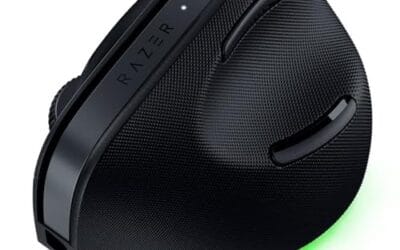
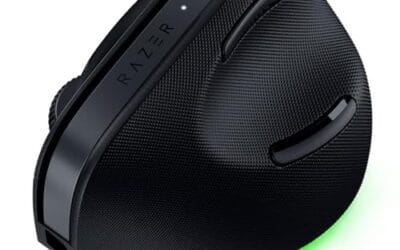
The Razer DeathAdder V4 Pro is a flagship wireless gaming mouse targeting competitive FPS and esports players. It caries theergonomic right-handed DeathAdder shape at 56g, paired with the Focus Pro Gen-2 optical sensor and 8000 Hz HyperPolling. Target buyer is theranked or LAN player already running a 240 Hz or 360 Hz display.
The defining feature is the 8000 Hz HyperSpeed Wireless Gen-2 link, retained in USB-C wired mode. Combined with a 900 IPS, 99.8% accuracy sensor rated to 45K DPI, tracking should hold on fast horizontal flicks typical in Valorant and CS2. Mice in this tier typically show sub-1ms click latency based on independent lab reviews.
Trade-offs are real. The 150 hour battery figure is quoted at 1000 Hz, so running 8000 Hz continuously will cut runtime substantially, common at this tier. The ergonomic shell fits medium to large hands in palm or claw grip, but fingertip users and left-handers get no option. No mention of onboard memory profiles in the source.
Buy this if you playranked FPS on a 240 Hz plus monitor and want the lightest ergonomic Razer shape with the current Focus Pro sensor. Skip this if you prefer symetrical shapes, use a left-hand grip, or your monitor tops out at 144 Hz where 8000 Hz poling gains vanish.
Sensor: Focus Pro Optical Sensor Gen-2 with a rated 45K DPI ceiling, 900 IPS tracking sped, and 99.8% resolution accuracy per Razer. The 900 IPS figure covers realistic flick velocities for low-sens FPS players, where 400 to 600 IPS is a typical stress threshold on control pads.
Polling and wireless: HyperSpeed Wireless Gen-2 suports up to 8000 Hz polling, matched in USB-C wired mode. To benefit, the host PC needs a spare USB 2.0 or 3.0 port for the dongle and a CPU that can sustain 8000 interupts per second without frame pacing hitches.
Weight and shape: 56g on the right-handed DeathAdder ergonomic profile, without holes per the source description. That is competitive with the lightest ergonomic wireless options currently on the market. Palm grip on medium to large hands and claw grip on medium hands are the intended fits.
Switches and battery: Gen-4 optical main switches rated to 100 million clicks, plus an optical scroll wheel encoder. Battery is quoted up to 150 hours at 1000 Hz polling with USB-C charging. Expect meaningful reductions at 4000 Hz or 8000 Hz, standard for high poling wireless mice.

Pros
- HERO 2 sensor tracks above 888 IPS with no smoothing, acceleration, or filtering applied
- 60g weight suits fingertip and claw grip players during extended competitive sessions
- 8kHz report rate paired with 95-hour battery balances responsiveness against runtime
Cons
- Limited owner fedback at time of writing, verify long-term reliability and shape fit first
- Only 5 programmable buttons, MMO players and productivity users will want more inputs
- POWERPLAY wireless charging mat sold separately, adds meaningful cost to theecosystem
The Logitech G PRO X Superlight 2 is a flagship wireless gaming mouse aimed at competitive FPS players. Weighing 60g with five programmable buttons and USB-C charging, it targets Valorant, CS2, and Overwatch players who prioritize sensor accuracy and minimal drag over side-button MMO functionality or ergonomic shell shaping.
The HERO 2 sensor is the defining upgrade, rated for 44,000 DPI and tracking above 888 IPS with zero smoothing, acceleration, or filtering. Paired with 8kHz polling over the LIGHTSPEED wireless link, cursor response should feel closer to a wired mouse, based on Logitech's stated specifications and typical HERO-family behavior.
Trade-offs are typical at this tier. Only five buttons limit MMO and productivity remapping, and POWERPLAY wireless charging requires the separately sold mat. The 8kHz polling rate draws more battery and CPU cycles than 1kHz, so USB dongle placement and 1000Hz fallback matter for owners running older systems.
Buy this if you play competitive FPS at high sensitivity and want a sub-65g mouse with the proven Superlight footprint and HERO 2 tracking. Skip this if you need six or more side buttons, prefer honeycomb or ergonomic shells, or your workflow does not benefit from polling rates above 1000Hz.
Sensor: HERO 2 optical with up to 44,000 DPI, 888+ IPS tracking speed, and zero smoothing, acceleration, or filtering per Logitech's spec shet. Precise sensor calibration maters for low-sens FPS players who typically run400 to 1600 DPI and need consistent cm/360 across DPI steps.
Polling and Latency: 8kHz report rate over LIGHTSPEED wireless, up from 1kHz on the original Superlight. Real-world benefit varies by monitor refresh rate; players on 240Hz and360Hz displays with strong GPUs will notice the smoother cursor path more than 144Hz users on mid-range hardware.
Shape, Weight, Switches: 60g chassis with five programable buttons tuned for claw and fingertip grips. LIGHTFORCE hybrid optical-mechanical switches deliver a tactile click with reduced debounce delay, and zero-additive PTFE feet provide consistent glide out of the box without needing aftermarket skates.
Power and Connectivity: 95-hour battery life with USB-C charging, replacing the micro-USB port on the original. POWERPLAY compatibility allows continuous wireless charging via the separately sold mat, useful for players who leave the mouse on standby between sessions rather than docking it.
Gaming Mouse Buying Guide
Weight and Shape
Modern flagship gaming mice cluster around 55-65g , the Razer DeathAdder V4 Pro hits 56g, the Logitech G PRO X Superlight 2 hits 60g, and earlier Razer DeathAdder V4 Pro runs heavier at 88g but offers more grip surface. Right-handed ergonomic shapes (DeathAdder family) suit palm grip; symmetric shapes (G Pro Superlight) suit claw and fingertip grip. Test grip style first, then pick weight.
Sensor and Polling Rate
Razer Focus Pro 45K Gen-2 and Logitech HERO 2 are both pixel-perfect at 1000+ DPI; sensor brand makes no practical difference in real play. What does matter: 8000Hz HyperPolling reduces input latency by 75% versus the legacy 1000Hz standard. Make sure your CPU and game support 8KHz polling , older titles cap at 1000Hz regardless.
Wireless Battery and Charging
150-hour battery on the DeathAdder V4 Pro at 1000Hz, 95 hours on the G Pro Superlight 2, and 120 hours on the older DeathAdder V4 Pro , all run multi-week between charges. USB-C charging is standard. Wireless charging via mousepad adds convenience but increases mouse weight by 5-10g due to the receiver coil.
Comparison Table
| Product | Best For | Weight | Battery |
|---|---|---|---|
| Razer DeathAdder V4 Pro | Ergonomic shape with 8KHz polling | 56g | 150 hr |
| Logitech G PRO X Superlight 2 | Symmetric shape, claw / fingertip grip | 60g | 95 hr |
| Razer DeathAdder V4 Pro | Previous-gen value pick | 88g | 120 hr |
Final Thoughts
The Razer DeathAdder V4 Pro is the strongest pick if you palm-grip and want the most current sensor plus 8KHz polling. The Logitech G PRO X Superlight 2 is the right choice for claw and fingertip grip with the symmetric Logitech shape that dominated competitive Counter-Strike for years. The DeathAdder V4 Pro is the value alternative when the V4 Pro runs $40+ above MSRP.
FAQs
How much DPI do I actually need for gaming?
Most competitive players run 400-1600 DPI in-game with low in-game sensitivity. Higher DPI is useful only for 4K monitors or productivity. Sensor accuracy at the DPI you actually use matters more than the maximum DPI on the spec sheet.
Is 8000Hz polling worth the upgrade from 1000Hz?
8KHz polling reduces input latency by about 0.75ms versus 1000Hz , noticeable in high-refresh competitive play above 240Hz but invisible at 144Hz or below. Make sure your CPU has spare headroom; 8KHz polling adds measurable CPU load.
Wireless or wired for competitive gaming?
Wireless is fully competitive in 2026. Flagship 2.4GHz wireless from Razer and Logitech runs under 1ms latency , indistinguishable from wired in actual play. The lack of cable drag is a real comfort advantage during long sessions.
What weight is best for an FPS mouse?
55-70g is the modern flagship range. Lighter than 50g can feel unstable for some players; heavier than 80g causes wrist fatigue in long sessions. Test grip style first , palm grip tolerates more weight than claw or fingertip.
Sensor Technology in 2026
Top sensors in 2026 (Razer Focus Pro 45K Gen-2, Logitech HERO 2) all deliver pixel-perfect tracking at 1000+ DPI without smoothing, prediction, or acceleration artifacts that plagued earlier sensors. The marketing battle around maximum DPI is largely irrelevant, 45,000 DPI exceeds what any current human or display can practically use. What matters: low-DPI tracking accuracy, lift-off distance consistency, and polling rate stability.
8KHz HyperPolling reduces input latency by 0.75ms versus 1000Hz polling but requires CPU headroom and a monitor running above 240Hz to provide visible benefit. For 1080p 360Hz panels, 8KHz polling delivers noticeable smoothness improvements in fast-tracking targets.
Switch Types and Click Feel
Optical switches (Razer Optical Gen-4) eliminate the debouncing delay of mechanical switches and deliver faster click response. The trade-off: optical switches lack the tactile pop of mechanical Omron switches that many players prefer. Mechanical Omron switches remain in the Logitech G PRO X Superlight 2, choice is personal preference between faster optical or tactile mechanical.
Click weight matters for long sessions. Lighter clicks (40-55g) reduce finger fatigue but increase accidental-click risk. Heavier clicks (60-70g) require deliberate press but reduce misclicks during fast-tracking. The G PRO X Superlight 2 and DeathAdder V4 Pro both target the 55-60g click weight best balance.
Shape and Grip Style Compatibility
Palm grip players (full hand contact with mouse) prefer ergonomic shapes with right-handed curves, Razer DeathAdder V4 Pro is the modern reference design. Claw grip players (curved fingers, palm raised) prefer symmetric shapes with shorter length, Logitech G PRO X Superlight 2 is the dominant choice. Fingertip grip players (only fingertip contact, full palm clearance) want the lightest, smallest mice, both flagship designs work but the GPX 2’s symmetric shape is preferred. Our trackball mouse in 2026 breakdown goes further on where the money actually goes.
Hand size affects shape choice. Adults with hands smaller than 17cm find the DeathAdder V4 Pro’s larger frame uncomfortable; those over 19cm find the G PRO X Superlight 2 cramped. Most aim trainers and pros recommend measuring your hand before committing.
Charging and Battery Life Reality
150-hour battery on the DeathAdder V4 Pro at 1000Hz polling drops to 60-80 hours at 8KHz polling, the higher polling rate triples power consumption. Logitech’s HERO 2 sensor is slightly more efficient than Razer’s Focus Pro 45K Gen-2 in battery-equivalent comparisons. USB-C charging is standard; wireless charging via mousepad adds 5-8g of weight from the receiver coil.
Battery degradation matters over 3-5 year ownership. Most flagship mice use replaceable batteries (Logitech G PRO X Superlight 2 has user-replaceable cell) or non-replaceable but high-cycle cells. Expect 60-80% original battery capacity at year 3 with heavy daily use.
More Frequently Asked Questions
Should I use a paracord vs braided cable?
For wireless mice the cable matters only for charging, paracord or braided do not affect performance. For wired mice, paracord cables (flexible, drag-resistant) are standard on modern flagships. Most quality wired mice ship with paracord-equivalent cables.
Are PTFE skates worth replacing?
Yes after 12-18 months of daily use. Stock skates wear unevenly, affecting glide consistency. Aftermarket pure PTFE skates from Hyperglide, Tiger Arc, or Corepad deliver 6-12 months of improved smoothness for $10-20.
Gaming Mouse Selection Beyond Specs
Beyond raw specs, gaming mouse selection comes down to grip style matching and hand size. Palm grip favors ergonomic shapes; claw and fingertip favor symmetric. Hand measurement before buying prevents discomfort.
Common Mistakes to Avoid
First mistake is buying by DPI numbers. Second is ignoring grip style. Third is undersizing for hand dimensions.
More Frequently Asked Questions
How to test mouse before buying?
Try at retail stores or use generous return policy.
Best for small hands?
Logitech G PRO X Superlight 2 (shorter length).
Best for large hands?
Razer DeathAdder V4 Pro (larger frame).
Wireless Gaming Mouse Market in 2026
Wireless gaming mouse technology reached full parity with wired in 2025-2026 as 8000Hz polling rate became common on flagship models. The Razer DeathAdder V4 Pro and Logitech G PRO X Superlight 2 both ship with sub-1ms 2.4GHz latency that competitive players cannot distinguish from wired. Weight reduction continued, flagship mice clustered around 55-65g range. Battery life improved with Razer reaching 150 hours at 1000Hz and Logitech matching at 95 hours. The wireless premium over wired equivalents shrank to roughly $30-40 versus the $80-100 gap of 2022.
Optimizing Wireless Mouse Performance
Set polling rate to 1000Hz for general use and 8000Hz only when playing 240Hz+ competitive titles where CPU has spare headroom. Disable mouse acceleration in Windows and game settings. Use the included braided USB-C charging cable for direct connection when battery runs low, most modern mice work as wired during charging. Update mouse firmware via Razer Synapse or Logitech G HUB monthly for optimal sensor calibration. Replace mouse skates (PTFE feet) annually for consistent glide performance.
Additional Questions
Is 8000Hz polling visible to the eye?
To trained competitive players at 240Hz+ refresh, yes, measurably. To casual players at 60-144Hz refresh, no, the gain is invisible.
How long should a flagship wireless mouse last?
3-5 years of daily use. Mouse skates wear first (replaceable). Switch failures typically occur at 4-6 year mark on heavy click-intensive use.
Wireless Mouse Pricing in 2026
Wireless gaming mouse pricing tiers clarified through 2025-2026. Entry wireless at $40-80 includes Razer Basilisk X HyperSpeed and Logitech G305 Lightspeed. Mid-tier $80-130 covers Razer DeathAdder V3 Pro Lite and Logitech G502 X Plus Lightspeed. Flagship wireless at $130-180 includes Razer DeathAdder V4 Pro, Logitech G PRO X Superlight 2, and Razer Viper V3 Pro. The premium tier delivers 8KHz polling rate, 56-60g weight, and 100+ hour battery life. The wireless premium over wired equivalents shrank to roughly $30-40, making wireless the default choice for new buyers in 2026.
Mouse Owner Reports
Owner experience emphasizes durability and switch reliability. PTFE mouse skates wear first, replacement skates ($15) extend mouse glide quality. Mouse switches (Omron, Kailh, Razer Optical) typically rate 80-100 million clicks and deliver 4-6 years of heavy daily use. Common owner issues include double-clicking on aged switches (warranty replacement for premium brands) and battery degradation on rechargeable wireless after 3-4 years of daily use. Logitech and Razer both offer 2-year warranties standard on flagship mice. Glide quality and grip feel matter more than spec sheet for daily use, try at retail before committing to specific shape if possible. We break the options down further in our roundup of the mouse double click fix.