

Nvidia sells two versions of the same card, and the only thing separating them on the box is a number: 8GB or 16GB. Same GPU chip, same clocks, same cooler on most models. The difference is memory capacity, and that single spec decides whether the card ages gracefully or starts stuttering the moment you push textures past what it can hold. If you’re cross-shopping the RTX 5060 Ti against pricier tiers, our roundups of the best RTX 5060 Ti prebuilt PC builds and the best GPU deals are worth a look before you commit.
Here’s the short version, then the long one. The 16GB model costs more, usually around $50 extra at retail, and it buys you headroom rather than raw speed. In games that fit inside 8GB, both cards perform nearly identically. In games that don’t, the gap turns ugly fast. That’s the whole story, but the details matter, so let’s break it down.
The short answer
Both cards use the same GB206 GPU with the same 4,608 CUDA cores and the same 128-bit memory bus. Compute power is identical. What changes is how much video memory sits on the board: 8 gigabytes versus 16 gigabytes of GDDR7. At 1080p with sensible settings, you won’t notice a difference. At 1440p, or with ray tracing and high-res textures, the 8GB model runs out of room and the frame times spike. The 16GB card just keeps feeding the GPU. It’s not faster. It’s fed.
If your budget is tight and you play esports titles or older games at 1080p, the 8GB card is fine. If you want the card to still make sense in three years, or you touch modern AAA releases at 1440p, pay for the 16GB. That’s the recommendation in one paragraph. The rest of this explains why.

Pros
- 12GB VRAM on 192-bit bus gives headroom over8GB rivals at 1440p.
- Single 8-pin connector and 650W PSU target means broad build compatibility.
- DisplayPort 2.1 with UHBR13.5 suports high-refresh QHD and 4K panels natively.
- 2-slot 249mm length fits compact ATX and many mATX chassis without clearance issues.
Cons
- Limited owner feedback at time of writing makes long-term reliability signals thin.
- PCIe 4.0 x8 interface can bottleneck slightly on older PCIe 3.0 platforms.
- Intel Arc driver maturity in older DX9/DX11 titles still trails NVIDIA and AMD.
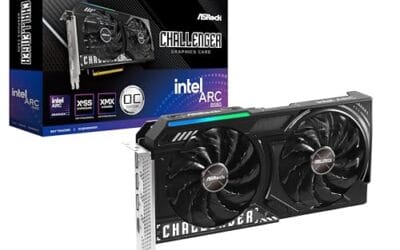
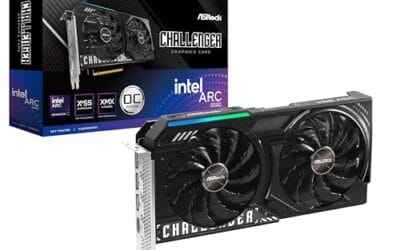
The ASRock Arc B580 Challenger 12GB OC is a mid-range 1440p GPU built on Intel's Xe2-HPG architecture with 20 Xe cores, 160 XMX engines, and a 2740MHz boost clock. It targets QHD gamers and content creators who want more VRAM than 8GB competitors offer at this bracket, without moving up to a 200W-plus card.
The defining feature is the 12GB GDDR6 pool on a 192-bit bus running at 19 Gbps, which gives real texture and framebuffer headroom at1440p. Combined with XeSS 2 AI upscaling and DirectX 12 Ultimate support, Arc B580 cards in this tier typically handle modern raster titles at high settings QHD, based on Intel's reference silicon behavior.
Trade-offs are typical for Intel Arc at this stage. The PCIe 4.0 x8 interface can shave frames on PCIe 3.0 boards, and driver polish on legacy DX9/DX11 games still lags competing vendors. The card requires a single 8-pin, 650W recommended PSU, and 249mm length, so verify chassis clearance and rail headroom before pairing with older bronze-tier supplies.
Buy this if you want a 1440p card with 12GB VRAM, DP 2.1 outputs, and XeSS 2 support on a modern PCIe 4.0 platform. Skip this if your library leans heavily on older DirectX 9 or 11 titles, or your motherboard is PCIe 3.0.
Resolution target: With 12GB GDDR6 on a 192-bit bus at 19 Gbps, this card is positioned for 1440p high settings in modern raster titles, with XeSS 2 upscaling extending playable framerates in heavier ray-traced workloads. 1080p esports at high refresh is well within scope.
Power and PSU pairing: ASRock lists a 650W recommended PSU and a single 8-pin connector. GPUs in this class typically draw around 190W board power, so pair with a quality 650W to 750W unit to leave transient headroom on ATX 3.0 or olderATX 2.x rails.
Build clearance: The2-slot cooler measures 249mm long, 132mm wide, and 41mm high. That fits most mid-towers and many mATX cases, but confirm front-radiator or HDD-cage clearance in compact builds beforeordering, especially SFF chassis rated under 250mm GPU length.
Display outputs: Three DisplayPort 2.1 ports (one primary up to UHBR13.5) plus one HDMI 2.1a drive up to four displays with resolutions up to 8K. UHBR13.5 suports high-refresh 4K and 1440p panels natively without DSC compromises.
The longer explanation
Video memory, or VRAM, holds everything the GPU needs to render a frame right now: textures, geometry, shadow maps, frame buffers, and increasingly the data ray tracing and frame generation lean on. When a game asks for more VRAM than the card has, the system doesn’t crash. It spills over into your regular system RAM across the PCIe bus, which is dramatically slower. That’s when you feel it. Average frame rate might still read 60, but the 1% lows collapse and the game hitches every time it swaps assets.
This is the trap with the 8GB card. Benchmark charts that show average FPS often hide the problem because averages smooth over the stutters. Owner reports and frame-time analysis tell the real story. A game like Hogwarts Legacy or a heavily modded title will happily eat 10 to 12GB at 1440p with ray tracing on. The 8GB card can’t hold that, so it thrashes. The 16GB card doesn’t. Same GPU, wildly different experience, and the only variable is the memory chips soldered around the die.
How it works
Nvidia builds these cards on a 128-bit memory bus, which limits how many memory chips it can address and at what width. To get 8GB, the board uses four 2GB GDDR7 modules. To get 16GB, it uses the same four positions but with 4GB modules, or a clamshell layout that puts chips on both sides of the PCB. Bandwidth stays the same because the bus width didn’t change. You’re adding capacity, not speed.
This matters for how you think about the upgrade. More VRAM never makes an individual frame render faster. It only prevents the card from running out of space and falling back to slow system memory. Think of it like a desk. A bigger desk doesn’t make you write faster, but if your work spills onto the floor, a bigger desk stops you from constantly bending down to pick things up. The 16GB model is the bigger desk.
Why it works this way
You might ask why Nvidia ships an 8GB card at all in 2025 when modern games clearly want more. The honest answer is cost and market segmentation. GDDR7 modules aren’t free, and shaving 8GB off the bill of materials lets Nvidia hit a lower price point that looks attractive on a spec sheet and in prebuilt machines. It also nudges buyers who want peace of mind toward the pricier variant. Both cards exist because both sell.
There’s a real engineering constraint too. That 128-bit bus is modest for the tier, so the extra memory is partly compensating. Modern rendering pipelines with ray tracing, DLSS frame generation, and high-resolution texture packs have pushed baseline VRAM demand well past where it sat a few years ago. Eight gigabytes was generous in 2019. It’s cramped now, and games keep asking for more each year.
When you’d want this
Go with the 8GB card if you’re building a budget 1080p machine, you mostly play competitive titles like Valorant, CS2, or Fortnite, and you’re comfortable turning texture settings down in the occasional AAA game. It saves money now, and for that use case the memory ceiling rarely gets hit. Plenty of happy owners run 8GB cards at 1080p without ever seeing a problem.
Choose the 16GB card if you game at 1440p, you want ray tracing on, you keep hardware for several years, or you dabble in local AI, video editing, or 3D work where VRAM is king. The extra capacity is cheap insurance against future stutter. If you’re pairing a strong CPU like a Ryzen 7 9800X3D, spending up on memory keeps the GPU from becoming the bottleneck first; our guide to the best GPU for the 9800X3D digs into that pairing. Content creators streaming and recording should also lean 16GB, as we cover in the best GPU for gaming and streaming writeup.

Pros
- GDDR7 memory on a 12GB frame suits 1440p high-refresh and early 4K workloads without hitting VRAM ceiling quickly.
- 0dB fan-stop below 50C keeps the card silent during desktop use, browsing, and light gaming sessions.
- Dual-ball bearing fans rated for roughly twice the lifespan of sleeve-bearing alternatives, reducing long-term maintenance concerns.
- NVIDIA DLSS 4 support enables frame generation and upscaling, recovering performance in ray-tracing-heavy titles.
Cons
- 3.125-slot footprint requires verifying case GPU clearance before ordering, particularly in mid-tower and mATX builds.
- TGP not explicitly listed in source data; pair with a PSU rated at least 150W above GPU draw for transient headroom, typical recommendation at this tier is 850W or above.
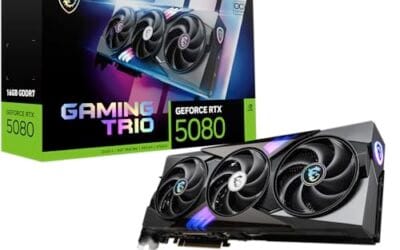
The ASUS TUF Gaming RTX 5070 OC is a high-end discrete GPU built on NVIDIA's Blackwell architecture. With 12GB GDDR7 memory and PCIe 5.0 interface, it targets enthusiast builders running 1440p high-refresh or early 4K setups who want a card that can sustain load without thermal throttling.
The standout feature is the thermal stack. ASUS combines a phase-change GPU thermal pad, MaxContact heat spreader with 5% increased surface area, and three Axial-tech fans spinning on dual-ball bearings. Based on the design specs, the phase-change pad should outperform traditional paste under extended gaming or GPU-compute sessions where die temperatures stabilize near TDP ceiling.
The 3.125-slot width is a real consideration, not a marketing point. Builders in tighter mATX or ITX cases need to confirm GPU slot clearance before purchasing. TGP figures are not listed in source data, but GPUs at this tier typically land between 200W and 250W, so a quality 850W PSU is the minimum sensible pairing. The conformal PCB coating and military-grade capacitors address durability concerns but do not offset the need for adequate airflow in the host case.
Buy this if you are building a dedicated 1440p or 4K gaming rig on PCIe 5.0 and want a card with above-average long-term component reliability. Skip this if your case has less than 3.125 slots of GPU clearance or your PSU is below 750W, as headroom for transient power spikes becomes a real stability risk.
VRAM and Resolution Fit: The 12GB GDDR7 frame is well-positioned for 1440p at maximum settings and 4K at medium-to-high presets in current titles. GDDR7 bandwidth reduces memory bottlenecks compared to GDDR6X at equivalent capacity, which matters in texture-heavy and ray-traced workloads.
Upscaling and Frame Generation: DLSS 4 support includes multi-frame generation, which is significant for GPU-limited scenarios at 4K with ray tracing enabled. Buyers targeting high-refresh 1440p esports titles will find DLSS 4 largely unnecessary at this GPU tier, but ray-tracing users benefit directly.
Slot and Clearance Requirements: The 3.125-slot design requires a minimum of four physical PCIe slot spaces free in the case. Card length is not specified in source data; confirm chassis GPU length clearance against ASUS product page measurements before purchasing.
Power and Connector: Connector type is not specified in source data. GPUs at this tier typically use a 16-pin 12VHPWR or 12V-2x6 connector. Verify PSU connector availability and target a PSU with at least 150W above measured GPU TGP for safe transient headroom.
What to look for in a graphics card
Beyond the memory decision, a few things separate a good buy from a regret. Cooling design matters: a card with dual or triple fans and a 0dB idle mode, like the ASRock Arc B580 Challenger at $309.99, stays quiet and cool without thermal throttling. Check the slot width too, since some modern cards run 3 slots or more and won’t fit small cases. The ASUS TUF Gaming RTX 5070 at $749.99, for instance, is a chunky 3.125-slot card.
Pay attention to display outputs and standards. HDMI 2.1a and DisplayPort 2.1 matter if you run a high-refresh 1440p or 4K monitor. Warranty length is another quiet differentiator; the ASUS TUF ships with a 3-year warranty, which is reassuring on a card you plan to keep. And always match the card to your resolution goals. If 4K is the target, memory capacity and bandwidth both climb in importance, which our best GPU for 4K gaming breakdown explains in detail.
Common misconceptions
The biggest myth is that 16GB makes the card faster. It doesn’t. In any game that fits inside 8GB, the two variants trade blows within a frame or two of each other. The 16GB card only pulls ahead when the 8GB card runs out of memory. Speed isn’t the benefit. Consistency is.
Another misread: people see “16GB” and assume it means 4K gaming is now on the table. Not quite. The GPU compute and the 128-bit bus still cap real 4K performance regardless of capacity. The 16GB helps the card behave well at 1440p and survive future titles, but it won’t turn a mid-tier chip into a 4K monster. For that you’re looking at higher tiers entirely, like the cards in our best RTX 5080 prebuilt PC roundup. And no, adding VRAM doesn’t raise your power draw in any meaningful way, so your PSU math stays the same.
Frequently asked
Is the RTX 5060 Ti 16GB worth the extra money?
For most people building today, yes. The premium is usually around $50, and it removes the single biggest weakness of the 8GB model: running out of memory at 1440p or in modern AAA games with ray tracing. If you only play 1080p esports titles, the savings on the 8GB card are defensible. For everyone else, the 16GB is the smarter long-term buy.
Will the 8GB version stutter in new games?
It can, especially at 1440p with high textures or ray tracing enabled. When VRAM fills up, the card spills data to system RAM and frame times spike, which you feel as hitching even if the average FPS looks fine. Dropping texture quality one notch usually fixes it, but that’s a compromise the 16GB card doesn’t ask you to make.
Do both cards have the same GPU?
Yes. Both use the identical GB206 chip with the same core count, clock speeds, and 128-bit memory bus. The only hardware difference is the amount of GDDR7 memory on the board. That’s why compute performance is essentially the same until memory capacity becomes the limiting factor.
Is 8GB enough for 1080p gaming?
In most cases, it’s still fine at 1080p, particularly for competitive and older titles. A handful of the most demanding 2024 and 2025 releases can push past 8GB even at 1080p with everything maxed, but turning textures from Ultra to High resolves that. If 1080p is your ceiling and you’re not chasing max settings, you’ll be comfortable.
Should I buy 16GB for future-proofing?
If you keep a graphics card for three or more years, the 16GB version is the safer bet. VRAM demand has climbed steadily each generation, and games released in 2026 and beyond will only ask for more. Paying a small premium now to avoid an early upgrade later is the kind of math that usually pays off. Think of it as headroom you grow into.



























Write Your Review
No reviews yet. Be the first to share your experience!