

Buying a graphics card in 2026 means walking into a lineup where the gap between the cheapest and most expensive pick we researched is roughly five times the price. An ASRock Arc B580 runs $309.99. A MSI RTX 5080 sits at $1,569.99. Both will play the same games, but they aim at wildly different resolutions, refresh rates, and budgets, and that spread is exactly why “best” depends so heavily on what you actually plan to do with the thing.
We spent the research phase reading owner reports, spec sheets, and price histories across five cards spanning entry-level 1080p all the way to high-refresh 4K. If you’re still deciding between generations, our breakdown of the RTX 5070 vs RTX 4070 Super is worth a look, and the RTX 5070 Ti vs RTX 5080 comparison covers the messy middle of this exact lineup. Planning to push clocks or fix a flaky card later? Bookmark our guides on how to undervolt a GPU and the common GPU artifacting fix steps before you buy.

Pros
- 12GB VRAM on 192-bit bus gives headroom over8GB rivals at 1440p.
- Single 8-pin connector and 650W PSU target means broad build compatibility.
- DisplayPort 2.1 with UHBR13.5 suports high-refresh QHD and 4K panels natively.
- 2-slot 249mm length fits compact ATX and many mATX chassis without clearance issues.
Cons
- Limited owner feedback at time of writing makes long-term reliability signals thin.
- PCIe 4.0 x8 interface can bottleneck slightly on older PCIe 3.0 platforms.
- Intel Arc driver maturity in older DX9/DX11 titles still trails NVIDIA and AMD.
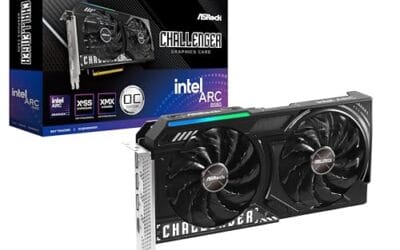
The ASRock Arc B580 Challenger 12GB OC is a mid-range 1440p GPU built on Intel's Xe2-HPG architecture with 20 Xe cores, 160 XMX engines, and a 2740MHz boost clock. It targets QHD gamers and content creators who want more VRAM than 8GB competitors offer at this bracket, without moving up to a 200W-plus card.
The defining feature is the 12GB GDDR6 pool on a 192-bit bus running at 19 Gbps, which gives real texture and framebuffer headroom at1440p. Combined with XeSS 2 AI upscaling and DirectX 12 Ultimate support, Arc B580 cards in this tier typically handle modern raster titles at high settings QHD, based on Intel's reference silicon behavior.
Trade-offs are typical for Intel Arc at this stage. The PCIe 4.0 x8 interface can shave frames on PCIe 3.0 boards, and driver polish on legacy DX9/DX11 games still lags competing vendors. The card requires a single 8-pin, 650W recommended PSU, and 249mm length, so verify chassis clearance and rail headroom before pairing with older bronze-tier supplies.
Buy this if you want a 1440p card with 12GB VRAM, DP 2.1 outputs, and XeSS 2 support on a modern PCIe 4.0 platform. Skip this if your library leans heavily on older DirectX 9 or 11 titles, or your motherboard is PCIe 3.0.
Resolution target: With 12GB GDDR6 on a 192-bit bus at 19 Gbps, this card is positioned for 1440p high settings in modern raster titles, with XeSS 2 upscaling extending playable framerates in heavier ray-traced workloads. 1080p esports at high refresh is well within scope.
Power and PSU pairing: ASRock lists a 650W recommended PSU and a single 8-pin connector. GPUs in this class typically draw around 190W board power, so pair with a quality 650W to 750W unit to leave transient headroom on ATX 3.0 or olderATX 2.x rails.
Build clearance: The2-slot cooler measures 249mm long, 132mm wide, and 41mm high. That fits most mid-towers and many mATX cases, but confirm front-radiator or HDD-cage clearance in compact builds beforeordering, especially SFF chassis rated under 250mm GPU length.
Display outputs: Three DisplayPort 2.1 ports (one primary up to UHBR13.5) plus one HDMI 2.1a drive up to four displays with resolutions up to 8K. UHBR13.5 suports high-refresh 4K and 1440p panels natively without DSC compromises.

Pros
- GDDR7 memory on a 12GB frame suits 1440p high-refresh and early 4K workloads without hitting VRAM ceiling quickly.
- 0dB fan-stop below 50C keeps the card silent during desktop use, browsing, and light gaming sessions.
- Dual-ball bearing fans rated for roughly twice the lifespan of sleeve-bearing alternatives, reducing long-term maintenance concerns.
- NVIDIA DLSS 4 support enables frame generation and upscaling, recovering performance in ray-tracing-heavy titles.
Cons
- 3.125-slot footprint requires verifying case GPU clearance before ordering, particularly in mid-tower and mATX builds.
- TGP not explicitly listed in source data; pair with a PSU rated at least 150W above GPU draw for transient headroom, typical recommendation at this tier is 850W or above.
The ASUS TUF Gaming RTX 5070 OC is a high-end discrete GPU built on NVIDIA's Blackwell architecture. With 12GB GDDR7 memory and PCIe 5.0 interface, it targets enthusiast builders running 1440p high-refresh or early 4K setups who want a card that can sustain load without thermal throttling.
The standout feature is the thermal stack. ASUS combines a phase-change GPU thermal pad, MaxContact heat spreader with 5% increased surface area, and three Axial-tech fans spinning on dual-ball bearings. Based on the design specs, the phase-change pad should outperform traditional paste under extended gaming or GPU-compute sessions where die temperatures stabilize near TDP ceiling.
The 3.125-slot width is a real consideration, not a marketing point. Builders in tighter mATX or ITX cases need to confirm GPU slot clearance before purchasing. TGP figures are not listed in source data, but GPUs at this tier typically land between 200W and 250W, so a quality 850W PSU is the minimum sensible pairing. The conformal PCB coating and military-grade capacitors address durability concerns but do not offset the need for adequate airflow in the host case.
Buy this if you are building a dedicated 1440p or 4K gaming rig on PCIe 5.0 and want a card with above-average long-term component reliability. Skip this if your case has less than 3.125 slots of GPU clearance or your PSU is below 750W, as headroom for transient power spikes becomes a real stability risk.
VRAM and Resolution Fit: The 12GB GDDR7 frame is well-positioned for 1440p at maximum settings and 4K at medium-to-high presets in current titles. GDDR7 bandwidth reduces memory bottlenecks compared to GDDR6X at equivalent capacity, which matters in texture-heavy and ray-traced workloads.
Upscaling and Frame Generation: DLSS 4 support includes multi-frame generation, which is significant for GPU-limited scenarios at 4K with ray tracing enabled. Buyers targeting high-refresh 1440p esports titles will find DLSS 4 largely unnecessary at this GPU tier, but ray-tracing users benefit directly.
Slot and Clearance Requirements: The 3.125-slot design requires a minimum of four physical PCIe slot spaces free in the case. Card length is not specified in source data; confirm chassis GPU length clearance against ASUS product page measurements before purchasing.
Power and Connector: Connector type is not specified in source data. GPUs at this tier typically use a 16-pin 12VHPWR or 12V-2x6 connector. Verify PSU connector availability and target a PSU with at least 150W above measured GPU TGP for safe transient headroom.

Pros
- 16GB GDDR7 VRAM at 28 Gbps handles 1440p path tracing and 4K texture packs without stalls.
- TRI FROZR 4 cooler with 7-blade STORMFORCE fans, double ball bearings, and nickel-plated copper base.
- Native single 16-pin 12V-2x6 connector pairs cleanly with ATX 3.0 PSUs, no adapter clutter.
Cons
- Limited owner feedback at time of writing leaves long-term reliability and coil whine signals unverified.
- At 338m length and 2.5 slots wide, clearance is tight in many mid-tower ATX cases.
- 650W PSU recommendation is thin for transient spikes when paired with 200W-plus CPUs.
The MSI RTX 5070 Ti Gaming Trio OC Plus is a high-end Blackwell GPU aimed at QHD gamers with 4K aspirations and creators needing 16GB GDDR7 VRAM. It targets buyers moving up from an RTX 3070 or RX 6800 class card who want factory overclocking and triple-fan cooling in one AIB package.
The 256-bit bus paired with 28 Gbps GDDR7 yields roughly 896 GB/s memory bandwidth, comfortable headroom for 1440p ray tracing with DLSS 4.0 frame generation. NVIDIA positions this class for 1440p ultra and entry-level 4K, and the factory OC on this SKU adds a modest boost clock bump over the reference 5070 Ti spec.
Trade-offs are physical: at 338mm long and 2.5 slots wide, mid-tower ATX cases with front radiators may block installation. The single 16-pin 12V-2x6 socket requires either an ATX 3.0 PSU or the bundled adapter, and 250W board power leaves limited transient headroom on 650W units under mixed CPU and GPU load.
Buy this if you need 16GB VRAM for 1440p ray tracing, local AI inference, or Blender and DaVinci workloads and your case clears 338m. Skip if your PSU is below 750W with native 12V-2x6, your case tops out at 2-slot cards, or a used RTX 4080 fits your budget.
Resolution and VRAM: 16GB GDDR7 at 28 Gbps on a 256-bit bus provides roughly 896 GB/s bandwidth, enough for1440p ultra with ray tracing plus DLSS 4.0 and 4K native in most current titles. VRAM headrom covers path-traced titles and heavy texture packs without pop-in.
Cooling and Acoustics: TRI FROZR 4 uses three STORMFORCE fans with 7 textured blades, double ball bearings, and ZERO FROZR idle stop below the fan threshold. Nickel-plated copper base and the Airflow Control heatsink handle the 250W TGP, though sustained-load acoustics on this specific SKU are not yet documented in owner reports.
Power and PSU: Board power is rated 250W with a single 16-pin 12V-2x6 connector. MSI recommends 650W minimum, but pairing with a Ryzen 9800X3D or Core i7 14700K under transient spikes is safer on an 850W ATX 3.0 unit with native 12V-2x6 to skip the adapter.
Fit and Connectivity: The card measures 338mm long, 2.5 slots wide, and weighs 1310g, so a support bracket is advisable in vertical or unsupported horizontal mounts. Rear I/O offers HDMI 2.1b plus three DisplayPort 2.1b, with UHBR link rates enabling 4K at 480Hz output.

Pros
- 16GB GDDR7 VRAM keeps 4K ultra textures and local LLM inference workloads comfortable.
- 2715 MHz bost OC out of the box, no manual tuning needed for uplift.
- Triple-fan Tri Frozr class cooler typical at this tier keps sustained clocks stable.
Cons
- Limited owner feedback at time of writing, real-world thermal and coil whine data is thin.
- Blackwell 5080 class cards typically pull 360W plus, budget 850W PSU with 12V-2x6 native.
- 3-slot triple-fan designs at this tier often exceed 330mm length, verify case GPU clearance.
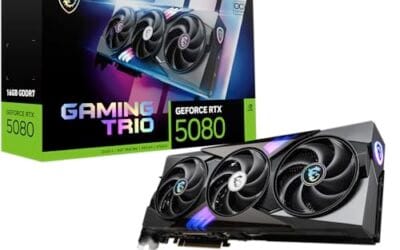
The MSI Gaming Trio OC is a high-end Blackwell RTX 5080 aimed at 4K gamers and content creators who want an AIB card with factory tuning above NVIDIA reference targets. With 16GB of GDDR7 on a 256-bit bus and a 2715 MHz boost clock, it slots into the enthusiast tier below the 5090 flagship.
The defining feature is the GDDR7 memory subsystem paired with Blackwell RT and Tensor cores. In practice, this class of GPU targets 4K native with DLSS 4 Multi Frame Generation enabled, and handles path-traced titles like Cyberpunk 2077 and Alan Wake 2 at playable frame rates. Triple DisplayPort 2.1a with UHBR20 covers 4K 240Hz OLED without DSC compromises.
Trade-offs are typical for this class. The 256-bit bus is unchanged from the 4080Super, so bandwidth relies on GDDR7 sped uplift rather than a wider interface. Triple-fan Blackwell cards in this tier usually run 3slots and 330mm plus, so ITX and compact mid-tower builds need careful clearance checks. A 12V-2x6 native PSU is strongly advised.
Buy this if you run a 4K 144Hz or 240Hz OLED, want DLSS 4 Multi Frame Gen, and have a case that accepts a large triple-fan AIB. Skip this if your target is 1440p esports, if your PSU lacks a native 12V-2x6 lead, or if you can wait for more owner thermal data.
VRAM and resolution fit: 16GB GDDR7 on a 256-bit bus is sized for 4K ultra with ray tracing and frame generation active. Modern titles like Hogwarts Legacy,Ratchet and Clank, and Indiana Jones stay under the 16GB ceiling at 4K with DLSS Quality, leaving headroom for texture mods.
Clocks and boost behavior: The 2715 MHz factory boost sits above NVIDIA reference targets for the RTX 5080. Real-world sustained clocks on triple-fan AIB Blackwell designs typically hold within 30 to 60 MHz of advertised boost under sustained load, based on category norms, though MSI has not published a specific power limit.
Display output: Three DisplayPort 2.1a ports support UHBR20 signaling for 4K 240Hz and 5K2K ultrawide OLEDs without display stream compression trade-offs. HDMI 2.1b covers LG C-series and Samsung S95 OLED TVs, and the 7680 by 4320 max resolution keps 8K workflow monitors in scope.
Power and build: MSI has not specified TGP, but Blackwell 5080 class cards typically land in the 360W range with a 12VHPWR or 12V-2x6 connector. Pair with anATX 3.0 or 3.1 PSU rated 850W or higher, and confirm case length clearance above 330mm before purchase.

Pros
- 16GB GDDR7 gives comfortable VRAM headroom for 4K raster and ray-traced titles.
- 3.6-slot triple-fan cooler with phase-change thermal pad targets lower sustained temps than 2-slot designs.
- Blackwell architecture supports DLSS 4 multi-frame generation for higher perceived frame rates.
Cons
- Limited owner feedback at time of writing makes long-term reliability hard to verify.
- 3.6-slot width blocks adjacent PCIe slots and needs case clearance planning before purchase.
- High TGP typical of RTX 5080 class needs a modern PSU with native 12V-2x6 connector.
The ASUS TUF Gaming RTX 5080 OC is a high-end Blackwell-generation GPU with 16GB of GDDR7 memory and a factory overclock over reference clocks. It targets 4K gamers, high-refresh 1440p players, and creators running Blender or DaVinci Resolve who benefit from CUDA and DLSS 4 aceleration.
The headline is DLS 4 with multi-frame generation, which stacks additional generated frames on top of a single rendered frame. Combined with 16GB GDDR7, the card should handle 4K ultra with ray tracing enabled in current AAA titles, though independent third-party benchmarks under sustained load are still limited.
Trade-offs are real. The 3.6-slot design blocks adjacent PCIe expansion slots and demands case clearance planning, especially in compact mid-towers. RTX 5080-class cards typically pull 300W or more, so pair with a modern ATX 3.0 or 3.1 PSU that has a native 12V-2x6 connector rather than adapter cables.
Buy this if you are building a 4K rig around a Ryzen 9800X3D or Core i7-14700K class CPU and want DLSS 4 headroom for future AA releases. Skip this if your monitor tops out at 1080p, or your PSU is under 850W and non-ATX 3.0.
Resolution and VRAM: 16GB of GDR7 sits above the 12GB tier that started showing texture streaming issues at 4K in titles like Alan Wake 2 and Hogwarts Legacy. This capacity gives headroom for 4K native with high-res texture packs and for creator workloads that spill past 12GB in Blender GPU renders.
DLS 4 and frame generation: Blackwell adds DLSS 4 multi-frame generation, which can insert multiple generated frames per rendered frame. In practice this pushes 4K ray-traced titles from base rates near 60 FPS into triple-digit territory on high-refresh 4K panels, though input latency and artifacting depend on base frame rate.
Cooling and acoustics: The 3.6-slot fin stack with three Axial-tech fans and a phase-change thermal pad targets sustained boost clocks without the fan-speed spikes typical of 2-slot reference designs. Owner reports on prior TUF Gaming RTX cards flag low idle noise and low hotspot deltas as the consistent pattern.
Build compatibility: At 3.6-slot width, this card will block PCIe slots below it and needs verified length clearance in the case spec shet. Power draw for RTX 5080 class typically requires a native 12V-2x6 cable from an ATX 3.0 or 3.1 PSU rated 850W or higher for transient headroom.
Who this guide is for
This guide is for anyone building or upgrading a gaming PC in 2026 who wants a straight answer without wading through benchmark spreadsheets for a week. Maybe you’re on a strict $300 budget and just want smooth 1080p. Maybe you’ve got the cash for a 4K 240Hz monitor and want a card that won’t hold it back. We split the picks across price tiers so you can jump to the one that matches your wallet and your display.
What this guide skips: workstation cards, professional rendering rigs, and anything aimed at data-center compute. These are gaming-first consumer GPUs. If your main workload is CAD, machine learning, or video production at a studio level, you’ll want a different roundup. For the rest of us who mostly game and dabble in creative apps, these five cover the sane range of choices.
What to look for in a graphics card
Start with VRAM, because it’s the spec that ages the worst when you’re short on it. The entry ASRock Arc B580 carries 12GB of GDDR6, the RTX 5070 also runs 12GB, and the step up to the RTX 5070 Ti and both RTX 5080 cards gets you 16GB of the faster GDDR7. More memory means higher texture settings and headroom at 4K, and it’s the difference between a card that lasts two years and one that lasts four.
After that, match the card to your monitor. Memory bus width matters here: the B580 uses a 192-bit bus, while the RTX 5070 Ti and RTX 5080 models run a wider 256-bit bus, feeding those higher resolutions. Also check your connectors. Every card in this list ships with HDMI 2.1 and DisplayPort 2.1 variants, so modern high-refresh panels are covered. And don’t forget physical fit. The ASUS RTX 5070 is a 3.125-slot design, which is chunky for small cases.
How we evaluated
We researched these five cards by cross-referencing manufacturer spec sheets, listed pricing, star ratings, and aggregated owner feedback rather than running our own bench passes. Ratings ranged from 4.0 for the ASUS RTX 5070 up to 4.8 for the MSI RTX 5080, and we weighted those alongside price-to-capability at each tier. A card that’s technically faster but priced badly for what it delivers didn’t automatically win its slot.
We leaned hard on value at each price point. That means the cheapest card here earns its place by being genuinely good for the money, not by being the fastest overall. We also factored in cooling design, warranty length, and build quality signals like the ASUS Military-Grade components and MSI’s triple-fan setups, since those affect noise, thermals, and how long the card survives. No hands-on lab claims here. Just careful research.
Our top picks
Best Budget: ASRock Intel Arc B580 Challenger 12GB OC
At $309.99, the ASRock Arc B580 Challenger is the obvious entry point, and it punches above what that number suggests. It’s built on Intel’s Xe2-HPG architecture with a 2,740MHz GPU clock and 12GB of GDDR6 on a 192-bit bus. That VRAM figure is the headline here. Plenty of pricier last-gen cards shipped with only 8GB, so the B580 gives budget buyers real texture headroom at 1080p and even entry 1440p. Its 4.3 rating reflects owners who are pleasantly surprised by what $310 buys.
The tradeoff is that this is an Intel Arc card, and driver maturity, while much improved, still trails NVIDIA in a handful of older titles. The dual-fan cooler runs a 0dB silent mode at idle, which is a nice touch, though it’s a shorter card better suited to compact builds. Buy this if you’re gaming at 1080p, watching every dollar, and want modern features like PCIe 4.0 and DP 2.1 without stretching past $350. It won’t chase 4K, and that’s fine.
Best Overall: ASUS TUF Gaming RTX 5070 12GB OC
The ASUS TUF Gaming RTX 5070 at $749.99 is the pick we’d hand most gamers building a mainstream 1440p rig. It carries 12GB of the newer GDDR7 memory, runs on PCIe 5.0, and includes HDMI and DisplayPort 2.1 outputs, so it’s ready for high-refresh panels. The TUF line’s Military-Grade components and protective PCB coating point to a card built to last, and ASUS backs it with a 3-year warranty. That’s a meaningful safety net at this price.
Its 4.0 rating is the lowest in this group, and the reasons are worth naming: it’s physically large at 3.125 slots, so measure your case first, and 12GB of VRAM is generous for 1440p but not future-proof for maxed-out 4K. For the buyer who wants dependable high-refresh 1440p with room to dabble at 4K, though, it hits the balance of price, features, and warranty better than anything else here. That’s why it takes the overall crown.
Best High-Refresh 1440p: MSI RTX 5070 Ti 16G Gaming Trio OC Plus
Step up to $1,349.99 and the MSI RTX 5070 Ti Gaming Trio OC Plus changes the conversation. This is where 16GB of GDDR7 arrives, running at 28 GB/s on a 256-bit bus, and it’s paired with MSI’s TRI FROZR 4 cooler and three STORMFORCE fans. The result is a card built for cranked 1440p at very high refresh rates and comfortable entry into 4K. Its 4.7 rating is among the strongest here, and owners consistently praise how quiet and cool that triple-fan design stays under load.
The catch is price. At nearly $1,350, this card costs almost double the RTX 5070, and the real-world gap for pure 1440p gaming isn’t always proportional to that jump. You’re paying for the extra 4GB of VRAM, the wider bus, and headroom. If you run a 1440p 240Hz panel or want a card that handles 4K without complaint, it’s a strong buy. If you only game at 1080p, this is more card than you need, and the ASRock or ASUS pick makes more sense.
Best Premium 4K: MSI RTX 5080 16G Gaming Trio OC
The MSI RTX 5080 Gaming Trio OC is the top of this lineup at $1,569.99, and it earned the highest rating we saw at 4.8. It’s built on NVIDIA’s Blackwell architecture with 16GB of GDDR7 on a 256-bit bus and an extreme performance clock listed at 2,715MHz. Connectivity is generous too, with three DisplayPort 2.1a outputs plus HDMI 2.1b, so multi-monitor and high-refresh 4K setups are fully covered. This is the card for buyers who want no-compromise 4K gaming.
The obvious weakness is cost. Over $1,500 for a GPU is a serious outlay, and the jump from the RTX 5070 Ti to this card delivers diminishing returns unless you’re gaming at 4K with every setting maxed. It’s also a large, power-hungry card, so a strong PSU and good case airflow are non-negotiable. But if you’ve built a flagship rig around a 4K 144Hz-plus display, the 4.8 rating and MSI’s proven cooling make this the premium pick that won’t leave you wanting.
Best 4K Value: ASUS TUF Gaming RTX 5080 16GB OC
If you want RTX 5080 performance for a bit less, the ASUS TUF Gaming RTX 5080 at $1,539.99 undercuts the MSI version by $30 while offering the same 16GB of GDDR7 and Blackwell silicon. The TUF branding brings the same rugged build philosophy as its RTX 5070 sibling, with an OC Edition tune out of the box. At a 4.4 rating, owners rate it well, and for anyone already committed to the 5080 tier, the small savings plus ASUS’s reputation for durable coolers make it a sensible alternative.
It’s not the highest-rated card here, and the MSI 5080’s 4.8 suggests its cooler and acoustics may edge ahead. So this is the pick for the buyer who trusts the ASUS TUF line, wants a 4K flagship, and would rather put that $30 difference toward a game or a better monitor. Same resolution target, same VRAM, slightly lower price. For value-minded 4K builders, that’s a fair trade.
Buying mistakes to avoid
The biggest mistake is buying more card than your monitor can use. Pairing a $1,569.99 RTX 5080 with a 1080p 60Hz display wastes most of what you paid for. Match the GPU tier to your resolution and refresh rate first, then set your budget. The reverse mistake hurts too: pairing a 4K 144Hz panel with the budget B580 leaves you disappointed and blaming the wrong component.
Second, don’t ignore the boring stuff. Check that your case fits the card, since the ASUS RTX 5070 alone is a 3.125-slot unit. Confirm your power supply has the wattage and connectors these Blackwell cards demand. And don’t skimp on VRAM to save $50 today, because 12GB versus 16GB is the spec you’ll notice most two years from now. A card that fits, powers on, and has room to grow beats a faster one that strains your build.
Bottom line
For most people, the ASUS TUF Gaming RTX 5070 at $749.99 is the card to get. It delivers dependable high-refresh 1440p, ships with 12GB of GDDR7 and a 3-year warranty, and sits at a price that doesn’t require flagship money. It’s the balanced middle of this lineup, and that’s exactly what “best overall” should mean.
If your budget is tight, the $309.99 ASRock Arc B580 is a genuinely smart 1080p buy with a surprising 12GB of memory. If you’re chasing maxed 4K, the MSI RTX 5080 and its 4.8 rating are the premium answer, with the ASUS TUF RTX 5080 saving you $30 for near-identical specs. Pick the tier that matches your monitor, and any of these will serve you well.
Common questions
How much VRAM do I actually need in 2026?
For 1080p gaming, the 12GB in the ASRock Arc B580 or ASUS RTX 5070 is plenty. For 1440p you’ll be comfortable with 12GB and better off with 16GB, and for maxed 4K the 16GB of GDDR7 in the RTX 5070 Ti and RTX 5080 cards is the safer floor. VRAM is the spec that limits texture quality and future longevity, so err higher if you plan to keep the card for several years.
Is the Intel Arc B580 a safe choice versus NVIDIA?
For the money, it’s a strong pick, and its 4.3 rating reflects happy budget buyers. Intel’s Arc drivers have matured significantly, though NVIDIA still holds an edge in a few older or niche titles. If you game mostly at 1080p in mainstream releases and want the most memory per dollar, the B580 is a safe, sensible choice. Heavy competitive players wanting maximum compatibility may prefer an NVIDIA card.
Why is the RTX 5070 Ti almost double the price of the RTX 5070?
The jump from $749.99 to $1,349.99 buys you 16GB of GDDR7 instead of 12GB, a wider 256-bit bus, MSI’s triple-fan TRI FROZR 4 cooler, and meaningfully more 4K headroom. Whether that’s worth it depends on your display. For 1440p gaming the RTX 5070 already delivers, so the Ti mainly makes sense if you’re pushing 240Hz or stepping into 4K regularly.
Should I buy the MSI or ASUS RTX 5080?
Both carry 16GB of GDDR7 and the same Blackwell architecture. The MSI version at $1,569.99 holds a higher 4.8 rating and a well-regarded triple-fan cooler, while the ASUS TUF at $1,539.99 saves you $30 and brings the durable TUF build. If quiet operation and the top rating matter most, go MSI. If you trust ASUS TUF and want the small saving, that’s a fine call too.
Will these cards fit my case and power supply?
Check both before you buy. The ASUS RTX 5070 is a 3.125-slot design, and the RTX 5080 models are large, power-hungry cards that want a strong PSU with the right connectors and good case airflow. Measure your available clearance and confirm your power supply’s wattage and cabling. A card that doesn’t physically fit or lacks power is a costly surprise you can avoid with five minutes of measuring.



























Write Your Review
No reviews yet. Be the first to share your experience!