Mechanical keyboards have quietly become one of the best-value categories in PC peripherals this year. Hot-swap sockets, once a $200+ enthusiast feature, now show up at $130. Wireless mechanical with multi-device pairing? It’s standard at $80. Premium switches that used to demand $80 specialty orders, like Cherry MX or Gateron clones, now ship pre-lubed from the factory for an extra $20. We’ve pulled together five deals that show how far the market has moved. Each one earns its slot for a different reason, so there’s something here whether you’re building a budget rig or chasing tactile perfection.
TL;DR – the deal in one line
The Logitech G413 SE at $80 is the no-nonsense full-size budget pick with an aluminum top plate that shouldn’t exist at this price. The ASUS ROG Strix Scope II X at $130 delivers hot-swap sockets, pre-lubed Snow V2 linears, and PBT keycaps for less than a custom kit. Logitech’s MX Mechanical at $160 owns the productivity desk with Easy-Switch pairing. SteelSeries Apex 5 lands at $99 with hybrid blues and an OLED smart display that’s part gimmick, part fun.
What you get
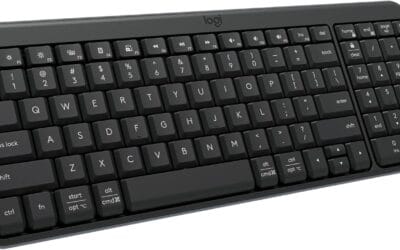
The G413 SE keeps things stripped back. You’re getting an aluminum-magnesium alloy top, tactile mechanical switches, USB-C detachable cable, white LED backlighting, and a full-size layout with media keys. No software bloat, no RGB, just a board that types well.
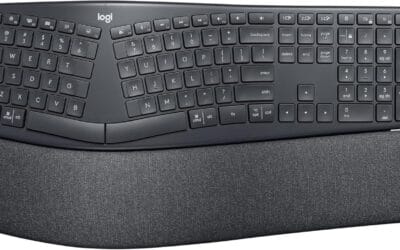
The MX Mechanical brings Logitech’s tactile quiet switches, low-profile backlit keycaps, Bluetooth and USB-C connectivity, and Easy-Switch for jumping between three paired devices. It’s built for office desks where you’d otherwise hear clack complaints.
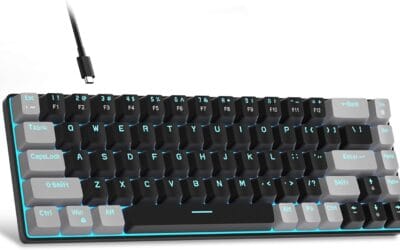
The Alto Keys K98M runs clicky switches over a vibration-absorbing gasket-mounted plate. USB-C charging, wireless-first design, 96% layout that keeps a numpad without the empty TKL real estate.
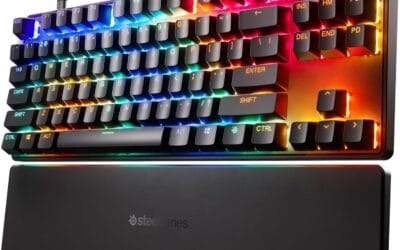
SteelSeries’ Apex 5 pairs hybrid blue switches (clicky upstroke, linear downstroke) with per-key RGB, an aluminum alloy frame, and an OLED smart display that shows discord pings, Spotify track info, and CPU temps.
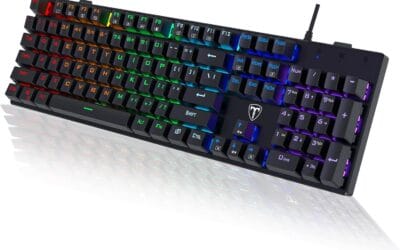
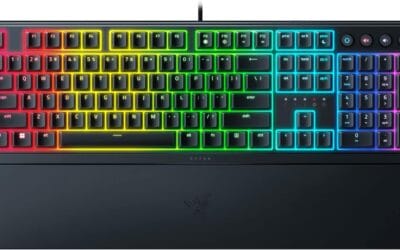
The ROG Strix Scope II X 100% goes the full distance: hot-swap sockets, factory pre-lubed Snow V2 linear switches, double-shot PBT keycaps, full RGB, dampening foam layers, and dedicated Mac and PC support out of the box.

SteelSeries Apex 5 Hybrid Mechanical Keyboard, OLED Display, Per-Key RGB, Aluminum Frame
Pros
- Hybrid blue switches rated to 20 million keypresses with tactile click and membrane smoothness in one mechanism.
- OLED display shows Discord notifications and game data without requiring a second screen or alt-tab.
- Aluminum alloy frame adds meaningful rigidity over plastic boards; resists flex during heavy typing sessions.
- Included magnetic wrist rest attaches and detaches cleanly, providing full palm support without extra purchase.
Cons
- Hybrid switch feel sits between membrane and mechanical; purists wanting true MX-style actuation will find it a compromise.
- IP32 rating covers only light spray and tilt, not spills; do not confuse with full liquid resistance.
The SteelSeries Apex 5 is a full-size hybrid mechanical gaming keyboard sitting in the mid-range tier. Its defining feature is a proprietary hybrid blue switch that combines a membrane layer with a tactile mechanical mechanism, targeting gamers who want audible click feedback without committing to a fully traditional mechanical board.
The OLED smart display is the most distinctive hardware addition at this tier. It surfaces Discord messages, game telemetry, and custom GIFs through SteelSeries GG software without requiring a secondary device. Owner reports broadly confirm the display works reliably after initial software setup, though GG software can be slow to initialize on boot.
The aluminum alloy frame is a genuine differentiator versus plastic competitors. It resists keyboard flex during hard keypresses, which matters during extended gaming sessions. The IP32 water resistance covers incidental spray from a 15-degree angle, not direct liquid spills, so the rating should not be read as spill-proof protection. Three-way cable routing keeps the desk tidy but the cable itself is not detachable.
Buy this if you want OLED display functionality and a tactile hybrid switch in a rigid aluminum chassis without sourcing a wrist rest separately. Skip this if you require a fully traditional mechanical switch mechanism or a detachable USB-C cable, as neither is available on this board.
Switch Type and Layout: The Apex 5 uses SteelSeries proprietary hybrid blue switches across a full-size layout with a numpad. The hybrid mechanism layers a membrane contact beneath a tactile blue switch, producing audible click with an actuation feel that sits noticeably softer than standard Cherry MX Blue switches. Not hot-swappable.
Durability and Resistance: Switches are rated for 20 million keypresses. The frame carries an IP32 water resistance rating, meaning it can handle light spray from up to a 15-degree angle but is not rated for direct spill protection. Users in humid environments or who consume drinks at their desk should treat this as splash mitigation only.
Connectivity and Polling Rate: The keyboard connects via USB and routes through one of three cable-exit channels built into the frame. Polling rate is not specified in source data. The OLED display and per-key RGB run through the same USB connection with no wireless option available.
Build and Accessories: The aluminum alloy frame reduces chassis flex compared to standard ABS plastic boards at this tier. The magnetic wrist rest attaches along the front edge and covers full palm depth. Dimensions are 900 x 300 x 4 millimeters, making this a large-footprint board that requires a full-size mousepad or wide desk surface.

ASUS ROG Strix Scope II X Full-Size Hot-Swap Mechanical Keyboard with NX Snow V2 Switches
Pros
- Hot-swap PCB supports both 3-pin and 5-pin switches for broad aftermarket compatibility.
- NX Snow V2 ships pre-lubed with dust-proof wall-stem design, reducing switch wobble compared to V1.
- Integrated foam layer and pre-lubed stabilizers address the most common acoustics complaints at this tier.
- Detachable wrist rest and aluminum top plate included at this price point, where competitors often charge extra.
Cons
- Wired USB only with no wireless option, unlike competing boards in the same tier that offer 2.4 GHz.
- Armoury Crate software is required for full macro and profile customization, and owner reports consistently flag it as bloated.
The ROG Strix Scope II X is a high-end, full-size wired mechanical keyboard built around ASUS's second-generation NX switch platform. It targets PC gamers and hybrid typist-gamers who want a 100% layout with a numpad, hot-swap flexibility, and factory-tuned acoustics without disassembling the board themselves.
The defining feature is the hot-swappable PCB paired with pre-lubed NX Snow V2 linear switches. The V2 revision adds an LED lens for better RGB diffusion and tightens the wall-stem design to reduce lateral wobble, a noticeable improvement over V1 based on owner reports. Users can drop in third-party 3-pin or 5-pin MX-footprint switches without soldering.
The honest trade-off at this tier is connectivity: this board is wired USB only. Competing keyboards at a similar price offer 2.4 GHz wireless alongside USB. The aluminum top plate adds rigidity and heft, which is a positive for desk stability but means this is not a portable board. Armoury Crate is required for macro programming, and owner feedback consistently flags it as resource-heavy.
Buy this if you want a full-size hot-swap board with out-of-box acoustic tuning and plan to stay wired at a fixed desk. Skip this if you need wireless flexibility or prefer a leaner software ecosystem than Armoury Crate provides.
Switch Specs: ROG NX Snow V2 are linear switches with the V2 revision's dust-proof wall-stem and pre-applied factory lube. The board also supports NX Storm clicky switches as an alternative. Actuation force and travel distance are not specified in the source data.
Layout and Build: Full 100% layout with numpad, aluminum top plate, and USB-C detachable cable. Three-position tilt adjustment is included. PBT doubleshot keycaps provide shine resistance and a slightly textured surface that holds up better under prolonged use than ABS.
Acoustics: Integrated sound-dampening foam sits beneath the PCB to absorb case resonance. Stabilizers on longer keys ship pre-lubed from the factory, which directly addresses the ping and rattle that untreated stabilizers produce. Owner feedback at this tier generally confirms the acoustics improvements are audible versus untreated boards.
Software and Hotkeys: F1 through F5 are pre-mapped to Xbox Game Bar and recording functions. A physical multi-function knob controls volume and RGB lighting without requiring Armoury Crate to be running. Full macro remapping requires Armoury Crate software installation.
Why these prices are actually good
Some context helps here. The G413 SE sat at $90 through most of 2024, so $80 is a real cut, not a fake MSRP play. More importantly, aluminum-framed mechanical boards at sub-$80 simply didn’t exist in 2022. You’d pay $120 minimum for the same build quality back then, and you wouldn’t get USB-C either.
The MX Mechanical at $160 isn’t dramatically cheaper than it was two years ago, but Logitech swapped in newer tactile quiet switches that feel meaningfully better. You’re paying flat dollars for an upgraded product, which counts as deflation in this market.
SteelSeries Apex 5 launched at $200 in 2018. It’s now $99. That’s heavy depreciation, sure, but the hardware still works fine and the OLED display hasn’t gotten worse with age. If you want a quirky board with personality, this is bargain territory.
The ROG Strix Scope II X is where the math gets fun. Building a comparable custom keyboard from scratch (hot-swap PCB, pre-lubed switches, PBT keycaps, aluminum case, dampening) runs $200 minimum on r/MechanicalKeyboards parts lists. ASUS is selling the fully assembled product at $130. That’s not a deal, that’s a category reset.
The catch (if any)
Every board on this list has a real limitation. The G413 SE’s backlight is white-only. No RGB, no per-key lighting tricks, and the white isn’t even adjustable in temperature. If you’ve built a themed rig, it won’t blend in.
The MX Mechanical uses tactile QUIET switches, which sounds great until you realize they’ve got noticeably less bump feedback than regular tactiles. Touch typists love them; gamers who want clear actuation feedback often don’t.
The Alto Keys K98M is wireless-only. There’s no USB cable mode for emergencies, so when battery dies mid-deadline you’re hunting for a charger. Battery anxiety is real on this one.
The Apex 5’s OLED display is novel for about two weeks. After that, it becomes a small distracting screen you’ll either ignore or disable. The board’s still good without it, but you’re paying for a feature that fades.
The ROG Strix Scope II X is full-size with a numpad. If you wanted TKL, 75%, or 65% to reclaim mouse space, this isn’t your board. It’s a big footprint and it knows it.
Where to grab it
Amazon’s the most reliable Logitech retailer right now. Pricing’s consistent and shipping’s fast, but don’t buy from third-party sellers on the Logitech listings. Counterfeit boards are a known issue and the difference isn’t obvious until you’ve used the real thing.
Best Buy occasionally matches the ROG Strix Scope II X price and throws in a warranty extension on PC bundles. Worth checking before you commit to Amazon.
Newegg sometimes bundles the SteelSeries Apex 5 with prebuilt PCs, which can drop the effective price below $80. If you’re shopping for a full rig anyway, that’s the play.
Similar deals worth a look
If none of these hit, two alternatives deserve a quick mention. The Keychron K series (K2, K8, K10) ranges from $90 to $130 with hot-swap sockets and the kind of community support that means YouTube tutorials exist for everything. They’re the gateway drug for custom keyboard tinkering.
For the enthusiast crowd, the GLORIOUS GMMK Pro 75% sits around $170 and brings a CNC-machined aluminum case, rotary knob, gasket-mounted plate, and full QMK/VIA firmware support. It’s the closest thing to a custom build you’ll get without soldering, and it’s worth the stretch if you’ve caught the bug.