

Buy the Radeon RX 6600 XT if it costs meaningfully less and you mostly play at 1080p with ray tracing off. Buy the GeForce RTX 3060 12GB if the two cost about the same, or if you’ll use DLSS or want more room for high-resolution textures. Both can still serve a 1080p build, but new stock can be expensive enough to make either one hard to justify.
The easy mistake is buying by the name alone. NVIDIA sold desktop RTX 3060 cards with 8GB and 12GB, and AMD’s plain RX 6600 is a slower card than the XT. The buying advice here compares the desktop RX 6600 XT 8GB with the desktop RTX 3060 12GB. Before ordering, check that the exact board fits your case and that your power supply has the connector it requires.
RX 6600 XT vs. RTX 3060 at a glance
| What to compare | Radeon RX 6600 XT 8GB | GeForce RTX 3060 12GB |
|---|---|---|
| Architecture | AMD RDNA 2 | NVIDIA Ampere |
| Memory | 8GB GDDR6, 128-bit bus | 12GB GDDR6, 192-bit bus |
| Reference graphics card power | 160W typical board power | 170W graphics card power |
| Vendor system PSU guidance | 500W | 550W |
| Native raster FPS at 1080p / 1440p | 62.7 / 40.7 | 61.5 / 41.9 |
| Upscaling in supported games | AMD FSR | NVIDIA DLSS Super Resolution or AMD FSR |
The FPS figures come from the same 11-game raster suite. The power figures are vendor ratings. Factory-overclocked boards can have different power specifications. Tom’s Hardware benchmark hierarchy, AMD specifications, and NVIDIA specifications.
What each desktop card offers
Radeon RX 6600 XT
AMD built the RX 6600 XT around 32 compute units and 32MB of Infinity Cache. Its 8GB of memory can be enough to run the games you already play at 1080p. Texture-heavy releases and large texture mods are where you’ll want to watch your settings. You can usually lower texture quality one step while keeping the game’s other settings where they are, which is a useful first move when memory is tight.

GeForce RTX 3060 12GB
The RTX 3060 12GB adds 4GB of memory over the Radeon. That extra room is most useful when the assets a game needs take up more than 8GB. If your games already fit comfortably in 8GB, the extra capacity alone won’t lift frame rates. NVIDIA also offers an 8GB desktop 3060 with a 128-bit bus, so check the listing photos or exact model code before treating an offer as the 12GB card in this comparison.
Gaming performance at 1080p, 1440p, and 4K
At 1080p, a near tie. The RX 6600 XT averaged 62.7 FPS at native 1080p in the Tom’s Hardware raster suite. The RTX 3060 12GB averaged 61.5 FPS. The gap is about 2%, small enough that I’d buy on price or features instead of that average. For a competitive game where you run a low preset, look up results for the specific game and a CPU close to yours. An older CPU can limit how much extra performance a GPU swap gives you at 1080p.
At 1440p, more reason to look at the 12GB card. The same suite puts the 3060 at 41.9 FPS versus 40.7 FPS for the 6600 XT. That’s still only a small difference, and both averages sit under 60 FPS at the listed settings. If you’re moving from a 1080p display to 1440p, expect to adjust graphics settings in demanding games. When stutter appears with high-resolution textures, try dropping the texture preset first. When frame rates are consistently low, reducing shadows, reflections, or render resolution is a better starting point. For more on memory limits, see our guide to what VRAM does in a gaming PC.
At native 4K, a steep drop on both. The 3060 led 22.2 FPS to 17.3 FPS in that raster suite. Older and lighter games can still work at 4K, but neither card is a good purchase for demanding games at that resolution. If you use a 4K TV with one of these cards, try a lower in-game render resolution or a quality upscaling mode before turning every setting down. Raster performance by resolution.

Ray tracing, upscaling, and streaming
The 3060’s bigger performance advantage shows up with ray tracing. In the same publication’s separate ray-tracing suite, it averaged 30.4 FPS at 1080p versus 17.2 FPS for the 6600 XT. A meaningful lead. The absolute numbers matter just as much. If you want to enable ray-traced reflections in a demanding game, start with modest ray-tracing settings and see how the game feels with upscaling. Either card can make more sense with the effect off if you care most about responsiveness. Ray-tracing benchmark table.
The 3060 supports DLSS Super Resolution in games that offer it. NVIDIA’s support chart shows that its DLSS Frame Generation feature requires a newer GPU. Games with a compatible FSR implementation can offer upscaling on both cards. At 1080p, I’d try the Quality preset first and compare it with native output in motion. Pay attention to thin geometry and small details that are easy to miss in a still screenshot. NVIDIA’s DLSS feature chart and AMD’s FSR 3.1 compatibility guidance.
For streaming on a single PC, look at the encoder your software can use. OBS supports NVIDIA NVENC and AMD AMF on compatible hardware. If your existing OBS setup relies on NVENC, the 3060 lets you keep that workflow. For variable refresh, check which mode the exact monitor supports over the input you’ll use. A FreeSync label alone doesn’t tell you whether that specific monitor and input are validated for G-SYNC Compatible operation. OBS hardware encoding documentation.
Power, case clearance, and motherboard fit
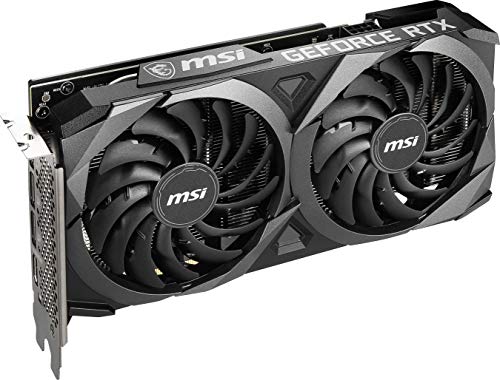
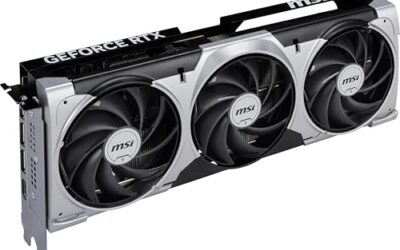
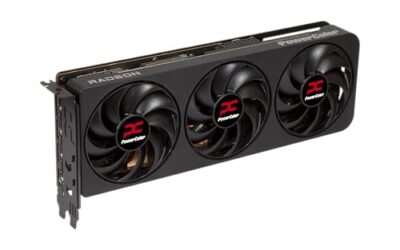
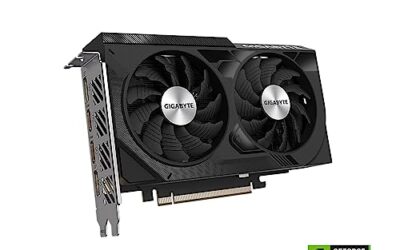
Check the board partner’s numbers when building around a tight power or space budget. The featured Sapphire NITRO+ RX 6600 XT is 240mm long, occupies 2.2 slots, and carries a 180W board rating. The MSI Ventus 2X 12G OC V1 is 235mm long, 42mm thick, and rated at 170W. Both call for one 8-pin PCIe power connector, and their vendors recommend 500W and 550W system power supplies, respectively. If there’s a front radiator or drive cage, measure the space that actually remains and leave room for the power cable to bend.
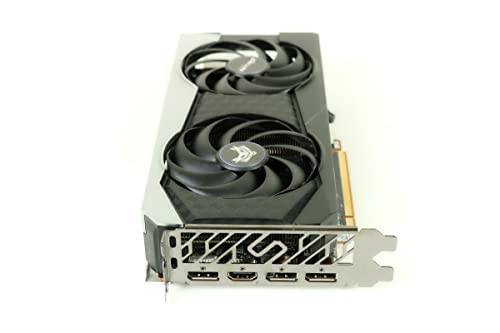
The Sapphire uses a PCIe 4.0 x8 link in a full-length slot. It’ll run on a compatible PCIe 3.0 board, but at PCIe 3.0 x8 link speed. If you have an older PC, look up results on a comparable platform for the games you care about before assuming the newest platform’s averages will carry over. Use the motherboard manual to identify the main graphics slot, especially if the board has a second full-length slot with fewer wired lanes. Sapphire board specifications and MSI board specifications.
What’s a fair price for either card?
On November 26, 2026, the new U.S. Amazon offers shown here were $379.00 for the Sapphire NITRO+ RX 6600 XT and $413.99 for the MSI Ventus RTX 3060 12GB. That $34.99 gap favors the Radeon for a buyer who’s choosing strictly between these two listings for conventional 1080p gaming. I’d compare both with the current 1080p graphics card options before paying either price. The two offers describe specific boards and sellers at a point in time. Check the delivered price when you shop.
If you’re shopping used, compare condition and the return window along with price. Confirm the memory capacity and exact model in the seller’s screenshots or label photos, and ask whether all the display outputs work. A local card with a clear return arrangement may be worth more to you than a slightly cheaper card that’s difficult to return. If you’re replacing a working 6600 XT or 3060 12GB, the 1080p results are close enough that I’d save that money for a larger upgrade.
Which graphics card should you buy?
- For 1080p without ray tracing, choose the cheaper card. A meaningful discount on the 6600 XT makes it the better fit for this use.
- For texture mods, DLSS games, or an existing NVENC workflow, choose the RTX 3060 12GB. Those are reasons to pay a modest premium when you know you’ll use the feature.
- For demanding games at 1440p high refresh or native 4K, shop a faster tier. Both cards tend to need substantial settings compromises in that role.
For the typical 1080p build I’d take a discounted 6600 XT. At similar prices, I’d take the RTX 3060 12GB for its extra memory and wider choice of upscaling options. Check the suffix, memory capacity, and board dimensions before you commit.
Frequently asked questions
What’s the NVIDIA equivalent of the plain RX 6600?
The desktop RTX 3060 12GB is in a similar class, though it’s faster in the cited modern raster suite. The plain RX 6600 averaged 51.9 FPS at 1080p compared with 61.5 FPS for the 3060 and 62.7 FPS for the 6600 XT. AMD lists 28 compute units and 132W typical board power for the RX 6600, versus 32 units and 160W for the XT. Consider the plain 6600 if it’s substantially cheaper or if your build benefits from its lower power rating. AMD RX 6600 specifications.
Does the same advice apply to an RTX 3060 laptop?
Laptop performance depends on the GPU power limit and cooling of the specific notebook, so use results for the laptop model you’re buying. The frame rates, power ratings, and buying advice above are for desktop cards. Even within one laptop GPU name, different chassis can deliver different results.
























Write Your Review
No reviews yet. Be the first to share your experience!