

The Gigabyte GeForce RTX 4060 WINDFORCE OC 8G is the first model I’d look for if I needed an RTX 4060. At 192 mm long, it fits many shorter cases, and its two HDMI outputs are handy for a monitor and a TV. For a case that stops short of 192 mm, start with the 163 mm ZOTAC Gaming GeForce RTX 4060 Solo.
Price matters more than the badge on the shroud. On November 25, 2026, the new U.S. Amazon offers we found for these five cards ran from about $600 to $999. NVIDIA introduced the RTX 4060 at $299 in 2023, and a newer RTX 5060 listing surfaced below the cheapest 4060 in our search. At those prices, I’d pass on all five. Use this shortlist to identify a board that fits if you find a much lower-priced offer.
Same GPU, different fit. The cards below share 8 GB of GDDR6, so the deciding factors are case clearance, the display ports you’ll use, and how much the seller wants for that exact model.


RTX 4060 cards at a glance
| Pick | Graphics card | Defining spec | Best for | Main trade-off |
|---|---|---|---|---|
| First choice | Gigabyte WINDFORCE OC 8G | 192 mm, two HDMI ports | A compact tower or a monitor plus TV | Only two native DisplayPort outputs |
| Shortest | ZOTAC Gaming Solo 8GB | 163 mm, one fan | A short GPU bay in a small-form-factor build | Check bracket, cable, and fan clearance separately |
| Three DisplayPorts | MSI VENTUS 2X BLACK 8G OC | 199 mm, three DisplayPort outputs | Several DisplayPort monitors | One native HDMI output |
| White build | ASUS Dual EVO White OC 8GB | 227.2 mm, 2.5 slots | A white case with room below the GPU | Color premium and added thickness |
| Large cooler | ASUS ROG Strix OC 8GB | 311.4 mm, 3.1 slots | A roomy case and a preference for the Strix design | Longest and thickest pick here |
Gigabyte GeForce RTX 4060 WINDFORCE OC 8G
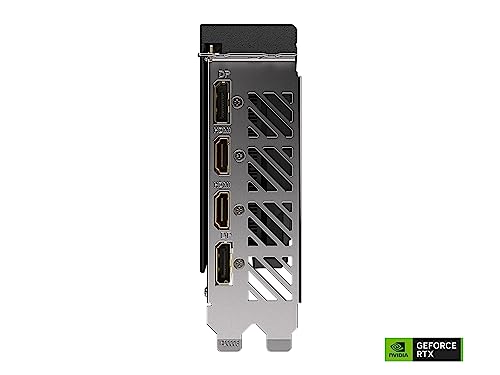
Start here if you need a straightforward full-height desktop card. The WINDFORCE OC measures 192 × 120 × 41 mm, uses one 8-pin PCIe power connector, and has two fans. Gigabyte lists a 2,475 MHz core clock against its quoted 2,460 MHz reference figure. That’s a 15 MHz difference on the spec sheet, so there’s little reason to pay extra for the OC suffix alone.
The useful detail is the port mix. You get two HDMI 2.1a and two DisplayPort 1.4a outputs. If your desk monitor and living-room TV both already use HDMI, you can connect both directly. For a three-monitor desk with DisplayPort on every screen, the MSI below gives you a third native DisplayPort and saves you from changing the cable plan.
Gigabyte lists a 450 W recommended PSU for this model. Check that against the rest of your build, especially if you’re adding the GPU to an older prebuilt with a proprietary supply. Look for an available PCIe power lead before placing the order. I’d pick this card when it fits and the price is competitive with other 4060s. It had the lowest new offer in this group on the day we checked, and that offer was still too high.
ZOTAC Gaming GeForce RTX 4060 Solo 8GB
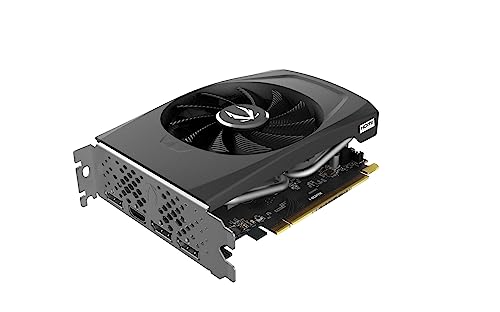
Only 163 mm end to end. The Solo is the card to measure for a small-form-factor build where a front fan, drive cage, or power supply eats into the GPU bay. It’s 29 mm shorter than the WINDFORCE, a difference that can decide whether you can slide the board in without rearranging the case.
The Solo pairs a single fan with the same 8 GB of GDDR6 found on the other cards here. That layout makes sense when length is the hard limit. If the GPU sits behind a solid side panel or a bundle of cables, plan how air will reach that fan before you settle on the case layout. Fan count alone gives you little basis to predict the noise in your build.
Short cases come in several shapes. Confirm the case accepts the card’s bracket height and cooler thickness, and check the clearance you’d have with the power lead attached. In a slim office desktop that specifically requires a low-profile bracket, shop for a model explicitly sold with that bracket. In a roomier tower, the Solo’s reduced length is worth paying for only if you can use the extra space.
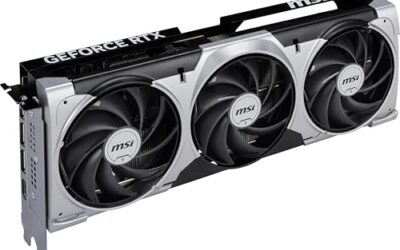
MSI GeForce RTX 4060 VENTUS 2X BLACK 8G OC
MSI’s VENTUS 2X BLACK fits a desk where DisplayPort is already the standard. Its three DisplayPort 1.4a outputs and one HDMI output give you another direct connection for a third DisplayPort screen. The card measures 199 × 120 × 41 mm, uses one 8-pin connector, and carries a 550 W PSU recommendation.
Look carefully at the two clocks in the listing. MSI specifies a 2,490 MHz boost and a 2,505 MHz Extreme Performance setting through MSI Center. The higher figure describes that software setting. It doesn’t tell you what frequency the card will sustain during a long game, and the change is too small to justify a big price difference by itself.
MSI also documents Zero Frozr, which stops the fans at sufficiently low temperatures. That’s useful if you want the GPU fans to sit idle during lighter desktop work. It gives you no measured noise figure for a game. If the case accommodates both this and the Gigabyte and you need only one display connection, let the total price decide. If you need two native HDMI outputs, go with the Gigabyte when the prices are close.
ASUS Dual GeForce RTX 4060 EVO White OC Edition 8GB
For a white build, I’d look at the ASUS Dual EVO White OC if a matching shroud is worth a modest premium to you. ASUS specifies dimensions of 227.2 × 123.24 × 49.6 mm, a 2.5-slot design, and one 8-pin connector. Its listed boost clocks are 2,505 MHz in default mode and 2,535 MHz in OC mode.
Take the EVO label seriously when you’re shopping for a tight case. Retailers may surface the original ASUS Dual White, the EVO White, and a 4060 Ti White in the same search. Match the listing to DUAL-RTX4060-O8G-EVO-WHITE before using these measurements. A sideways-mounted card may also sit closer to the case panel than you expect. Check the mount and the available space around the fans.
White parts can tie a build together, but the 8 GB memory capacity is the same as the plain black cards here. If the seller wants a substantial premium for this finish, see what the same money buys in our white graphics card buying guide. That’s especially useful if you’re buying the GPU and case together and can choose a different size.
ASUS ROG Strix GeForce RTX 4060 OC Edition 8GB
The Strix is the big card on this shortlist. ASUS describes a 311.4 mm board, a 3.1-slot cooler with three fans, and a single 8-pin power connection. It makes sense to compare this model if you want the Strix design and have already set aside space for a large cooler in an open tower.
Measure with the front radiator and fans installed. A case with enough advertised GPU length can still run out of space after those parts move the front obstruction closer to the expansion slots. At this thickness, also look at the slot positions for a capture card or network adapter, plus the space between the cooler and a bottom-mounted fan.
This is the hardest of the five cards to make a value case for. The extra space buys a different cooler and shroud, and the GPU still has 8 GB of memory. We don’t have comparable noise or temperature measurements for these five models, so the Strix gets no acoustic ranking here. Choose it only at a competitive price with those dimensions and that design in mind. For a high-priced listing, put the money toward a different GPU tier.
How We Evaluated
We used NVIDIA’s RTX 4060 specifications for the shared GPU features and board-maker documentation for dimensions, ports, connectors, and clock modes. Then we checked U.S. Amazon offers for the exact new desktop models. Our fit picks weigh the actual size and connector layout ahead of small factory clock differences. The prices reflect the November 25, 2026 snapshot and can change with the seller.
We treated factory clocks as specifications and cooler design as a compatibility consideration. Those details support advice about what fits and plugs in. Comparing real frame rates, fan noise, or temperatures would require comparable measurements across cards and systems.
How to choose an RTX 4060
What can you buy for the same total price?
Compare the delivered price, including tax and shipping, with a compatible RTX 5060 or another current option. A current listing is useful only if the card fits and the seller’s terms work for you. A compact model can still make sense for a build with a strict length limit, particularly if replacing the case would also mean moving the power supply or radiator. For a new build with room to choose, the graphics card guide by price tier is a better starting point when older inventory costs more.
How much space is usable with the PC assembled?
Measure from the rear expansion bracket to the nearest obstruction. Then check thickness and the space between the top edge of the card and the side panel. Allow room to route the power lead without pinning it against the case. Write those three limits down before comparing models. A case listing that quotes only maximum GPU length leaves two dimensions for you to verify.
Does the existing PSU have the right cable?
NVIDIA lists 115 W total graphics power for the desktop RTX 4060. That’s a card-level figure. Manufacturer PSU recommendations account for the rest of the system and vary across models. Check the exact card’s requirement, your CPU and other components, and the type of PCIe cable your PSU provides. For an OEM desktop, look up the actual supply and chassis specifications, since similar-looking configurations can ship with different parts.
Will 8 GB suit your games and settings?
For 1080p, look at the specific games you play and how willing you are to adjust textures or ray tracing. High-resolution texture packs and higher output resolutions can put more pressure on video memory. A larger 4060 cooler won’t change the 8 GB limit. If you’re targeting high texture settings in demanding games at 1440p, compare cards with more memory before paying a premium for any model here. Our Intel Arc versus RTX 4060 comparison covers trade-offs outside NVIDIA’s lineup.
Frequently asked questions
Is the RTX 4060 Ti the same card with a better cooler?
The 4060 Ti is a separate GPU with 4,352 CUDA cores versus 3,072 on the non-Ti desktop card. NVIDIA lists 8 GB and 16 GB versions of the Ti. Several partners reuse names such as Dual, WINDFORCE, and VENTUS across GPU models, so check the full GPU name and memory capacity before you compare prices.
Can an RTX 4060 do ray tracing and DLSS Frame Generation?
Yes. NVIDIA documents hardware ray tracing and DLSS Frame Generation support for the RTX 4060. Game support varies. If a game feels sluggish at its native frame rate, tune the graphics settings and upscaling first. Frame Generation can make the image look smoother in a supported game, while the base frame rate still matters to how it feels to play.
Is a used RTX 4060 worth considering?
It can be, when the discount covers the trade-offs. Check the exact board model, ask for photos of the actual card and its connectors, and read the seller’s return terms before paying. Confirm warranty coverage with the board maker if it matters to you. The offers compared above were for new cards, so compare any used price with what a suitable new alternative would cost you today.
Bottom Line
If you find an RTX 4060 at a substantial discount, start with the Gigabyte WINDFORCE OC 8G for its compact length and two HDMI ports. Buy the ZOTAC Solo when those extra 29 mm of clearance decide whether your build works. Choose the other variants for a port layout, finish, or cooler you can actually use. At the prices we found, I’d look at current GPUs first and revisit the 4060 when the listing price drops.
























Write Your Review
No reviews yet. Be the first to share your experience!