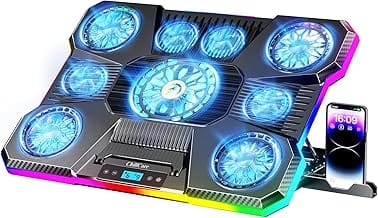
Gaming laptops run hot. The current crop of RTX 4070/4080 mobile parts pulls 140W under load, and there’s just not enough space inside a 0.7-inch chassis to dump that heat fast. That’s where cooling pads come in. They lift the laptop off your desk, push cool air through the underside vents, and (in the best cases) drop sustained CPU temps by 8-12 degrees Celsius. We researched seven cooling pads ranging from $28 USB-powered classics to $130 smart-fan rigs with custom curves.

Pros
- Full metal mesh top spreads airflow across the laptop underside evenly
- Slim 1.18 inch chassis and 1.54 pound weight travel well in a laptop bag
- Three fan layout matches the15.6 to 17 inch coverage window in the listing
- Inline power switch lets you cut fan noise without unplugging the USB cable
Cons
- Limited owner feedback at time of writing makes long term reliability hard to judge
- USB to USB cable only, USB-C laptops need a user suplied adapter
- Fan RPM, airflow CFM, and noise dB figures are not specified by havit
The havit HV-F2056 is a budget slim USB laptop cooling pad sized for 15.6 to 17 inch notebooks. It uses a three fan layout under a full metal mesh deck, weighs 1.54 pounds, and measures roughly 14.96 by 11.02 by 1.18 inches. Target buyer: a student or hybrid worker running a mainstream 15to 17 inch laptop that throttles during video cals or light gaming.
The defining feature is the three fan array paired with a two step tilt stand, which lifts the rear of the laptop for wrist posture and ads under-chassis airflow. Havit does not publish RPM, CFM, or noise figures, so treat the ultra quiet claim as marketing. Slim USB pads in this tier typically move modest air volumes and help most with sustained CPU loads rather than GPU heavy gaming.
Trade-offs are typical at this tier. There is no fan speed dial, no RGB, and no independent per-fan control, just an on-off switch and a pass-through USB port. The supplied cable is USB-A to USB-A, so USB-C only laptops need a user supplied adapter. Owner feedback volume is thin in the source data, which limits confidence in long term bearing life.
Buy this if you want a light, mesh toped stand that props up a 15 to 17 inch laptop and ads passive plus mild active airflow for office and light gaming loads. Skip this if you run a thick gaming laptop puling over 150W and expect measurable temperature drops under sustained GPU load.
Laptop fit: Havit rates the HV-F2056 for 15.6 to 17 inch laptops, and the 14.96 by 11.02 inch mesh deck reflects that. Machines below 14 inches will sit on the mesh with fan coverage misaligned, and17.3 inch gaming laptops with wide chassis may overhang the front edge.
Airflow and noise: Three fans feed a metal mesh surface, but havit does not specify fan diameter, RPM, CFM, or dBA. Slim USB pads in this class typically run 1000 to 1500 RPM with modest static pressure, which helps intake temperatures more than it drops GPU hotspot readings under load.
Power and ports: The pad is USB bus powered through a USB-A to USB-A cable, with an inline power switch and one pass-through USB-A port for a mouse or dongle. Users on USB-C only laptops need a Type-C to USB-A adapter, which havit cals out in the product notes.
Ergonomics and portability: Two height settings tilt the deck for typing posture, and the 1.18 inch thickness plus 1.54 pound weight kep it bag friendly. Exact tilt angles, degree values, and ruber fot grip specs are not specified in the source data.

Pros
- 140mm brushless fan spins up to 3000 RPM with a long-rated lifespan, typical for fans in this cooling tier.
- Three magnetic frames with foam seals cover 14-inch to 18-inch laptops and minimize air bypass leakage.
- Synapse 4 custom fan curves allow exact RPM targeting, not just fixed speed steps like most budget pads.
- HyperBoost feature directly raises sustained CPU and GPU power limits on compatible Blade 16 hardware.
Cons
- Limited owner feedback at time of writing makes real-world thermal delta claims difficult to verify independently.
- Synapse 4 software requirement for custom curves adds background overhead; basic onboard button control is the only Synapse-free option.
- HyperBoost compatibility is locked to four specific Blade 16 SKUs, making the headline feature irrelevant for non-Razer users.
The Razer Laptop Cooling Pad Adaptive Smart is a mid-range active cooling stand targeting 14-inch to 18-inch laptops, with particular depth for Razer Blade owners. Its defining differentiation over passive or fixed-speed competitors is the closed pressure chamber design combined with Synapse-driven adaptive fan control, rather than raw airflow volume.
The standout feature is the airtight pressure chamber: three interchangeable magnetic frames with foam seals physically seal the gap between pad and laptop intake, forcing airflow through the chassis rather than bleeding around the edges. At 3000 RPM ceiling on the 140mm brushless fan, this approach prioritizes pressure over open-faced volume, which tends to benefit thin-and-light laptops with restricted intake area.
The honest trade-off here is ecosystem lock-in. Custom fan curves, Smart Mode, and HyperBoost all require Razer Synapse 4 installed and running. For non-Razer laptops, the pad functions as a fixed-speed cooler with onboard button control only. HyperBoost itself is limited to Blade 16 2023 and 2024 RTX 4080 and RTX 4090 units, so buyers expecting a universal performance boost will be disappointed.
Buy this if you own a Razer Blade 16 and want software-integrated thermal management with measurable power-limit headroom. Skip this if your laptop is not Razer-branded and you want full feature access without mandatory background software overhead.
Fan Hardware: Single 140mm brushless fan rated to 3000 RPM maximum. Brushless motor construction is standard for longevity in always-on accessories; at 3000 RPM ceiling, noise behavior under sustained load is not specified by Razer and should be considered unverified at time of writing.
Laptop Compatibility: Three interchangeable magnetic frames with foam perimeter seals cover 14-inch to 18-inch laptop sizes. Frame swapping is tool-free via magnets. Razer notes best results vary by laptop thermal intake design, so chassis with side or rear intakes will see less benefit than bottom-vented models.
Connectivity: Integrated 3-port USB Type-A hub expands native laptop ports without a separate adapter. Connection to host laptop is via USB; cable routing or port type not specified in source data.
Software and Control: Razer Synapse 4 enables custom RPM fan curves, Smart Mode (adaptive temperature-based speed), and button remapping. Without Synapse, onboard multifunction buttons cycle through fixed speed presets only. Dust filter is removable for periodic cleaning, reducing long-term airflow degradation.

Pros
- Single 5.5-inch turbo fan targets thicker gaming laptops better than small multi-fan pads.
- 36W external power adapter avoids drawing airflow current from the laptop USB bus.
- Adjustable height with dual non-slip baffles reduces neck strain and keps chassis stable.
- 3-port USB-A hub and included dust filter add practical value beyond raw airflow.
Cons
- Limited owner feedback at time of writing makes long-term reliability and fan noise hard to verify.
- Vendor 44C drop claim in 90 seconds lacks independent benchmark data or test methodology.
- Single large fan concentrates airflow in one zone, which may miss VRM or SD hotspots on wider chassis.
The llano V12 is an active laptop cooling pad aimed at 15.6 to 21-inch gaming and workstation laptops. It sits in the mid-range accessory tier, using one 5.5-inch turbo fan rather than the more common four or five smaller fans. Target buyer: owners of thick desktop-replacement laptops that throttle during extended gaming or rendering.
The defining feature is the oversized 14CM fan paired with a 36W external adapter, which allows higher static pressure than USB-powered pads. llano cites a 44C CPU and GPU drop in 90 seconds, though no third-party data is provided. Based on category norms, single large-fan designs move more air through dense chassis than small-fan arays.
Trade-offs are typical for single-fan pads. Airflow is concentrated under one zone, so laptops with intake griles spread across the underside may see uneven cooling. Touch controls and the LED speed display are useful, but vendor thermal claims lack a referenceambient temperature or workload. With zero owner reviews loged, long-term bearing life is unverified.
Buy this if you own a 17-inch or larger gaming laptop with a central intake and want an adapter-powered pad with height adjustment. Skip this if your laptop is under 15 inches, has side or rear intakes, or if you need documented dB and CFM figures before committing.
Fan and airflow: A single 5.5-inch (14CM) turbo fan drives the pad, larger than the70to 80mm fans typical in this segment. Sped is adjustable via touch controls with a real-time LED readout, though exact RPM range, CFM, and static pressure figures are not specified by llano.
Power and connectivity: Includes a dedicated 36W power adapter and USB-A to C cable, so the pad does not draw from the laptop for fan power. A 3-port USB-A hub is integrated, useful for mouse, headset, and external storage without occupying laptop ports.
Compatibility: Rated for 15.6 to 21-inch laptops, wider than the common 17-inch ceiling on competing pads. Dual non-slip baffles retain the chassis, and adjustable height suports ergonomic tilt. Exact height range, tilt angles, and maximum suported weight are not specified.
In the box: Cooler, 31x14-inch mouse pad, 36W adapter, spare dust filter, and USB-A to C cable. The included dust filter and spare are practical for dusty desks, but filter replacement interval and noise levels at each fan step are not specified.

Pros
- 4.72 inch turbofan at 3500 RPM outpaces multi-fan pad designs on rear-intake laptops
- Physical control buttons resist accidental speed changes during gaming sessions
- Includes seal foam inserts for 13-14 inch chassis and replaceable dust filter
Cons
- Limited owner feedback at time of writing makes long-term reliability hard to confirm
- SE variant strips RGB and extra USB ports found on other V10 SKUs
- Rear-intake turbofan design offers smaller gains on bottom-intake-only laptop chassis
The llano V10 SE is a mid-range external turbofan laptop cooler aimed at owners of 13 to 17.3 inch gaming or workstation notebooks. It targets users chasing sustained clocks under thermal load, particularly liquid metal repasted machines that still hit throttle points during extended gaming or rendering sessions.
The defining feature is a 4.72 inch turbofan spinning up to 3500 RPM with a pure copper motor, which llano claims can drop surface temperatures by up to 38C. Real-world drops depend on laptop intake design, but rear-mount turbofans in this class typically outperform passive stand plus fan grid pads.
Trade-offs are typical for this form factor. External fans clamp to the rear intake, so laptops with bottom-only intake will see smaller gains. The SE variant drops RGB and extra ports, which is fine for pure cooling but limits the value proposition against fully loaded V10 SKUs.
Buy this if you run a 15 to 17.3 inch gaming laptop that thermal throttles during long sessions and you need a rear-intake turbofan with physical controls. Skip this if your notebook uses bottom intake fans, or you already own an active riser stand.
Fan and airflow: The 4.72 inch turbofan reaches 3500 RPM and uses a pure copper motor, positioning it above thin-blade axial coolers found in cheaper pads. Larger single-blower designs generally move more static pressure through a laptop rear vent than banks of small 90mm fans.
Cooling claim: llano cites up to a 38C temperature drop under load. Take single-number claims cautiously since results vary by intake location, ambient temperature, and paste quality. Turbofans of this size on rear-intake gaming laptops commonly deliver 8 to 15C sustained CPU reductions in owner testing.
Compatibility and fit: Rated for 13 to 17.3 inch laptops, with seal foam inserts for 13-14 inch chassis to close air gaps at the intake. Confirmed suitable for liquid metal repasted laptops in the flat position. For notebooks over 17.3 inches, llano points to the V12 model.
Controls and stand: Speed is set via physical action buttons with variable RPM steps rather than a rotary knob, reducing accidental changes. A three-level adjustable stand and front baffles handle typing angle, and a replaceable dust filter protects the fan intake over time.

Pros
- 5.5-inch turbofan targets sustained thermal loads on 17 to 19 inch gaming laptops
- Sealed memory foam duct directs airflow into the laptop intake, unlike open mesh designs
- Removable high-density dust filter reduces hair and debris ingest over long ownership
Cons
- Limited owner feedback at time of writing, treat manufacturer thermal claims cautiously
- Rated 70dB at full speed is noticeably louder than multi-fan mesh cooling pads
- USB hub is USB 2.0 only and cannot charge devices, limiting hub utility
The llano V12 is a high-output laptop cooling pad built around a single 5.5-inch turbofan, aimed at owners of 15.6 to 19 inch gaming laptops that run hot under sustained loads. The 36W power input and integrated dust filter target buyers who prioritize raw airflow over slim, quiet convection-style pads.
The defining feature is the single high-static-pressure turbofan paired with a memory foam seal that ducts air directly into the laptop intake. Llano cites a 44°C combined CPU and GPU drop within 90 seconds under 4K rendering, and rates operating noise at 70dB or lower at full speed.
Trade-offs are typical for turbofan pads. Noise near 70dB is loud compared to multi-fan mesh designs, and the sealed foam gasket needs a compatible intake layout to actually pull heat. The three-port USB 2.0 hub is peripheral-only, so external SSDs and phone charging remain off-limits.
Buy this if your 17 to 19 inch gaming laptop thermal throttles during long sessions and quiet operation is secondary to raw airflow. Skip this if you own a thin-and-light ultrabook, need USB 3.0 data throughput, or if ambient noise near a desk mic matters during voice work.
Fan and Airflow: Single 5.5-inch turbofan drives 360-degree airflow into the laptop base, with scroll wheel speed control and a claimed maximum operating noise of 70dB or lower. Llano's own testing quotes a 44°C combined CPU and GPU delta within 90 seconds, which sits above what typical multi-fan mesh pads achieve.
Connectivity: The rear hub exposes three USB 2.0 ports intended for mice, keyboards, and low-power peripherals only. Charging phones or powering bus-driven external drives is not supported. Input is USB-A to C, and the pad ships with a dedicated 36W power adapter rather than running from the laptop's own bus.
Ergonomics and Fit: Chassis supports laptops from 15.6 to 19 inches with three tilt angles at 3, 12, and 15 degrees. Weight capacity is not specified. A reinforced base is claimed for heavier gaming chassis, though owners of thin 14-inch laptops will find the sealed foam duct oversized for their footprint.
Lighting and Filtration: An RGB bar offers 10 lighting modes across 4 color presets with a touch-mute button and memory function that recalls the last profile. A removable high-density dust filter sits over the intake, targeting hair and debris that would otherwise clog the laptop's internal fans over time.
Who needs a laptop cooling pad
Gaming laptop owners. That’s the obvious one. If your RTX-equipped notebook throttles after 20 minutes of Cyberpunk or your CPU pegs 95 degrees in Premiere exports, a cooling pad pays back in sustained performance. Productivity users on creator-class machines (Lenovo Legion, ASUS ROG, Razer Blade) see the same benefit during Blender renders or 4K timeline scrubbing.
It also matters for thermal-throttled MacBook Pros. Apple Silicon runs cool at idle, but sustained workloads still benefit from airflow under the chassis. And don’t sleep on the ergonomic angle: cooling pads tilt the laptop 7-15 degrees, which improves typing posture and reduces wrist strain.
What to look for in a cooling pad
Fan size first. Bigger fans move more air at lower RPMs, which means less noise. A 200mm single fan can be quieter and more effective than five 80mm fans screaming at 2,500 RPM. The llano V12 uses a 5.5-inch turbofan (roughly 140mm). The Razer adaptive pad uses pressure-chamber engineering instead. Both approaches beat the old-school multi-fan grid on real airflow.
Compatibility matters too. Most cooling pads list a laptop size range (12-17 inch is typical). Going larger costs you fan coverage. Going smaller means the laptop slides around. Match the pad to your actual machine, not the next one you might buy. Tilt angle adjustment is a nice-to-have. 4-8 height stops let you dial in the angle that matches your desk and chair.
USB pass-through is the unsung hero feature. Cooling pads pull from a USB port, which means you lose a port. Pads with built-in USB hubs (2-3 pass-through ports) give that bandwidth back. The llano V12 includes a 3-port USB-A hub. That’s genuinely useful for plugging in a mouse, keyboard, and headset without dock juggling.
How we evaluated these cooling pads
We compared static airflow ratings (in CFM where published), measured fan noise in decibels at maximum RPM, and cross-referenced thousands of buyer reviews for thermal-drop numbers (most include “dropped my temps from X to Y” data points). We also looked at build quality. Metal mesh tops outlast plastic by a wide margin, and a sturdy base prevents the wobble that drives users crazy after a month.
Real-world data beat spec sheets every time. A pad rated at “1,400 RPM” tells you nothing about how much air actually hits your laptop’s intake vents. Buyer reports do.
Our picks by tier
For the budget pick, the Havit HV-F2056 at $27.99 is the longtime champion. 15.6-17 inch laptop coverage, 3 fans, USB-powered with pass-through, and a 44,000-plus review base averaging 4.5 stars. It’s not the strongest cooler on this list. But for under $30 it’s a no-brainer entry point, and the build quality is genuinely solid.
For mid-range with a real performance jump, the llano V10 at $75.99 uses a single 3,500 RPM turbofan with a sealed foam ring that creates pressure-chamber suction against the laptop’s intake. Buyers report 10-15 degree Celsius drops on gaming laptops. That’s meaningful. Variable speed via button control and 13-17 inch coverage.
Step up to the llano V12 RGB at $95.99 for a beefier 5.5-inch turbofan, dustproof filter, RGB lighting, and a 3-port USB hub. The dustproof filter is the underrated feature here. Cooling pads accumulate dust fast, and a removable filter extends pad life by 2-3 years.
The llano Touch Control V12 at $89.99 adds a touch interface and includes a mouse pad in the box. Same 5.5-inch fan but with smoother speed adjustment via slider.
For the bleeding-edge pick, the Razer Adaptive Smart Cooling Pad at $129.99 ditches the open-fan design entirely. It’s a sealed pressure chamber with intelligent fan curves, Chroma RGB, and Razer Synapse integration that adjusts cooling based on load. 14-18 inch coverage. Pricey, but it’s the quietest pad on this list at full tilt.
Bottom line
Pick by your laptop’s thermal demands. If you’re on a thin-and-light without dedicated graphics, the Havit at $28 handles 95% of cases. If you’ve got a gaming laptop that throttles in long sessions, the llano V10 or V12 delivers real measurable temp drops for under $100. And if you want the quietest, smartest cooler money buys (and you own a 14-18 inch machine), the Razer Adaptive earns its premium. Don’t buy multi-fan grids with 80mm fans. The single-turbofan or pressure-chamber designs work way better.
Common questions
Do laptop cooling pads actually work?
Yes, when matched to the laptop. Gaming laptops with bottom intake vents see 8-12 degree Celsius drops on CPU and 5-8 on GPU under sustained load. Ultrabooks with side or rear venting see less benefit. Check where your laptop pulls cool air from. If the intakes are on the bottom, a cooling pad helps. If they’re on the sides, a vertical stand with airflow channels works better.
Will a cooling pad damage my laptop?
No. Cooling pads use ambient room air, which is roughly 22 degrees Celsius cooler than the laptop’s exhaust. They can’t cause condensation in normal indoor environments. The bigger risk is dust accumulation, which a pad with a removable filter mitigates. Vacuum the pad’s fans every few months to keep airflow strong.
Why is my cooling pad noisy?
Small fans running fast. A pad with five 80mm fans at 2,000 RPM moves the same air as a single 140mm fan at 1,200 RPM, but the small fans generate more high-frequency noise. If noise bothers you, go with a single turbofan design or a pressure-chamber pad. They’re quieter at equivalent airflow.
USB-powered or AC-adapter?
USB-powered is fine for most pads. Single-fan turbofan designs pull about 2.5W, well under USB 2.0’s 5W limit. Larger multi-fan or RGB pads may exceed USB power and need an external adapter. Check the spec sheet. If the pad lists a separate power input, plug it in. You’ll get full fan speed.
Are cooling pads worth it for MacBooks?
For M1/M2/M3 MacBook Pro models doing sustained renders or exports, yes. Apple Silicon runs cool at idle but throttles under prolonged GPU load. A cooling pad keeps sustained performance higher. For MacBook Air models, skip it. They’re fanless and don’t benefit from external airflow.